On ClickUp event
ClickUp event triggers run a pipeline when a supported event occurs for a ClickUp task. The pipeline runs when the event and task match the configured trigger and filters. For example, you can deploy a preview when a task moves to review or start a hotfix pipeline when an urgent task is created.
The trigger supports the following ClickUp events. In YAML, event names correspond to ClickUp webhook event names:
| Event in Buddy | YAML |
|---|---|
| Status updated | taskStatusUpdated |
| Task created | taskCreated |
| Task updated | taskUpdated |
| Task deleted | taskDeleted |
| Assignee updated | taskAssigneeUpdated |
| Due date updated | taskDueDateUpdated |
| Priority updated | taskPriorityUpdated |
| Tag updated | taskTagUpdated |
| Comment posted | taskCommentPosted |
| Comment updated | taskCommentUpdated |
| Task moved | taskMoved |
| Time estimate updated | taskTimeEstimateUpdated |
| Time tracked updated | taskTimeTrackedUpdated |
Configure the trigger
- Open the pipeline and go to the Workflow tab.
- Click + in the Triggers section and select the ClickUp trigger.
- Select the Integration and the events that should trigger the pipeline.
- Add filters to restrict which tasks can trigger the pipeline, if needed.
- Click Apply changes.
Image loading...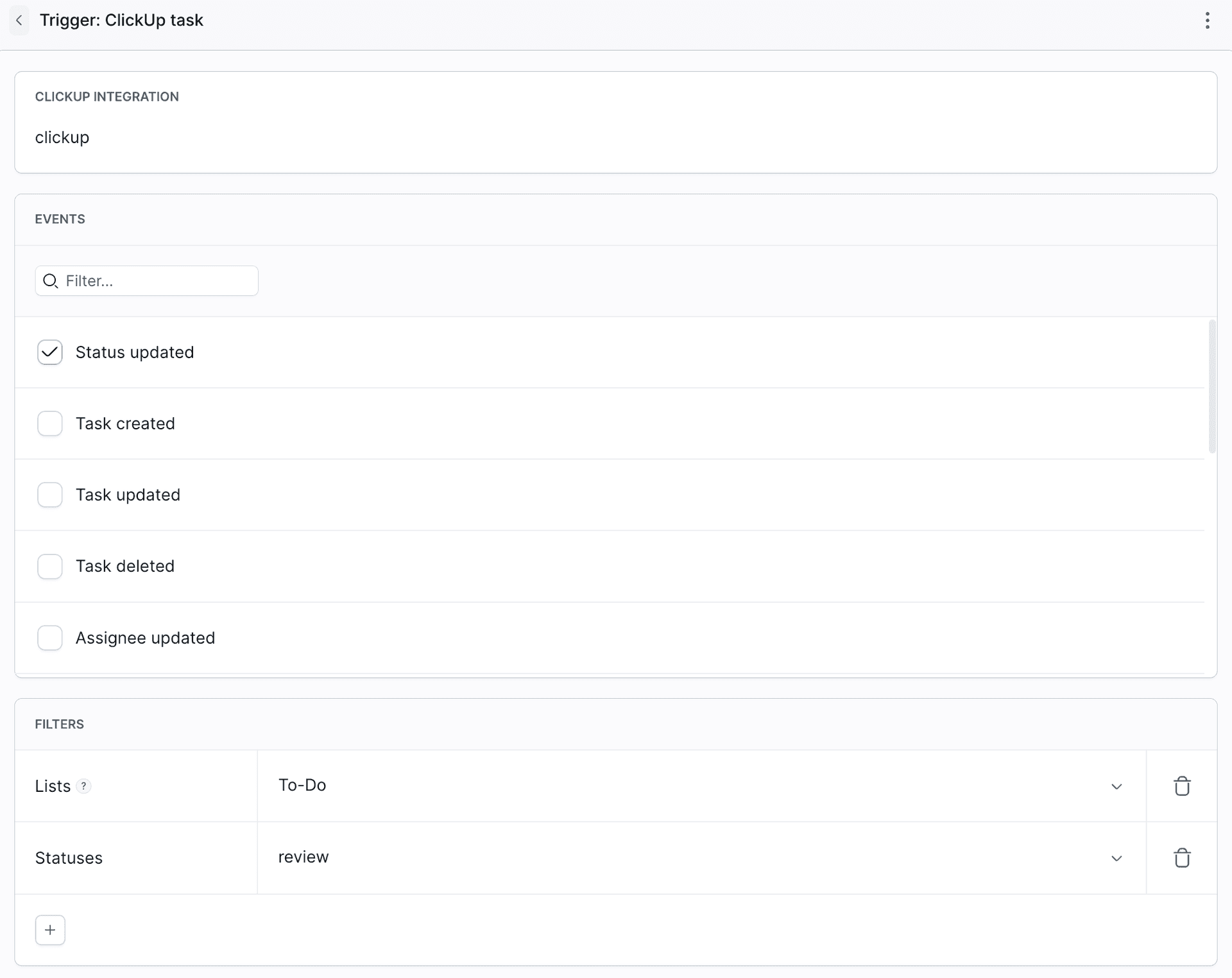
Filters
Click + in the Filters section to add a filter:
Image loading...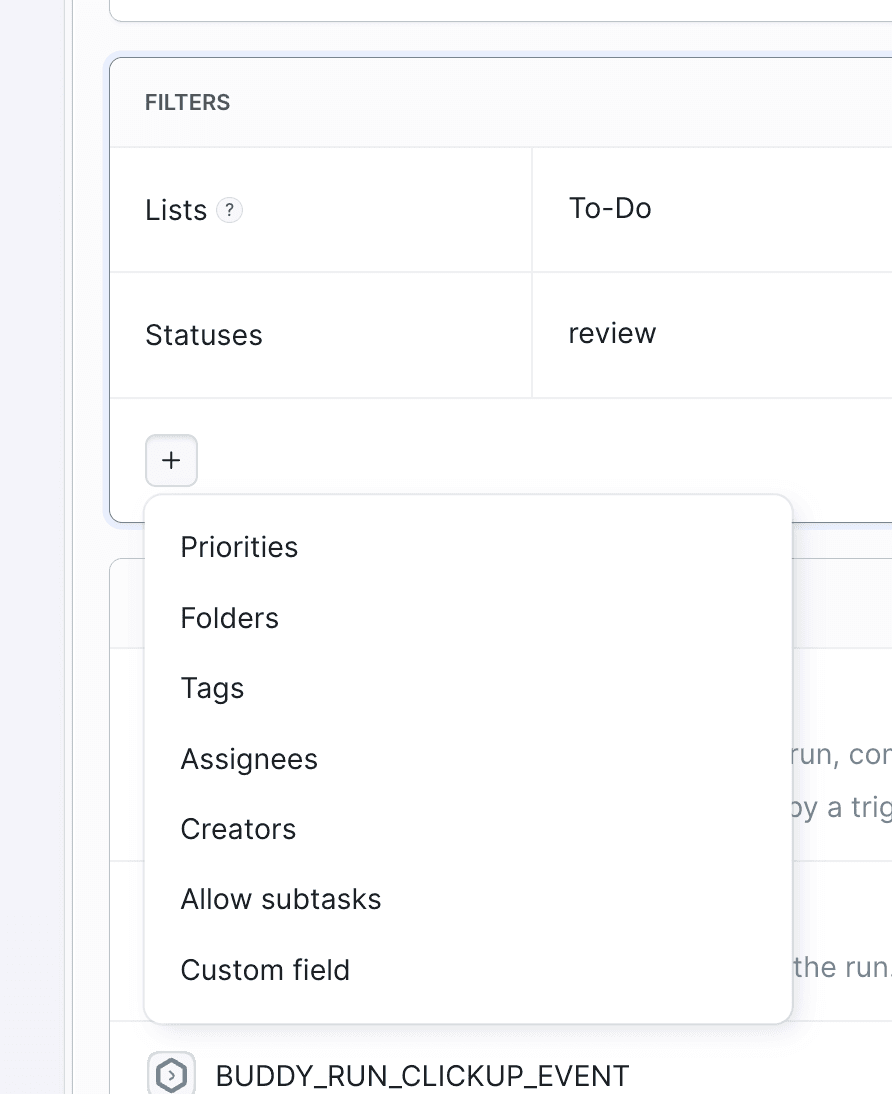
Each filter is a list. An empty list matches everything. The trigger fires when the task matches every filter that is set.
- Folders and Lists - names of the ClickUp folders and lists the task belongs to.
- Statuses - statuses of the task, as displayed in ClickUp.
- Priorities -
urgent,high,normal,low. - Tags - the filter matches when the task has at least one of the listed tags.
- Assignees - email addresses; matches when at least one assignee is on the list.
- Creators - email addresses; matches when the task creator is on the list.
- Custom fields - each entry has a field name and a list of accepted values. An entry matches when at least one value matches; entries are combined with
AND. - Allow subtasks (
include_subtasksin YAML) - enabled by default. When enabled, the trigger matches both top-level tasks and subtasks. Disable it to match only top-level tasks.
YAML
The event type is CLICKUP. The integration field requires the integration identifier, not its display name:
- pipeline: "Deploy preview for review"
  events:
    - type: "CLICKUP"
      integration: "our-clickup-prod"
      lists:
        - "Sprint Backlog"
      events:
        - "taskStatusUpdated"
      statuses:
        - "review"
  actions:
    - action: "Deploy preview"
      type: "SSH_COMMAND"
      targets:
        - "preview-server"
      commands: |-
        ./deploy-preview.sh
Filters can be combined. This trigger reacts to new and updated top-level tasks in one list, limited to selected priorities, tags, people, and custom field values:
events:
  - type: "CLICKUP"
    integration: "our-clickup-prod"
    lists:
      - "Sprint Backlog"
    events:
      - "taskCreated"
      - "taskStatusUpdated"
    statuses:
      - "review"
      - "ready-to-merge"
    priorities:
      - "urgent"
      - "high"
    tags:
      - "qa-regression"
    assignees:
      - "mike.benson@buddy.works"
    custom_fields:
      - name: "Story Points"
        values:
          - "8"
          - "13"
    include_subtasks: false
Variables
A run started by a ClickUp event receives these variables:
| Name | Description |
|---|---|
BUDDY_RUN_CLICKUP_EVENT | ClickUp event that triggered the run, for example taskStatusUpdated |
BUDDY_RUN_CLICKUP_TASK_ID | Identifier of the task associated with the event |
BUDDY_RUN_CLICKUP_TASK_NAME | Name of the task |
BUDDY_RUN_CLICKUP_TASK_URL | URL of the task in ClickUp |
BUDDY_RUN_CLICKUP_STATUS | Status the task has after the event |
BUDDY_RUN_CLICKUP_PREVIOUS_STATUS | Previous task status. Exported for status change events |
BUDDY_RUN_CLICKUP_PRIORITY | Priority of the task. Exported when the task has one |
BUDDY_RUN_CLICKUP_TAGS | Tags of the task, comma separated |
BUDDY_RUN_CLICKUP_TAGS | Task tags, comma-separated |
BUDDY_RUN_CLICKUP_CREATOR | Email address of the person who created the task |
BUDDY_RUN_CLICKUP_LIST / BUDDY_RUN_CLICKUP_LIST_ID | Name and identifier of the list the task belongs to |
BUDDY_RUN_CLICKUP_FOLDER / BUDDY_RUN_CLICKUP_FOLDER_ID | Name and identifier of the folder containing the list. Not exported when the list does not belong to a folder |
BUDDY_RUN_CLICKUP_SPACE_ID | Identifier of the space the task belongs to |
BUDDY_RUN_CLICKUP_DUE_DATE | Due date of the task as a Unix timestamp in milliseconds. Exported when the task has one |
BUDDY_RUN_CLICKUP_COMMENT | Text of the comment. Exported for comment events |
BUDDY_RUN_CLICKUP_PAYLOAD | Body of the ClickUp webhook that started the run |
$BUDDY_RUN_CLICKUP_TASK_ID to the Update ClickUp Task action to update the task associated with the triggering event.
See also
Last modified on Nov 12, 2026