On git event
Trigger on Git event
- A commit is pushed to the repository
- A branch or tag is created
- A branch or tag is deleted
Image loading...
For example, if you want to run unit tests for every change to the repository, you can select Git push as the trigger event and use a wildcard with *:
Image loading...
You can also use it to automatically deploy changes from a specific branch whenever a change in the branch is detected:
Image loading...
Trigger on pull request
Pipelines can also run on pull request events when a pull request targeting one of the selected branches is opened, reopened, or updated with new commits. The trigger is available for repositories hosted in Buddy, GitHub, and GitLab. In GitLab, pull requests are called merge requests.
Event names follow the terminology used by the Git provider. For repositories hosted in Buddy, the trigger looks like this in YAML:
events:
- type: PULL_REQUEST
  events:
  - OPENED
  - REOPENED
  - SYNCHRONIZED
  branches:
  - main
Available events: OPENED, REOPENED, SYNCHRONIZED, CLOSED, MERGED, READY_FOR_REVIEW.
For repositories integrated with GitHub:
events:
- type: PULL_REQUEST
  events:
  - opened
  - reopened
  - synchronize
  branches:
  - main
Available events are GitHub pull request activity types: opened, reopened, synchronize, edited, closed, ready_for_review, converted_to_draft, assigned, unassigned, labeled, unlabeled, review_requested, review_request_removed, locked, unlocked, milestoned, demilestoned, enqueued, dequeued, auto_merge_enabled, auto_merge_disabled.
For repositories integrated with GitLab, the events are merge request actions:
events:
- type: PULL_REQUEST
  events:
  - open
  - reopen
  - update
  branches:
  - main
Available events: open, reopen, update, close, merge, approval, unapproval, approved, unapproved. approval and unapproval fire when a single reviewer approves or revokes an approval, approved and unapproved when the merge request meets or stops meeting its approval rules. GitLab also sends update when a merge request is closed or reopened, so with update selected, closing a merge request runs the pipeline.
In the UI, select the base branches and the event types in the trigger settings:
Image loading...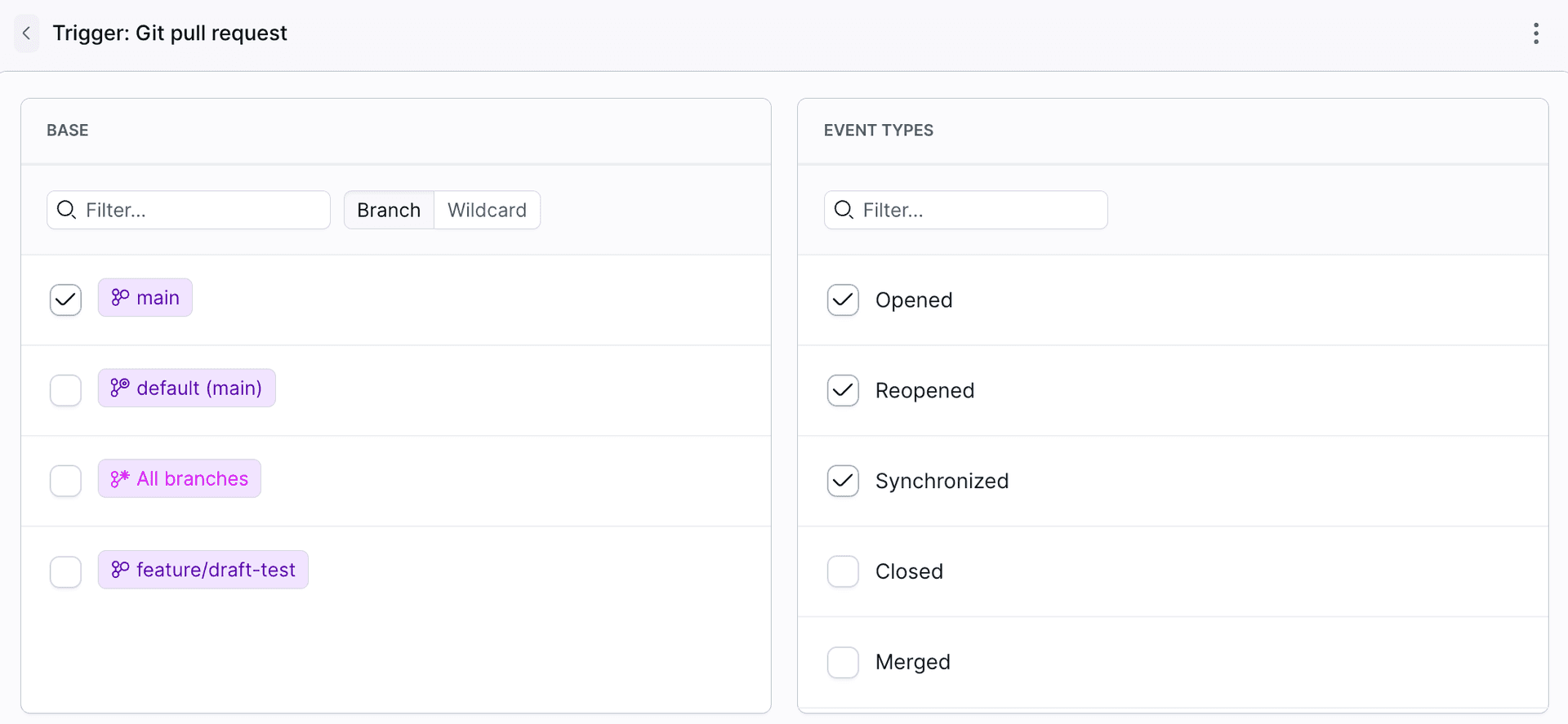
Each run gets the pull request details in $BUDDY_RUN_PR_* variables, e.g. $BUDDY_RUN_PR_NO, $BUDDY_RUN_PR_TITLE, $BUDDY_RUN_PR_HEAD_BRANCH, and $BUDDY_RUN_PR_BASE_BRANCH. The full list with examples is shown below the event types in the trigger settings.
$BUDDY_RUN_PR_DRAFT set to true. To skip heavy steps until the pull request is ready for review, add a condition on this variable.
Last modified on Oct 29, 2026