Introduction
Buddy runs Terraform and OpenTofu inside your pipelines. Your configuration lives in the repository. A pipeline plans the change, someone reviews it, and the same plan is applied. You can see every resource the change touches in the run view, without reading raw logs.
Image loading...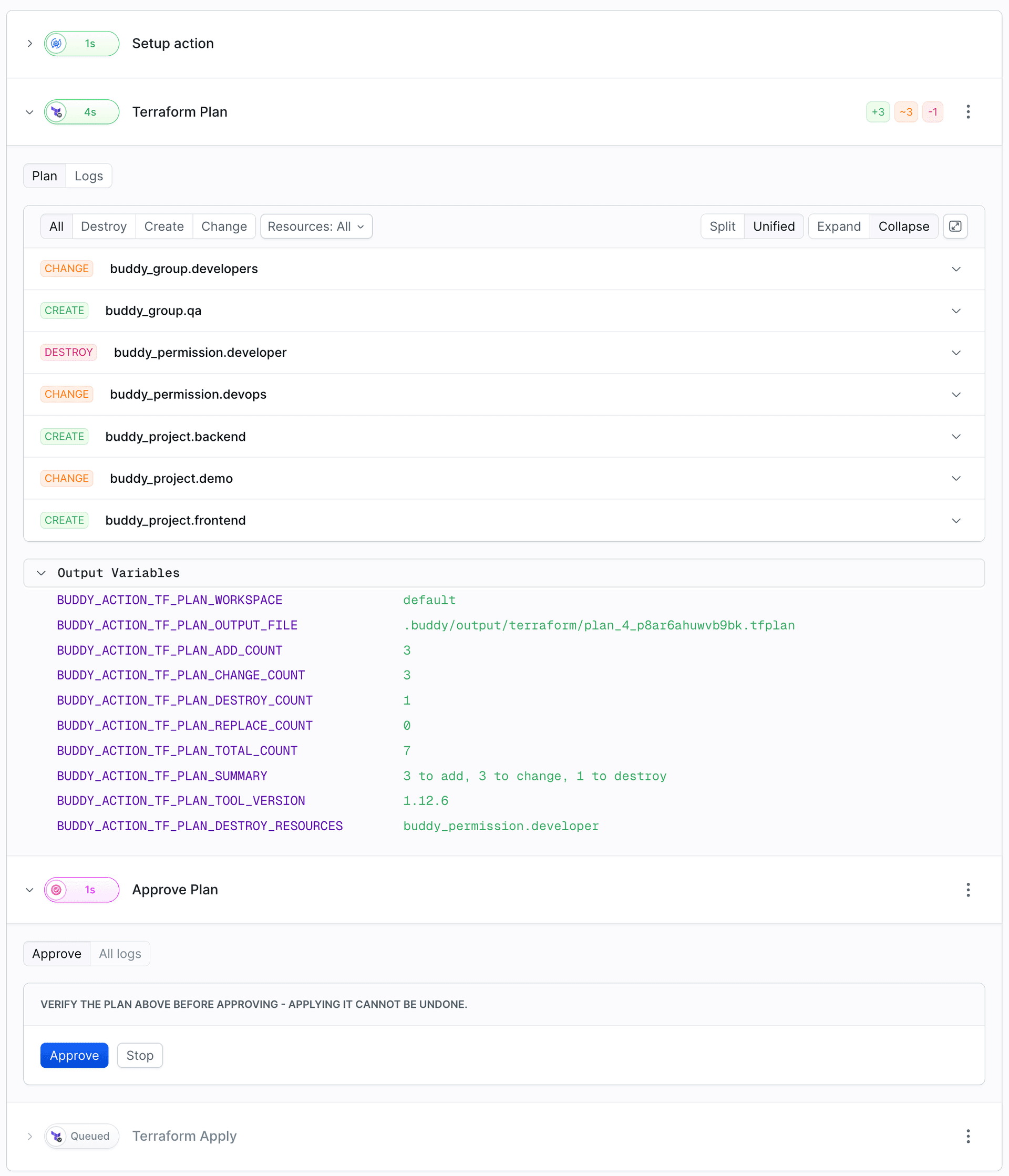
Why run Terraform in a pipeline
- Every change is reviewed. The plan is shown as a list of resources to create, change, and destroy. Apply runs exactly the plan that was approved.
- Control over who approves. Approve Run can be limited to specific people or groups, and can require someone other than the person who started the run.
- Nothing changes between plan and apply. Terraform locks the state only while a command runs. Pipeline runs are sequential by default, so the next run waits until the current one goes from Plan through approval to Apply.
- Same environment on every run. A container with the pinned tool version, and credentials from integrations instead of laptops.
- State without extra infrastructure. Keep it in a Buddy artifact with locking, or in your own backend.
- Drift is caught early. A scheduled check finds changes made outside of Terraform.
- Full history. Every run shows who started it, who approved it, and what was applied.
Actions
| Action | YAML type | What it does |
|---|---|---|
| Terraform Plan | TERRAFORM_PLAN | Runs init and plan, saves the binary plan file, and renders a structured diff of resources to add, change, destroy, and replace |
| Terraform Apply | TERRAFORM_APPLY | Applies the plan file produced by the Terraform Plan action in the same run, and marks each resource as applied or failed |
| Terraform Drift Detection | TERRAFORM_DRIFT_DETECTION | Runs a refresh-only plan to find resources changed or removed outside of Terraform |
| Terraform CLI | TERRAFORM | Runs any commands you write - fmt, validate, import, state, output, and anything else |
Plan, Apply, and Drift Detection are native actions. You don't write commands for them. Buddy generates the commands, reads the JSON that Terraform produces, and turns it into a resource diff and output variables. The Terraform CLI action is a shell around the terraform binary. Use it when you need full control over the commands.
The recommended flow
- Terraform Plan computes the change and stores the plan file on the pipeline filesystem.
- Approve Run (
WAIT_FOR_APPLY) pauses the run until a person reviews the diff and approves it. See Manual approval. - Terraform Apply applies that exact plan file. Terraform doesn't re-plan, so what you approved is what gets applied.
The Quick start builds this pipeline step by step, and Plan and Apply explains what happens under the hood.
Terraform or OpenTofu
The native actions run either tool, picked with the tool field:
tool | Image | Versions |
|---|---|---|
OPENTOFU | ghcr.io/opentofu/opentofu | Any published OpenTofu version |
TERRAFORM | hashicorp/terraform | Open-source versions, up to 1.5.7 |
CUSTOM | Your own Docker image | Whatever binary you bring |
For any other version or a Terraform-compatible binary, use CUSTOM with your own image. See Terraform & OpenTofu versions.
Where the state lives
Each action has a backend setting. You can keep the state in a Buddy artifact, with locking, so no bucket is needed. You can use S3 or GCS with credentials from a Buddy integration. Or you can keep any other backend declared in your code (azurerm, HTTP, ...). See State backends.
What runs where
- Every Terraform action runs in a Linux Docker container. The repository is mounted, and the working directory is the repository root unless you set
working_directory. - Plan and Apply share files through the pipeline filesystem, so they have to be in the same pipeline run.
- The resource diff is stored with the action execution. It appears in the run view and in the REST API as the
terraformPlanfield of the action execution.
Not to be confused with
This section is about running your infrastructure code in Buddy. To manage Buddy itself - projects, pipelines, variables - from Terraform, see the Terraform Buddy provider.
Last modified on Oct 19, 2026