Contexts
Contexts are a mechanism for controlling pipeline execution in Buddy. They define the conditions under which a pipeline should run — for example, on a specific Git branch, with a given tag, or in a selected environment.
Contexts act as intelligent filters that check different aspects of your project and determine whether the pipeline should be executed. They allow you to precisely control which code or environment changes trigger a pipeline run.
Context allow you to:
- Environment control - running pipelines only in specific environments
- Filtering Git branches - running actions only for specified branches or tags
- Selective implementation - adjusting pipelines to specific scenarios
Image loading...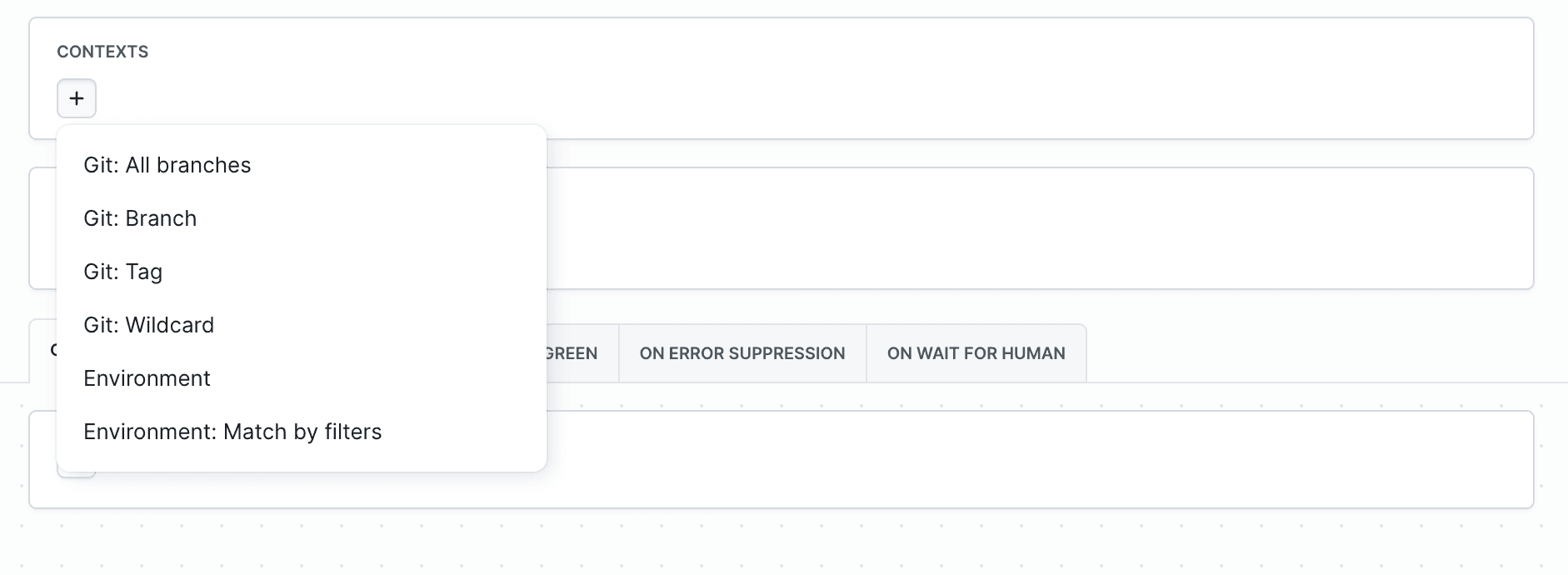
Contexts types
- Git: All branches - The pipeline will run for every branch.
- Git: Branch - The pipeline runs only for a specific, named branch (e.g., main, develop, release).
- Git: Tag - The pipeline runs only when a new tag is pushed.
- Git: Wildcard - Allows you to define a pattern for multiple branches, tags, and pull requests:
release/*- pipeline runs on every branch that starts withrelease/.feature/*- for feature branches (e.g., feature/login, feature/payment).hotfix/*- for hotfix branches (e.g., hotfix/security, hotfix/critical)
- Environment - The pipeline runs only in the context of a previously created Environment.
- Environment: Match by filters - An advanced option that allows matching the Environment using filters (
ID,Scope,Tags).
Linking contexts
You can add multiple contexts — the pipeline will run if at least one of them matches. Example:
- Branch
mainor tagv* feature/*orhotfix/*
Image loading...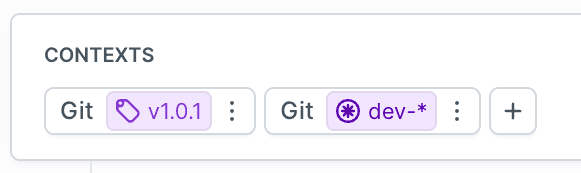
In this example
- Git Tag
v1.0.1- pipeline runs for tagv1.0.1 - Git Wildcard
dev-*- the pipeline runs on every branch that starts withdev-
In this case, the pipeline will be triggered both on the v1.0.1 tag and on any branch starting with dev- (e.g., dev-feature, dev-bugfix).
Default settings
By default, a new pipeline is assigned the Git: default branch context, which means it will only run for the repository’s main branch.
Examples
Example 1: Test pipeline for all changes
Runs on every push to any branch.
- pipeline: test_pipeline
  name: Run Tests
  refs:
  - refs/heads/*
  events:
  - type: PUSH
  actions:
  - action: Build and Deploy
    type: BUILD
    docker_image_name: library/node
    docker_image_tag: 22
    commands:
    - npm install
    - npm run build
    shell: BASH
  - action: Deploy to Test Server
    type: TRANSFER
    input_type: BUILD_ARTIFACTS
    local_path: /build
    targets:
    - target: test_target
      type: FTP
      name: Test FTP Target
      host: 192.168.1.100
      auth:
        username: test_user
        password: '!encrypted PSHXSxoQlP5gKp5K9WPtaUqouBZDPT6tbvxEwoSErVlmlPVtWmadkbPlQPzLyhWA.SV2RqXV0vKpJ/u/QuaIqTg=='
      path: /var/www/site/
Example 2: Production deployment only from master
The pipeline requires manual execution and deploys the application to the production environment. It is available only for the master branch, ensuring controlled production deployments.
- pipeline: deploy_production
  name: Deploy to Production
  refs:
  - refs/heads/master
  actions:
  - action: Build and Deploy
    type: BUILD
    docker_image_name: library/node
    docker_image_tag: 22
    commands:
    - npm install
    - npm run build
    shell: BASH
  - action: Deploy to Server
    type: TRANSFER
    input_type: BUILD_ARTIFACTS
    local_path: /
    targets:
    - target: my_target
      type: FTP
      name: My FTP Target
      host: 192.168.1.1
      path: /var/www/site/
      auth:
        username: user_ftp
        password: '!encrypted m6YApN/LzkG9ANQawlKsHQ==.lrAqT+T7siQ82D6BhNM1sQ=='
      path: /var/www/html
Example 3: Scheduled pipeline
The pipeline is triggered automatically every hour according to the schedule, but only for specific refs (tag 1.1.4 or the dev branch). It performs a database backup and automatically uploads it to the backup server.
- pipeline: maintenance
  name: Database Backup
  refs:
  - refs/tags/1.1.4
  - refs/heads/backup
  events:
  - type: SCHEDULE
    start_date: 2025-08-05T15:35:00Z
    delay: 60
  actions:
  - action: Create Backup
    type: BUILD
    docker_image_name: library/postgres
    docker_image_tag: 15
    commands:
    - pg_dump -h $DB_HOST -U $DB_USER $DB_NAME > /backup/backup.sql
    services:
    - type: POSTGRE_SQL
      connection:
        host: postgres
        user: root
        password: root
    shell: BASH
  - action: Upload Backup
    type: TRANSFER
    input_type: BUILD_ARTIFACTS
    local_path: /backup
    targets:
    - target: my_backup_target
      type: SSH
      name: My backup target
      host: 192.168.1.1
      path: /var/www/backup_site/
      auth:
        username: user_ftp
        password: '!encrypted jnID5rObn/FzRtX0fRMPHA==.XVy23NcO6Im8AWAahARafg=='
Example 4: Pipeline triggered on new branch creation
The pipeline is triggered automatically when new branches are created. It runs tests and uploads files to the staging server.
- pipeline: feature_branch_tests
  name: Feature Branch Tests
  refs:
  - refs/heads/*
  events:
  - type: CREATE_REF
  fail_on_prepare_env_warning: true
  actions:
  - action: Run Test Suite
    type: BUILD
    docker_image_name: library/node
    docker_image_tag: 22
    commands:
    - npm install
    - npm run test:full
    shell: BASH
  - action: Deploy to Staging
    type: TRANSFER
    input_type: BUILD_ARTIFACTS
    local_path: /build
    targets:
    - stage_frontend
Example 5: Pipeline triggered on branch deletion
The pipeline is triggered automatically when a feature-* branch is deleted. It cleans up Kubernetes resources and sends a Slack notification about the branch removal.
- pipeline: cleanup_after_branch_deletion
  name: Cleanup After Branch Deletion
  refs:
  - refs/heads/feature-*
  events:
  - type: DELETE_REF
  fail_on_prepare_env_warning: true
  actions:
  - action: Remove K8s Namespace
    type: KUBERNETES_CLI
    digital_ocean_cluster: e1111111-b11b-1b11-90e0-1111a11e111b
    integration: digitalocean
    commands:
    - "echo \"Removing Kubernetes namespace: $BUDDY_RUN_REF_TYPE\""
    - kubectl delete namespace $BUDDY_RUN_REF_TYPE || echo "Namespace does not exist"
    kubectl_version: latest
  - action: Notify Slack
    type: SLACK
    content: |
      Branch *$BUDDY_RUN_REF_NAME* has been deleted by $BUDDY_TRIGGERING_ACTOR
    channel: general
    integration: v1ZzQABWJxbo85AAdgwOL0EMrN
Last modified on Sep 17, 2026