Visual Checkpoints in Cypress Flows
A Cypress test walks Bloom's subscription wizard end to end: it clicks through Blend, Plan, and Review, then confirms the subscription went live. Every run is green. But the Review screen is where a customer sees, one last time, what they're actually agreeing to, and if that screen renders wrong, the test has no way to know. It only checks text and DOM state, not what the page actually looks like. Visual Tests close that gap with one line per step, starting at the two points in the flow where a broken render actually matters: Review and Confirmed. The checkpoints don't need new test code, they just hook into navigation the test already runs.
The wizard your test already covers
Bloom is a small subscription wizard for freshly roasted coffee with four steps: Blend, Plan, Review, and Confirmed.
Image loading...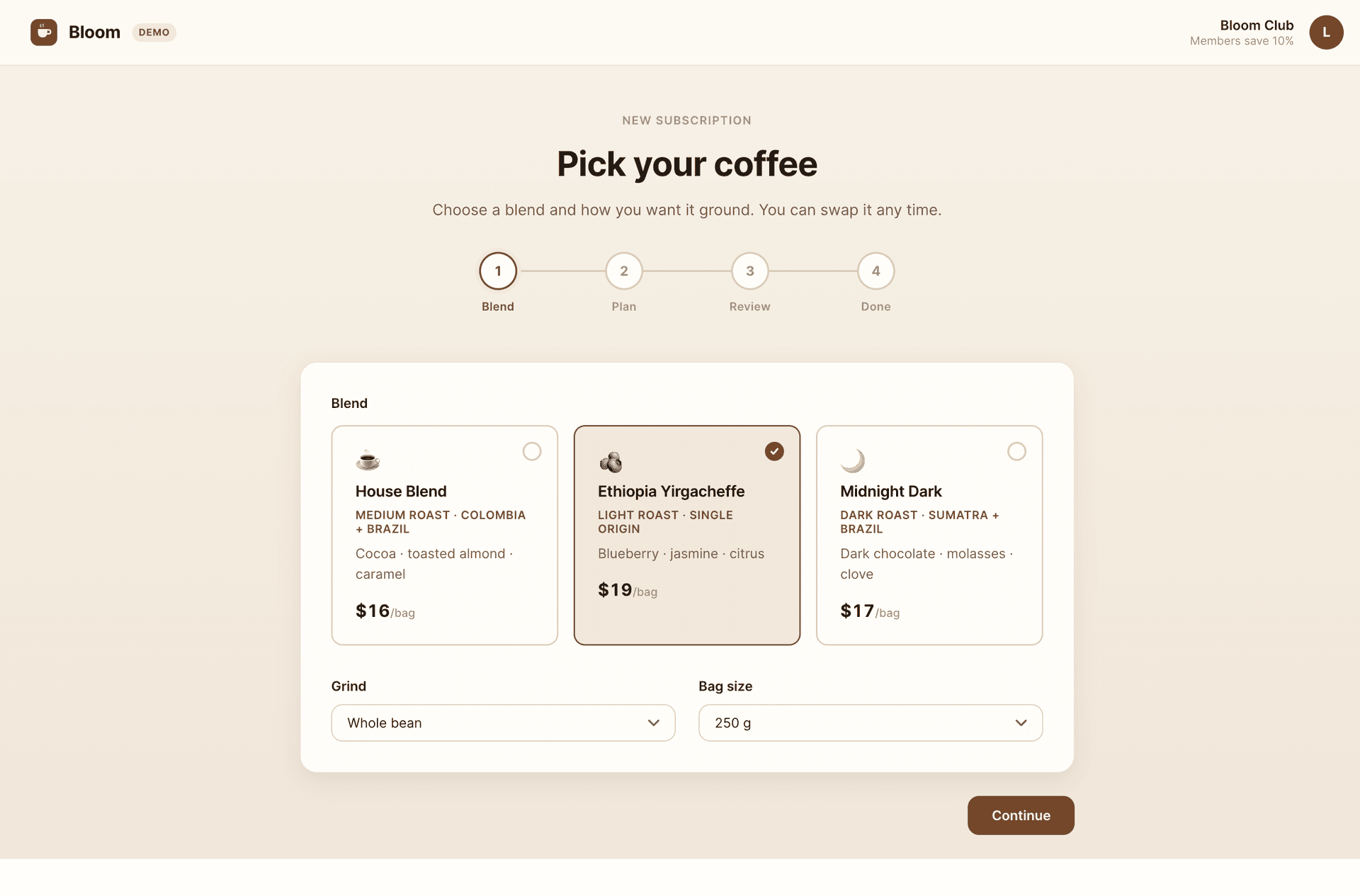
Image loading...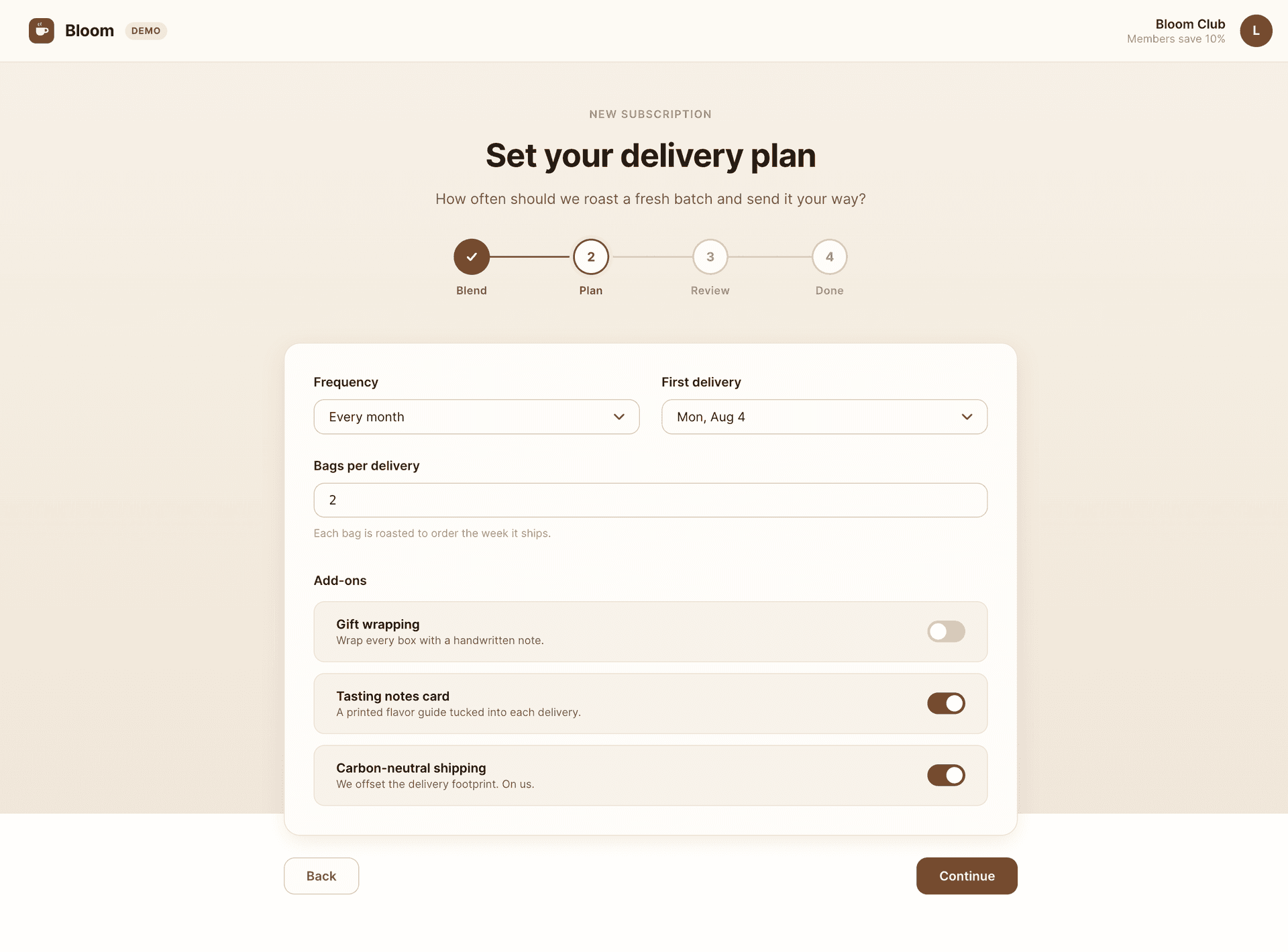
The team already has a Cypress e2e test that walks all four steps end to end. It clicks through, checks pre-filled values, and at the end confirms the subscription is active:
// cypress/e2e/subscribe.cy.js: existing end-to-end test for the full flow.
describe("Bloom coffee subscription", () => {
  it("subscribes to the pre-filled monthly plan end to end", () => {
    cy.visit("/#/");

    // Step 1 - Blend: Ethiopia is selected, grind and bag size are set.
    cy.get('[data-cy="blend-ethiopia"]')
      .should("have.attr", "aria-pressed", "true");
    cy.get('[data-cy="continue"]').click();

    // Step 2 - Plan: the monthly plan moves forward.
    cy.location("hash").should("eq", "#/plan");
    cy.get('[data-cy="frequency"]').should("have.value", "Every month");
    cy.get('[data-cy="continue"]').click();

    // Step 3 - Review: check content, click through.
    cy.location("hash").should("eq", "#/review");
    cy.get('[data-cy="review-summary"]').should("contain.text", "Ethiopia Yirgacheffe");
    cy.get('[data-cy="review-total"]').should("contain.text", "$38.00");
    cy.get('[data-cy="start"]').click();

    // Step 4 - Confirmed: the subscription is active.
    cy.location("hash").should("eq", "#/confirmed");
    cy.get('[data-cy="confirmed-card"]').should("contain.text", "is live");
  });
});
Every assertion reads content and behavior: routing, default values, totals, final state. None of them look at how the screen appears.
How many checkpoints does this wizard need?
Visual Tests captures a snapshot of the screen you point at and compares it to a baseline, the last accepted render. When the difference exceeds the configured pixel tolerance threshold, Buddy flags it for review and pauses the pipeline until someone approves it.
The first instinct after adding Visual Tests is to snapshot every screen, and for a four-step wizard, that instinct is correct. Each step is a distinct state the customer has to pass through, the test already stops on every one of them, and a checkpoint is one line. Blend and Plan can break in ways no assertion covers, like a card grid that collapses or a toggle that lands on top of its label, and a snapshot is the only thing that would notice..
Not every checkpoint carries the same risk, though, and that decides where you start. The highest-value checkpoints sit at the boundary of a meaningful state: where user decisions are already made and are about to become something irreversible. In this wizard, there are two such boundaries:
- Review, the last look at the full order before the card is charged.
- Confirmed, proof that the subscription actually started.
These two go in first, and they are the ones this guide follows through the whole story, because a broken layout there has direct cost. Blend and Plan take the same one-liner right after, once the first baseline settles.
Coverage and priority are different questions. Give every step of the wizard a checkpoint, but when you introduce Visual Tests into an existing suite, start at the state boundaries - the screens where a visual failure costs real money - and extend from there.
Why Review in particular
Look at the Review screen in its healthy version. It is the last stop before the card is charged, and it hosts a loud amber badge AUTO-RENEWS · BILLED MONTHLY. It is the only signal on the screen that the customer is signing up for recurring, self-renewing billing, not a one-time purchase:
Image loading...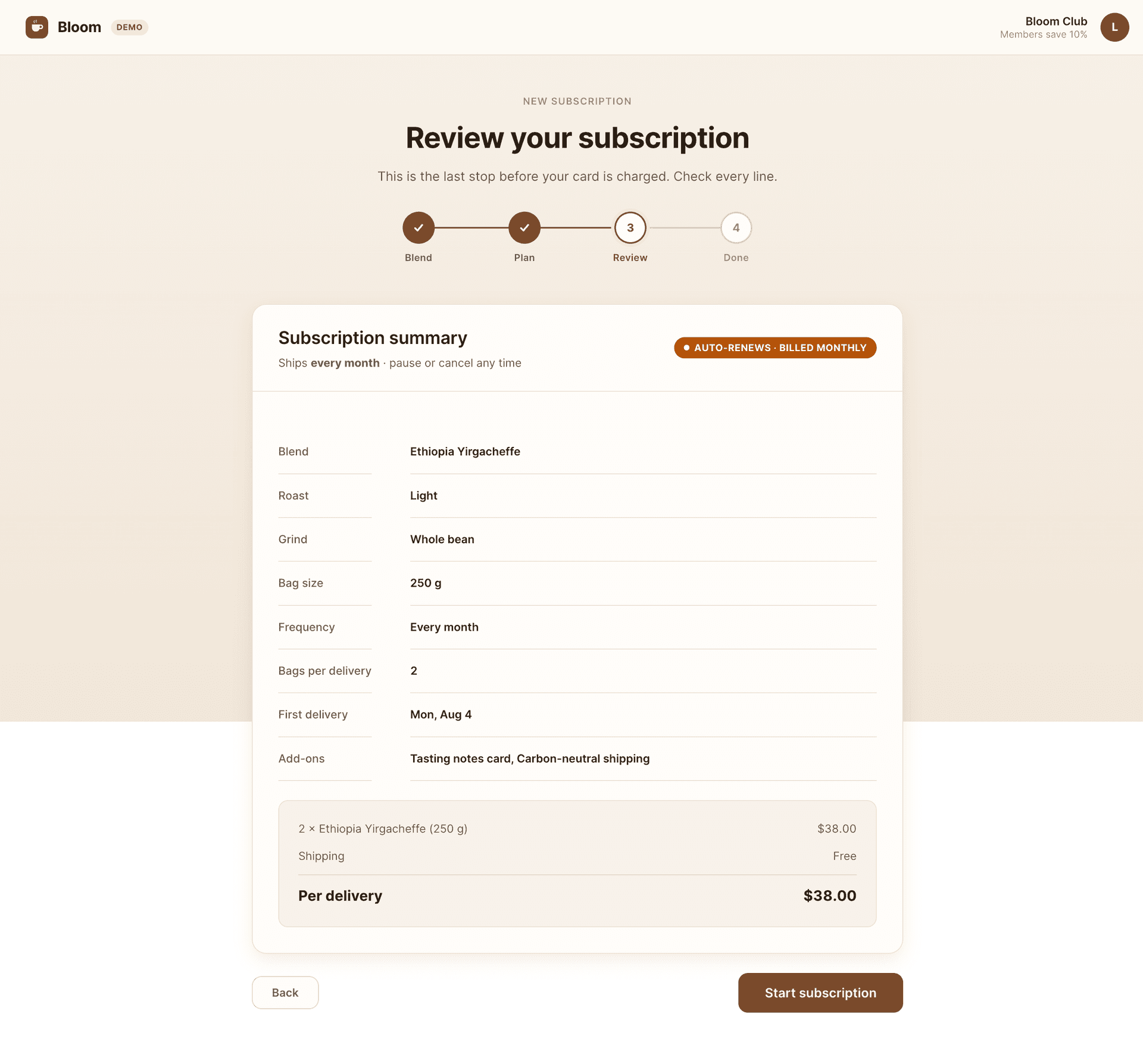
Now look at the test assertions on this step. They verify that review-summary contains "Ethiopia Yirgacheffe" and that review-total is "$38.00". Nobody asserts that the badge is amber, because nobody writes a test for "is the warning visible enough". If the badge faded into a gray pill that blends into the background, the text "Auto-renews" would still render, and the test would still be green. This is a state boundary where appearance matters more than content, and that is exactly why it deserves a checkpoint.
One line where the test already stops
Once you know where checkpoints belong, wiring them in is easy. Buddy Visual Tests reuses the test navigation, so you do not write new code. The suite has a CLI tab with a ready snippet for each runner, including Cypress: package install, one import line, and the command that starts a session.
Image loading...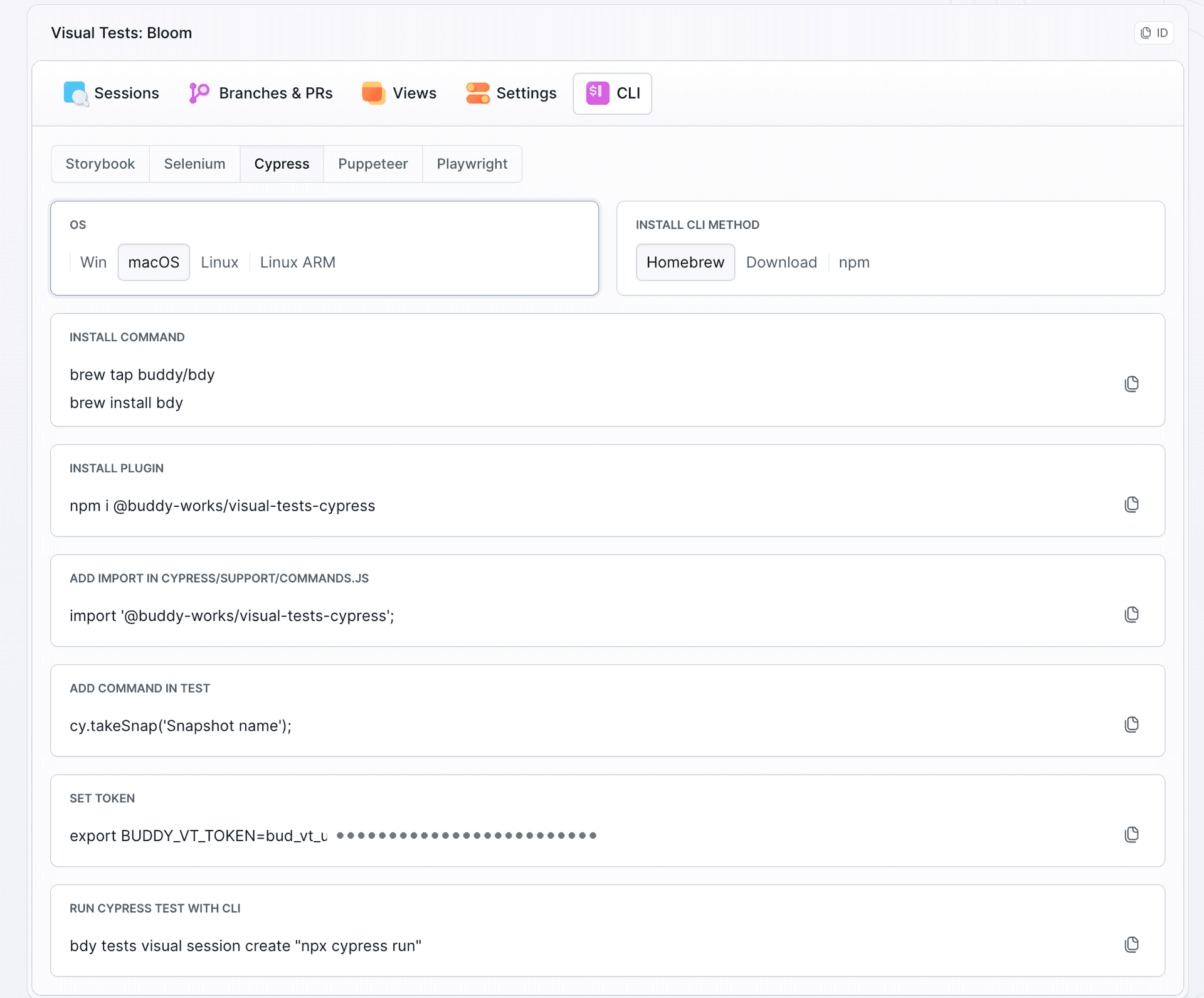
Install the official Cypress package:
npm install --save-dev @buddy-works/visual-tests-cypress
$
Register the cy.takeSnap() command with one import in the support file:
// cypress/support/e2e.js
import "@buddy-works/visual-tests-cypress";
Start with the two boundary checkpoints, each added where the test already stops:
    // Step 3 - Review: CHECKPOINT 1. Last screen before the card is charged.
    cy.get('[data-cy="review-summary"]').should("contain.text", "Ethiopia Yirgacheffe");
    cy.get('[data-cy="review-total"]').should("contain.text", "$38.00");
    cy.takeSnap("bloom-review", { fullPage: true });   // <- one line

    cy.get('[data-cy="start"]').click();

    // Step 4 - Confirmed: CHECKPOINT 2. Proof that the subscription is active.
    cy.get('[data-cy="confirmed-card"]').should("contain.text", "is live");
    cy.takeSnap("bloom-confirmed", { fullPage: true }); // <- one line
Blend and Plan take the same line at the end of their step blocks: cy.takeSnap("bloom-blend", { fullPage: true }) and cy.takeSnap("bloom-plan", { fullPage: true }). The rest of this guide follows the two boundary checkpoints - that is where the regression we are about to plant lands - so the sessions in the screenshots below carry two snapshots each.
Outside a Visual Tests session, cy.takeSnap() does nothing harmful. Plain npx cypress run still works as a functional e2e test. The checkpoint only activates when you run the same test inside a Buddy session:
bdy tests visual session create "npx cypress run"
$
The suite decides how many renders one checkpoint produces
Before you run the first session, create a suite, the place where snapshots land and where the baseline lives. Name it Bloom, set its ID to coffee-subscription, and pick snapshot mode, browsers, OS, and the device list. The ID matters: it is the identifier the pipeline actions reference later, so the YAML at the end of this guide runs against the suite you create here:
Image loading...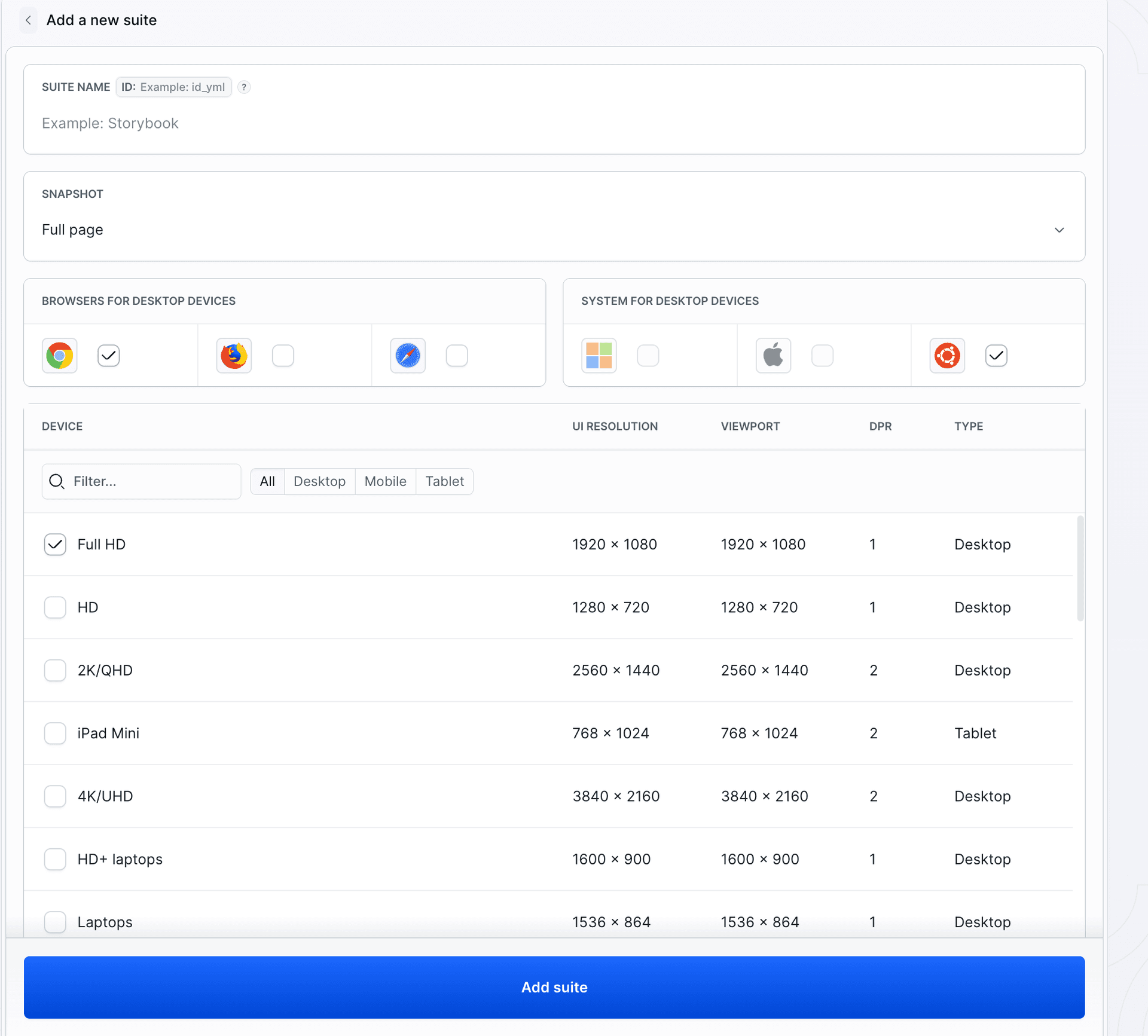
The rest of the configuration lives in Settings and multiplies every checkpoint across a matrix: full page or viewport only, which browsers (Chrome, Firefox, Safari), which resolutions, diff threshold, which branch is the baseline, which color scheme.
Image loading...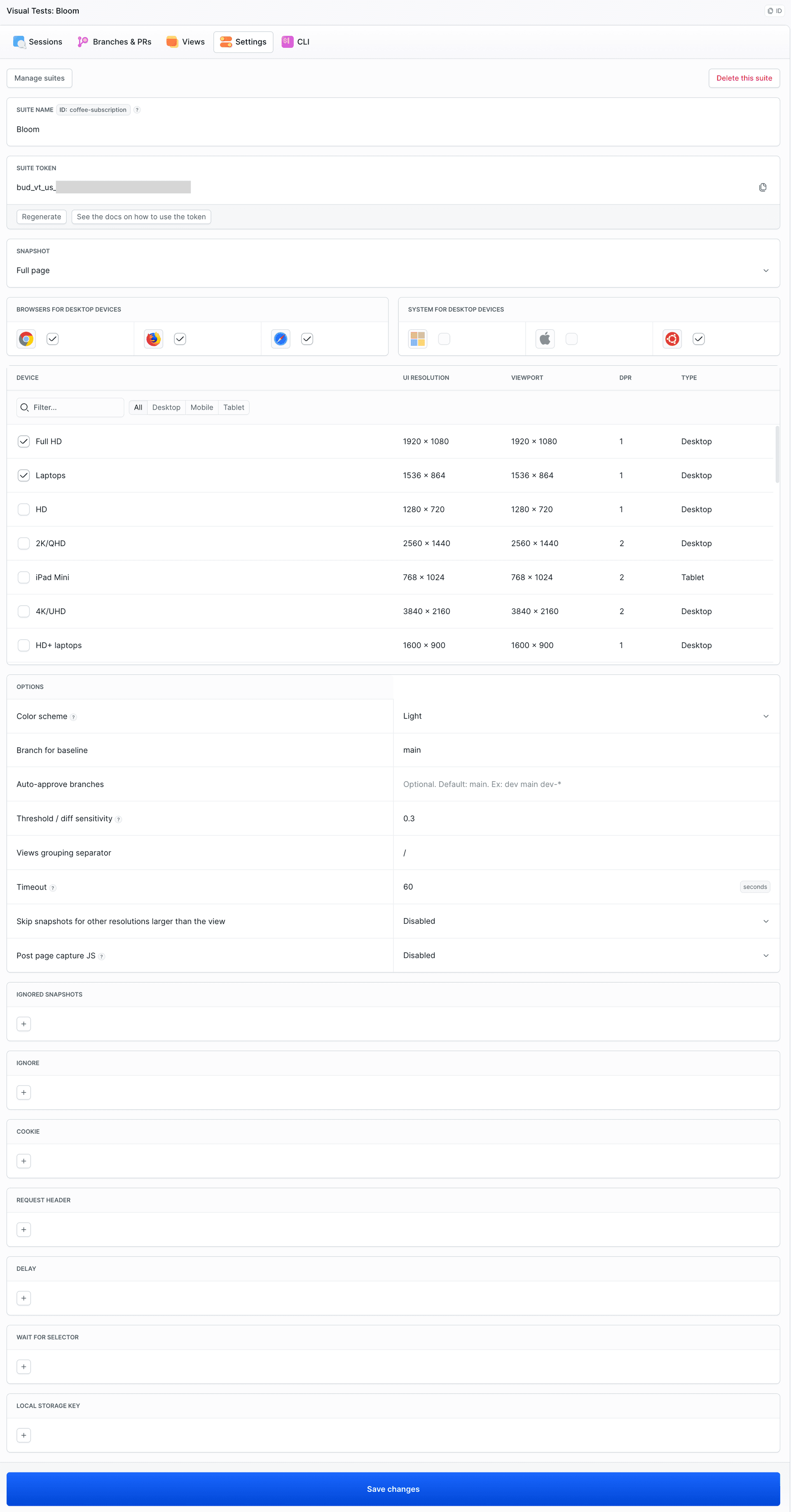
You configure the matrix in the suite, not in test code. Here Bloom renders in three browsers at two desktop resolutions, so one cy.takeSnap() produces six renders per screen, and the full four-step wizard produces twenty-four per run. When that number grows faster than you can review, trim browsers and resolutions you do not support in Settings - do not skip wizard steps to save renders.
Baseline: the first accepted render
Visual Tests needs a baseline, the first accepted render to compare future snapshots against. Run the test inside a session on the main branch:
# Prepare the browser for resource discovery (once).
bdy tests visual setup

# Keep the suite token in an environment variable, never in the repo.
export BUDDY_VT_TOKEN="<your-suite-token>"

# Run the existing Cypress test inside a Visual Tests session.
bdy tests visual session create "npx cypress run"
$$$$$$$$
The session feeds the suite two snapshots: bloom-review and bloom-confirmed. Approve them on main to establish the baseline. From then on, main is the reference, and snapshots from it are auto-approved.
Visual Tests compares pixels, so dynamic data hurts stability. If the wizard showed today's date or a random order number, every run would differ from the baseline. Bloom is deterministic: the plan starts from fixed values, so the total and first delivery date are the same every time. When you cannot control the data, mask it with cssIgnores or xpathIgnores in takeSnap() options. If a diff turns out to be only edge and text noise, or content that had not finished loading at capture time, raise the threshold or wait for the resource instead of masking.
The cleanup that hides the warning
This commit is the regression: refactor: consolidate badge variants into a single neutral pill. It merges three badge variants into one neutral pill and strips out the color tokens that made the auto-renew badge stand out:
  /* ---- Badges / pills ---- */
+ /* One neutral pill, shared by every badge in the flow. */
  .badge {
    ...
-  }
- .badge--recurring {
-   color: #fff;
-   background: var(--color-recurring);
- }
- .badge--onetime {
-   color: var(--color-onetime);
-   background: var(--color-onetime-soft);
+   color: var(--color-ink-muted);
+   background: var(--color-surface-2);
  }
- /* Plan accents. A recurring subscription is deliberately loud (amber) so
-    nobody signs up for auto-renewing billing without noticing it renews. */
- --color-recurring: #b45309;
- --color-recurring-soft: #fbead4;
- --color-onetime: #6c5d4f;
- --color-onetime-soft: #f0ece5;
In JSX, two badge badge--recurring classes become plain badge on both screens. The diff is +5 / -17 across four files and looks like a tidy cleanup. The token disappeared together with the comment explaining why the badge was loud. Functionally nothing breaks: the text "Auto-renews · Billed monthly" still renders, the total is still $38.00, the Cypress test is still green. Only the color changed, and nobody asserts color:
Image loading...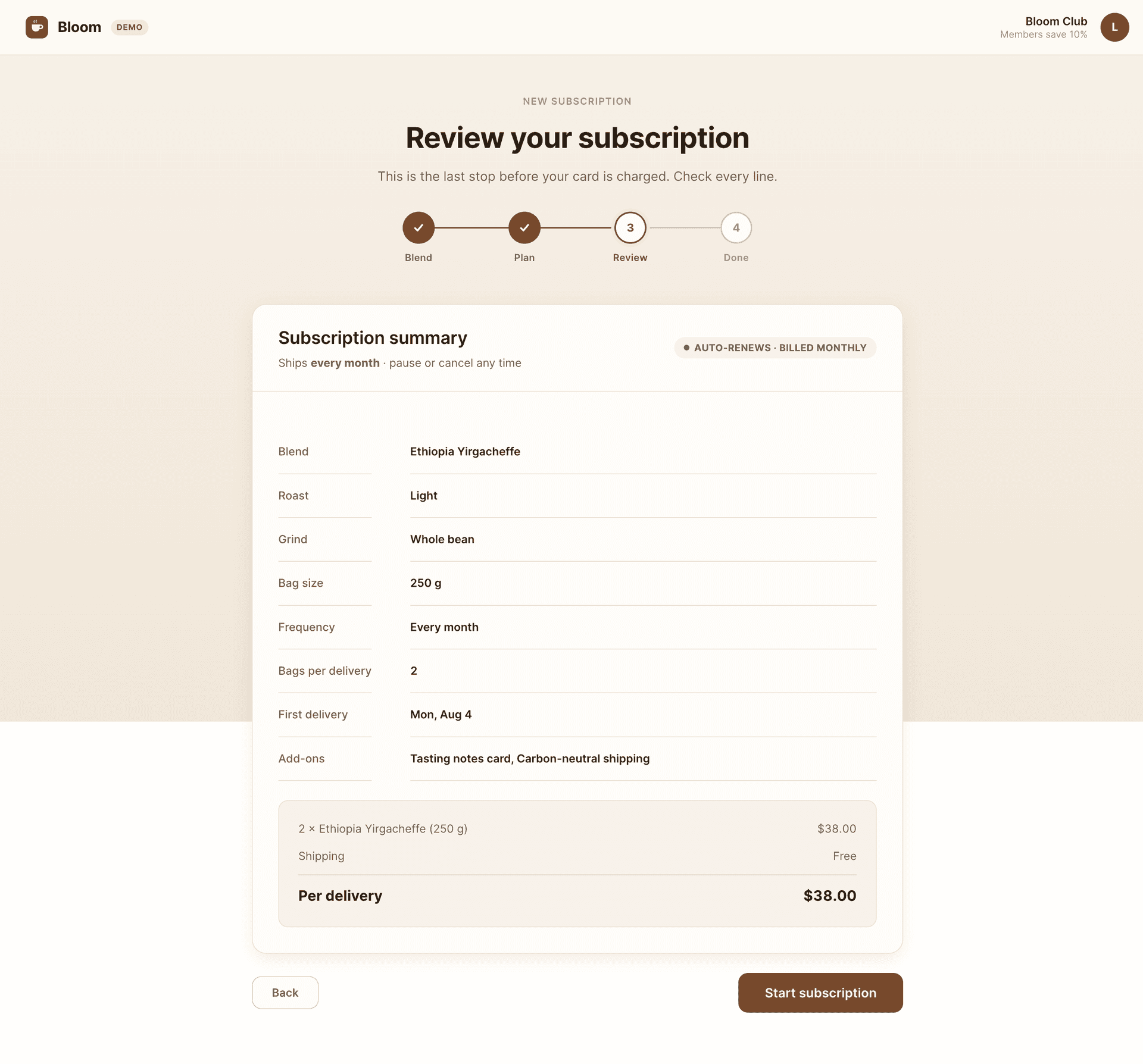
The checkpoint catches what the assertion does not
Pushing that commit to a feature branch triggers a pipeline that builds the app, runs the test in a session, and computes the diff against the baseline. Open the side-by-side comparison on the Review checkpoint:
Image loading...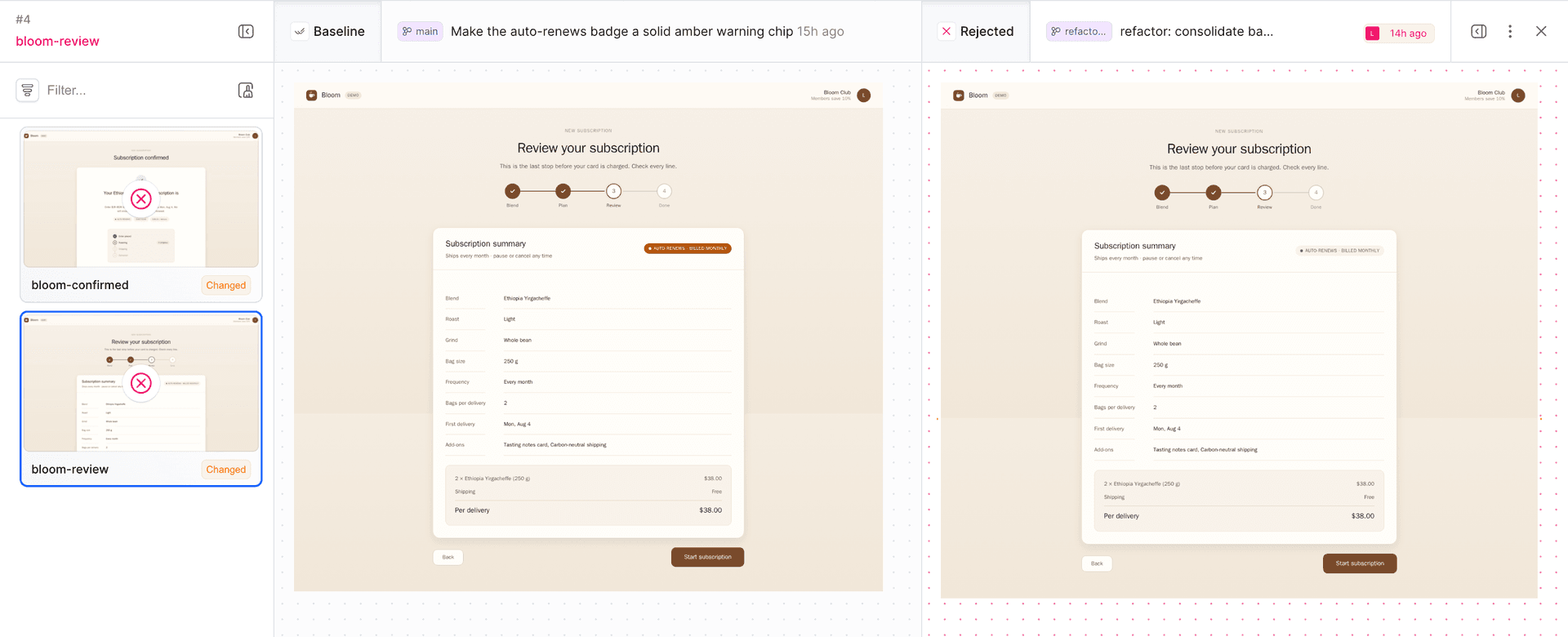
On the left, the baseline from main: loud amber AUTO-RENEWS · BILLED MONTHLY. On the right, the feature branch version: same text, but the pill blended into the card. The same happens on the second checkpoint, the Confirmed screen, where the "Auto-renews" badge stops standing out from the neutral "Every month" and "$38.00 / delivery" chips:
Image loading...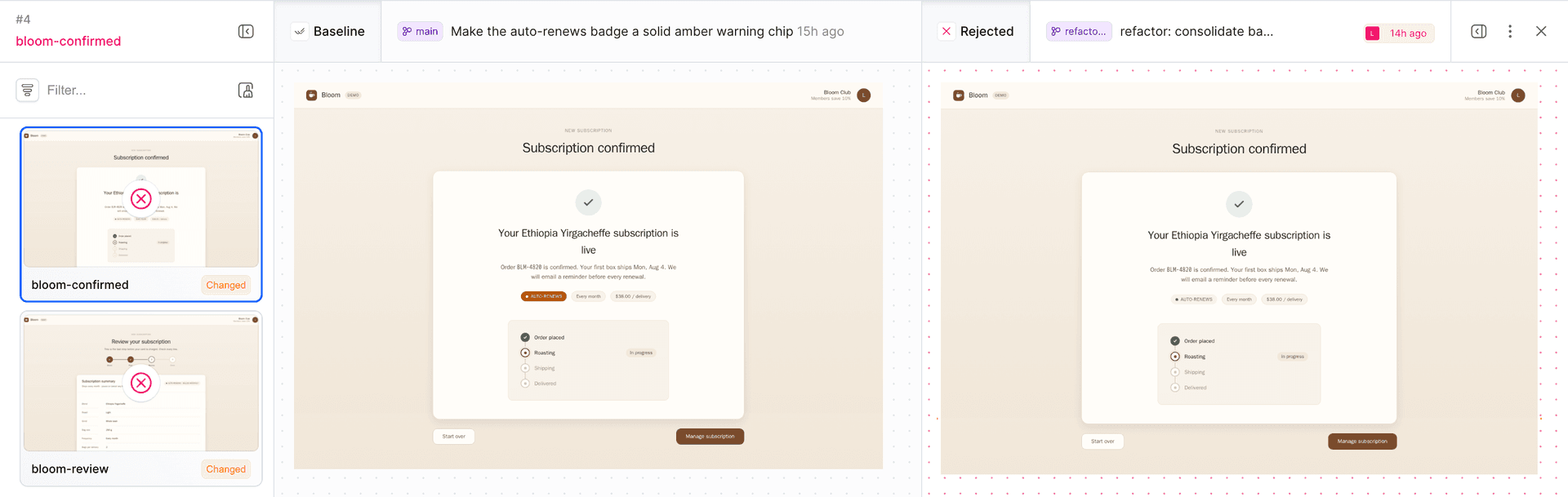
Both checkpoints sat exactly where the regression hit. The functional test passed, the customer can still subscribe, and the only signal about auto-renewal disappeared. Only Visual Tests caught it, because only VT looks at the rendered image, not the text in the DOM. If you had snapshotted Blend and Plan but skipped Review, the regression would have slipped through despite more snapshots.
The gate does not let a broken checkpoint through
Manual review is easy to skip, so the pipeline enforces visual review in CI. It has three actions: run the test in a Visual Tests session, pass through the APPROVE_VT gate, and only then promote the change further.
Image loading...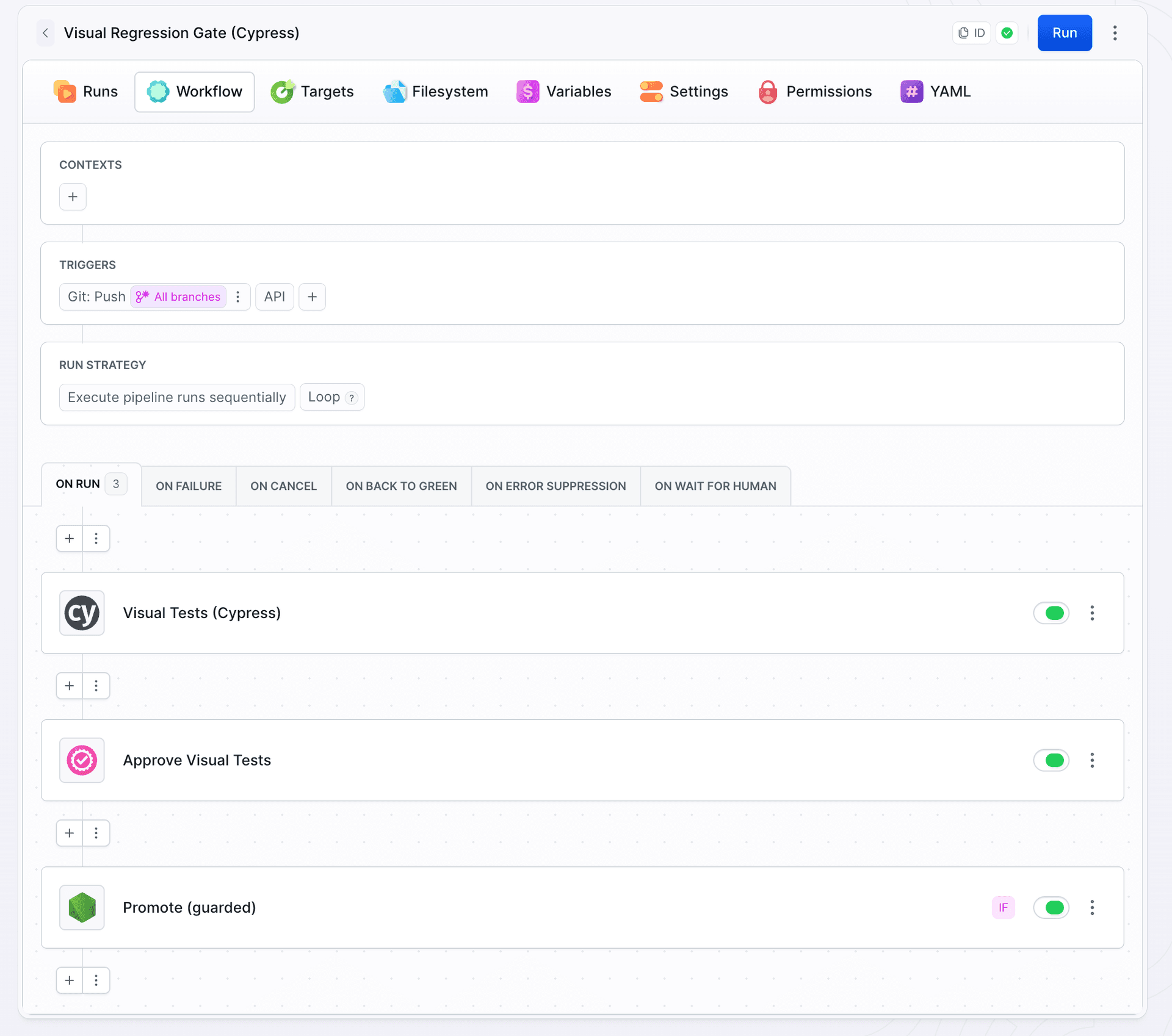
The first action is the native CYPRESS action. It builds the static wizard, serves it locally, and runs the test inside a session. The key field is visual_tests_suite, which ties the session result to the suite created earlier (coffee-subscription) so the gate knows what to look at:
Image loading...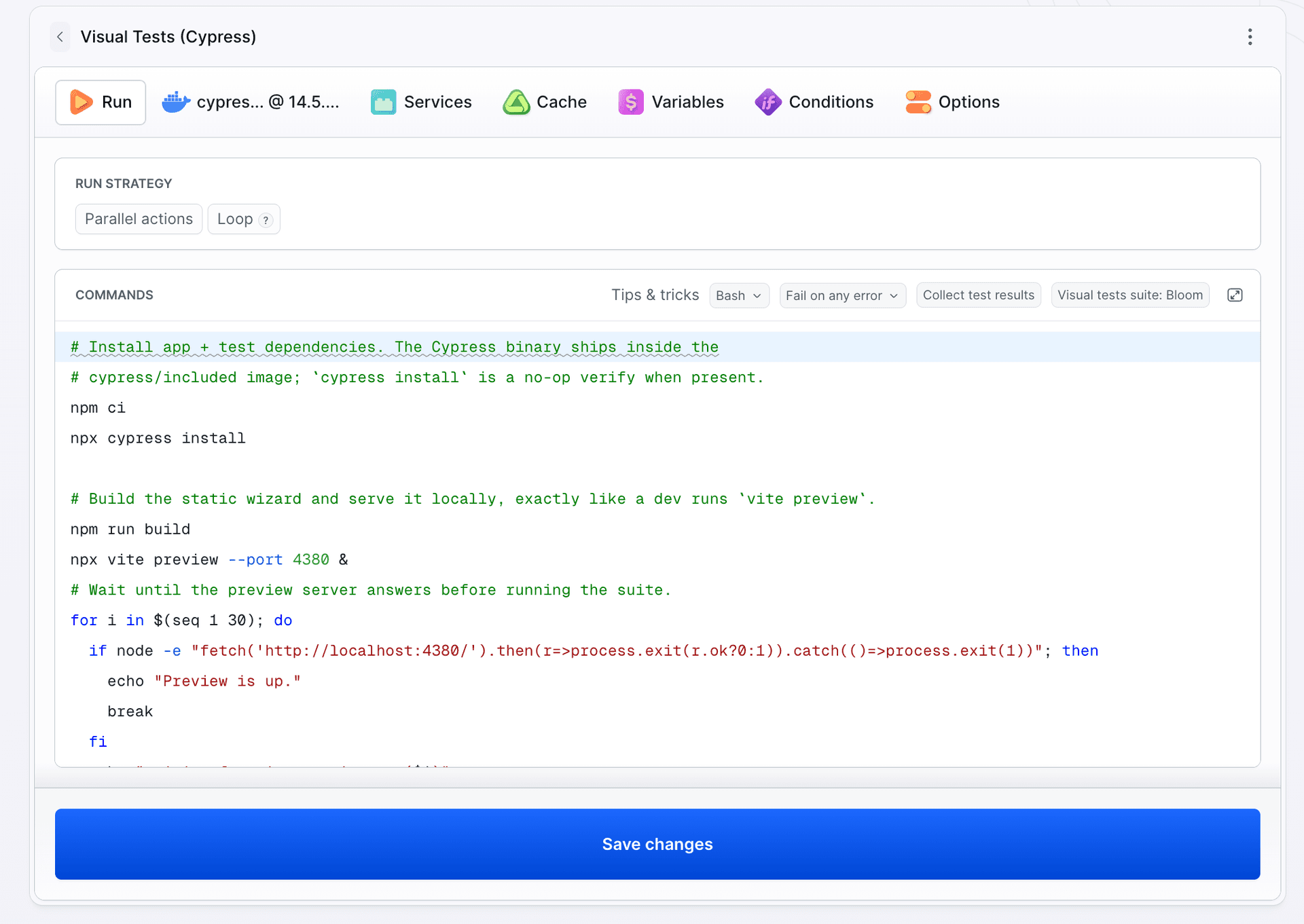
bdy tests visual session create command for you. That is exactly the setup_commands, visual_tests_suite, and session command of the Cypress action in the YAML below.
Image loading...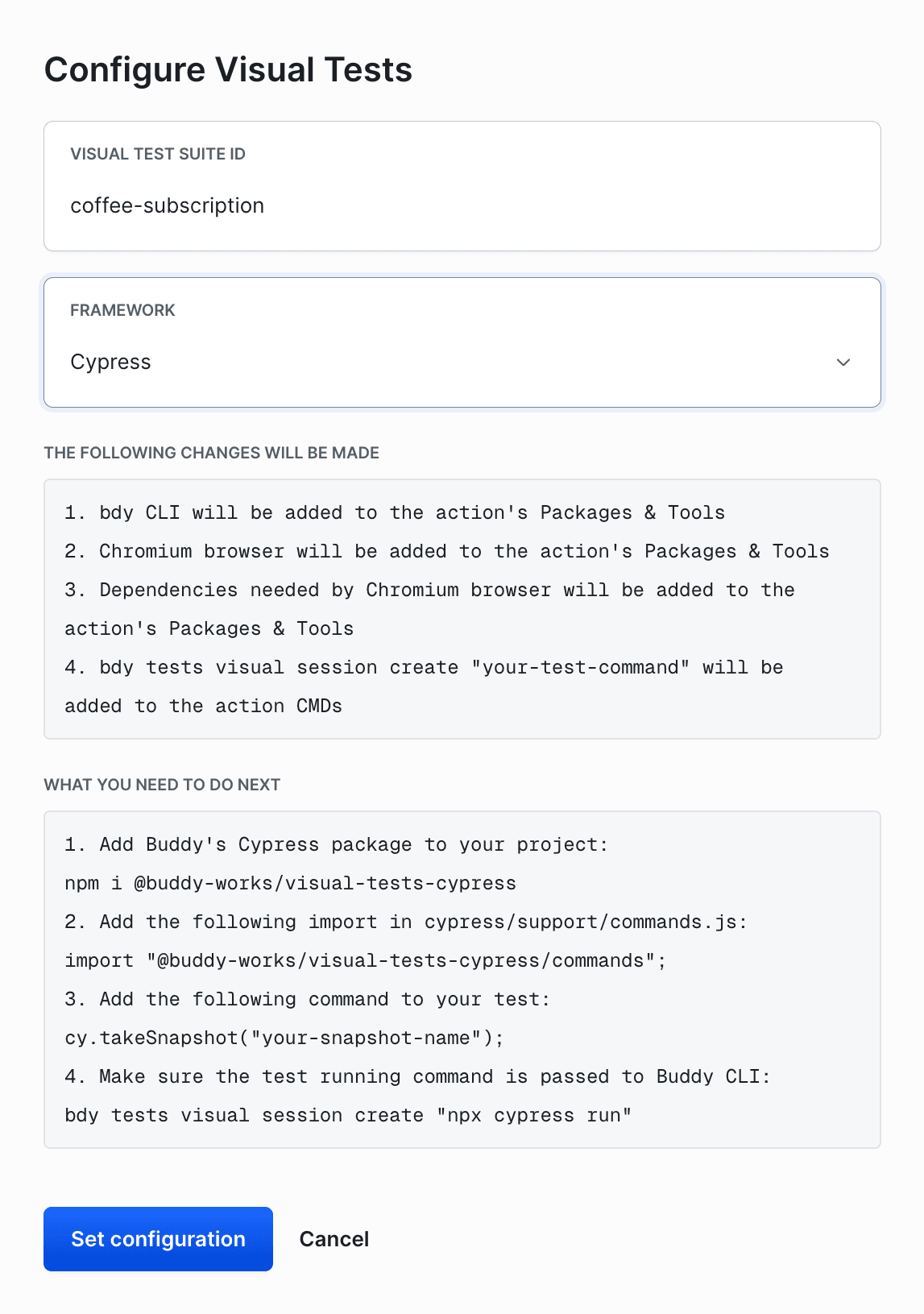
The second action is the APPROVE_VT gate. It points at the suite and revision, and holds the pipeline until someone approves or rejects the visual change:
Image loading...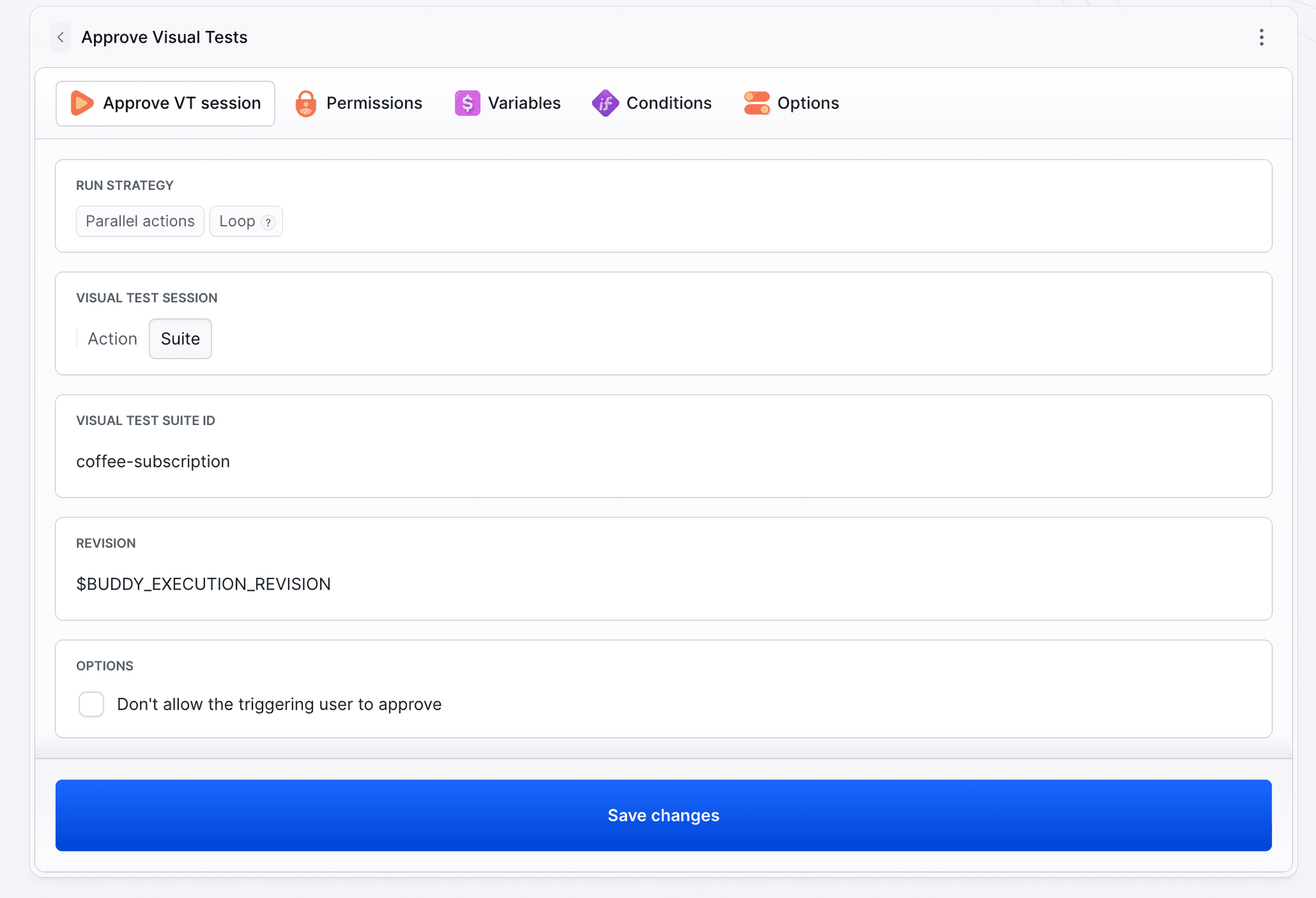
The full pipeline in YAML, exported 1:1 from the project behind these screenshots. The only things to change for your own app are the suite ID (both references), the token value, and the build-and-serve commands:
# Trigger: push to any branch except main.
- pipeline: visual-regression-gate
  name: Visual Regression Gate (Cypress)
  fail_on_prepare_env_warning: true
  events:
    - type: PUSH
      refs:
        - refs/heads/*
  variables:
    # Suite token from the suite's CLI tab. Paste it in the pipeline variables
    # UI and tick Encrypted - never commit the raw value.
    - key: BUDDY_VT_TOKEN
      value: "<your-suite-token>"
      encrypted: true
    - key: DEMO_DEPLOY_ENABLED
      value: "false"
  trigger_conditions:
    - trigger_condition: VAR_IS_NOT
      trigger_variable_key: BUDDY_EXECUTION_BRANCH
      trigger_variable_value: main
  actions:
    - action: Visual Tests (Cypress)
      type: CYPRESS
      docker_image_name: cypress/included
      docker_image_tag: 14.5.4
      shell: BASH
      reset_entrypoint: true
      visual_tests_suite: coffee-subscription
      setup_commands: |-
        #BEGIN INSTALL BUDDY CLI
        if command -v apt-get > /dev/null 2>&1; then apt-get update && apt-get install -y gnupg ca-certificates && gpg --homedir /tmp --no-default-keyring --keyring /tmp/buddy.kbx --keyserver hkp://keyserver.ubuntu.com:80 --recv-keys eb39332e766364ca6220e8dc631c5a16310cc0ad && gpg --homedir /tmp --no-default-keyring --keyring /tmp/buddy.kbx --export > /usr/share/keyrings/buddy.gpg && echo "deb [arch=amd64 signed-by=/usr/share/keyrings/buddy.gpg] https://es.buddy.works/bdy/apt-repo prod main" | tee /etc/apt/sources.list.d/buddy.list > /dev/null && apt-get update && apt-get install -y bdy; else echo "Error: apt-get not found." && exit 1; fi
        #END INSTALL BUDDY CLI
        #BEGIN INSTALL BROWSER
        bdy tests visual setup
        #END INSTALL BROWSER
      commands: |-
        # Install app + test dependencies. The Cypress binary ships inside the
        # cypress/included image; `cypress install` is a no-op verify when present.
        npm ci
        npx cypress install

        # Build the static wizard and serve it locally, exactly like a dev runs `vite preview`.
        npm run build
        npx vite preview --port 4380 &
        # Wait until the preview server answers before running the suite.
        for i in $(seq 1 30); do
          if node -e "fetch('http://localhost:4380/').then(r=>process.exit(r.ok?0:1)).catch(()=>process.exit(1))"; then
            echo "Preview is up."
            break
          fi
          echo "waiting for vite preview... ($i)"
          sleep 2
        done

        # Run the existing Cypress flow inside a Visual Tests session. The plugin
        # server collects the checkpoint snapshots and uploads them to the Bloom
        # suite (BUDDY_VT_TOKEN binds the session to it).
        CYPRESS_BASE_URL=http://localhost:4380 bdy tests visual session create "npx cypress run"
    - action: Approve Visual Tests
      type: APPROVE_VT
      from_action: Visual Tests (Cypress)
      suite: coffee-subscription
      ref: $BUDDY_EXECUTION_REVISION
    - action: Promote (guarded)
      type: BUILD
      docker_image_name: library/node
      docker_image_tag: "20"
      shell: BASH
      trigger_conditions:
        - trigger_condition: VAR_IS
          trigger_variable_key: DEMO_DEPLOY_ENABLED
          trigger_variable_value: "true"
      commands: |-
        echo "Visual review passed for $BUDDY_EXECUTION_BRANCH."
        echo "Promoting $BUDDY_EXECUTION_REVISION to prod (demo, no real side effects)."
The feature push triggers a run. The Visual Tests (Cypress) action finishes green because the test passes functionally, but the Approve Visual Tests gate stops, and Promote (guarded) never starts:
Image loading...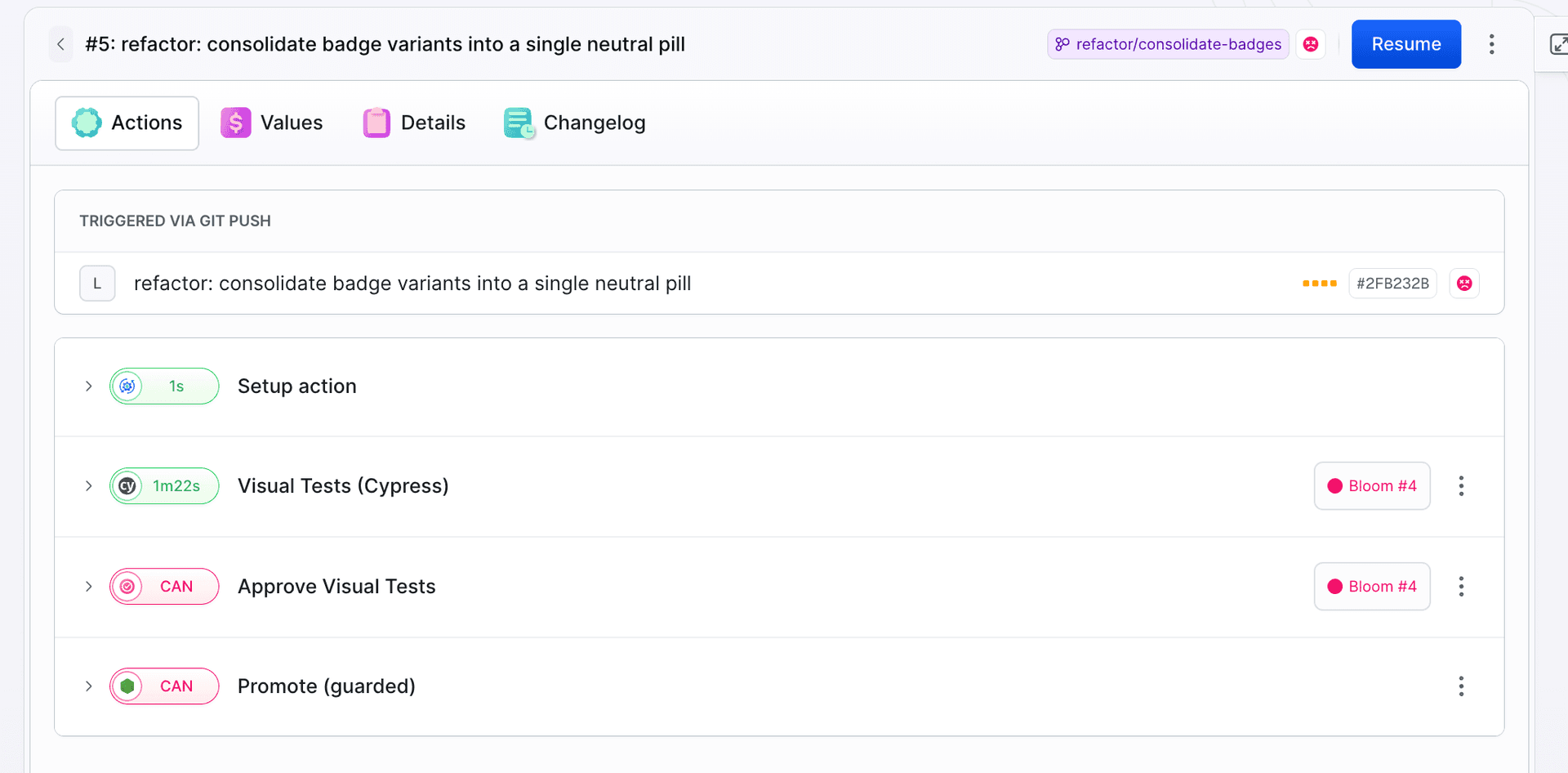
The functional build is green, but Visual Tests stopped the pipeline anyway. The test walked the full flow; the broken checkpoint simply doesn't move forward..
Two gotchas with the native CYPRESS action on the cypress/included image. The image has ENTRYPOINT ["cypress","run"], which intercepts Buddy's command script, so set reset_entrypoint: true. And do not mount cached_dirs on /root/.cache/Cypress, because an empty mount hides the binary bundled in the image.
Open the diffs and decide: accidental regression or intentional change. This one is accidental, so reject it in review. The gate stays closed, and promotion never starts.
Reject, fix, green
Close the loop. On the feature branch, restore the loud badge variant and add a comment so the next cleanup does not remove it again:
+ /* Recurring plans stay loud (amber) on purpose: this is the only signal that
+    billing auto-renews. Do not fold it back into the neutral badge. */
+ --color-recurring: #b45309;
- <span className="badge">
+ <span className="badge badge--recurring">
    <span className="badge__dot" aria-hidden="true" />
    Auto-renews · {BILLED[plan.frequency]}
  </span>
Push triggers a new run. The test runs with the same command, and the result now matches the baseline. When there is nothing to review, Buddy auto-approves unchanged snapshots, the gate has nothing to hold, and the pipeline passes:
Image loading...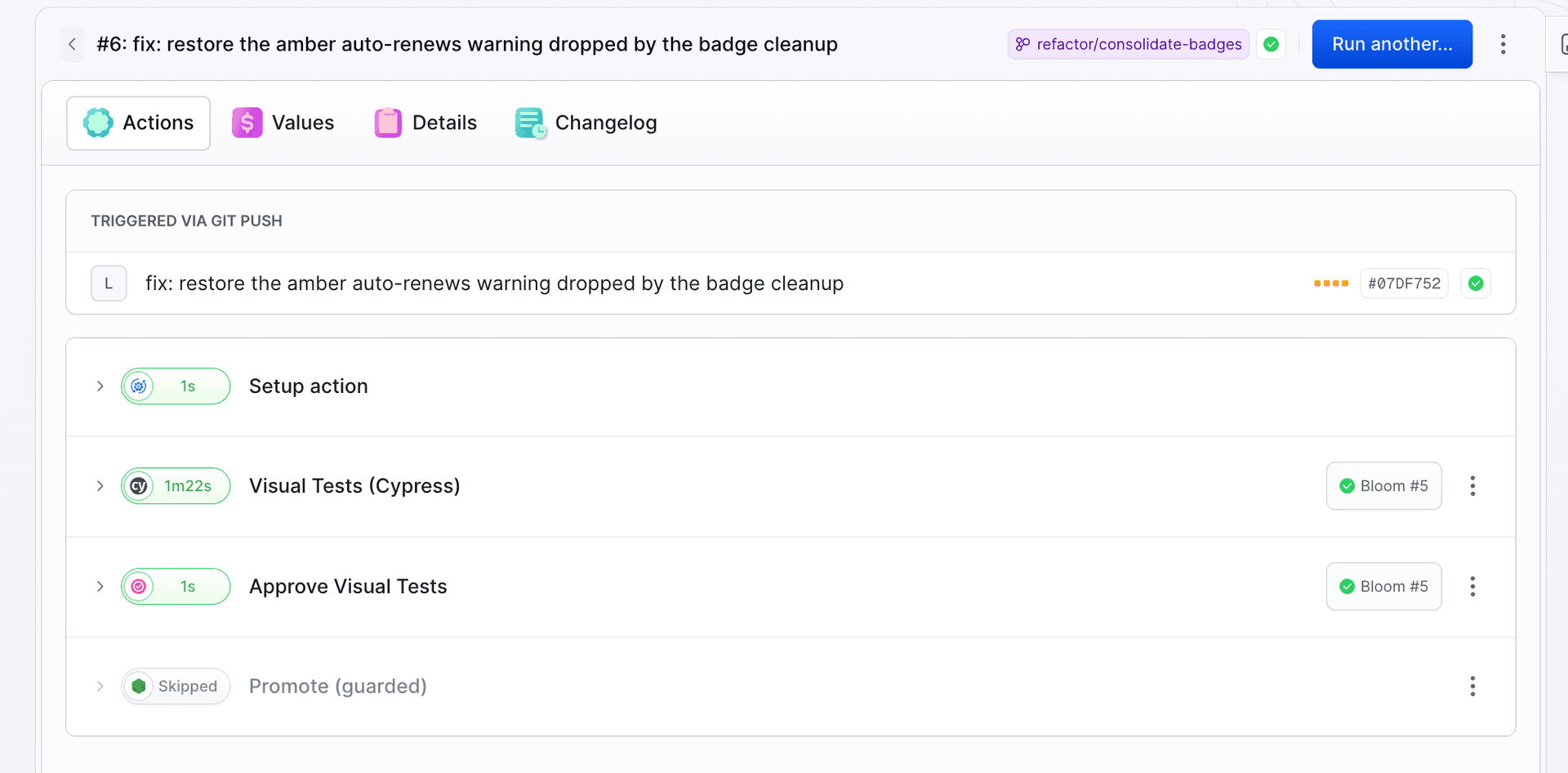
The full arc is visible in the suite session list: baseline on main, caught and rejected regression, and finally a green fix:
Image loading...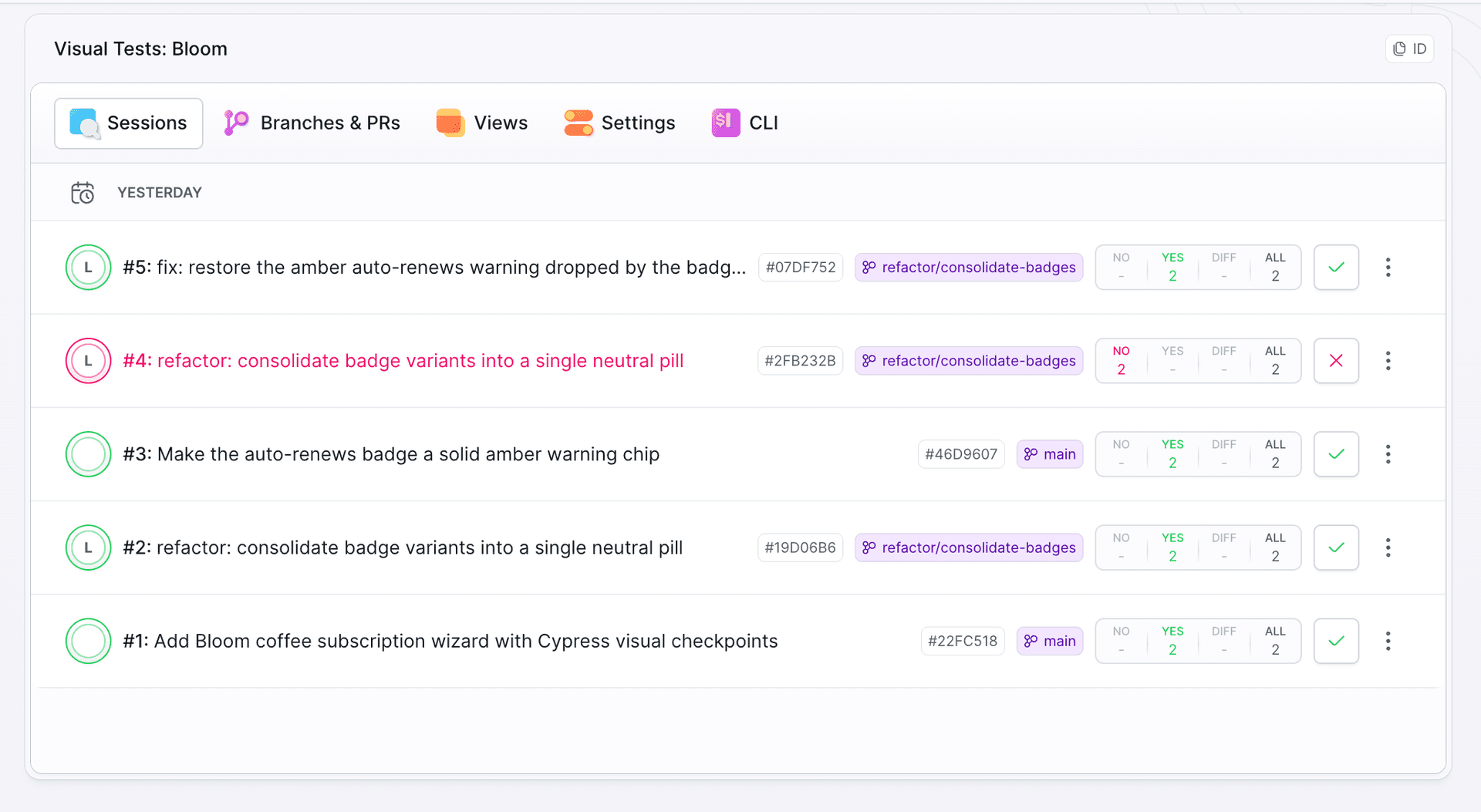
Point an agent at your own project
The Bloom wiring is small enough to do by hand, but if an AI agent (Claude Code, Cursor, or similar) works in your repo, the whole setup compresses into one prompt. Paste it into the repository that holds your Cypress tests and fill in the suite ID:
Add Buddy Visual Tests checkpoints to this project's existing Cypress e2e tests.

Setup:
- Install @buddy-works/visual-tests-cypress as a dev dependency.
- Add `import "@buddy-works/visual-tests-cypress";` to cypress/support/e2e.js.

Checkpoints:
- Find the spec that walks our most critical user flow.
- At the end of every distinct UI state it visits (each wizard or checkout step, each screen reached after a navigation), add one line after the existing assertions for that state: cy.takeSnap("<flow>-<step>", { fullPage: true }); Use stable kebab-case snapshot names.
- Do not snapshot mid-animation or mid-load states; snap only after the step is fully rendered.
- If a screen shows dynamic data (dates, order numbers, avatars), pass cssIgnores or xpathIgnores in the takeSnap options.
- Do not change any existing assertions. Outside a Buddy session takeSnap is a no-op, so `npx cypress run` must still pass unchanged.

Pipeline (buddy.yml):
- Add a pipeline triggered on PUSH to refs/heads/* with a trigger condition that skips the main branch.
- Action 1: type CYPRESS on the cypress/included image with reset_entrypoint: true and visual_tests_suite: <suite-id>. Do not mount cached_dirs on /root/.cache/Cypress. Commands: install dependencies, build and serve the app locally, wait until the server answers, then run bdy tests visual session create "npx cypress run".
- Action 2: type APPROVE_VT with from_action pointing at the Cypress action, suite: <suite-id>, and ref: $BUDDY_EXECUTION_REVISION.
- The suite token is provided as the encrypted pipeline variable BUDDY_VT_TOKEN. Never hardcode it.

My suite ID: <suite-id>.
Reference pipeline: https://buddy.works/guides/visual-checkpoints-in-cypress-flows
The prompt encodes the same gotchas the hint above spells out, so the first run does not stall on the image entrypoint or a hidden Cypress binary.
Checkpoints in other tools
Wrapping a Cypress test is one of several ways to feed a suite. The checkpoint principle is the same for all of them: start at state boundaries and extend until every meaningful state has a snapshot. Only the entry point changes, and the suite shows a snippet for each:
| Method | Best when | Setup cost |
|---|---|---|
| Test runner (Cypress, Playwright) | You already have e2e tests on a critical flow | One import in the support file and one takeSnap() per checkpoint |
| Automation script (Puppeteer) | You have a bot walking the app after login | One plugin instance and one takeSnap() per screen |
URL crawl (bdy tests capture) | You do not want to change code | No code changes, but the app needs a public URL |
Storybook (bdy tests visual upload) | You use Storybook | Component testing in isolation, story by story |
The same checkpoint approach applied to a Playwright flow is covered in a companion guide.
Summary
- Functional tests read content and behavior; they are blind to appearance. A Cypress test walks the entire wizard and confirms success even when the warning on the Review screen faded to invisibility.
- Cover every step, prioritize state boundaries. On a wizard each step deserves a checkpoint; Review and Confirmed go in first because a broken layout there has direct cost, and placement is what decides whether a regression gets caught.
- VT reuses the navigation the test already walks. One import in the support file and one
cy.takeSnap()line per checkpoint, with no new tests to write. - You configure the render matrix in the suite, not in code. One
takeSnap()produces as many renders as browsers and viewports you pick in Settings, so when the matrix grows too loud, trim browsers and resolutions there instead of skipping wizard steps. - The
APPROVE_VTgate holds promotion to prod until approve or reject. A rejected regression does not move forward, and a green fix passes automatically.

Jarek Dylewski
Customer Support
A journalist and an SEO specialist trying to find himself in the unforgiving world of coders. Gamer, a non-fiction literature fan and obsessive carnivore. Jarek uses his talents to convert the programming lingo into a cohesive and approachable narration.