Your Puppeteer Bot Generates PDFs Blind
You have a Puppeteer script that logs into the app every night and exports invoices to PDF. It has run for months, nobody touches it. The problem is that nobody looks at those PDFs either. When the page that feeds the export quietly breaks, you only find out from a customer. In this guide you will add the official Visual Tests package to that same script, one line at each place where the bot already pauses, and turn every screen it passes through into a visual checkpoint, without writing separate tests.
The automation you already have
PDF Invoicer, is a small invoicing app. It has a sign-in, a dashboard listing
40 invoices, and a printable single-invoice view. Behind the login runs billing-bot.js,
a Puppeteer script the team runs every night: it attaches to the app, creates a
repeatable invoice, and exports every open invoice to PDF via page.pdf(). Tonight's
batch is a dozen open invoices.
What the bot is doing:
js// billing-bot.js: the team's nightly automation.
import puppeteer from "puppeteer";
import { INVOICES } from "./src/data/invoices.js";

async function run() {
  const browser = await puppeteer.launch({ headless: true });
  const page = await browser.newPage();

  // 1) Sign in with credentials from the environment.
  const { BASE_URL, USER, PASSWORD } = process.env;
  await page.goto(BASE_URL, { waitUntil: "networkidle0" });
  await page.type('input[name="email"]', USER);
  await page.type('input[name="password"]', PASSWORD);
  await page.click('button[type="submit"]');

  // 2) Draft tonight's invoice through the real form.
  await page.click('a[href="#/invoices/new"]');
  // ...pick the client, add line items, submit...

  // 3) Export every open invoice to PDF. This is the bot's actual job.
  for (const inv of INVOICES) {
    await page.goto(`${BASE_URL}/#/invoices/${inv.id}`);
    await page.pdf({ path: `pdf-out/${inv.number}.pdf`, format: "letter" });
  }
}
The script is stateful and interactive. It logs in, fills a form, navigates between views, generates artifacts. That's something a test runner or a URL crawl can't do as neither one goes behind the login or clicks through a form.
The blind spot: nobody looks at the PDFs
The bot runs flawlessly. page.pdf() never throws as long as the page renders, and it
always renders. The pipeline is green, yet nobody checks the visual quality of the PDFs.
The page that feeds every export is an ordinary app view. It shares design tokens with the rest of the UI. All it takes is for someone to move one shared token and the print can break on every invoice at once, silently, because functionally nothing fails.
You need a way to compare the rendered image of each of these pages, not just to check that the script reached the end.
Add visual regression testing to Puppeteer
Buddy Visual Tests reuses the navigation the bot already performs. You do not write a new script. You install the official package for Puppeteer:
bashnpm install --save-dev @buddy-works/visual-tests-puppeteer$
You create a single plugin instance, then add one line at each place the bot already stops:
jsimport { VisualTestsPlugin } from "@buddy-works/visual-tests-puppeteer";

const vt = new VisualTestsPlugin();

// ...inside the bot's existing flow:
await vt.takeSnap(page, "Sign in");
// ...after signing in and opening the dashboard:
await vt.takeSnap(page, "Dashboard", { fullPage: true });
// ...on the invoice page, right next to page.pdf():
await vt.takeSnap(page, `Invoice ${inv.number}`, {
  fullPage: true,
  cssIgnores: [".invoice__date", ".invoice__generated-at"],
});
takeSnap() wraps the navigation the bot already does. Every screen it passes,
sign-in, the New invoice form, the dashboard, and each invoice rendered to PDF, becomes
a visual checkpoint. And because page.pdf() renders exactly the snapshot DOM, the
page feeding every PDF is guarded by that same checkpoint.
Snapshotting the page's DOM, not the PDF binary. Buddy compares pages, not files. The snapshot guards the same UI and CSS layer that
page.pdf()draws the document layout from, so when a change shifts that page's layout, Visual Tests catches it before the PDFs reach a customer. Print and screen rendering are not identical (PDF uses@media print), so treat the snapshot as an early signal of print regressions, not a 1:1 preview of the file.
Outside a Visual Tests session, takeSnap() is a silent no-op (suppressErrors
defaults to true). A plain node billing-bot.js still just generates PDFs like every
other day. The checkpoint only kicks in when the script runs inside a Buddy Visual
Tests session.
Build a baseline on main
Visual Tests needs a baseline, the first approved render that later snapshots are compared against. Create a suite, prepare the browser, and run the same bot script inside a session:
bash# Prepare the browser for resource discovery. bdy tests visual setup # Keep the suite token in an environment variable, never in the repo. export BUDDY_VT_TOKEN="<your-suite-token>" # Run the existing bot script inside a Visual Tests session. bdy tests visual session create "node billing-bot.js"$$$$$$$$
The session feeds the suite snapshots of sign-in, the form, the dashboard, and every
invoice. Approve them on the main branch to establish the baseline. From then on
main is the reference, and snapshots from it are auto-approved:
Image loading...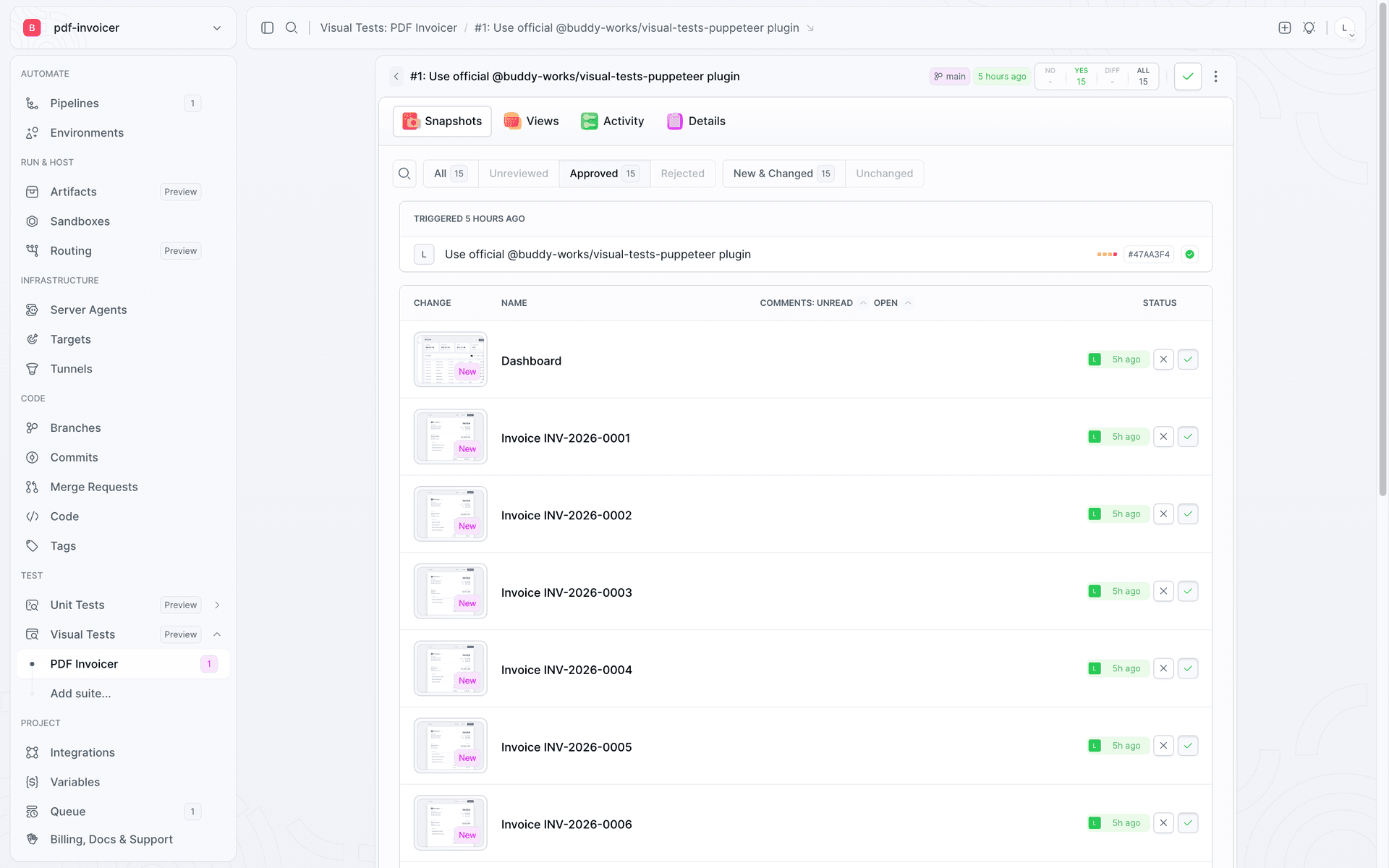
takeSnap() in the bot yields six
renders per page, and you do not touch the script's code to change that. You set the
matrix in the suite.
localStorage and fills the form with fixed values) or mask what you cannot control with the cssIgnores / xpathIgnores options of takeSnap(). Timing matters too: wait for fonts, images, and animations to settle before each takeSnap(), since networkidle0 alone does not guarantee the paint is done.
The cleanup that breaks the print
Back to the visual regression. The culprit is an innocent-looking commit
style: add breathing room to invoice table cells, which bumps one spacing token in
tokens.css:
diff/* Padding inside cells of the invoice line-items table. */ --cell-pad-y: 12px; - --cell-pad-x: 16px; + --cell-pad-x: 40px; /* "a little more breathing room in the columns" */
The Amount column in the invoice table has table-layout: fixed and a fixed width, and
the amounts have white-space: nowrap. Larger padding eats the space for the column's
content. At 1440 px it is subtle: the "UNIT PRICE" header wraps onto two lines. In print
and in the PDF, where the page is narrower (Letter format), the largest amount hits the
column edge and the total wraps. The functional build passes, because all the numbers
are still in the DOM.
Visual Tests catches what nobody reported
Pushing that commit to a feature branch triggers a pipeline that moves the code to preview, runs the bot in a session, and computes the diff against the baseline. Start with a side-by-side comparison on the invoice with the largest line item:
Image loading...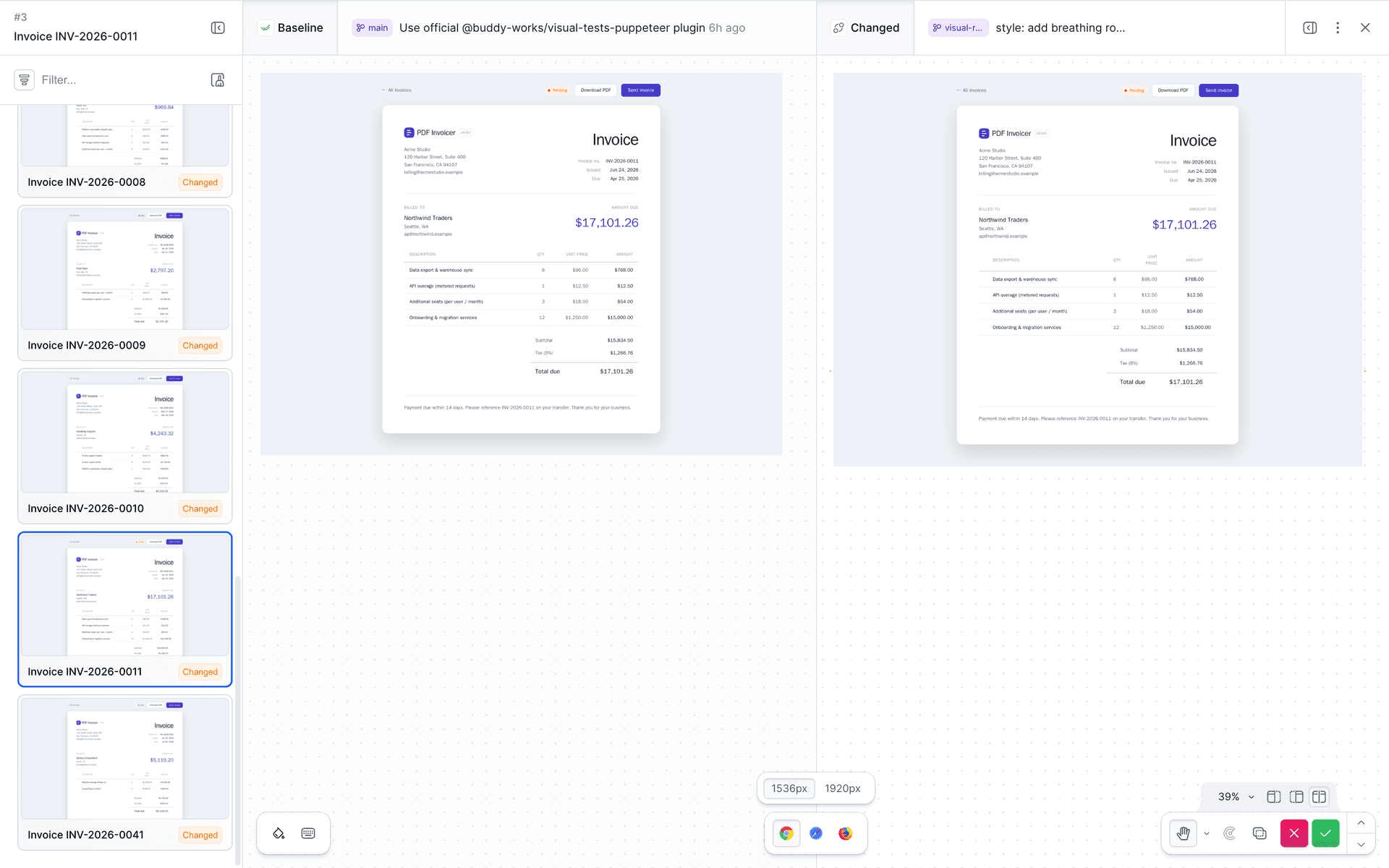
Turn on Show differences mode. Buddy dims the unchanged areas and marks the differences in red, exactly where the print broke:
Image loading...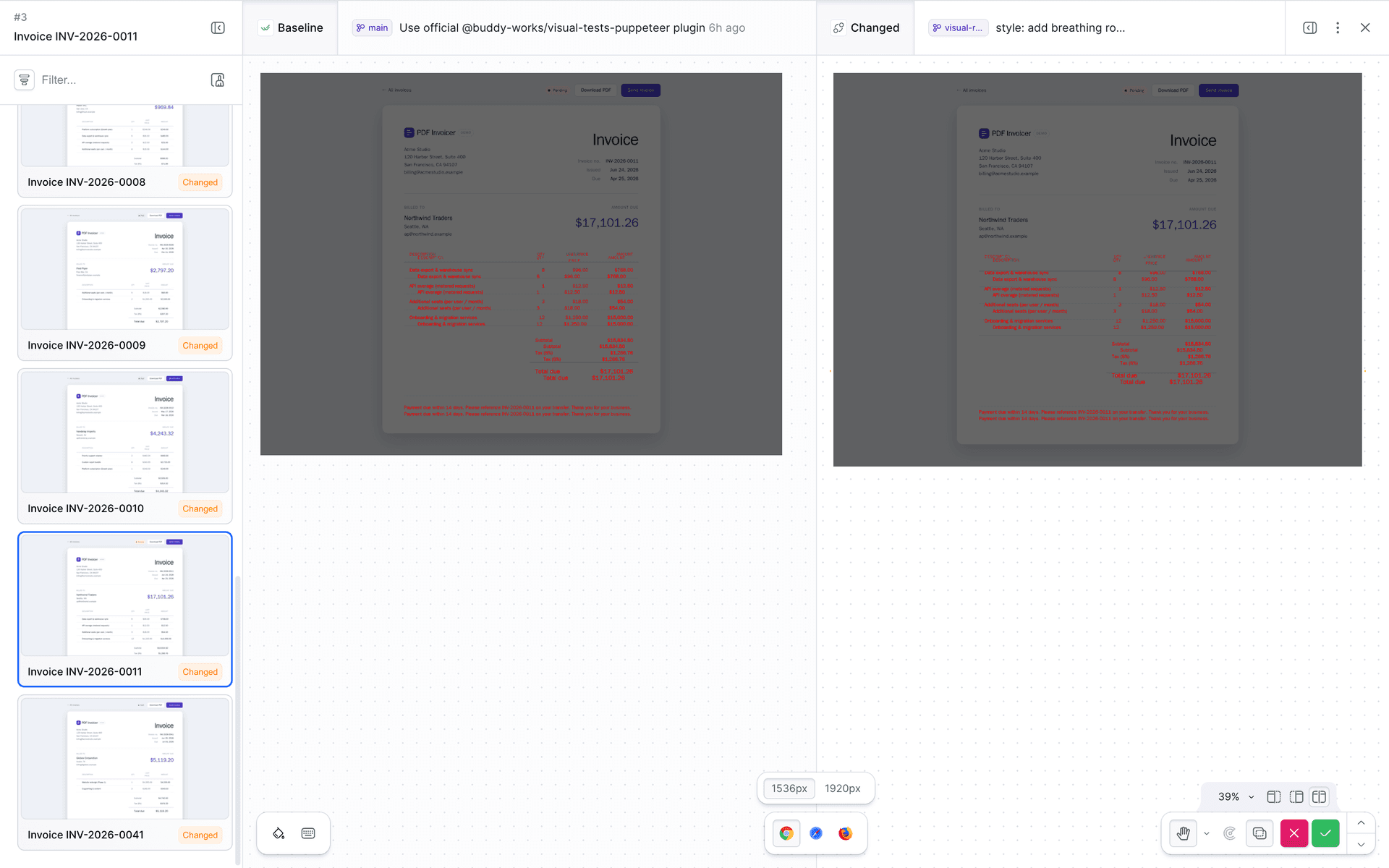
The real value, though, shows up at scale. One change to a shared token moved all 12 invoices in this run, the entire long tail nobody looks at. The three pages that do not use this token (sign-in, dashboard, the New invoice form) stayed untouched:
Image loading...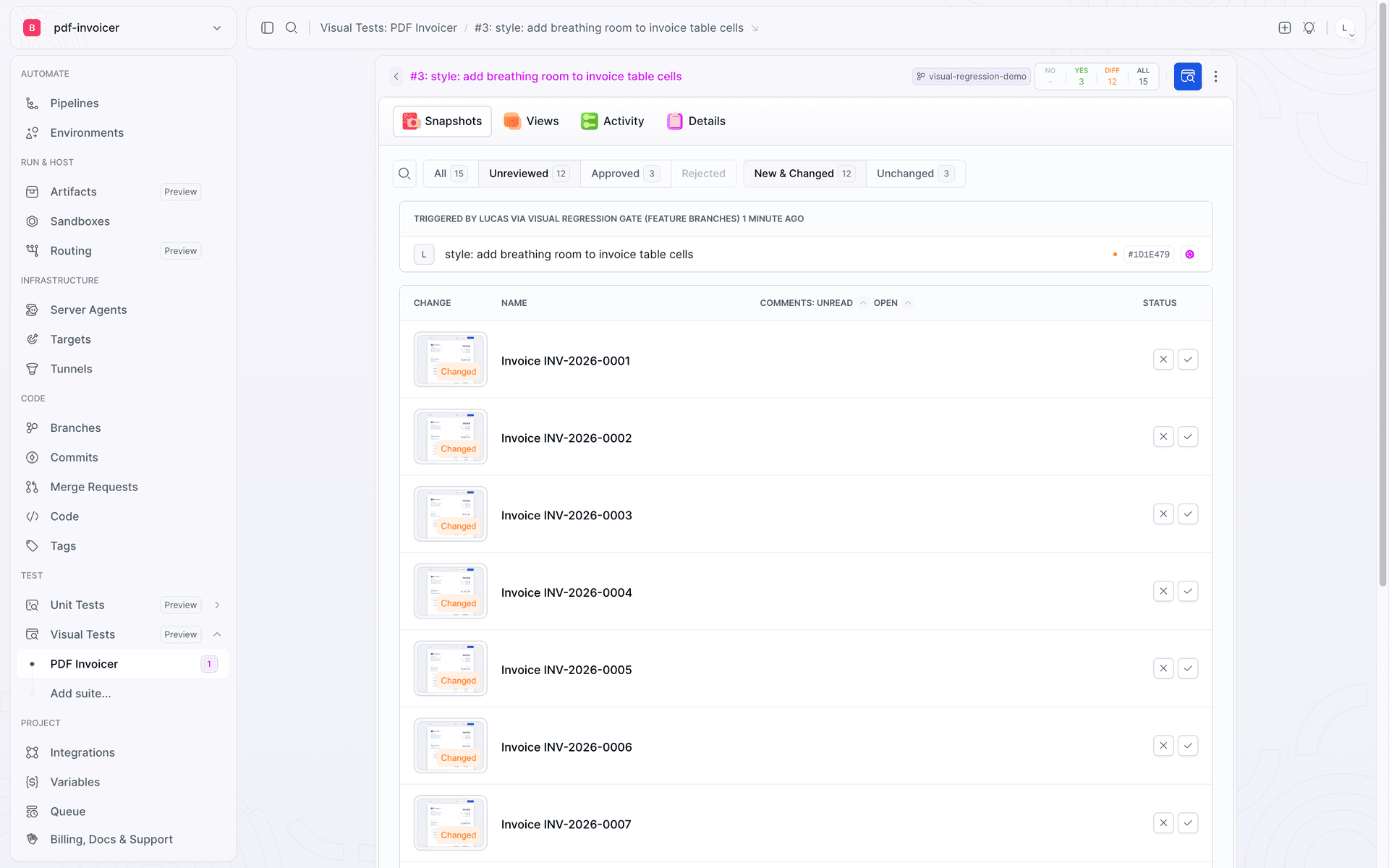
If someone checked this manually, they might open one or two PDFs and decide everything is fine. Visual Tests shows immediately that the skew affects every invoice, because the source is a single shared token.
The gate holds promotion to prod
A manual check is easy to skip, which is why the pipeline enforces a visual review in
CI. A push to a feature branch moves the code to a preview sandbox, runs the bot in a
session, and stops at the APPROVE_VT gate. Until someone approves the changes
visually, promotion to prod does not move:
Image loading...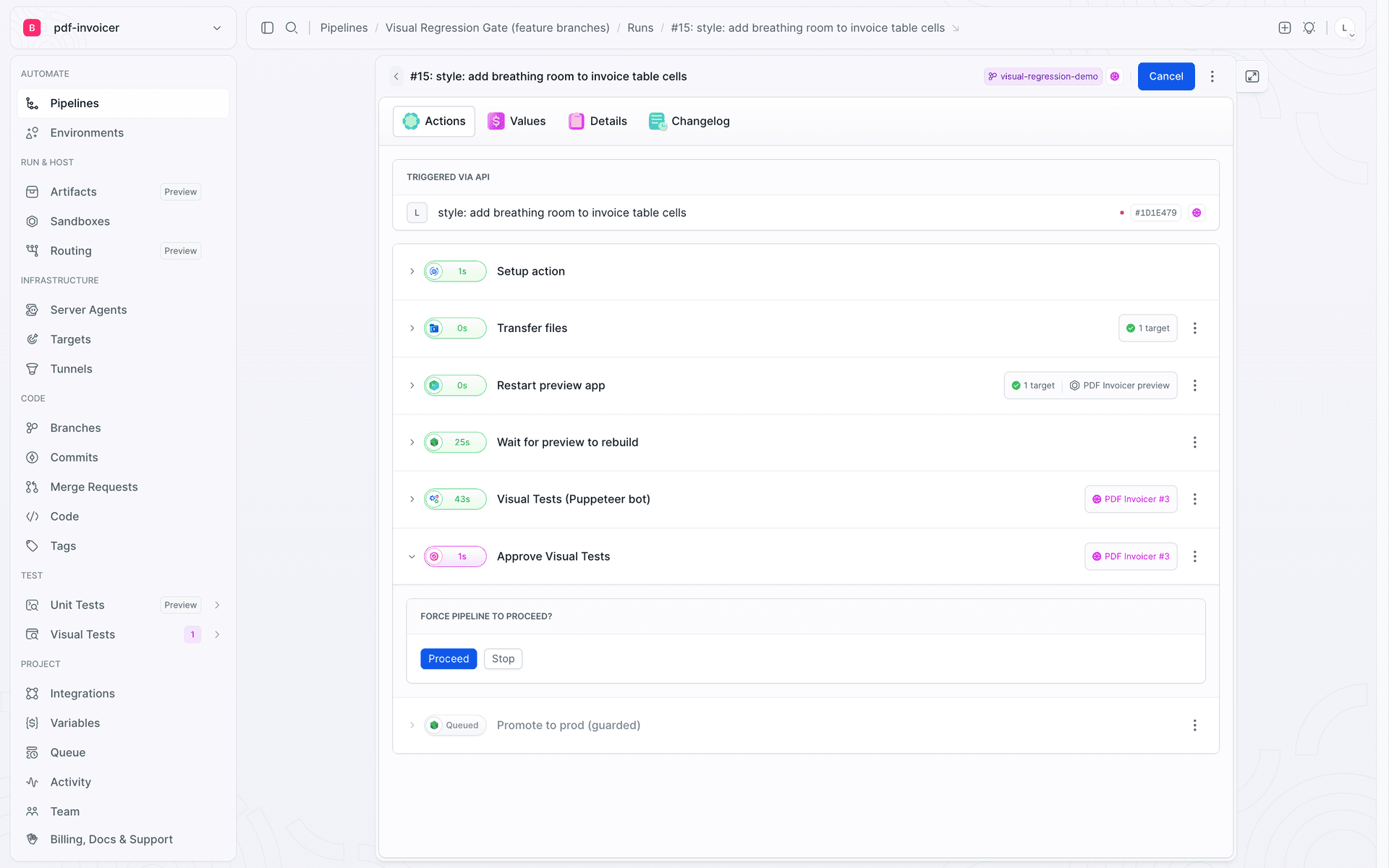
The pipeline reflects this governance model: main is the baseline and "prod", and
every change under review goes to a feature branch, behind the gate.
yaml# Trigger: push to any branch other than main.
- pipeline: "Visual Regression Gate (feature branches)"
  events:
    - type: PUSH
      refs: ["refs/heads/*"]
  trigger_conditions:
    - trigger_condition: VAR_IS_NOT
      trigger_variable_key: BUDDY_EXECUTION_BRANCH
      trigger_variable_value: main
  actions:
    - action: Transfer files                 # branch source to the preview sandbox
      type: TRANSFER
    - action: Restart preview app            # rebuild the transferred code
      type: SANDBOX_MANAGE
    - action: Wait for preview to rebuild     # health check until the endpoint returns 200
      type: BUILD
    - action: Visual Tests (Puppeteer bot)    # bdy tests visual session create "node billing-bot.js"
      type: BUILD
      visual_tests_suite: pdf_invoicer
    - action: Approve Visual Tests            # gate: holds the pipeline until a decision
      type: APPROVE_VT
    - action: Promote to prod (guarded)       # inert demo, behind the gate
      type: BUILD
      trigger_conditions:
        - trigger_condition: VAR_IS
          trigger_variable_key: DEMO_DEPLOY_ENABLED
          trigger_variable_value: "true"
The
Promote to prodaction in this example is inert, because theDEMO_DEPLOY_ENABLED=truecondition is never met. In a real pipeline this is where your deploy, notification, or transfer sits, and that is what the gate protects.
Open the diffs and decide: an accidental regression or an intended change. This one is accidental, so reject it in review. The gate stays closed and promotion never starts. The broken print does not reach prod.
Fix it and let it through
Close the loop. Revert the token on the feature branch and add a comment so the next cleanup does not repeat the mistake:
diff- --cell-pad-x: 40px;
+ --cell-pad-x: 16px;   /* Do not bump this, it overflows the amounts column. */
The push triggers a new run. The bot runs with the same command, and the result now matches the baseline. When there is no change to review, Buddy automatically approves the unchanged snapshots without a human:
Image loading...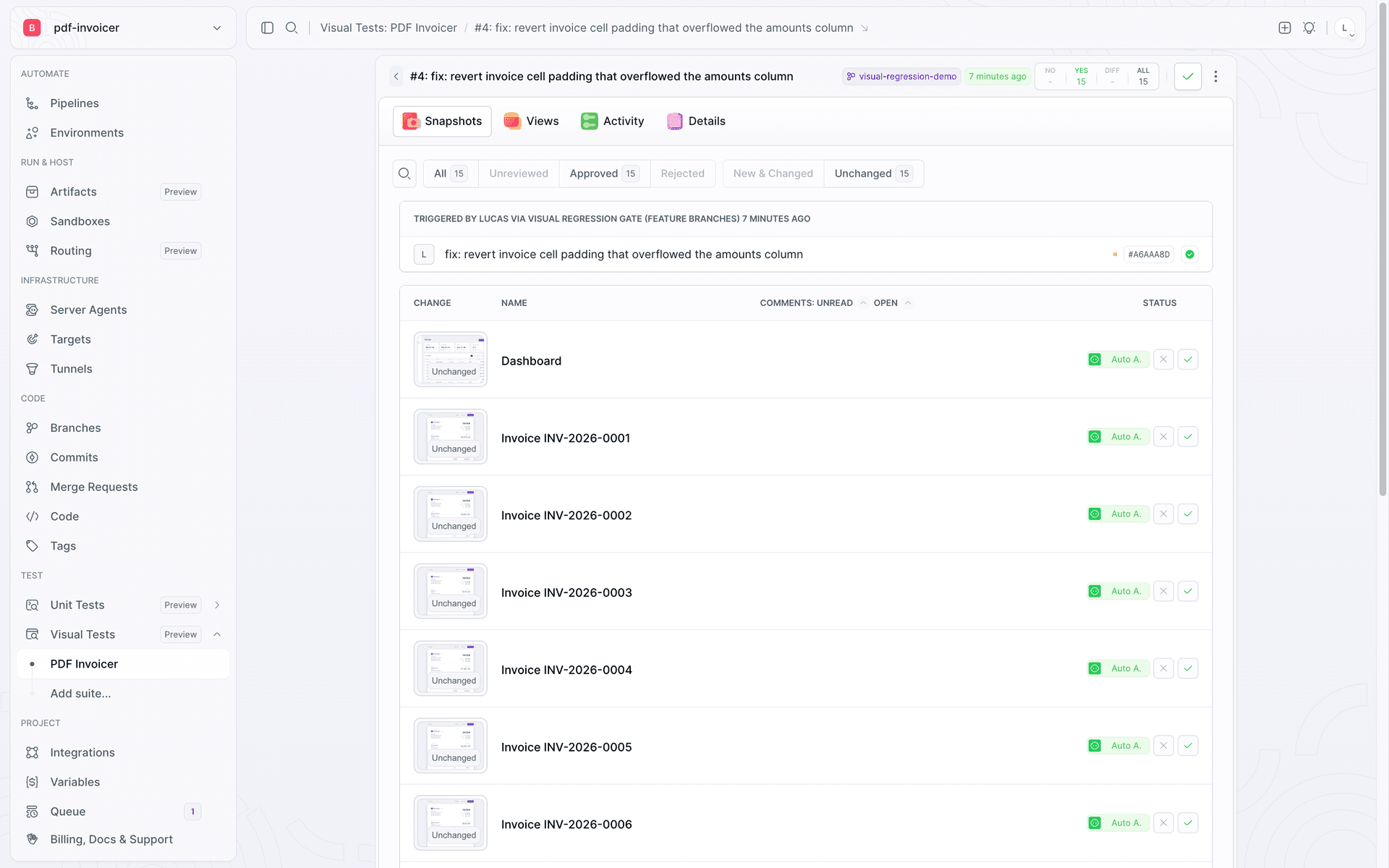
The gate has nothing to hold, so it lets the pipeline through and promotion starts:
Image loading...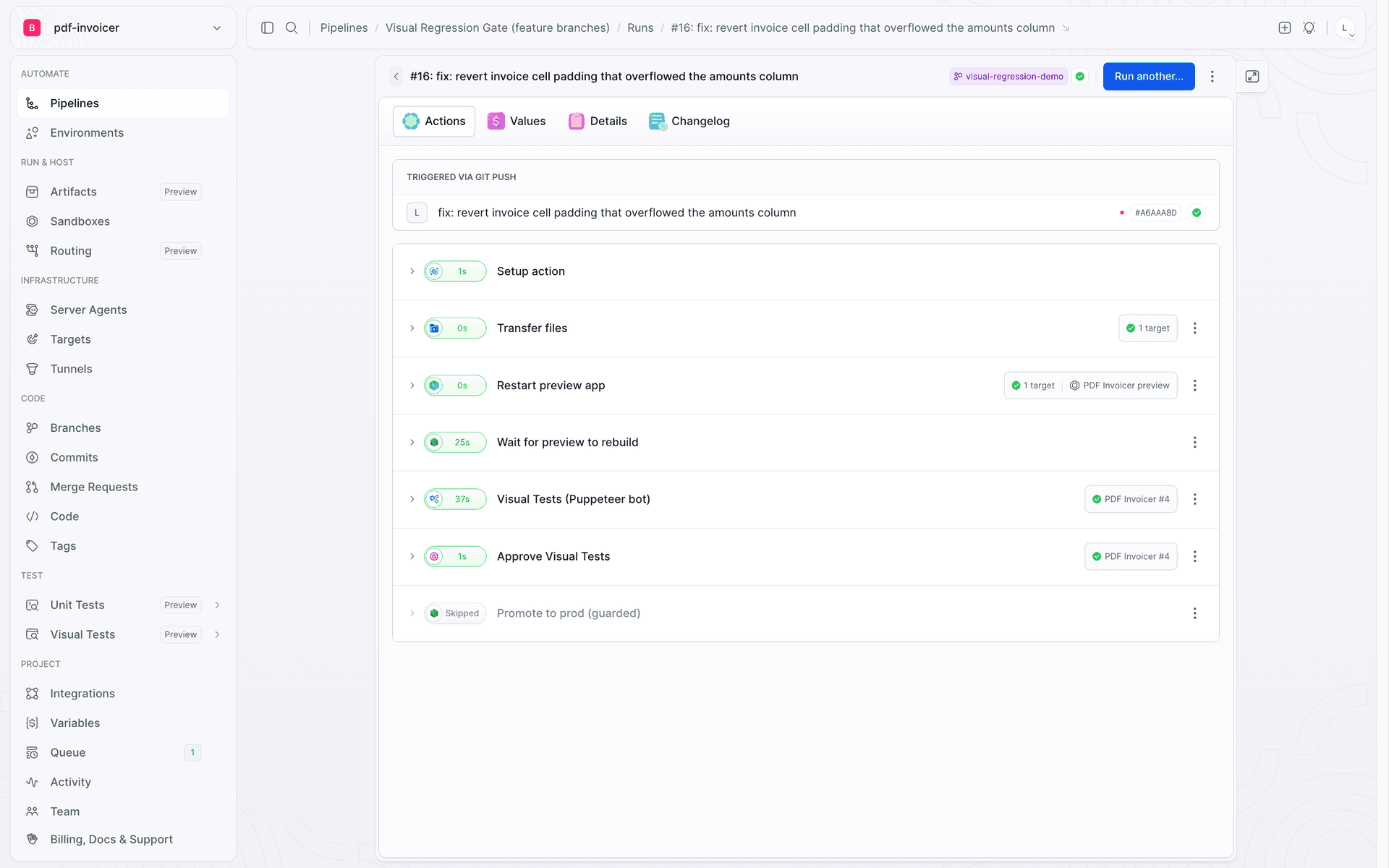
You can see the whole arc in the suite's session list: the baseline on main, the
caught and rejected regression, and the green fix at the end:
Image loading...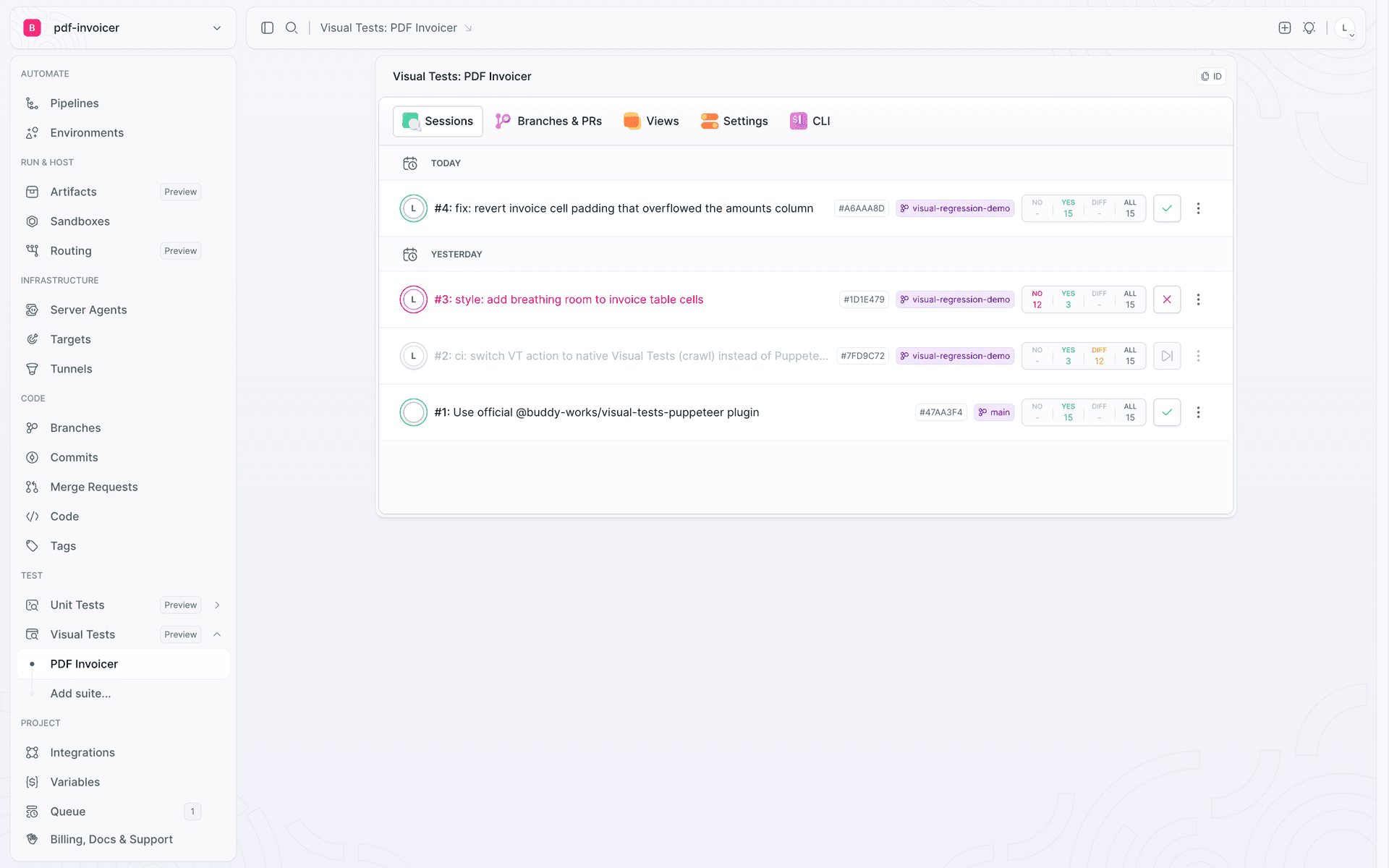
Other ways to feed Visual Tests
Wrapping a Puppeteer script is one of several ways to feed a Visual Tests suite. It is the best one when critical navigation lives in automation behind a login, not in tests or under a public URL.
| Method | Best when | Setup cost |
|---|---|---|
| Automation script (Puppeteer) | You have a bot that walks the app behind a login and generates artifacts | One plugin instance and one takeSnap() per screen, reusing existing navigation |
| Test runner (Playwright, Cypress) | You already use e2e tests | A one-time fixture and one checkpoint per view |
URL crawl bdy tests capture | You do not want to change code | No code changes, but the app needs a public URL |
Storybook bdy tests visual upload | You use Storybook | Component testing in isolation, story by story |
Summary
- Blind spot: a bot can finish successfully even when the page it's printing from is broken.
- One line per screen: add takeSnap() wherever the bot already pauses — no separate test suite.
- Snapshot the page, not the file: the DOM page.pdf() renders from is the same DOM the checkpoint compares.
- Shared tokens, shared blast radius: one token change broke all 12 invoices in a single run.
- The gate decides:
APPROVE_VTblocks the deploy until someone approves or rejects.

Jarek Dylewski
Customer Support
A journalist and an SEO specialist trying to find himself in the unforgiving world of coders. Gamer, a non-fiction literature fan and obsessive carnivore. Jarek uses his talents to convert the programming lingo into a cohesive and approachable narration.