OIDC Configuration for GitHub Actions in Buddy
An OIDC identity provider for GitHub Actions enables secure workflow authentication to the Buddy API without storing credentials. The buddy/login@v1 action automatically exchanges tokens.
Configuration
When selecting GitHub Actions in the OIDC identity provider configuration, you will configure:
Image loading...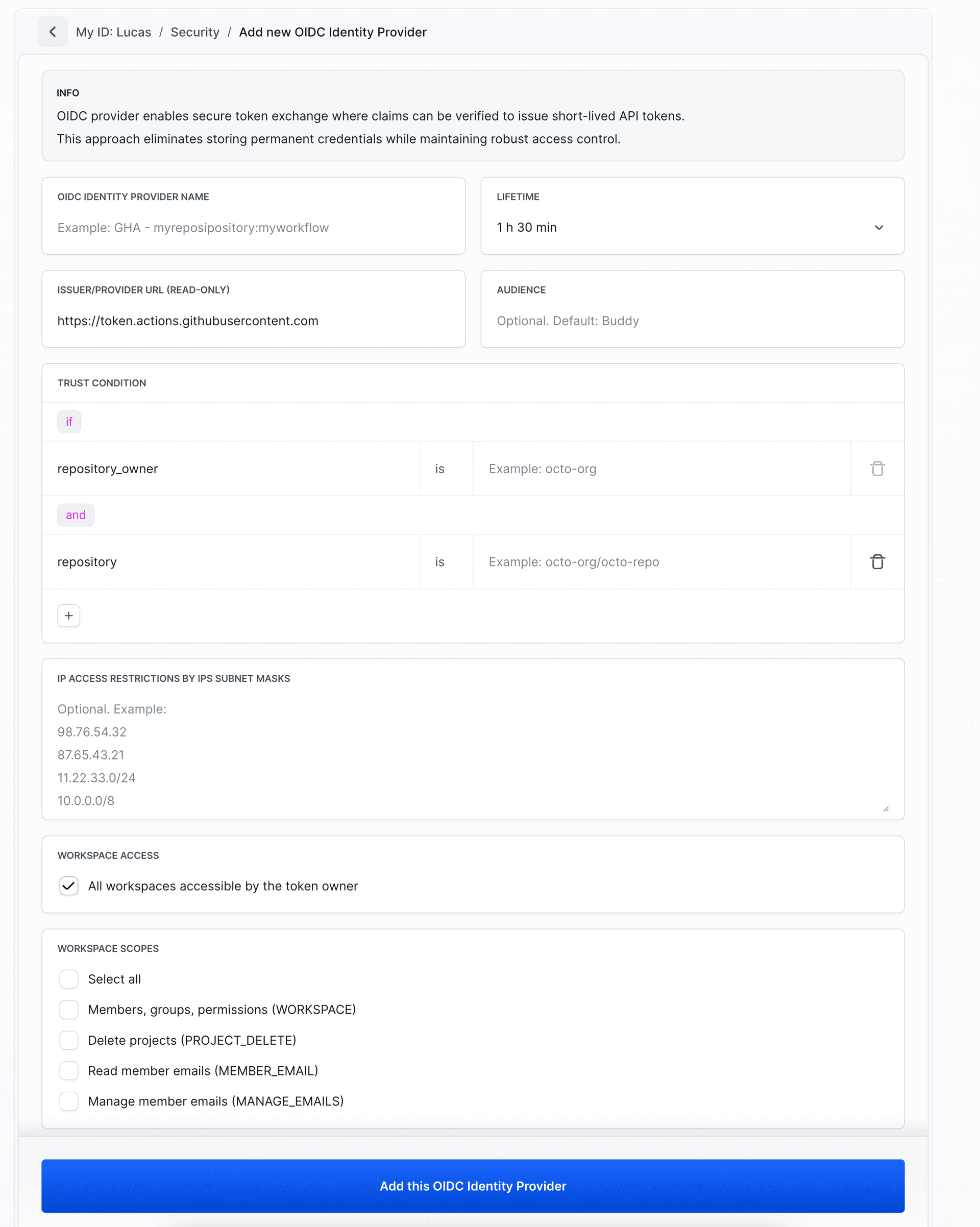
- OIDC Identity Provider Name: A descriptive name (e.g.,
GHA - myrepository:myworkflow) Lifetime: Token validity time (counted from exchange moment). Available options:
- 10 min
- 30 min
- 1 h
- 1 h 30 min
- 3 h
- 8 h
- Issuer/Provider URL: Automatically set to
https://token.actions.githubusercontent.com(read-only) - Audience: Optional, defaults to
Buddy - Trust Conditions: Define conditions based on GitHub Actions claims (see Trust Conditions)
Warning
Trust condition
repository_owner is required for GitHub Actions.
- IP Access Restrictions: Optional IP subnet masks for additional security
- Workspace Access: By default, access to all the user’s workspaces. Uncheck to limit to selected ones.
- Scopes: Select specific permissions. OIDC identity providers use the same scopes as OAuth 2.0 applications. For detailed descriptions, see Supported scopes
After clicking Add this OIDC Identity Provider you will receive Provider ID and ready-to-use code for GitHub Actions workflow.
Image loading...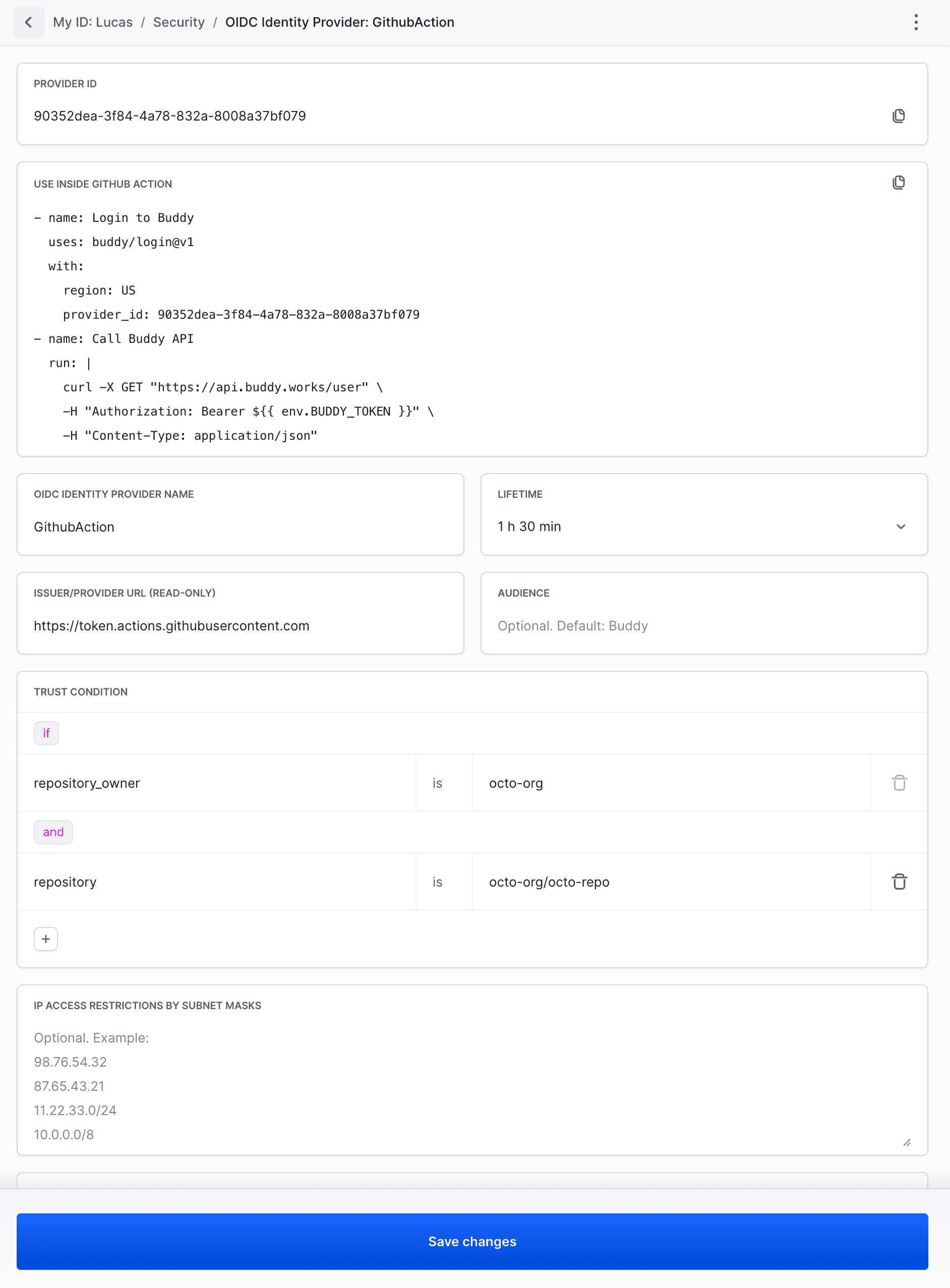
Usage in GitHub Actions
After creating an OIDC identity provider, use it in your GitHub Actions workflow:
yaml# .github/workflows/deploy.yml
name: Deploy to Buddy

on:
  push:
    branches: [main]

jobs:
  deploy:
    runs-on: ubuntu-latest
    permissions:
      id-token: write
      contents: read
    steps:
      - name: Login to Buddy
        uses: buddy/login@v1
        with:
          region: US
          provider_id: a2cca468-0e78-43c8-a9aa-cee4b7bf44b9
          audience: Buddy

      - name: Call Buddy API
        run: |
          curl -X GET "https://api.buddy.works/user" \
            -H "Authorization: Bearer ${{ env.BUDDY_TOKEN }}" \
            -H "Content-Type: application/json"

      - name: List projects in workspace
        run: |
          curl -X GET "https://api.buddy.works/workspaces/${{ github.repository_owner }}/projects" \
            -H "Authorization: Bearer ${{ env.BUDDY_TOKEN }}" \
            -H "Content-Type: application/json"
Token is available as ${{ env.BUDDY_TOKEN }} in subsequent steps.
Parameters:
region:USorEU(depending on Buddy region)provider_id: Provider ID (UUID) from OIDC identity provider configurationaudience: Audience value configured in OIDC identity provider (defaults toBuddy)
Related documentation
- Trust Conditions - Trust conditions configuration for GitHub Actions
- Supported scopes - Available permissions and scopes
Last modified on Mar 4, 2026