Scriptless Visual Regression Testing Without Writing Code
You have a site with dozens of pages and zero visual tests, because nobody is going to hand-write one for every subpage. Scriptless visual regression testing flips that around: you point Visual Tests at your sitemap, and Buddy visits every URL, renders it, and compares it against a baseline.
bashbdy tests capture --sitemap https://your-site.com/sitemap.xml$
Run it once, and it covers 60 pages at five renders apiece. After the second run you know exactly which subpages drifted - including the ones nobody has opened in months. This guide walks three ways to run it: the CLI, a Buddy pipeline, and GitHub Actions.
Baseline in one command
Before VT can catch a regression, you need a baseline: a snapshot of the state you consider correct. capture with a sitemap does this in a single sweep across every URL, without writing anything:
bash# Keep the suite token in an environment variable, never in the repo. export BUDDY_VT_TOKEN="bud_vt_us_***" bdy tests capture \ --sitemap https://your-site.com/sitemap.xml \ --ignoreUrls ".*dark-launch.*"$$$$$$
Buddy fetches the sitemap, visits every URL, serializes the DOM, and renders it on its side across the whole suite matrix. Ours is Full HD on Chrome, Firefox, and Safari plus iPad Pro 11" and iPhone 14 Pro, so five renders per page. In the dashboard the first session is all new snapshots, and Approve all turns them into the branch baseline.
Not everything in the sitemap belongs in a snapshot.
A page behind a feature flag, a draft, a diagnostic endpoint - all of it is noise. In the CLI you drop them with a regex: --ignoreUrls ".*dark-launch.*". The pipeline action calls the same field IGNORE URLS, and in YAML it's ignore_urls. Don't want the whole sitemap? Instead of --sitemap, pass addresses with --urls (inline) or --urlsFile (from a file) - in the UI those are Inline URL list and URL list from file.
The crawl catches 18 pages out of 60
The test project is glossary (Next.js, App Router), a dictionary of DevOps terms running on a Buddy sandbox. Its sitemap holds 60 URLs: a home page, a contact page, dozens of term pages, and 18 letter index pages (/letter-a/, /letter-b/, ...).
An innocent-looking commit lands, "Refine letter index cards". Someone split the cards into their own class and, along the way, pasted the accent color as a literal instead of pulling it from the brand token:
css/* globals.css: accent hardcoded instead of var(--accent) */
.term-grid--index .term-card .eyebrow,
.term-grid--index .term-card h2 {
  color: #7c3aed;
  -webkit-text-fill-color: #7c3aed; /* h2 overrides plain color, both are needed */
}
.term-grid--index .term-card::after {
  background: #7c3aed;
}
The brand blue turns purple, but only on the letter index pages. The rule hangs off the term-grid--index class that the home page never uses. The git diff reads like cleanup, and functional tests pass, because the links, headings, and content are untouched. The same capture on the branch that already carries the regression: 18 Changed, 42 Unchanged.
Image loading...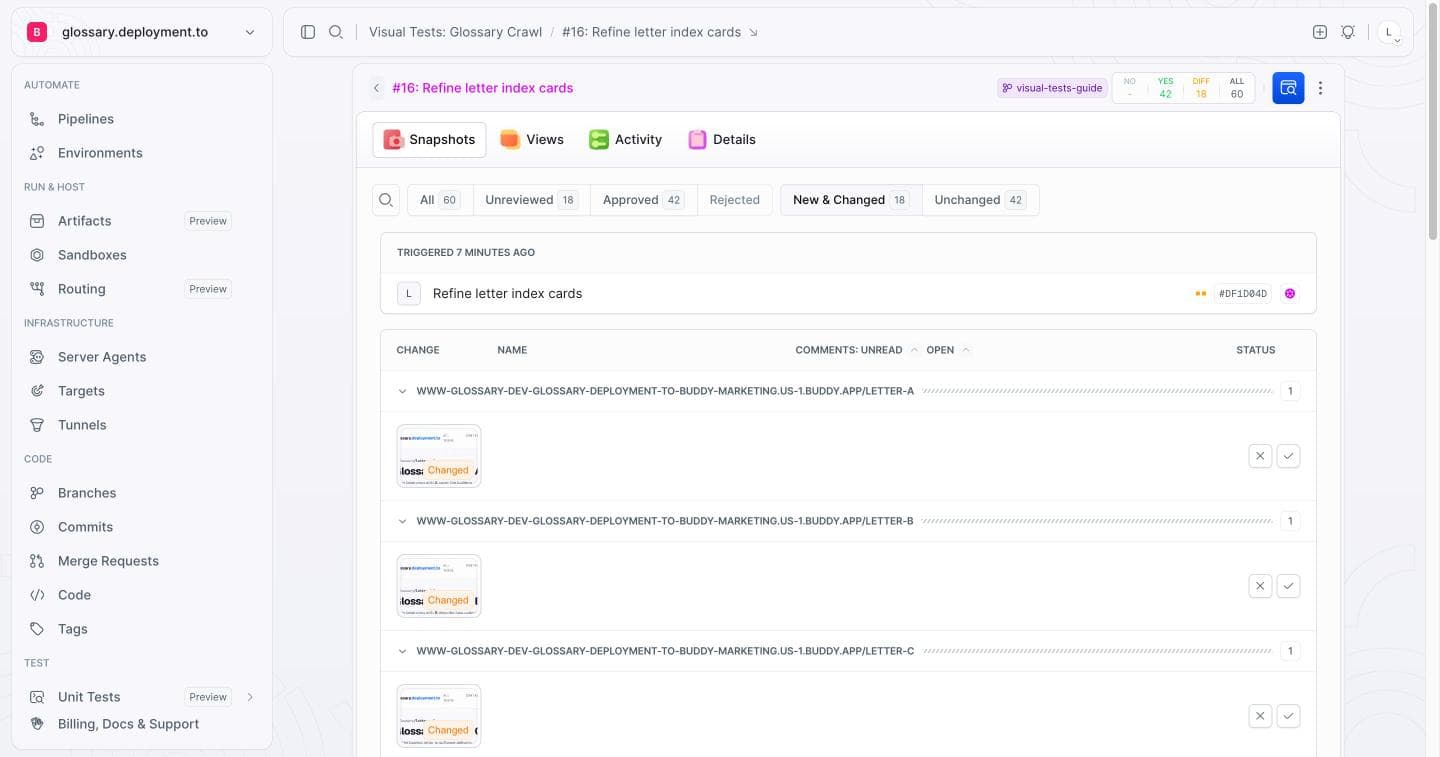
Eighteen changed pages. Nobody had to know upfront where the regression sat - the crawl walked every link and pointed at what drifted from the baseline on its own. This is the long tail that kills hand-rolled visual regression testing: a developer opens the home page on every deploy, but /letter-q/? Nobody clicks there for months.
The review shows it plainly. Baseline with the brand blue on the left, the candidate with the purple on the right:
Image loading...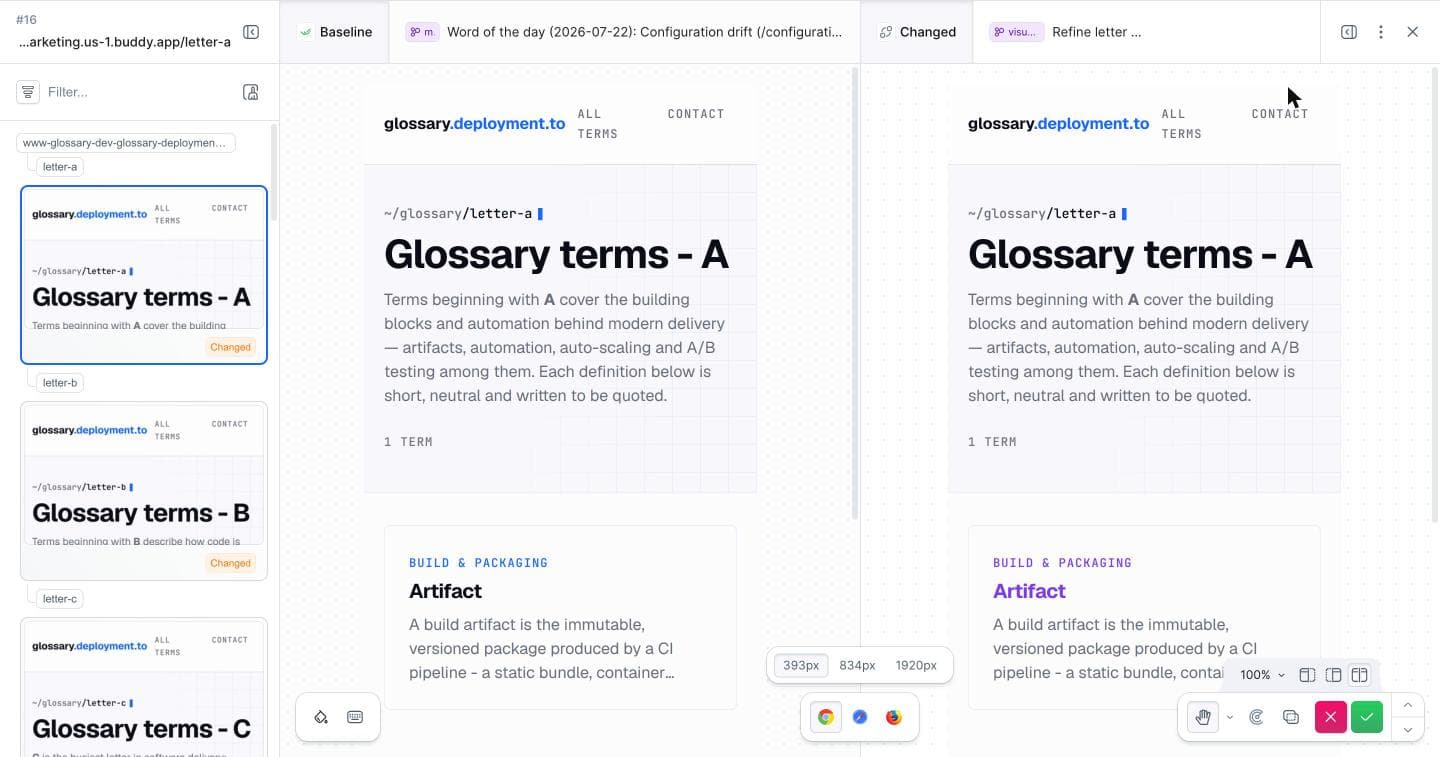
The Show differences mode overlays a red mask on exactly the pixels that changed, so you don't have to hunt for the change by eye:
Image loading...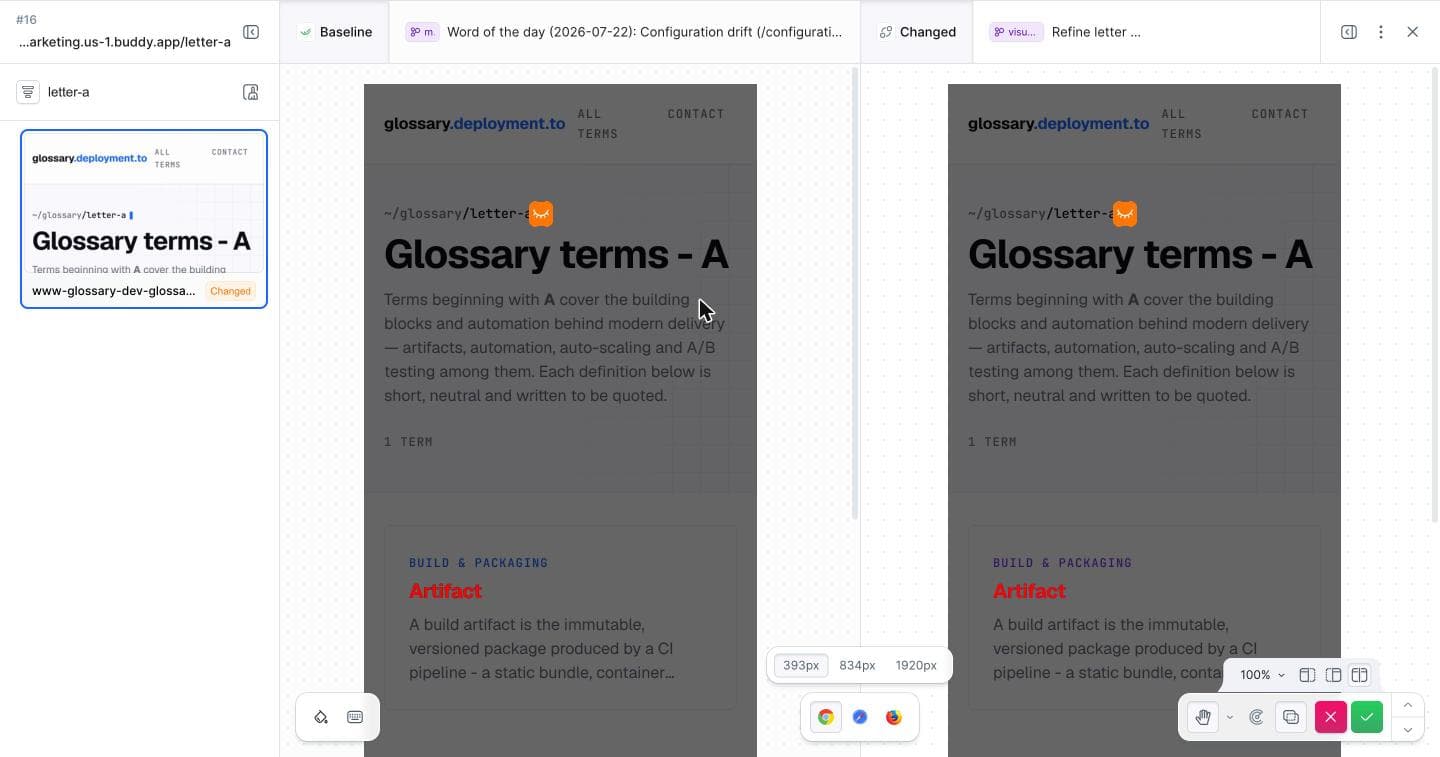
And the home page? Blue accent on both sides, tagged Unchanged, no regression:
Image loading...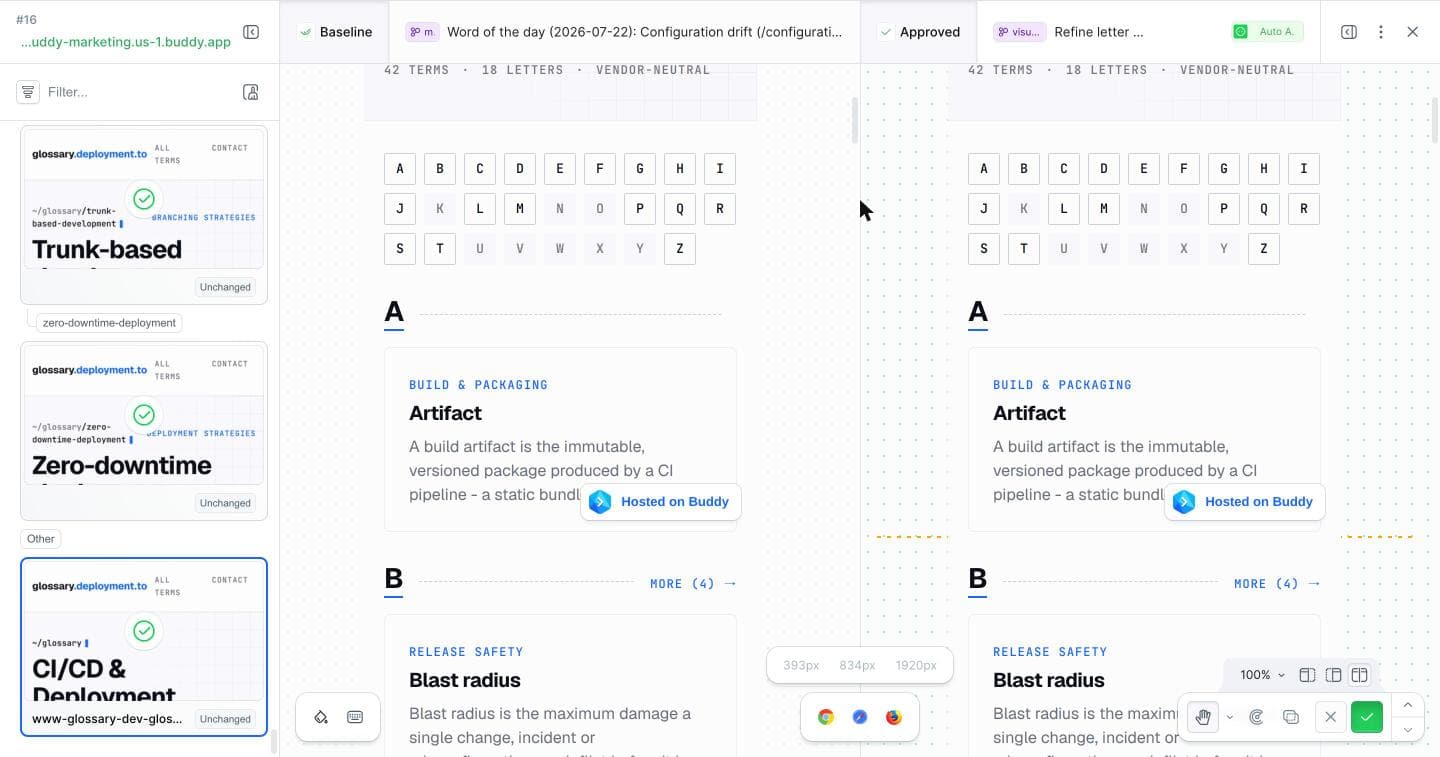
Elements that tend to flicker on full-page snapshots - position: fixed widgets, cursor artifacts - you mask with an IGNORE Selector in the suite settings:
Image loading...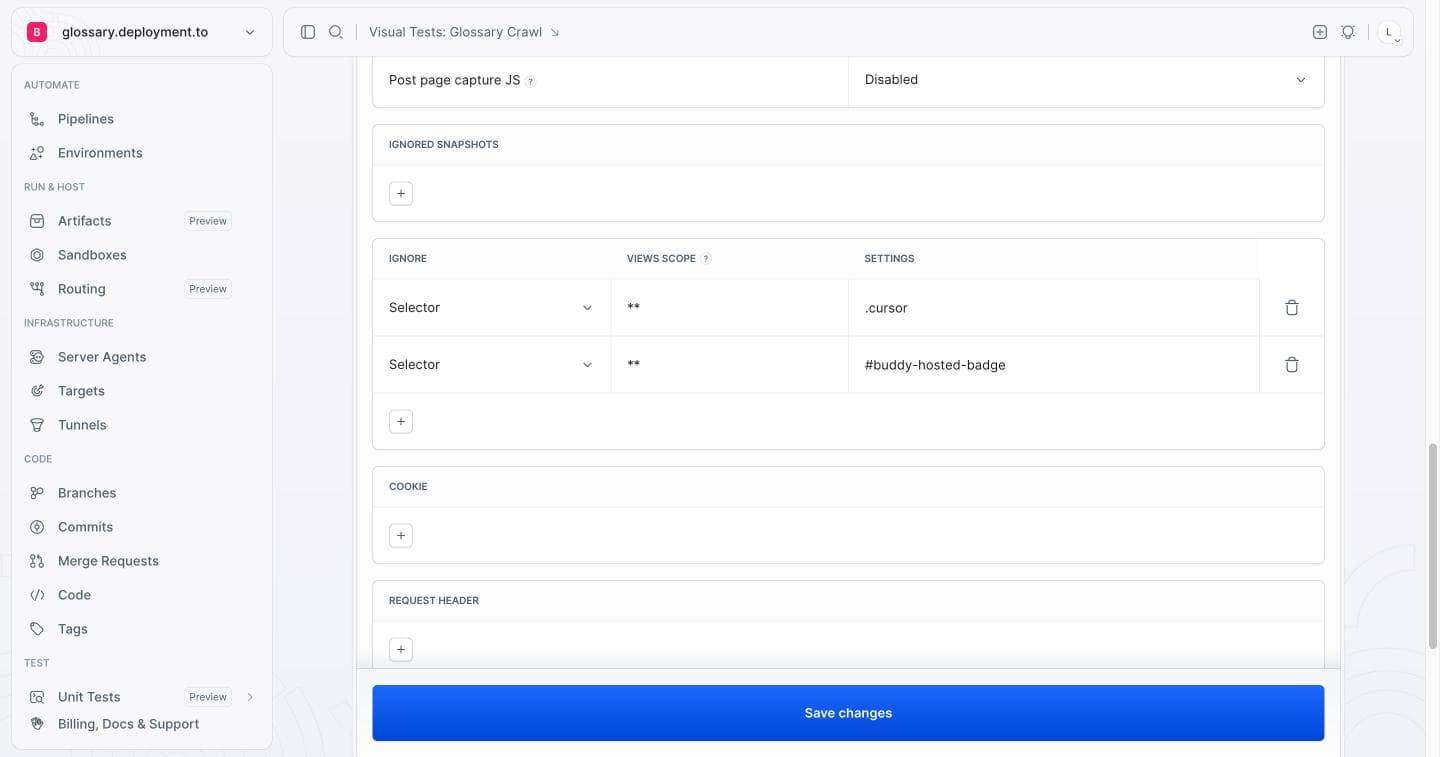
The same regression, this time in a pipeline
A manual capture is great for the baseline and for exploring, but the gate in CI should be something that runs itself on every push. In Buddy the scriptless crawl is a native Visual Tests action - the same mechanism as the CLI command, only clicked together. You pick the URL source (we use the sandbox Remote sitemap), the suite, and the same IGNORE URLS as in the CLI:
Image loading...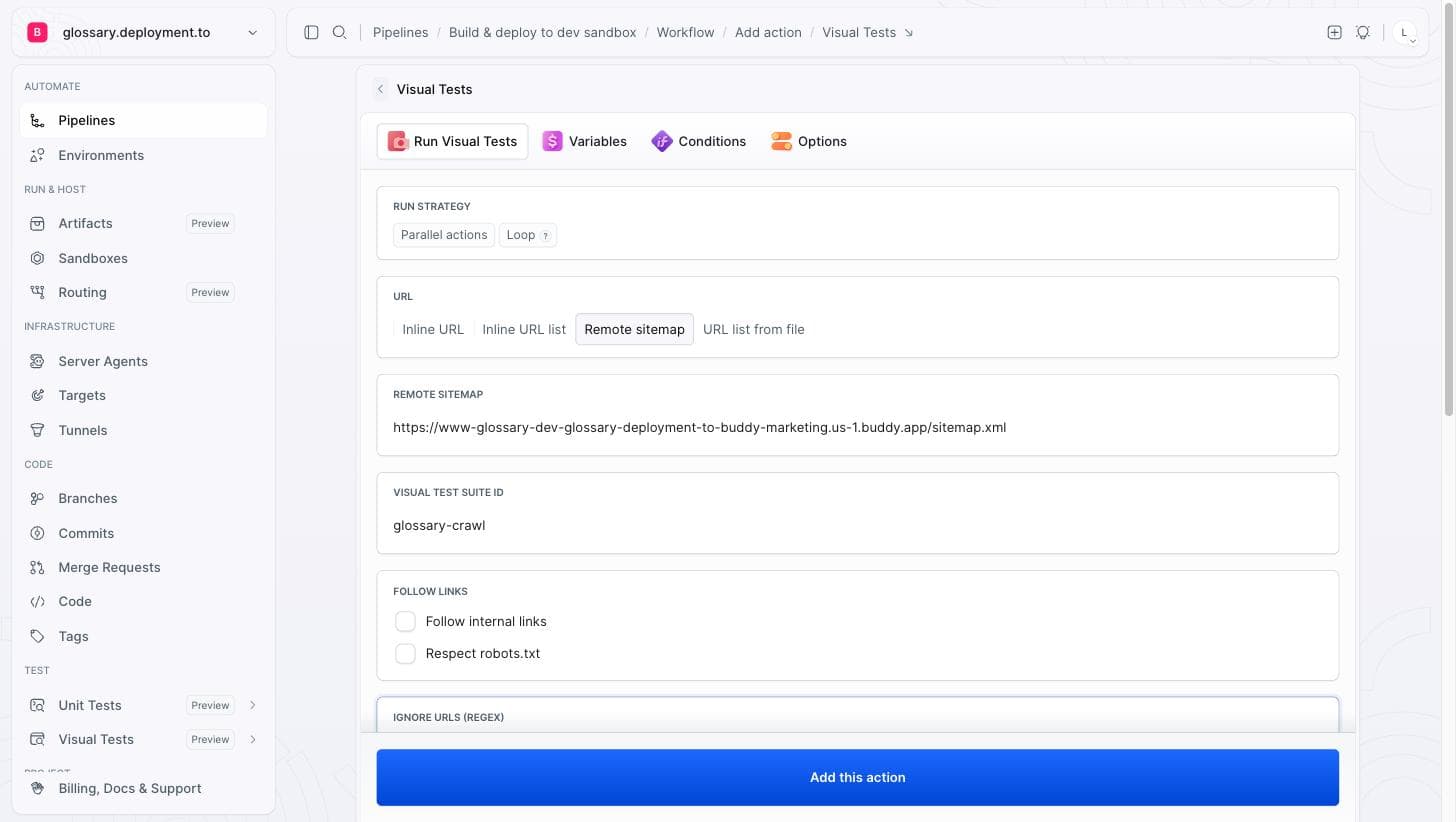
The whole pipeline has four actions: restart the dev sandbox, SLEEP through the rebuild, run the crawl, and the APPROVE_VT gate that holds the run for a human decision:
Image loading...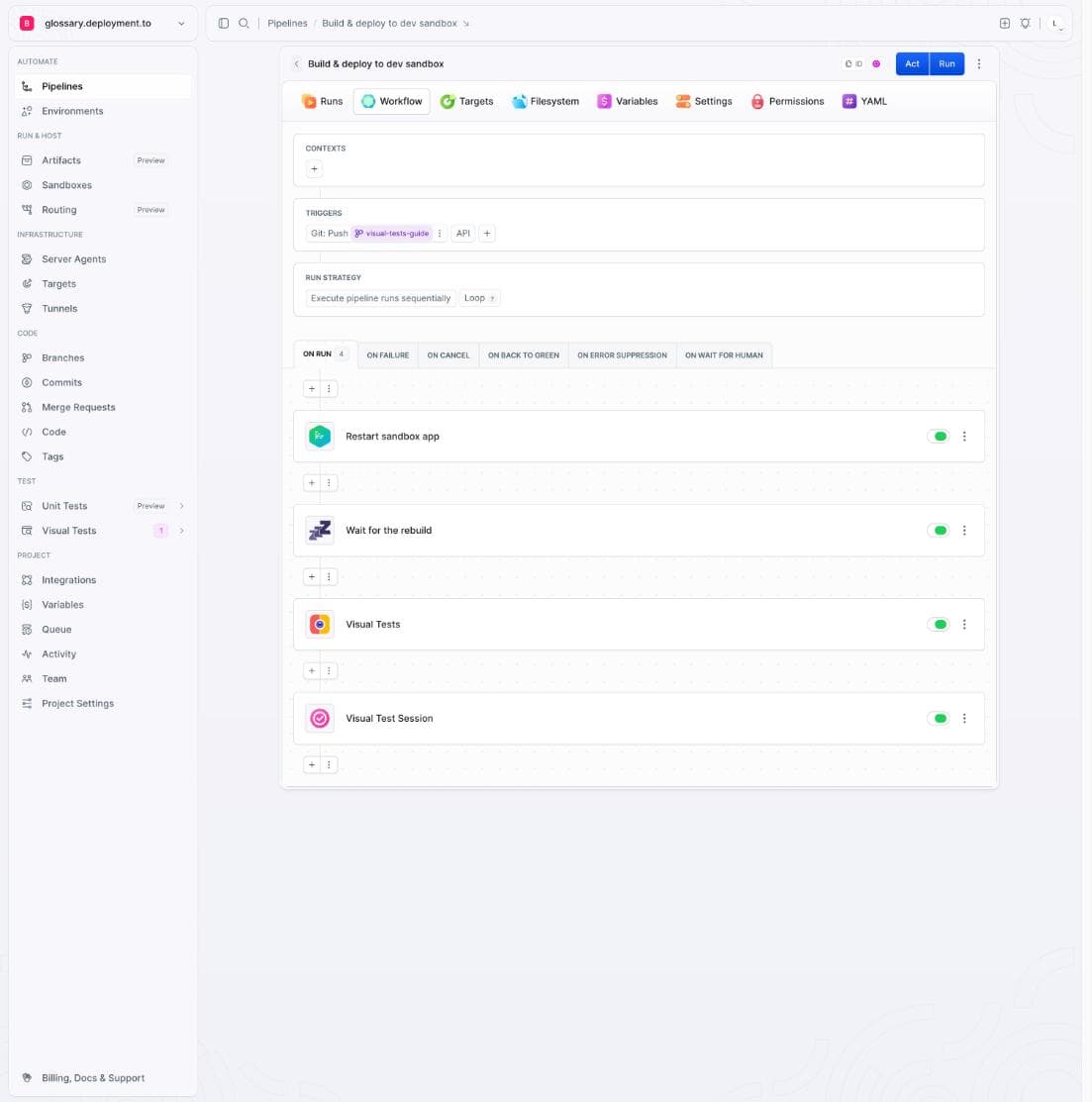
yaml- pipeline: glossary-visual-tests
  name: Glossary visual regression
  events:
  - type: PUSH
    refs:
    - refs/heads/visual-tests-guide
  actions:
  - action: Restart glossary-dev
    type: SANDBOX_MANAGE
    operation: APP_RESTART
    targets:
    - glossary-dev
  - action: Wait for rebuild
    type: SLEEP
    sleep_in_sec: 120
  - action: Crawl sitemap
    type: VISUAL_TEST_2
    visual_tests_suite: glossary-crawl
    sitemap: https://my-sandbox.us-1.buddy.app/sitemap.xml
    ignore_urls:
    - .*dark-launch.*
  - action: Approve visual session
    type: APPROVE_VT
Pushing the regression branch fires a run. The sandbox rebuilds, the crawl sweeps all 60 pages and reports the same 18 Changed as locally:
Image loading...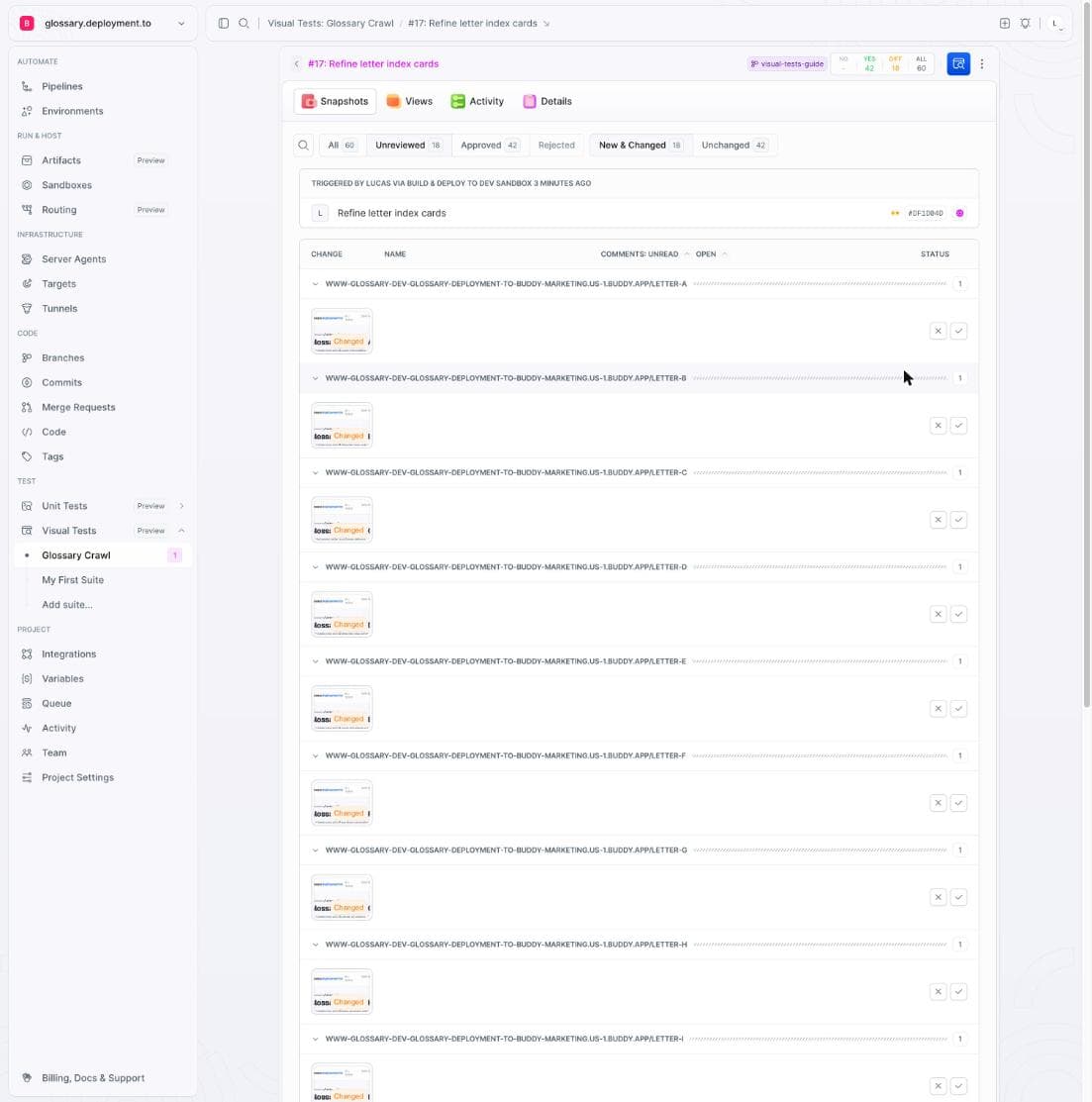
The APPROVE_VT gate catches those changes and stops the run with Force pipeline to proceed?. Until a human approves the differences, the deploy does not move on:
Image loading...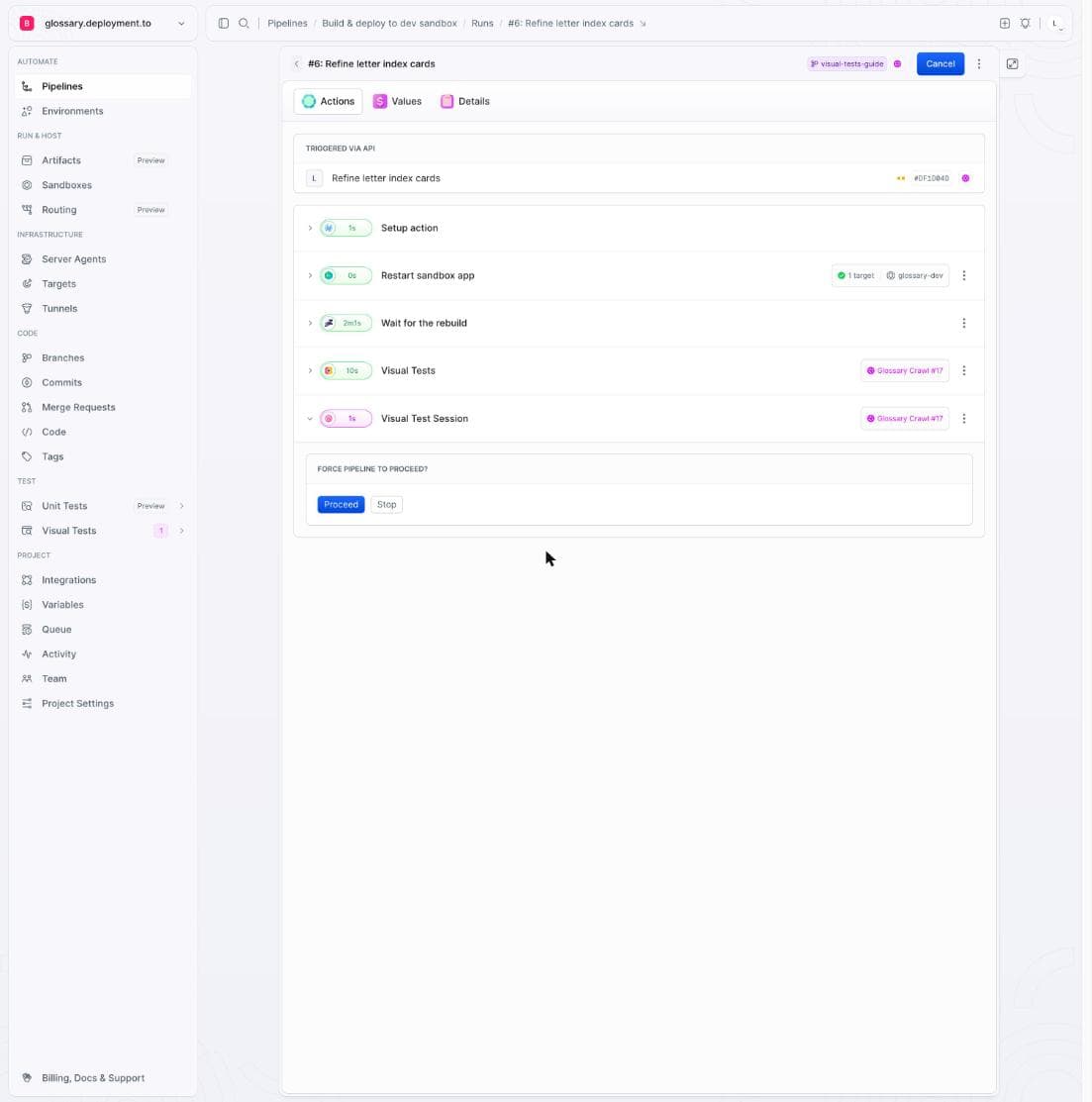
Nobody wants this regression on production, so we click Stop. The run halts, and the purple letters never leave the sandbox:
Image loading...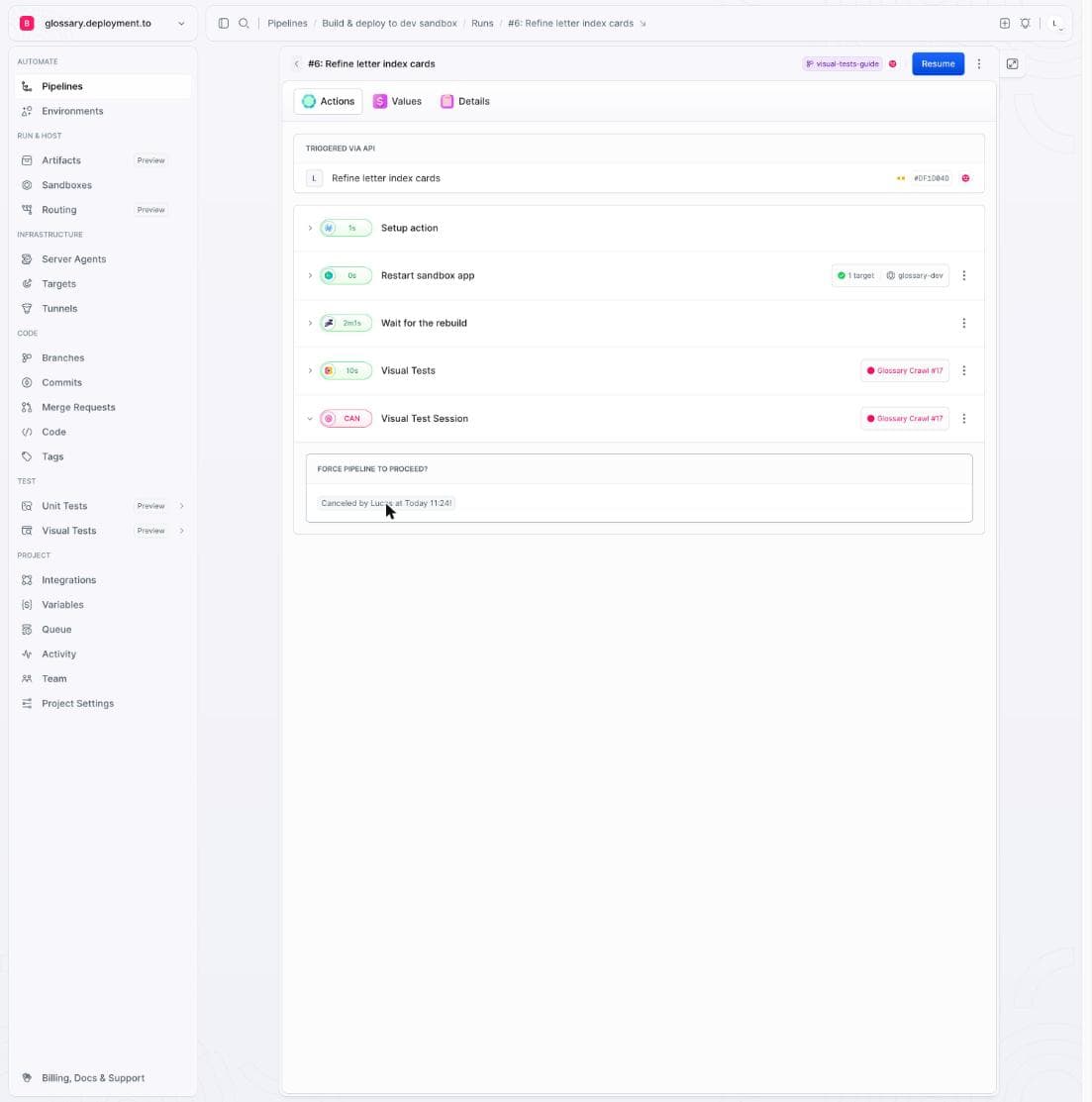
The same session, from GitHub Actions
Your CI doesn't have to live in Buddy - the same capture runs from GitHub Actions. First add the suite token as a BUDDY_VT_TOKEN secret (Settings → Secrets and variables → Actions → New repository secret):
Image loading...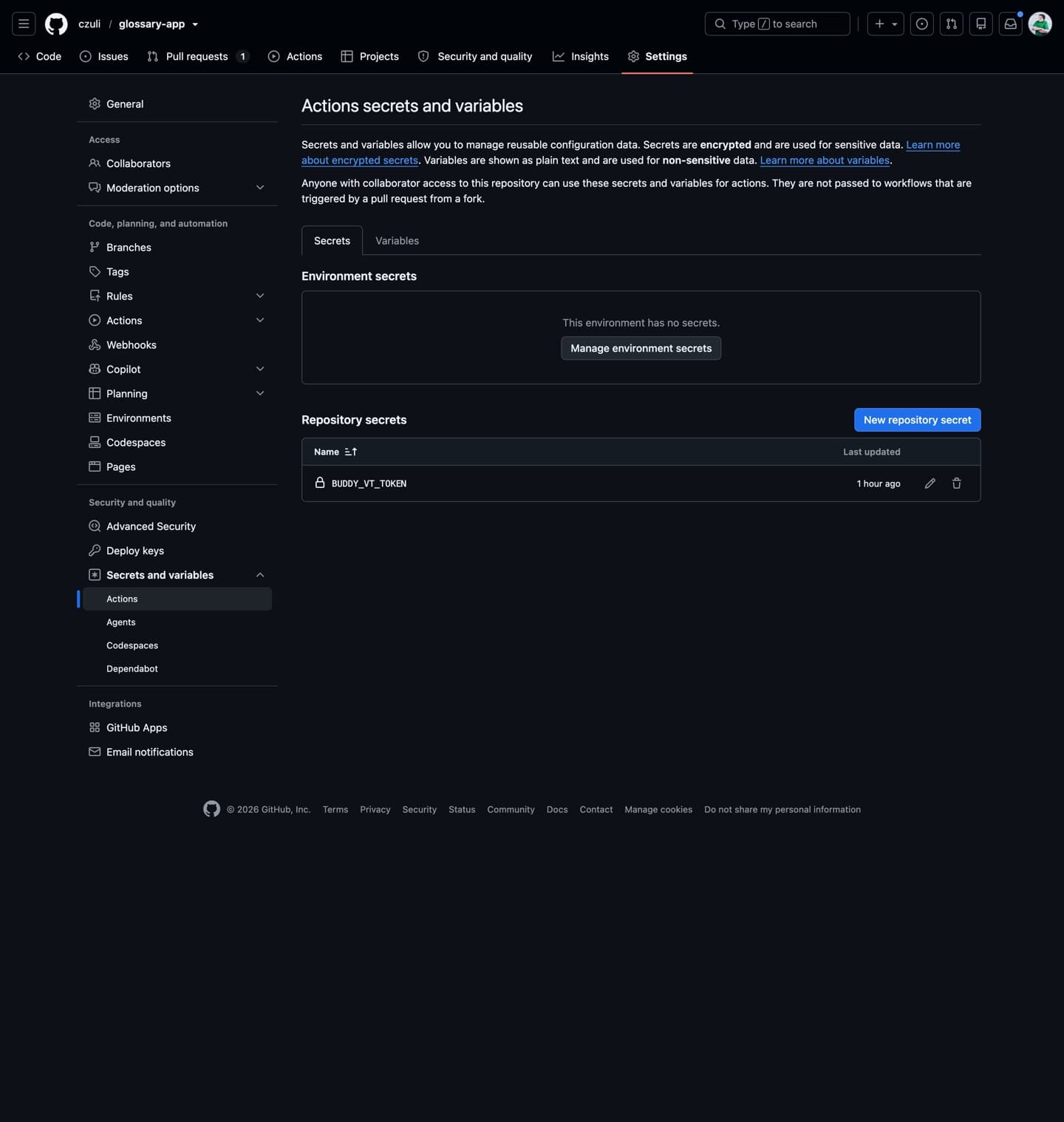
Then, in the job, install the bdy CLI and repeat the baseline command against the sandbox sitemap:
yamlname: Glossary visual regression
on: [push, pull_request]

jobs:
  visual-tests:
    runs-on: ubuntu-latest
    steps:
      - uses: actions/checkout@v4
      - uses: actions/setup-node@v4
        with:
          node-version: "20"
      - name: Install Buddy CLI
        run: npm i -g bdy
      - name: Capture sitemap
        env:
          BUDDY_VT_TOKEN: ${{ secrets.BUDDY_VT_TOKEN }}
        run: |
          bdy tests capture \
            --sitemap https://my-sandbox.us-1.buddy.app/sitemap.xml \
            --ignoreUrls ".*dark-launch.*"
A push or PR fires the workflow, and the session lands in the same suite as the local run:
Image loading...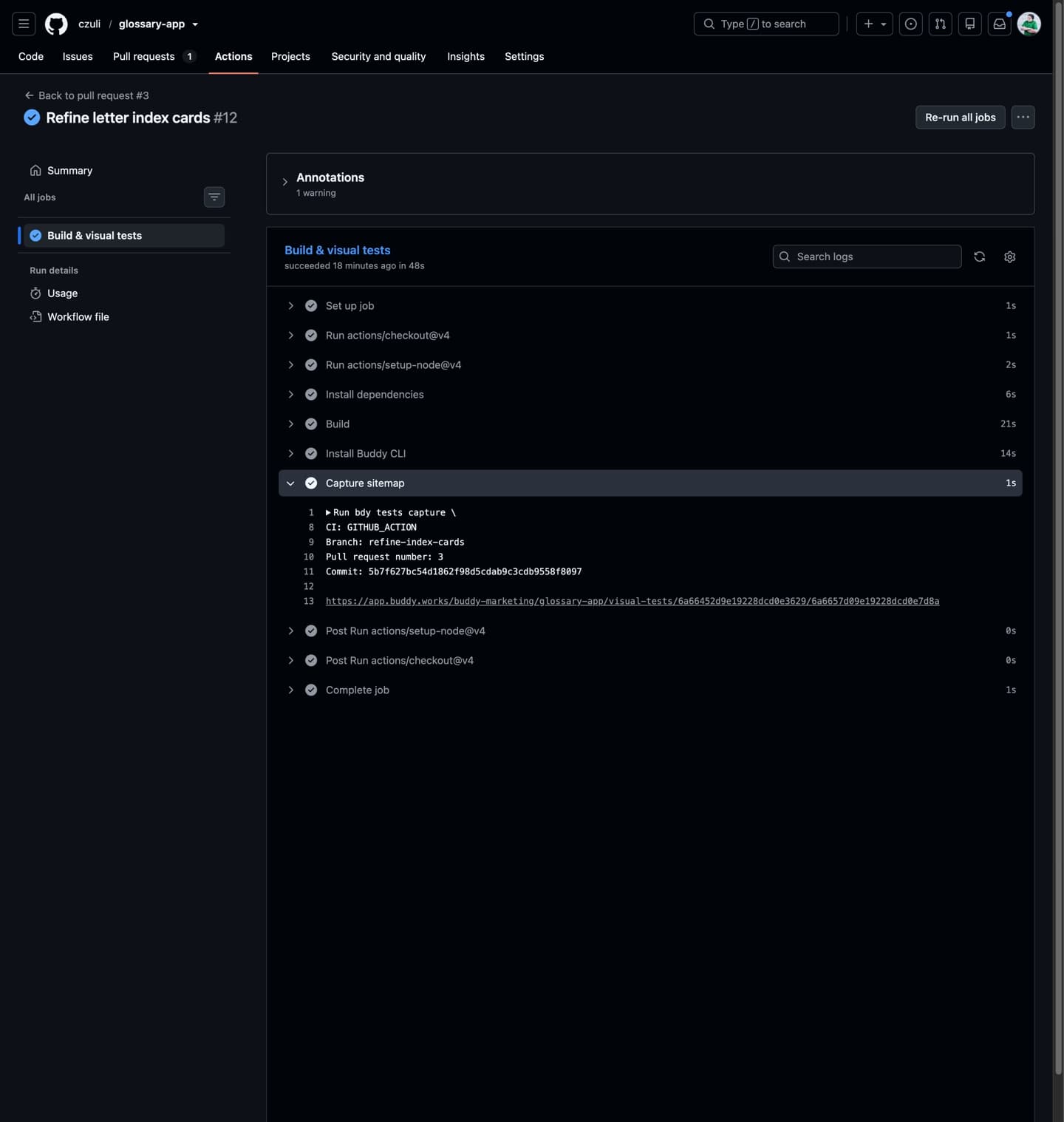
Buddy reports the result back as a commit status on the PR, under the context buddy/visualtest/<suite-name>. A session with unreviewed diffs reports as failing and only flips to success once the changes are approved in Buddy. Make that status required in branch protection and the PR with the purple letters can't be merged:
Image loading...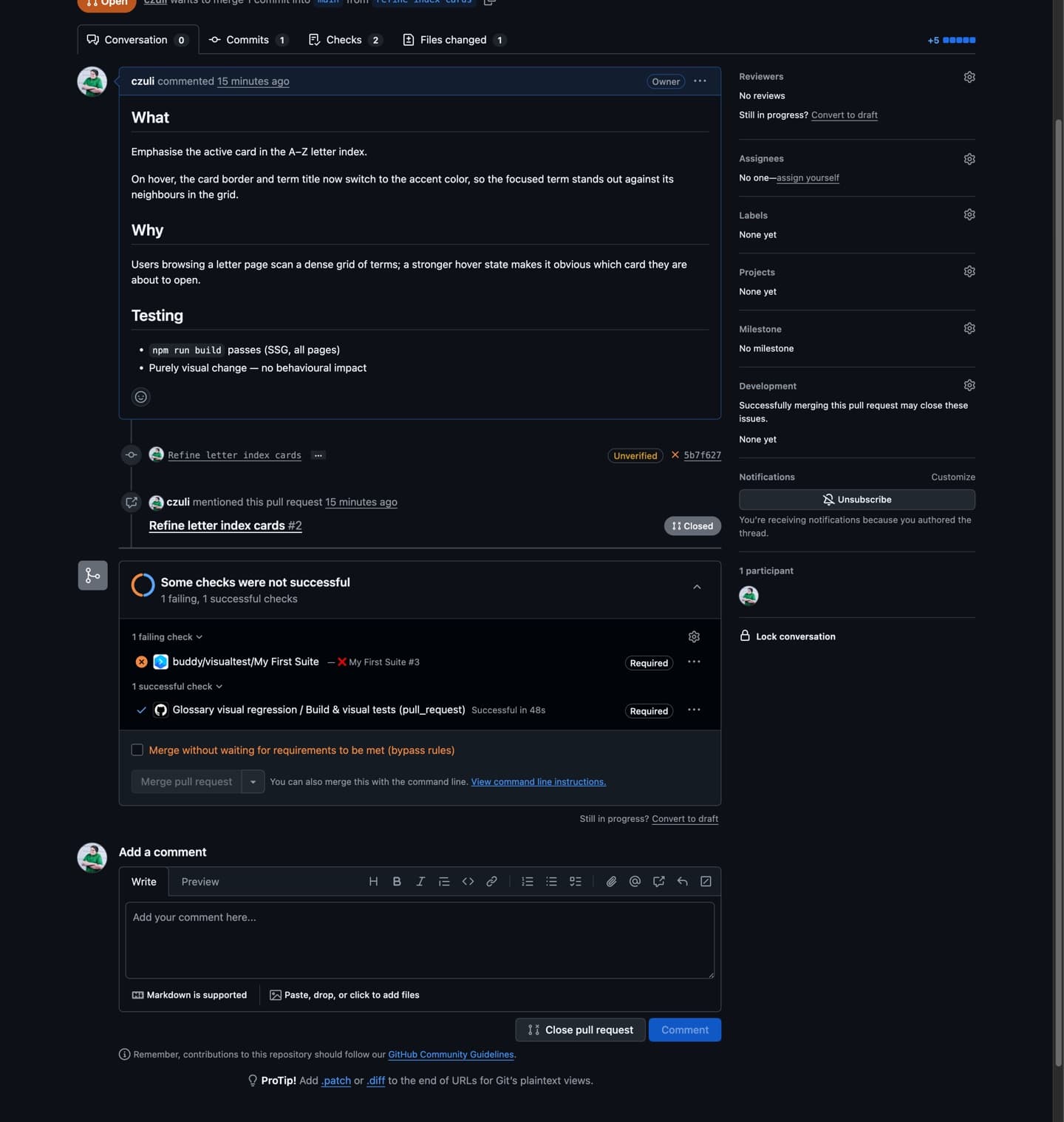
You wire it in under Settings → Branches: enable Require status checks to pass before merging and add the buddy/visualtest/<suite-name> check:
Image loading...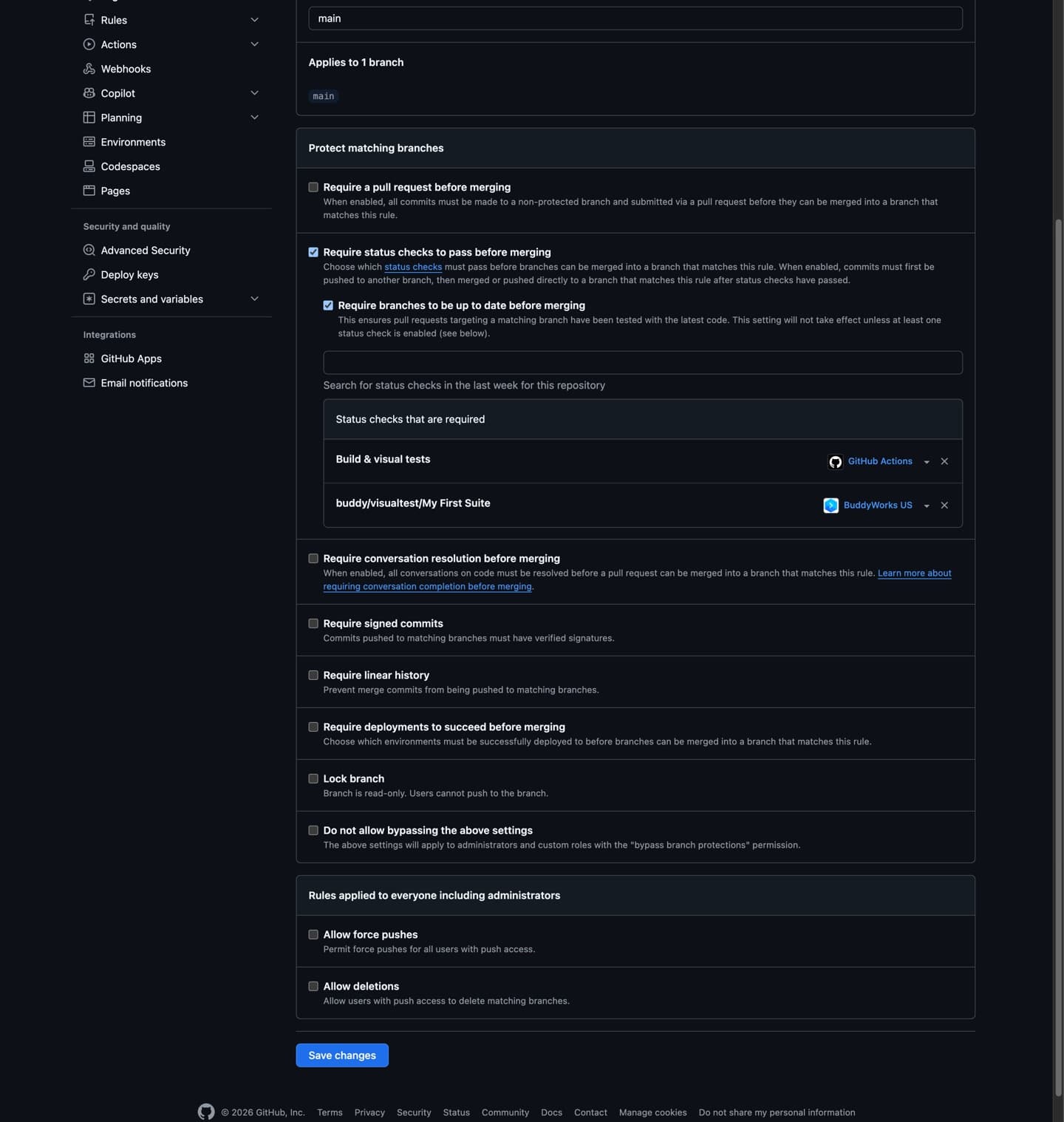
It's the same gate as APPROVE_VT in the pipeline, only on GitHub's side: the PR won't reach main until someone approves the session in Buddy.
Takeaways
- Zero code. You point Buddy at a sitemap (
--sitemap) or a list of addresses (--urls/--urlsFile), the rest happens on its side. You mask noise with config:--ignoreUrlsfor whole addresses, an IGNORE Selector forposition: fixedelements. - The long tail is covered. The crawl visits every URL, so the pages nobody opens get the same protection as the home page. A behavior suite won't catch this - a purely visual regression passes it green.
- The gate guards CI.
APPROVE_VTin a pipeline or a required commit status in GitHub Actions - either way the deploy waits for a human.
The crawl is one of the ways to feed a Visual Tests suite. If you already have end-to-end tests, the same mechanism lets you add visual checkpoints without rewriting them, with sibling packages for Playwright, Cypress, Selenium, and Puppeteer. The scriptless crawl is for the case where there are no tests at all, and the site still needs to stay under control.

Jarek Dylewski
Customer Support
A journalist and an SEO specialist trying to find himself in the unforgiving world of coders. Gamer, a non-fiction literature fan and obsessive carnivore. Jarek uses his talents to convert the programming lingo into a cohesive and approachable narration.