Plan and Apply
Terraform Plan and Terraform Apply are a pair. Plan computes the change and saves it to a plan file. Apply applies exactly that file. You can put Approve Run between them so that a person reviews the diff before anything changes.
Terraform Plan
Buddy generates the commands. You don't edit them:
bashexport TF_WORKSPACE=<tf_workspace> # only when set cd <working_directory> # only when set <bin> init -input=false <bin> workspace show <bin> plan -input=false -out=<plan file> -json <additional_args> <bin> show -json <plan file>$$$$$$
<bin> is tofu, terraform, or your custom_binary_path. After the commands finish, Buddy reads the JSON plan, builds the resource diff, and exports output variables.
The plan file is saved on the pipeline filesystem under .buddy/output/terraform/, relative to the repository root. Its path is exported as BUDDY_ACTION_TF_PLAN_OUTPUT_FILE.
Terraform Apply
bashexport TF_WORKSPACE=<tf_workspace> # only when set cd <working_directory> # only when set <bin> show -json <plan file> <bin> apply -json -input=false <additional_args> <plan file> <bin> show -json$$$$$
Apply does not run init. It reuses the .terraform directory that Plan left on the pipeline filesystem. Because of that:
- Plan and Apply must run in the same pipeline run.
- Plan and Apply must use the same
tool,version,working_directory,tf_workspace, andbackend. If the workspace or backend differ, Apply runs against a different state.
The action exits with the exit code of apply. After apply, Buddy reads the state again, even when apply failed, so the diff shows which resources were applied and which failed.
Image loading...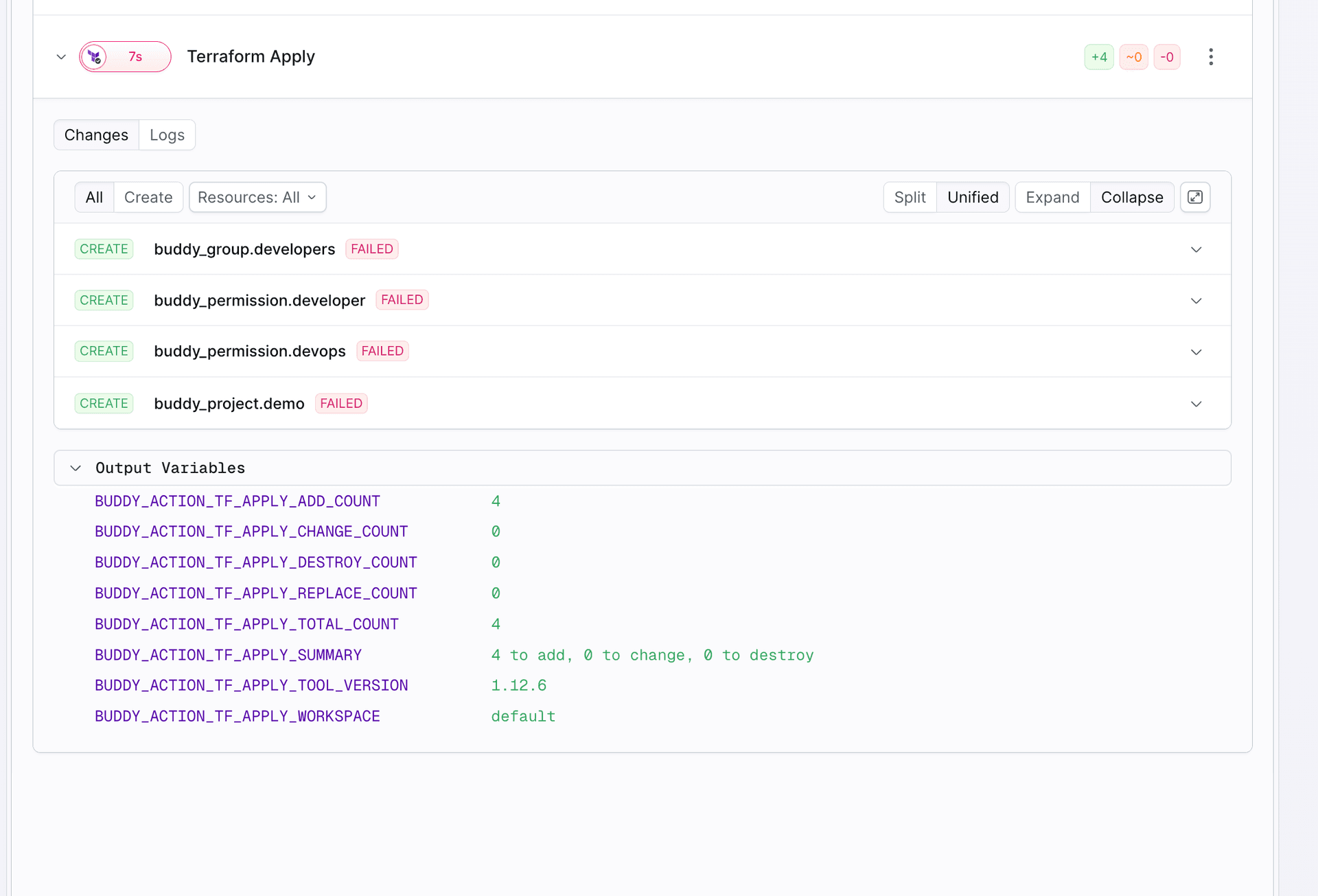
The plan file
By default, Apply uses $BUDDY_ACTION_TF_PLAN_OUTPUT_FILE, the file from the most recent Plan action in the run. To point at a different file, for example when one run has more than one Plan action, set plan_file_path:
Image loading...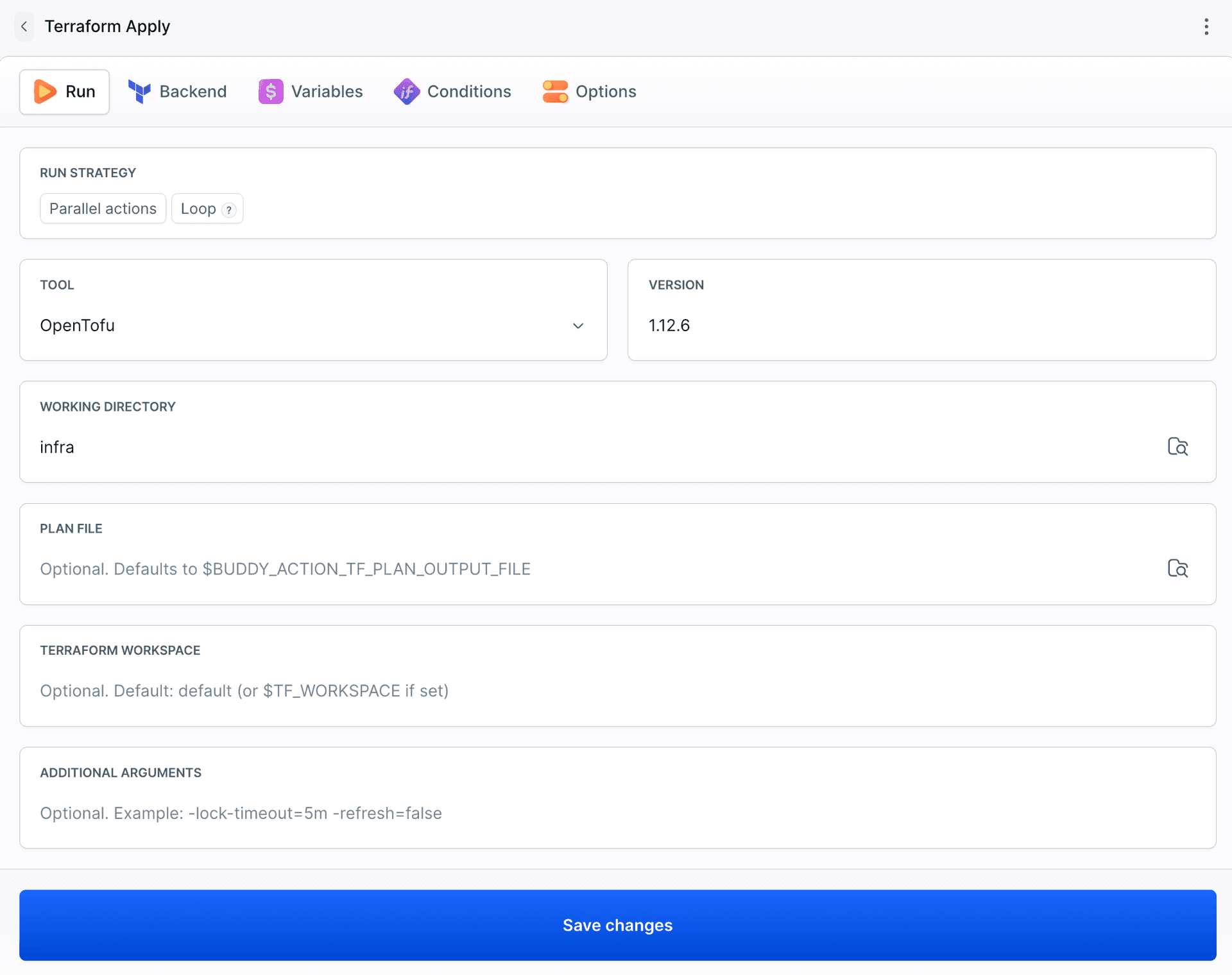
yaml- action: Apply network
  type: TERRAFORM_APPLY
  tool: OPENTOFU
  version: 1.12.6
  working_directory: network
  plan_file_path: $NETWORK_PLAN_FILE
Plan file names include the run and the action execution. A retried Plan, a loop iteration, or a parallel action never overwrites another plan file.
(sensitive value). Anyone who can download the pipeline filesystem can read them.
Retrying
You can retry a failed Apply on its own. It reapplies the same plan file. If the infrastructure or state has changed since the plan was made, Terraform rejects the stale plan (Saved plan is stale). Run the pipeline again to make a fresh plan.
The resource diff
Both actions store a structured diff with the action execution. It appears in the run view and in the REST API as the terraformPlan field of the action execution.
Image loading...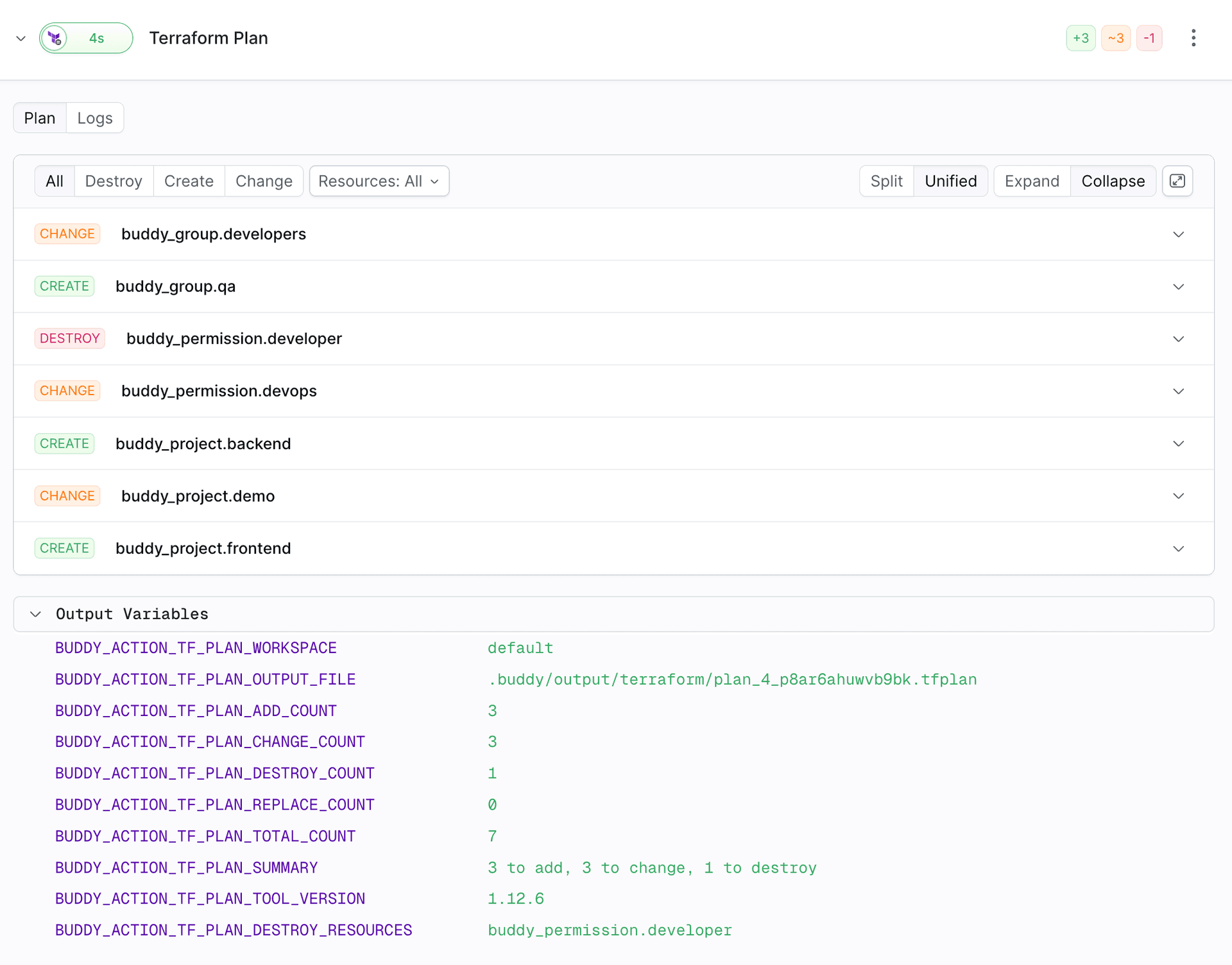
| Change type | Meaning |
|---|---|
CREATE | The resource will be created |
UPDATE | The resource will be changed in place |
DELETE | The resource will be destroyed |
DESTROY_CREATE | Replace: destroy first, then create |
CREATE_DESTROY | Replace: create first, then destroy (create_before_destroy) |
These are the values of change_type in the REST API. The run view labels UPDATE as CHANGE and DELETE as DESTROY.
Each resource includes its address, type, change type, and the values before and after the change.
Image loading...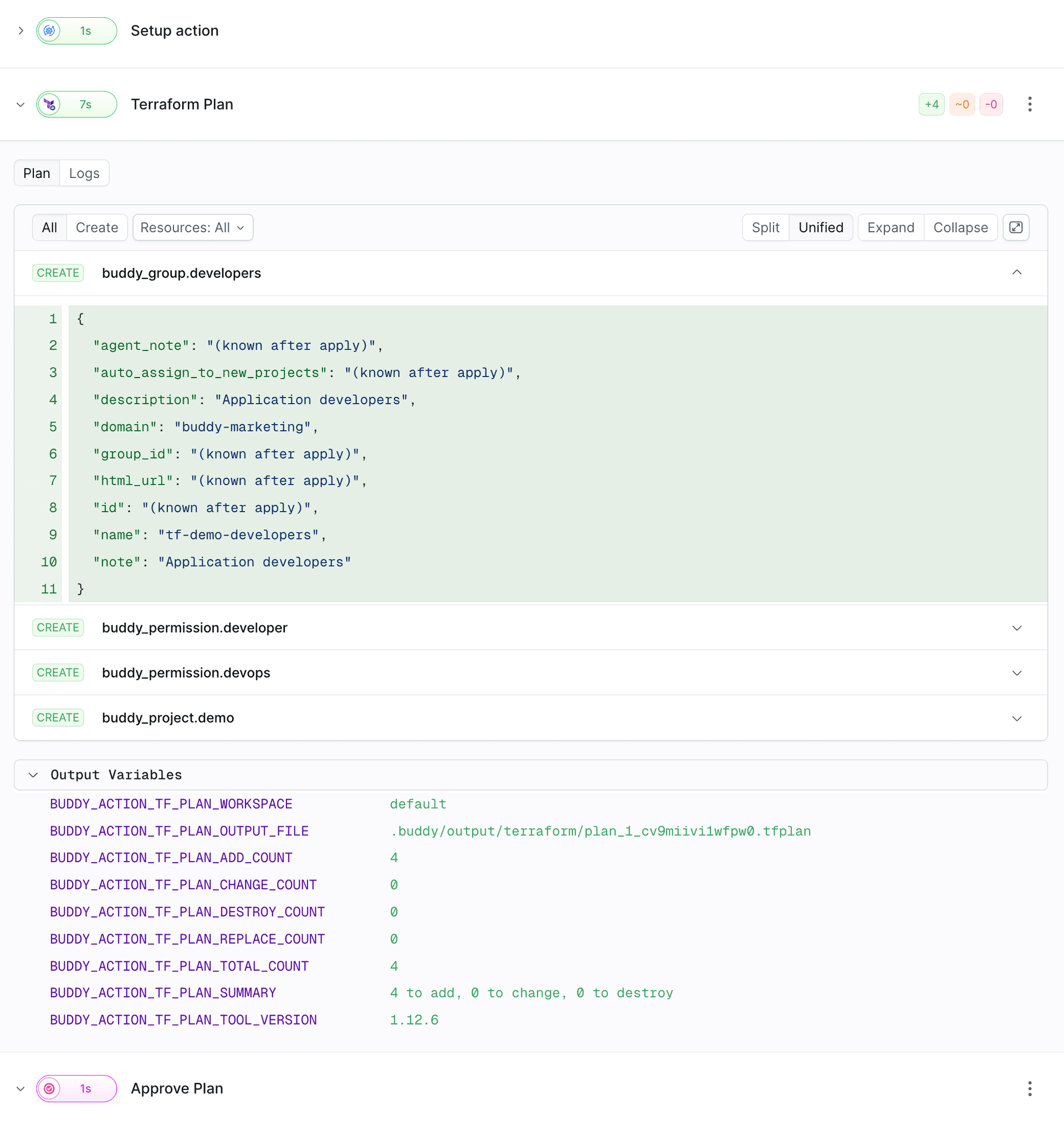
- Resources with no changes and data sources that are only read are left out.
- Sensitive values appear as
(sensitive value). - Values unknown at plan time appear as
(known after apply). After Apply, Buddy fills them in with the real values from the state. - In Apply, every resource gets a status:
APPLIEDorFAILED.
The diff and variables are created even when the action fails, as long as the tool managed to write the plan. If init fails, for example, there is no diff.
Additional arguments
additional_args is one string that is added at the end of plan or apply. Use it for anything the action has no field for:
| Goal | additional_args |
|---|---|
| Variable files | -var-file=prod.tfvars |
| A single variable | -var=instance_count=3 |
| Concurrency | -parallelism=20 |
| Waiting for a lock | -lock-timeout=5m |
| Targeting | -target=module.network |
| Destroying everything | -destroy (in Plan, see Destroy) |
Pass Plan options such as -var-file, -target, and -destroy to the Plan action. They are already part of the plan file, so Apply doesn't need them again.
Conditional apply
Plan exports counters you can use in trigger conditions. Some common patterns:
Skip approval and apply when nothing changes. Run Approve Run and Apply only when the plan has changes:
yaml- action: Approve
  type: WAIT_FOR_APPLY
  trigger_conditions:
    - trigger_condition: VAR_GREATER_THAN
      trigger_variable_key: BUDDY_ACTION_TF_PLAN_TOTAL_COUNT
      trigger_variable_value: "0"
- action: Apply
  type: TERRAFORM_APPLY
  tool: OPENTOFU
  version: 1.12.6
  trigger_conditions:
    - trigger_condition: VAR_GREATER_THAN
      trigger_variable_key: BUDDY_ACTION_TF_PLAN_TOTAL_COUNT
      trigger_variable_value: "0"
Ask for approval only when something is destroyed. Apply additive changes automatically, and stop for review when the plan destroys or replaces resources:
yaml- action: Approve destroy
  type: WAIT_FOR_APPLY
  description: "This plan destroys: $BUDDY_ACTION_TF_PLAN_DESTROY_RESOURCES"
  trigger_conditions:
    - trigger_condition: OR
      trigger_operands:
        - trigger_condition: VAR_GREATER_THAN
          trigger_variable_key: BUDDY_ACTION_TF_PLAN_DESTROY_COUNT
          trigger_variable_value: "0"
        - trigger_condition: VAR_GREATER_THAN
          trigger_variable_key: BUDDY_ACTION_TF_PLAN_REPLACE_COUNT
          trigger_variable_value: "0"
Approve Run can also block the person who started the run from approving it (prevent_self_approval: true).
Configuration reference
| Field | Plan | Apply | Description |
|---|---|---|---|
tool | ✓ | ✓ | OPENTOFU, TERRAFORM, or CUSTOM. See Versions |
version | ✓ | ✓ | Version number, latest, or a variable. Not used with CUSTOM |
working_directory | ✓ | ✓ | Path relative to the repository root. Default: . |
tf_workspace | ✓ | ✓ | Terraform workspace, exported as TF_WORKSPACE. See Workspaces and environments |
additional_args | ✓ | ✓ | Extra arguments appended to plan or apply |
backend | ✓ | ✓ | State backend. See State backends |
plan_file_path | ✓ | Plan file to apply. Default: $BUDDY_ACTION_TF_PLAN_OUTPUT_FILE |
For the full list of fields, including the custom image fields, see the YAML reference for Terraform Plan and Terraform Apply.
Last modified on Oct 19, 2026