Rulesets
A ruleset defines rules for branches and tags in a Buddy Git repository. Buddy checks the rules on every push, commit made in the editor, pull request merge, and ref deletion. A change that violates a rule is rejected, and the error message identifies the ruleset and the reason.
Rulesets replace the old push permissions that were set separately for each branch. One ruleset covers many branches or tags at once.
Creating a ruleset
- In the project, go to Branches and open the Rulesets tab. Rulesets for tags are in Tags > Rulesets.
- Click New ruleset.
- Enter a name and an identifier, and list the branches or tags in the Refs field.
- Select the rules in the Rules section.
- In the Bypass tab, choose who can bypass the rules.
- Click Add ruleset.
Image loading...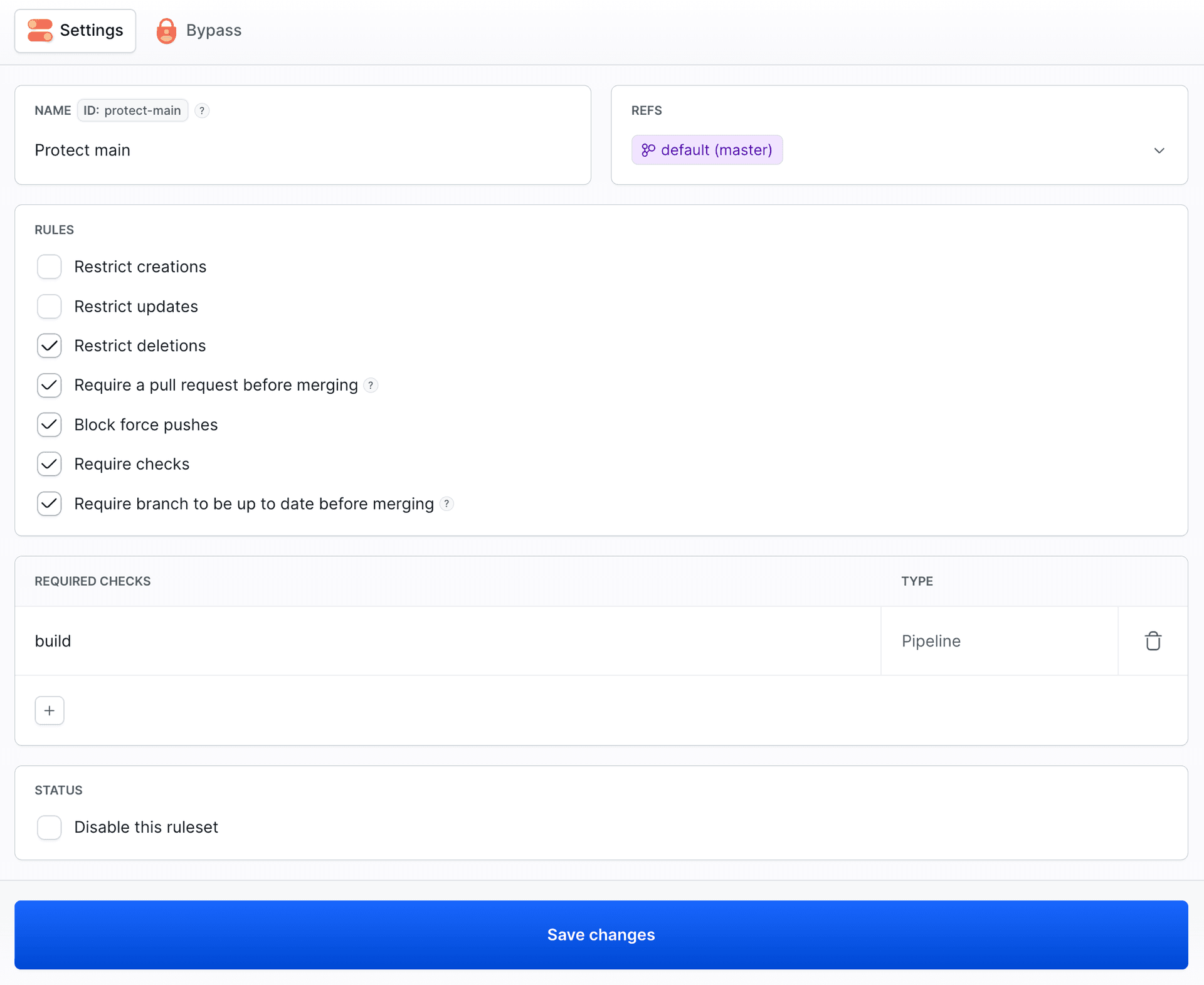
The ruleset list shows the refs, rules, and bypass entries for each ruleset. The toggle next to a ruleset disables it without deleting it. The Disable this ruleset option in the form also disables the ruleset. The RULES column in All branches shows which branches are covered by rulesets.
Image loading...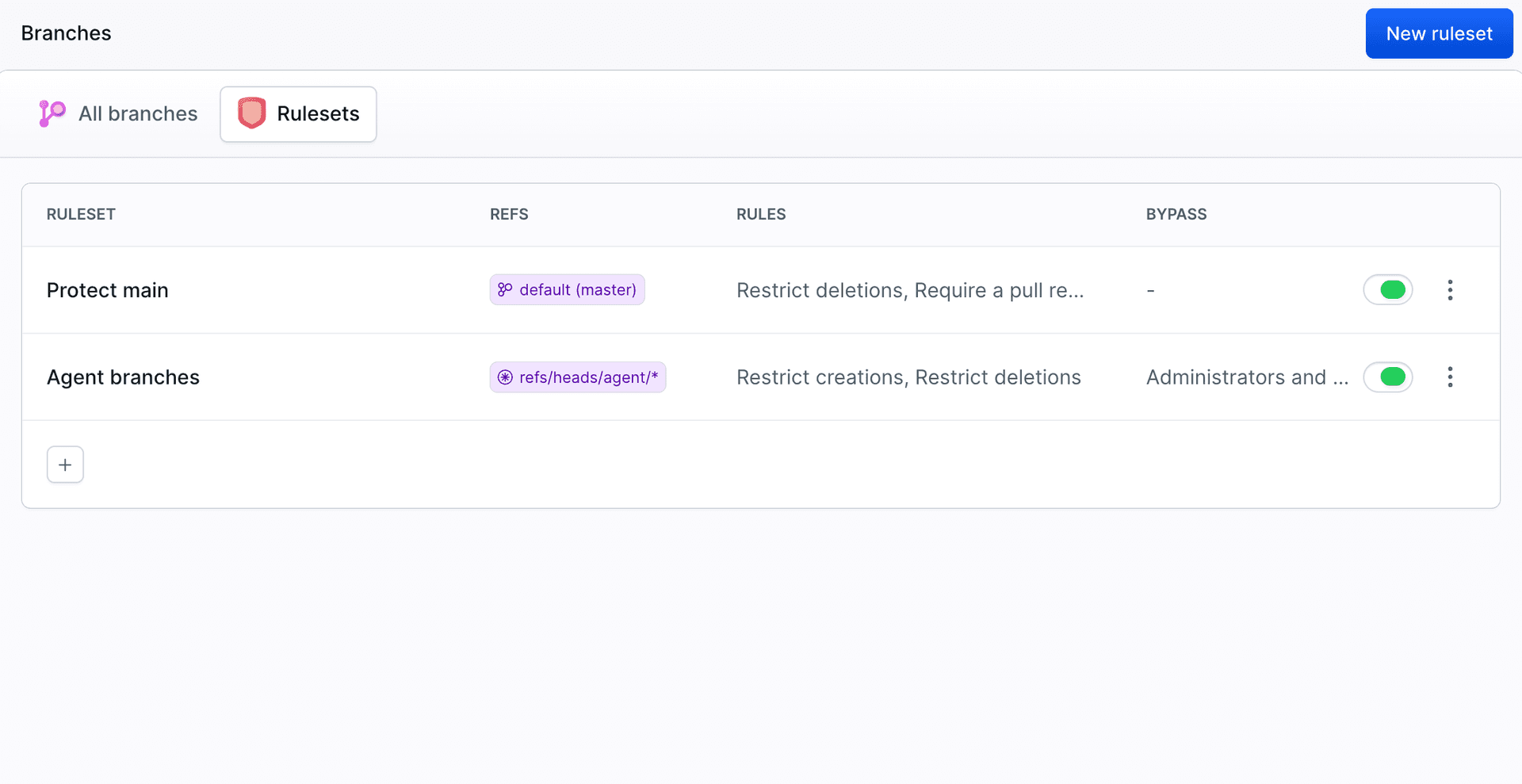
Rulesets have no test mode. An enabled ruleset blocks changes immediately, so check the patterns in the RULES column before you enable rules on a production branch.
Refs
The Refs field accepts 1 to 20 patterns. The syntax is the same as in pipeline triggers:
| Pattern | Matches |
|---|---|
refs/heads/main | the main branch |
refs/tags/v* | tags starting with v |
main | the branch and the tag named main |
refs/heads/agent/* | branches under agent/ |
:default | the default branch of the repository, also after it changes |
(regex) | refs matching the regular expression in parentheses |
Full pattern reference: Wildcards.
Rules
| Rule in the UI | YAML field | Effect |
|---|---|---|
| Restrict creations | restrict_creation | blocks creating new refs that match the pattern |
| Restrict updates | restrict_update | blocks pushes to an existing ref, including pull request merges |
| Restrict deletions | restrict_deletion | blocks deleting the ref |
| Require a pull request before merging | require_pull_request | commits are made on another branch and reach the protected one only through a pull request merge; direct pushes are rejected |
| Block force pushes | block_force_push | blocks pushes that rewrite history |
| Require checks | required_checks | a pull request merge requires successful pipelines and test sessions |
require_pull_request, block_force_push, and required_checks apply only to branches. A tag ruleset saves them, but Buddy does not enforce them.
The first push to an empty repository is not subject to restrict_creation.
Required checks
After you select Require checks, add status sources in the REQUIRED CHECKS table:
- pipelines from this project
- unit test suites
- visual test suites
A pull request can be merged only after every required source reports success for the latest commit on the branch. The Require branch to be up to date before merging option (require_up_to_date) also requires the branch to contain the latest changes from the base branch. After the branch is updated, the required checks must pass again on the new latest commit.
Only a pipeline that sets the commit status can be a required check. A pipeline with do_not_create_commit_status: true is rejected:
Required check source does not mark commits with its status: pipeline lint
You also cannot turn off the commit status in a pipeline that is a required check:
Required by ruleset "Protect main" - remove it from the ruleset first
Missing sources
You can delete a pipeline that is a required check. The ruleset then lists that pipeline in the missing_sources field, and the CLI prints Missing sources: build (PIPELINE). The entry disappears when the project has a pipeline with the same identifier again.
A new ruleset with a source that does not exist cannot be saved:
Required check source not found: pipeline build
Bypass
The Bypass tab defines who can bypass the ruleset's rules:
- Administrators & Project Managers (
admins) - workspace administrators and project managers - Others (
others) - all other project members - Member (
users) - selected workspace members - Bud (
users) - Buds, AI agents with their own account in the workspace - Group (
groups) - groups assigned to the project
Each entry is Allowed (ALLOWED) or None (Deny) (DENIED). A member or Bud must have access to the project, and a group must be assigned to it. Otherwise Buddy rejects the ruleset:
User 31 is not a member of the project
Image loading...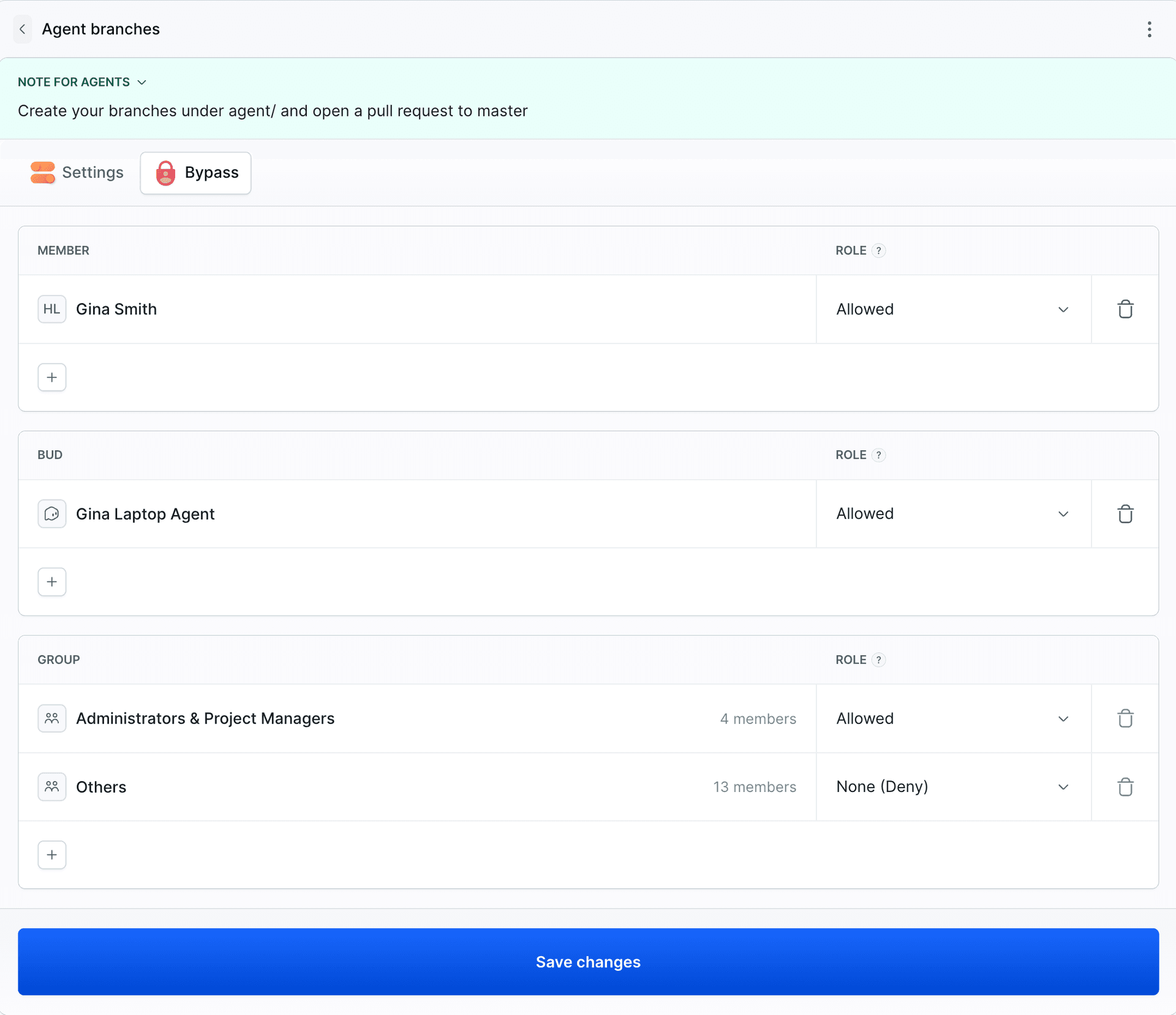
Buddy checks the entries in this order:
- A personal entry in Member or Bud. If one exists, its setting takes precedence.
- Groups, including Administrators & Project Managers. If there is no personal entry, Buddy checks all groups the person belongs to.
- Others - for members who do not match any of the entries above.
DENIED entry in users is subject to the rules despite admins: true, and a Bud with ALLOWED in users bypasses them despite others: DENIED. The group settings stay unchanged.
Notes for humans and agents
A ruleset has two notes:
- Note for humans (
note) - an explanation for team members - Note for agents (
agent_note) - an instruction for AI agents, for example where to create branches
The API, the CLI (bdy ruleset get), and the YAML export return both notes. The rejection message does not include them, so an agent should read the ruleset before performing operations on the protected refs. More about notes: Resource notes.
Image loading...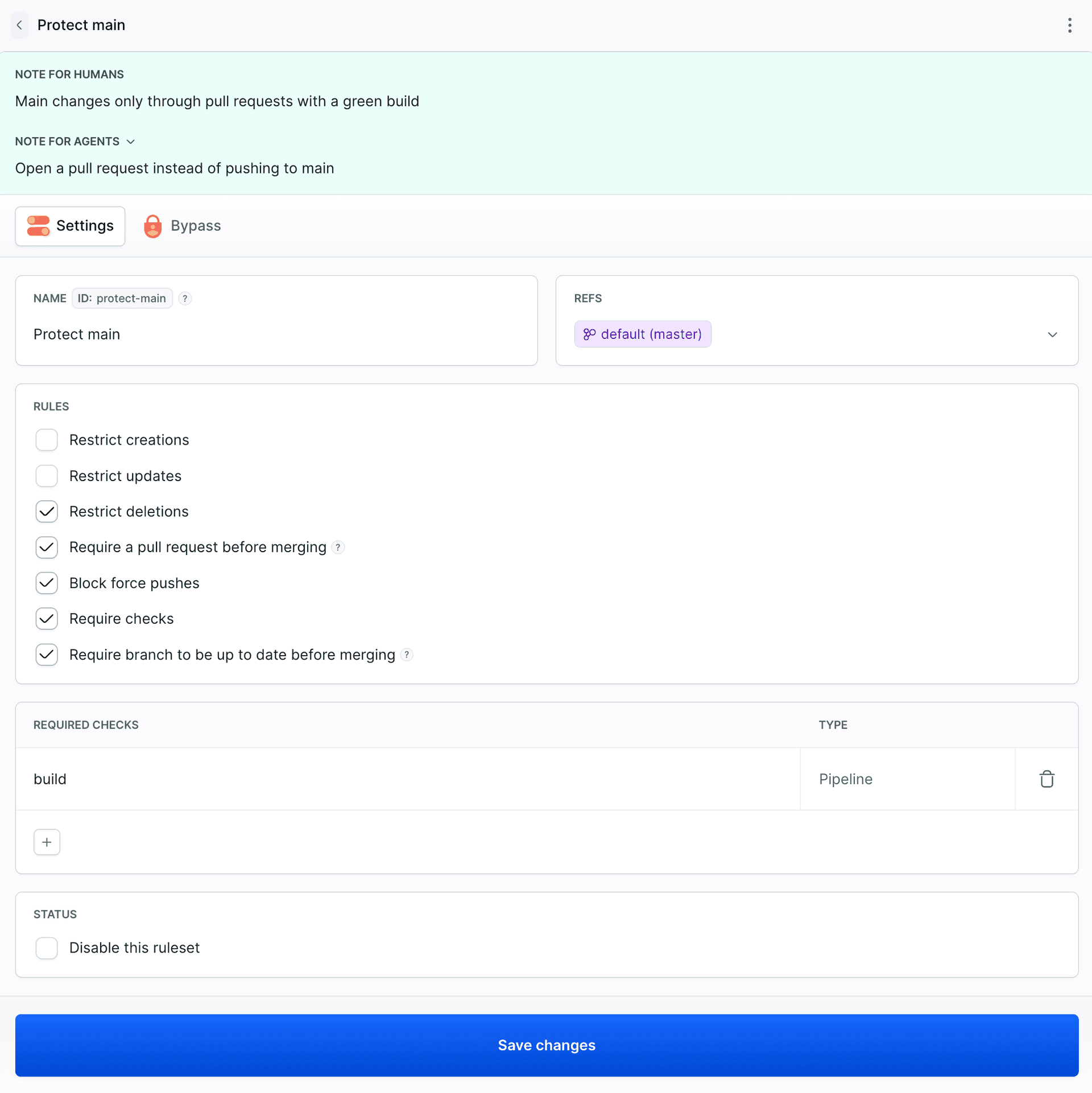
Rejection messages
| Situation | Message |
|---|---|
| Commit directly to a protected branch | Ruleset "Protect main": changes must be made through a pull request |
| Merge while a check is still running | Ruleset "Protect main": required checks have not passed: pipeline build: in_progress |
| Merge after a failed check | Ruleset "Protect main": required checks have not passed: pipeline build: failed |
| Branch out of date with the base branch | Ruleset "Protect main": branch is out of date with the base branch - update it and wait for the checks of the new commit |
| Deleting a protected branch | Ruleset "Protect main": deleting this ref is not allowed |
| Creating a protected tag | Ruleset "Release tags": creating this ref is not allowed |
A rejected push in the terminal:
$ git push origin master
To https://app.buddy.works/my-workspace/my-project
 ! [remote rejected] master -> master (Ruleset "Protect main": changes must be made through a pull request)
error: failed to push some refs to 'https://app.buddy.works/my-workspace/my-project'
$$$$
YAML
You can save a ruleset as YAML. This example protects the default branch: changes go in only through a pull request with a successful build pipeline, and force pushes and branch deletion are blocked for everyone.
identifier: protect-main
name: Protect main
refs:
  - ":default"
bypass:
  admins: false
  others: DENIED
rules:
  required_checks:
    pipelines:
      - build
    unit_tests_suites: []
    visual_tests_suites: []
    require_up_to_date: true
  require_pull_request: true
  block_force_push: true
  restrict_deletion: true
note: Main changes only through pull requests with a green build
agent_note: Open a pull request instead of pushing to main
The second example reserves branches for an agent. Only the Bud with ID 46 and administrators can create and delete branches under agent/:
identifier: agent-branches
name: Agent branches
refs:
  - refs/heads/agent/*
bypass:
  admins: true
  others: DENIED
  users:
    - id: 46
      access: ALLOWED
rules:
  restrict_creation: true
  restrict_deletion: true
agent_note: Create your branches under agent/ and open a pull request to main
Import the file in the Import YAML tab of the New ruleset form. A ruleset with the same identifier is replaced. To get an existing ruleset as YAML, use Download YAML in the ruleset menu.
rules and bypass objects are saved as a whole. A rule missing from the object you send is turned off.
CLI and API
The CLI manages rulesets with bdy ruleset (alias bdy rs):
bdy ruleset list -w my-workspace -p my-project
bdy ruleset create --yaml @protect-main.yml -w my-workspace -p my-project
bdy ruleset update protect-main --yaml @protect-main.yml -w my-workspace -p my-project
bdy ruleset delete protect-main -w my-workspace -p my-project
$$$$
Workspace administrators and project managers create and edit rulesets. An API token needs the RULESET_READ scope to read and RULESET_MANAGE to make changes. Full endpoint list: Rulesets API.
See also:
- Pull requests - what a blocked merge looks like and how to update a branch
- Branches - creating and merging branches
- Wildcards - ref pattern syntax
- Resource notes - notes for AI agents in Buddy resources
Last modified on Nov 25, 2026