Cursor
Cursor is an AI-first code editor built around an agent that understands your entire project. It reads across the codebase, runs commands, edits files wherever changes are needed, and keeps your work moving without leaving the editor. Paired with Buddy, Cursor can deploy your project and let Buddy handle the entire deployment workflow. On top of that, it can trigger and monitor your pipelines, ship changes across environments, and dig through build output and logs when something needs fixing.
Quick start
Install the Buddy CLI
npm install -g bdy
$Log in to Buddy
bdy login
$Link your project
Run this inside your project directory to connect it to a Buddy project:
bdy proj link
$Install the Buddy skill
npx skills add buddy/buddy-plugin
$
The Buddy skill teaches the agent to drive Buddy through the bdy CLI - link a project, deploy, run pipelines, ship across environments, and read build logs - so you can ask for all of it in plain language.
Open Cursor and start the agent
Open your project in Cursor and start the agent (⌘I / Ctrl+I). You can also launch it from the terminal with the Cursor CLI:
cursor-agent
$Prompt the agent
Ask it to build and ship something end to end, for example:
Create a snake app and deploy it for me
Example prompts
Once the agent is running and your project is linked to Buddy, try prompts like:
- Create a Next.js app and deploy it to production.
- Deploy an Umami analytics instance and wire it into my app.
- Deploy an AI chatbot with Postgres for history and Redis for rate limiting.
- Deploy my app, set up a CDN, and buy and configure a domain with SSL.
- Add a pipeline that runs on every change in the repository and executes my test suite.
- Add a pipeline that runs every minute, checks that my site is up, and sends a notification to Slack, email, Telegram, or SMS if anything is wrong.
- Check the last few CI pipeline runs for failures, read the logs, and fix the failing tests.
- Analyze the logs from the last production deployment and fix the errors.
- Find the last successful production deployment and roll back to it.
- Check my app logs and open issues based on what you find.
Run Cursor in a pipeline
Cursor also runs the other way around: as the Cursor action inside a Buddy pipeline, driven by the headless Cursor Agent CLI. Instead of you prompting the agent from the editor, the pipeline does it on an event - a pull request, a failed deploy, a cron schedule - with access to the repository, artifacts, and variables of that run.
Connect Cursor
Add a Cursor integration with your User API Key. The action reads the credentials from it, so the key never lands in the repository.Add the Cursor action
In the pipeline, click Add action and pick Cursor. Set the integration and the model.
Image loading...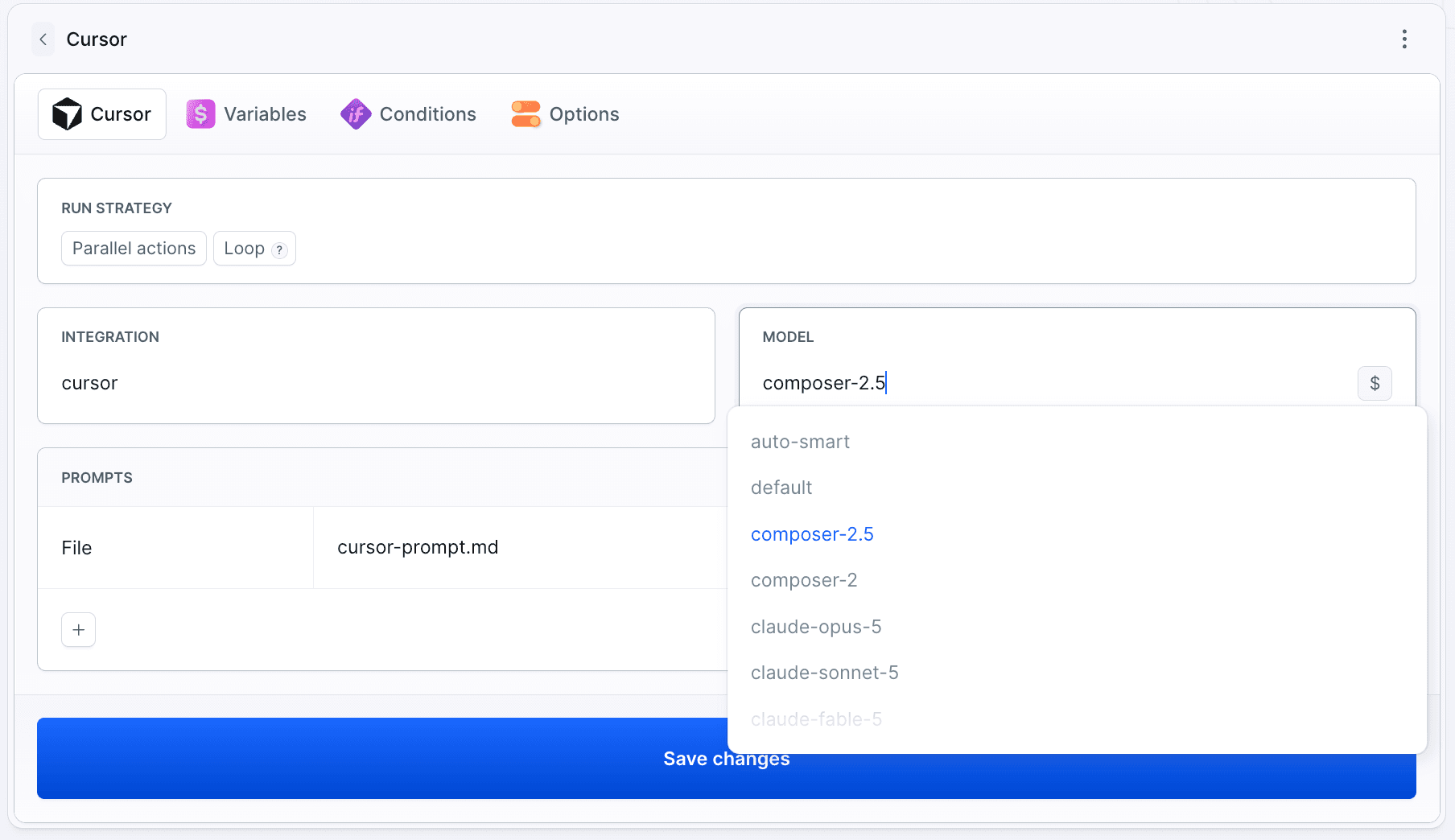
Write the prompt
Add one or more prompts - inline, or read from a file in the repository such as.buddy/cursor-prompt.md.
Or define it in YAML:
- action: Cursor
  type: CURSOR
  integration: cursor
  prompts:
  - make pull request review
  - file: .buddy/cursor-prompt.md
  model: auto-smart
See Run agents in a pipeline for prompt files and what you can trigger the agent on, and Cursor with YAML for the full field reference.
Connect MCP
Give Cursor access to Buddy over MCP so it can run pipelines, manage deployments, and read logs. See the MCP page for the regional server URLs, authentication modes, and the full list of tool categories.
With the remote server
Add the server to .cursor/mcp.json in your project (or ~/.cursor/mcp.json for all projects):
{
  "mcpServers": {
    "buddy": {
      "url": "https://mcp.buddy.works/mcp"
    }
  }
}
Or ask Cursor to set it up for you:
Add the Buddy MCP server (https://mcp.buddy.works/mcp) to your MCP configuration.
With the Buddy CLI
If you're already logged in with bdy login, bdy mcp runs a local MCP server that proxies to Buddy using your CLI session - no OAuth prompt, no token to manage. Add it to .cursor/mcp.json:
{
  "mcpServers": {
    "buddy": {
      "command": "bdy",
      "args": ["mcp", "--tools", "pipelines,source"]
    }
  }
}
Omit the --tools arguments to expose all categories.
Last modified on Oct 1, 2026