Branch preview environments with Buddy Sandboxes
You can review a PR by running it locally, but that often means extra work: setting up the whole environment, switching between branches, cleaning up afterwards. The alternative is reading the diff and trusting that the author checked it on their machine before sending it for review.
A sandbox in Buddy is a full machine with a public HTTP address, so every branch can get its own copy of the application. The sandbox follows the branch lifecycle:
- a push creates it,
- the next push updates it,
- deleting the branch removes it,
- a timeout puts inactive previews to sleep.
The command below creates a single sandbox that serves as the base. You take a snapshot of it and two pipelines do the rest: preview-up on push and preview-delete on branch deletion.
bashbdy sb create --yaml @app-base.yml -p sandboxes-preview-envs$
Prerequisites
- bdy CLI installed and logged in
- A Buddy project with the application repository
- Slack integration added to the workspace
Base sandbox: a machine where the app already runs
Start with one sandbox described in YAML. The application lives in the project repository. In our example, it is a simple Dispatch Board in Node that listens on 0.0.0.0:3300 and shows the branch and commit in a banner. For a different stack you only swap build_command and the command in apps:
yaml# app-base.yml
- sandbox: app-base
  name: App base
  os: ubuntu:24.04
  resources: 2x4
  tags:
  - base
  app_dir: /buddy
  apps:
  - node server.js
  endpoints:
  - www: 0.0.0.0:3300
  fetch:
  - ref: main
    path: /buddy
    build_command: npm ci --omit=dev
fetch pulls the project repository into /buddy and runs npm ci there, apps starts the server, and endpoints exposes port 3300 on a public *.buddy.app address. The sandbox comes with node, docker, go, python, git and bdy preinstalled, so there is no provisioning here.
You can keep the sandbox definition in a YAML file.
The same settings can be passed as flags (--tag base --app-dir /buddy --fetch ...). The advantage of app-base.yml is that it sits in the repo next to the code, so every change is in git history, and you can update an existing machine with bdy sb update app-base @app-base.yml.
Snapshot: a preview boots in seconds
Freeze the base machine into a snapshot so every preview starts from a ready image: a configured system with a warm npm cache. The preview only pulls the code from its own branch:
bashbdy sb snap create app-base -n dispatch-board-base --wait$
Pipeline preview-up: a push brings up the environment
One pipeline on the PUSH event handles every branch except main. It deletes the previous preview of that branch, creates a new one from the snapshot and posts the link to Slack. In spec, the endpoint uses the full form with a name, address, and region. In the sandbox file, the shorthand www: 0.0.0.0:3300 was enough:
yaml# preview-up.yml
- pipeline: preview-up
  refs:
  - "refs/heads/*"
  events:
  - type: PUSH
    refs:
    - "refs/heads/*"
  trigger_conditions:
  - trigger_condition: VAR_IS_NOT
    trigger_variable_key: BUDDY_RUN_BRANCH
    trigger_variable_value: main
  actions:
  - action: Drop the previous preview
    type: SANDBOX_MANAGE
    operation: DELETE
    ignore_errors: true
    targets:
    - "preview-${BUDDY_RUN_BRANCH}"
  - action: Build the preview
    type: SANDBOX_CREATE
    from: SNAPSHOT
    snapshot_name: dispatch-board-base
    sandbox_identifier: "preview-${BUDDY_RUN_BRANCH}"
    spec:
      sandbox: "preview-${BUDDY_RUN_BRANCH}"
      name: "Preview ${BUDDY_RUN_BRANCH}"
      timeout: 900
      tags:
      - preview
      apps:
      - node server.js
      endpoints:
      - name: www
        endpoint: 0.0.0.0:3300
        region: US
      fetch:
      - path: /buddy
        ref: "${BUDDY_RUN_BRANCH}"
        build_command: npm ci --omit=dev
  - action: Post the preview link
    type: SLACK
    integration: slack
    channel: general
    content: "Preview for `${BUDDY_RUN_BRANCH}` at ${BUDDY_RUN_COMMIT_SHORT}: ${BUDDY_SANDBOX_URLS}"
Before you save the file, replace integration and channel in the Slack action with values from your workspace. Then create the pipeline from that file with a single command:
bashbdy pip create --yaml @preview-up.yml -p sandboxes-preview-envs$
A commit on the dispatch-eta branch moves the ETA of one shipment by half an hour. The run finishes in 9 seconds and shows it was triggered by the push, not by hand:
Image loading...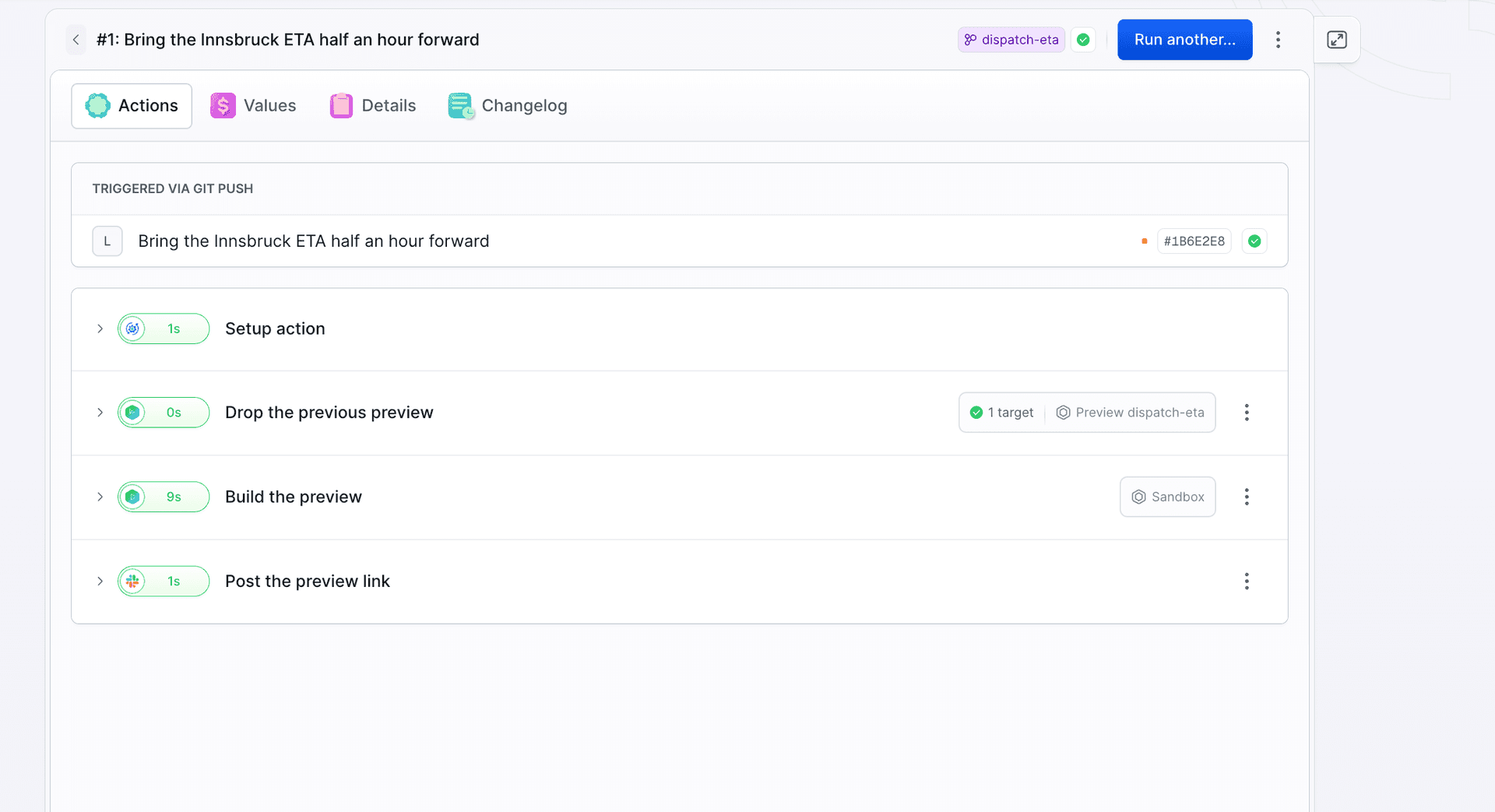
The public link from the action leads to the application from that branch. The banner tells you exactly what you are looking at:
Image loading...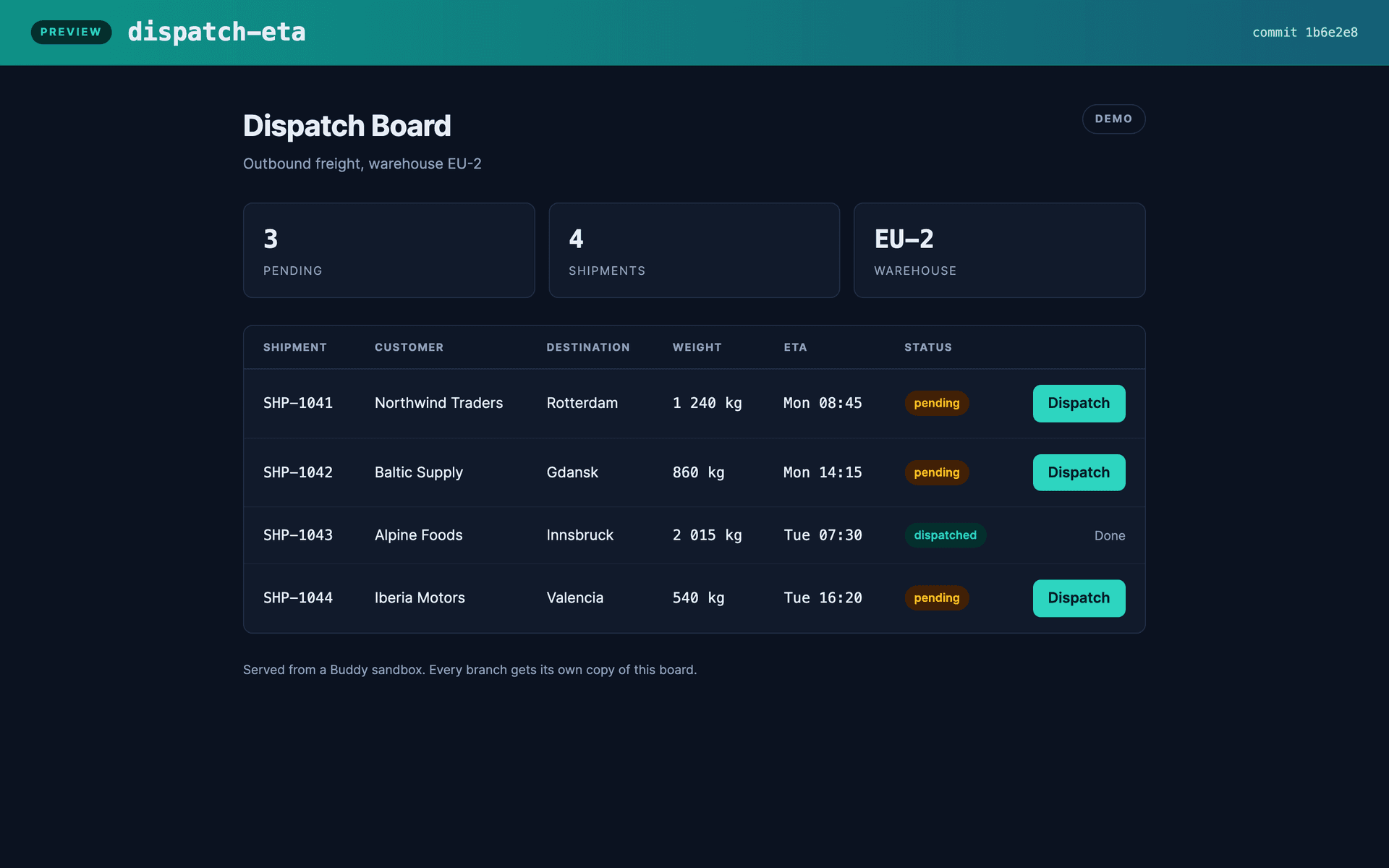
Delete and recreate, do not update.
update_if_exists: true in SANDBOX_CREATE only reconfigures the machine, it does not pull new code, so the preview stays on the old commit. That is why the first action deletes the previous environment (ignore_errors: true covers the first push on a branch). This also applies to further commits on the same branch: the preview is deleted on every push, which at 9 seconds of boot time from a snapshot is cheaper than policing drift. With a heavier build (Next.js, Laravel with composer) or data in a database the math flips: then you create the sandbox without fetch and let the pipeline push the code on every push with the DEPLOY_TO_SANDBOX action.
One event handles the entire preview lifecycle
A push to a new branch fires CREATE_REF and PUSH at the same time. If you build two pipelines, one per event, both try to create the same sandbox. A single pipeline on PUSH handles both the first push and every one after it.
Always take the link from the action output
Do not build the preview address by hand. The host gets shortened and salted when the name is long, and the salt changes every time the environment is recreated. SANDBOX_CREATE returns ready-made values:
BUDDY_SANDBOX = "preview-dispatch-eta"
BUDDY_SANDBOX_NAME = "Preview dispatch-eta"
BUDDY_SANDBOX_TAGS = "preview"
BUDDY_SANDBOX_SSH_URL = "preview-dispatch-eta-wea9m.us-1.shr.io:14532"
BUDDY_SANDBOX_URLS = "https://www-preview-dispatch-eta-sandboxes-preview-envs-buddy-mar-lw1mi.us-1.buddy.app"
In the dashboard you will find the same address in the Tunnels section of the sandbox:
Image loading...
Variables this pipeline uses.
BUDDY_RUN_BRANCH and BUDDY_RUN_COMMIT_SHORT are default variables of every run. All five BUDDY_SANDBOX* values are the output of the action that creates the sandbox, available to the following actions in the same run. Watch out for branch names with a slash: the sandbox identifier is derived from the branch name, so feature/eta will not work.
A second branch is a second environment
The same pipeline handles any number of branches. Each one gets its own machine, its own address and its own data:
Image loading...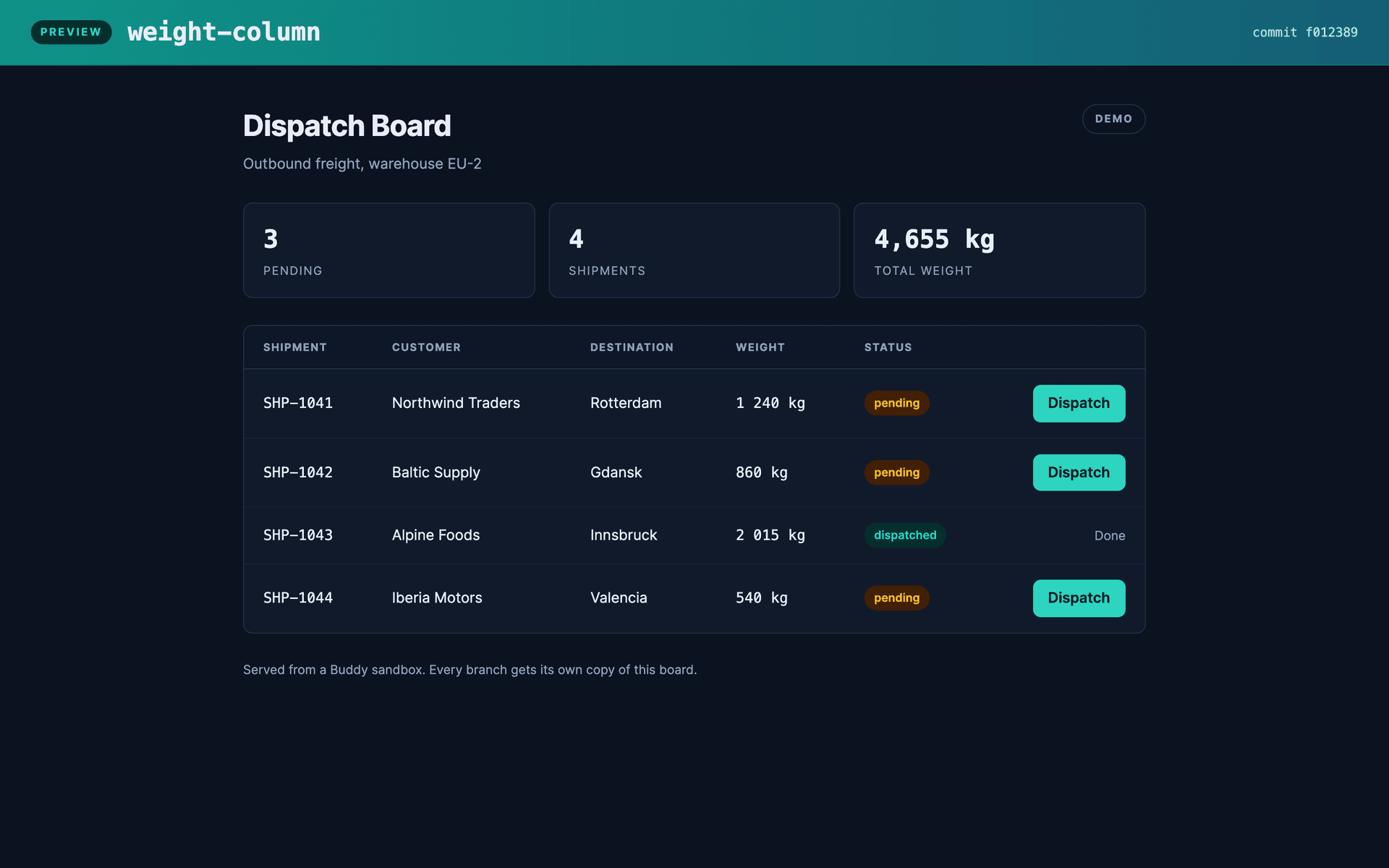
The sandbox list then shows the base machine with the base tag and the previews with the preview tag:
Image loading...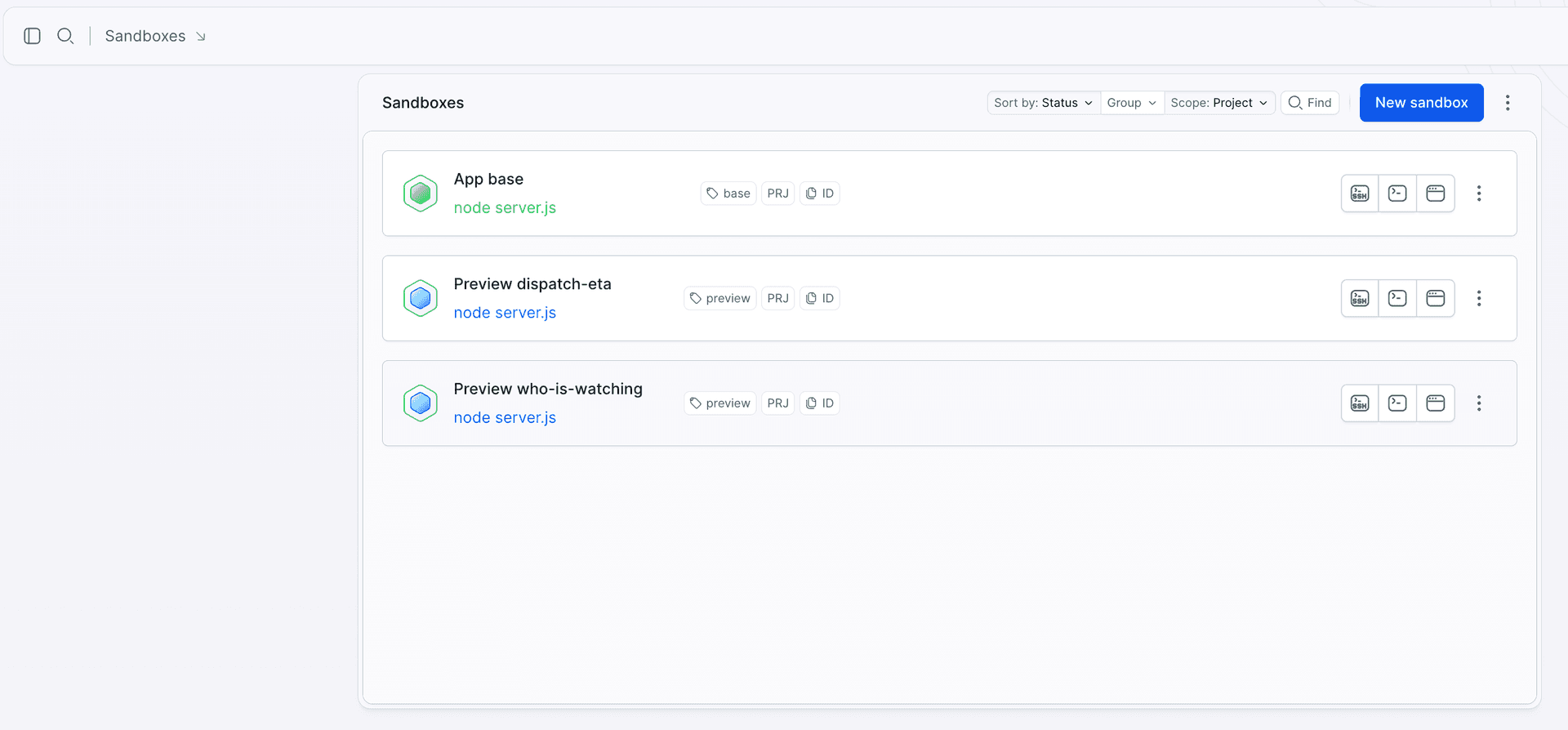
The settings of a single preview show exactly what it inherited from the snapshot and what the pipeline added:
Image loading...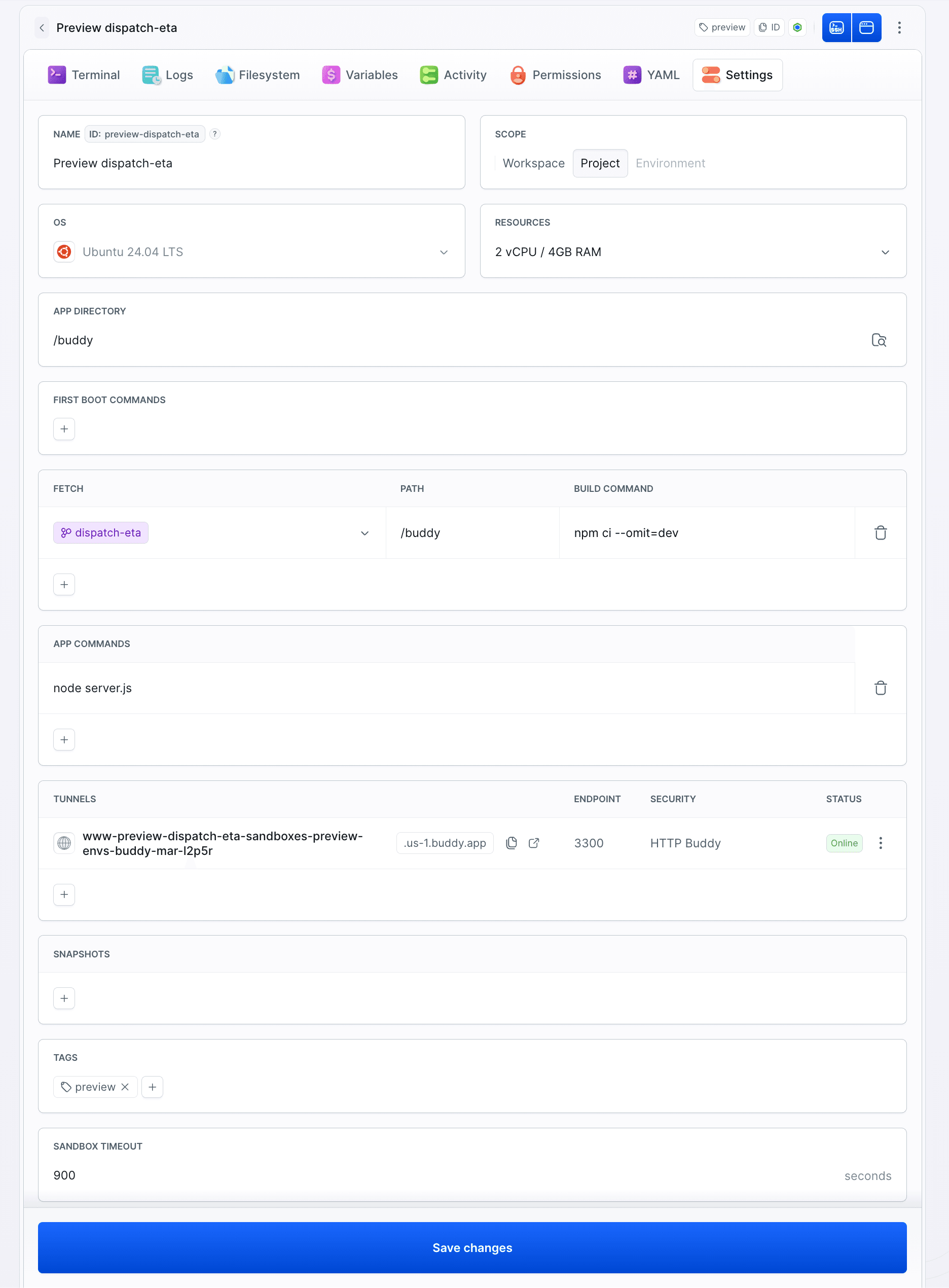
A forgotten preview goes to sleep on its own
timeout: 900 in the sandbox spec takes care of previews everyone forgot about. After 15 minutes without traffic the machine goes to STOPPED and stops consuming resources, while its disk stays. You do not have to wake it up: the first visit to the preview address wakes the sandbox automatically. In our case the response from a sleeping environment arrived in under 5 seconds:
bash$ bdy sb status preview-dispatch-eta Status STOPPED $ curl https://www-preview-dispatch-eta-sandboxes-preview-envs-buddy-mar-lw1mi.us-1.buddy.app/health {"status":"ok","branch":"dispatch-eta","commit":"1b6e2e8"} $ bdy sb status preview-dispatch-eta Status RUNNING$$$$$$$$
A timeout stops, it does not delete.
Traffic on the endpoint resets the countdown, so an environment someone is actually using will not fall asleep mid-review. After a timeout the sandbox stays on the list with STOPPED status, so its identifier is still taken. The next push to that branch recreates the environment anyway, because the pipeline starts with SANDBOX_MANAGE and the DELETE operation. A preview disappears for good only when the branch is deleted.
The branch goes, the environment goes too
Merging or abandoning a branch ends the life of its preview. The DELETE_REF event triggers the second pipeline:
yaml# preview-delete.yml
- pipeline: preview-delete
  refs:
  - "refs/heads/*"
  events:
  - type: DELETE_REF
    refs:
    - "refs/heads/*"
  actions:
  - action: Delete the preview
    type: SANDBOX_MANAGE
    operation: DELETE
    ignore_errors: true
    targets:
    - "preview-${BUDDY_RUN_BRANCH}"
  - action: Post the cleanup note
    type: SLACK
    integration: slack
    channel: general
    content: "Branch `${BUDDY_RUN_BRANCH}` is gone, its preview sandbox was deleted."
The Slack action has the same two fields to replace. You create the pipeline the same way: bdy pip create --yaml @preview-delete.yml -p sandboxes-preview-envs. Deleting the weight-column branch takes the pipeline a second:
Image loading...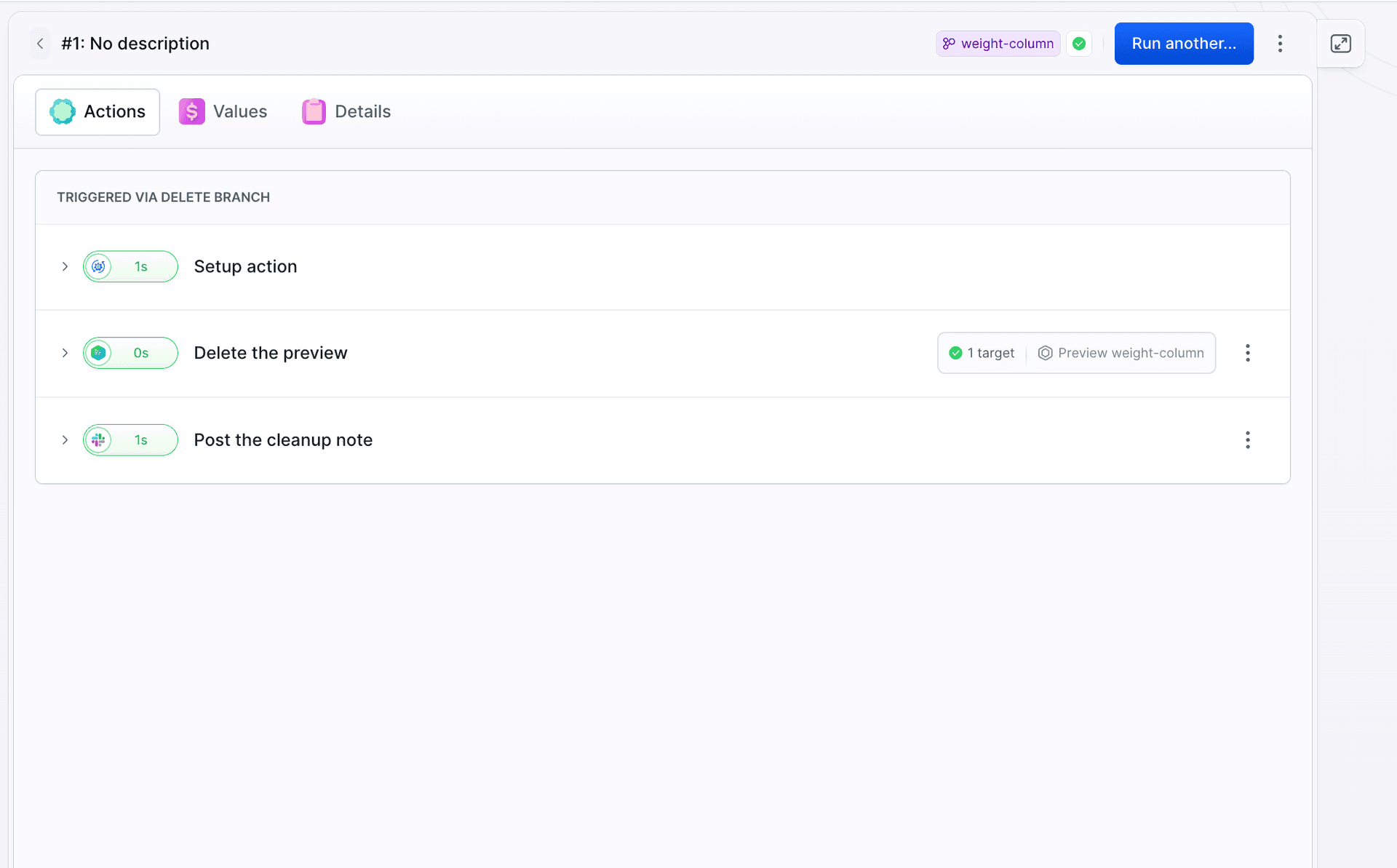
Takeaways
- An environment is an event. A push creates the preview,
DELETE_REFremoves it. Nobody clicks, nobody cleans up. - The snapshot does the work. Set up once, on the base machine. A preview starts from an image with a warm npm cache.
- Take the address from the output.
BUDDY_SANDBOX_URLSshows the real host, a hand-built one breaks as soon as the name gets shortened.
Docs: sandbox configuration, endpoints, lifecycle, yaml-sandbox, plus the Create new sandbox and Manage sandbox actions. Such a preview is public, which is often unacceptable on a client project.

Jarek Dylewski
Customer Support
A journalist and an SEO specialist trying to find himself in the unforgiving world of coders. Gamer, a non-fiction literature fan and obsessive carnivore. Jarek uses his talents to convert the programming lingo into a cohesive and approachable narration.