ClickHouse migrations and analytics checks in Buddy pipelines
This week, we added a native ClickHouse target to Buddy. It lets you run schema migrations, queries, and data checks directly from the pipelines responsible for deployment.
What is ClickHouse
ClickHouse is an open-source columnar database designed for analytics. It processes large datasets of application events, logs, and product metrics. Over time, it often becomes part of the release process. Schema changes need to reach production together with the application, materialized views require updates, and after every deploy, you need to verify that data is still arriving where it should.
How it worked until now
Connecting to ClickHouse from a pipeline meant assembling a custom step: install the client, pass the host through variables, keep the password in a shell command or variables, and hope nobody copies that block into another project. The target removes this step. The connection is defined in one place, the pipeline references it by name, and the action provides a ClickHouse client already wired to that connection.
Step 1: add the ClickHouse target
Go to the Targets tab, click New target, and select ClickHouse. The required fields are the name, scope, host, and credentials. Everything else is optional:
Image loading...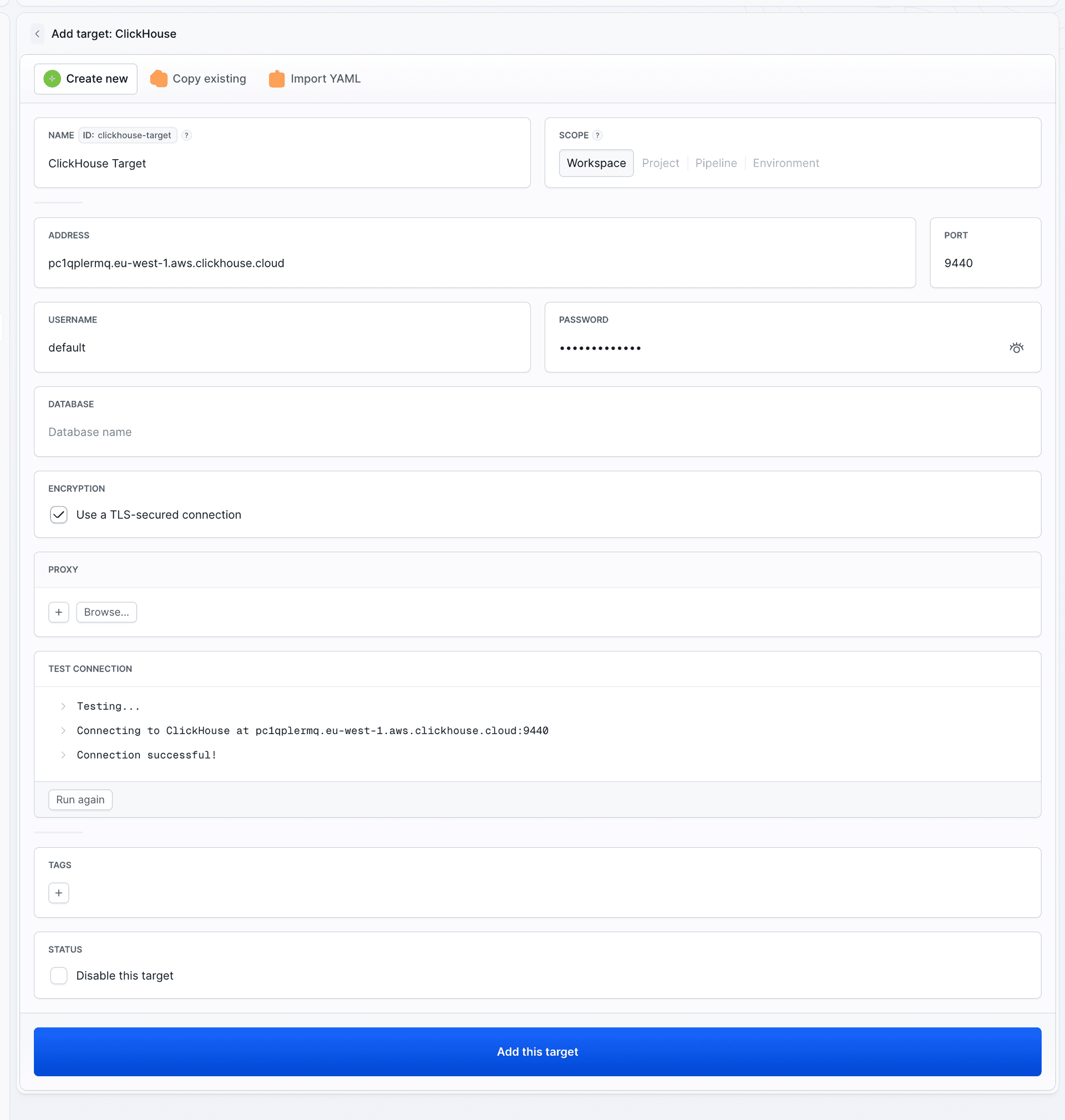
- Port defaults to
9000, the native protocol port. This is not the HTTP port, so8123will not work here. - Secure switches the connection to TLS.
- Database sets the default database so queries do not have to qualify every table.
- Proxy points to an SSH target and tunnels the connection, letting you reach a cluster behind a bastion.
https:// prefix and use port 9440, not 8443. For self-hosted ClickHouse, leave Secure disabled unless TLS is configured on the server.
Step 2: run queries from a pipeline
The target is used by the ClickHouse CLI action. The commands field contains shell commands, not raw SQL. The connection to the target is configured automatically, so you do not need to provide host or credential flags:
yaml- pipeline: "Apply ClickHouse migrations"
  events:
    - type: PUSH
      refs:
        - "refs/heads/main"
  actions:
    - action: "Migrate schema"
      type: "CLICKHOUSE_CLI"
      targets:
        - clickhouse-prod
      commands: |-
        clickhouse-client -q 'SHOW DATABASES'
        clickhouse-client --queries-file migrations/2026_09_08_add_projection.sql
The two most common options are -q for a single query and --queries-file for a SQL file stored in the repository. The commands field supports shell commands, so you can also execute multiple .sql files in sequence or process query output with another tool.
You can also define the target inline in the action. This works well for a one-off pipeline, but when several pipelines use the same connection, a named target is easier to manage in one place.
The check that is worth adding first
Migrations are the obvious use case, but the easiest win is a post-deployment data check. A deployment that succeeds while the event stream is broken looks green in every dashboard except the one nobody is watching. One action after the deploy closes that gap:
yaml- action: "Verify events are landing"
  type: "CLICKHOUSE_CLI"
  trigger_time: ON_EVERY_EXECUTION
  targets:
    - clickhouse-prod
  commands: |-
    ROWS=$(clickhouse-client -q "SELECT count() FROM events WHERE event_time > now() - INTERVAL 10 MINUTE")
    echo "Events in the last 10 minutes: $ROWS"
    test "$ROWS" -gt 0
When the query returns zero, the test command exits with an error. The action receives a failed status, and the pipeline triggers its configured notifications. No extra tooling or separate cron job is required, and the query stays in the same repository as the code that produces the events.
Below is the result of a run against ClickHouse Cloud. The migration creates a table, the check counts the latest rows, and the result appears in the logs.
Image loading...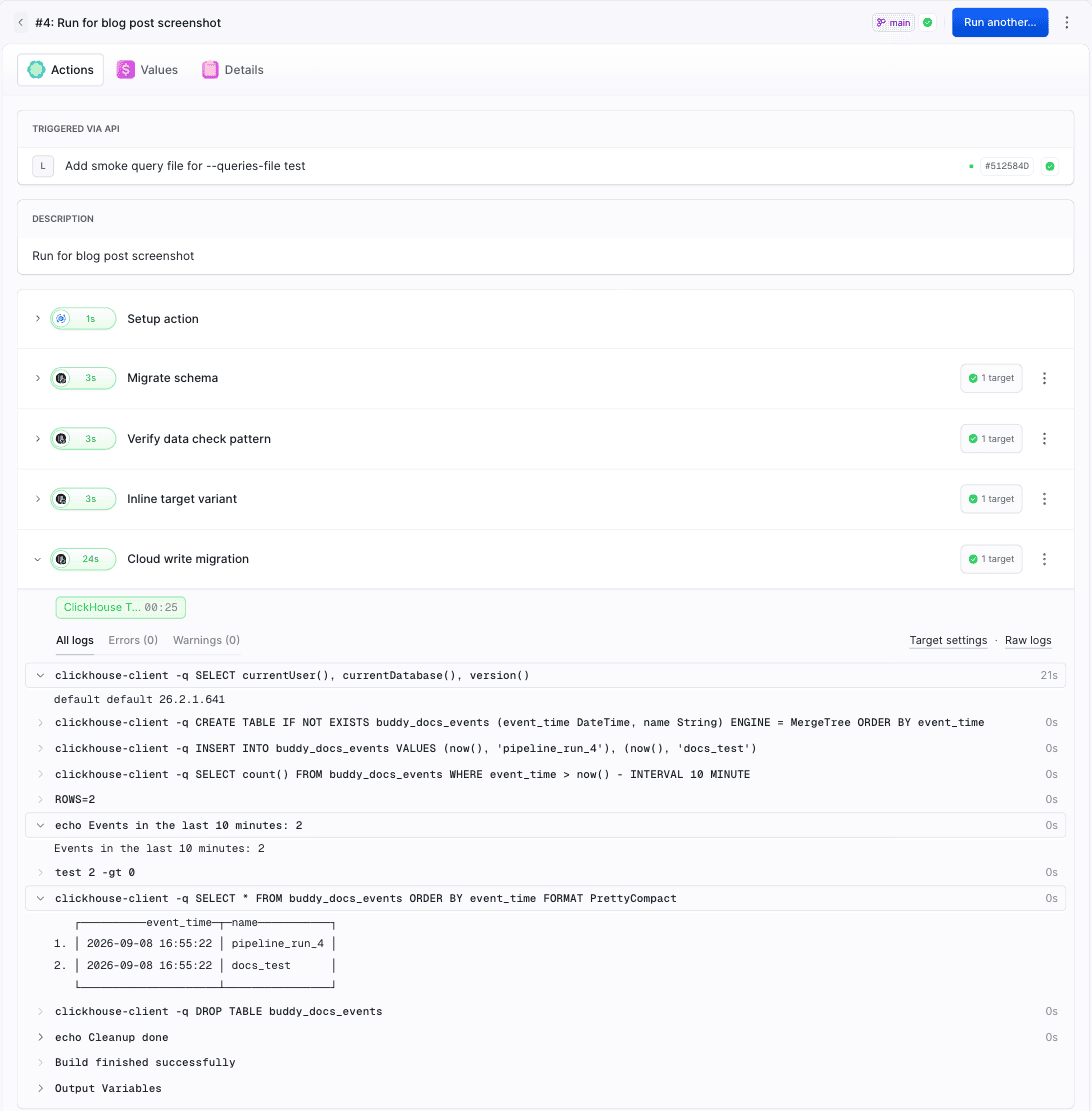
Where it fits
The ClickHouse target joins PostgreSQL, MySQL, MSSQL, and MongoDB. It follows the same scope rules and supports both inline and named targets. If you already run database migrations with Buddy, the configuration will feel familiar.
You can find the full field reference, YAML examples, and solutions to common problems in the ClickHouse target documentation.
Add a ClickHouse target to your workspace, place a ClickHouse CLI action in an existing pipeline, and start with a simple post-deployment data flow check.

Jarek Dylewski
Customer Support
A journalist and an SEO specialist trying to find himself in the unforgiving world of coders. Gamer, a non-fiction literature fan and obsessive carnivore. Jarek uses his talents to convert the programming lingo into a cohesive and approachable narration.