Weekly restore drill in Buddy with the new Extract action
A green backup job tells you that a backup was created. It does not tell you whether that backup can actually be restored.
That is the problem this pipeline is meant to solve. It downloads the latest backup from S3, extracts it, restores the database in a sandbox, and runs a few checks against the restored data.
With the new Extract action, the whole restoration process can run automatically on a schedule, giving you regular proof that your backups are usable instead of finding out during an outage.
What the Extract action does
Until now, unpacking an archive in a pipeline meant an action with unzip -P $PASSWORD or tar -xzf, picking an image that includes those tools, and handling the archive passwords securely.
Extract wraps all of that in a single action with a few fields:
- source_path - path to the archive in the pipeline filesystem,
- destination_path - defaults to the directory the archive is in,
- password - for encrypted archives, best passed from an encrypted variable,
- delete_source - a checkbox that removes the archive after a successful extraction. Off by default.
Supported formats:
- archives:
zip,7z,tar, - compressed archives:
tar.gz,tar.bz2,tar.xz, - single compressed files:
gz,bz2,xz.
This is what the configured action looks like in a pipeline:
Image loading...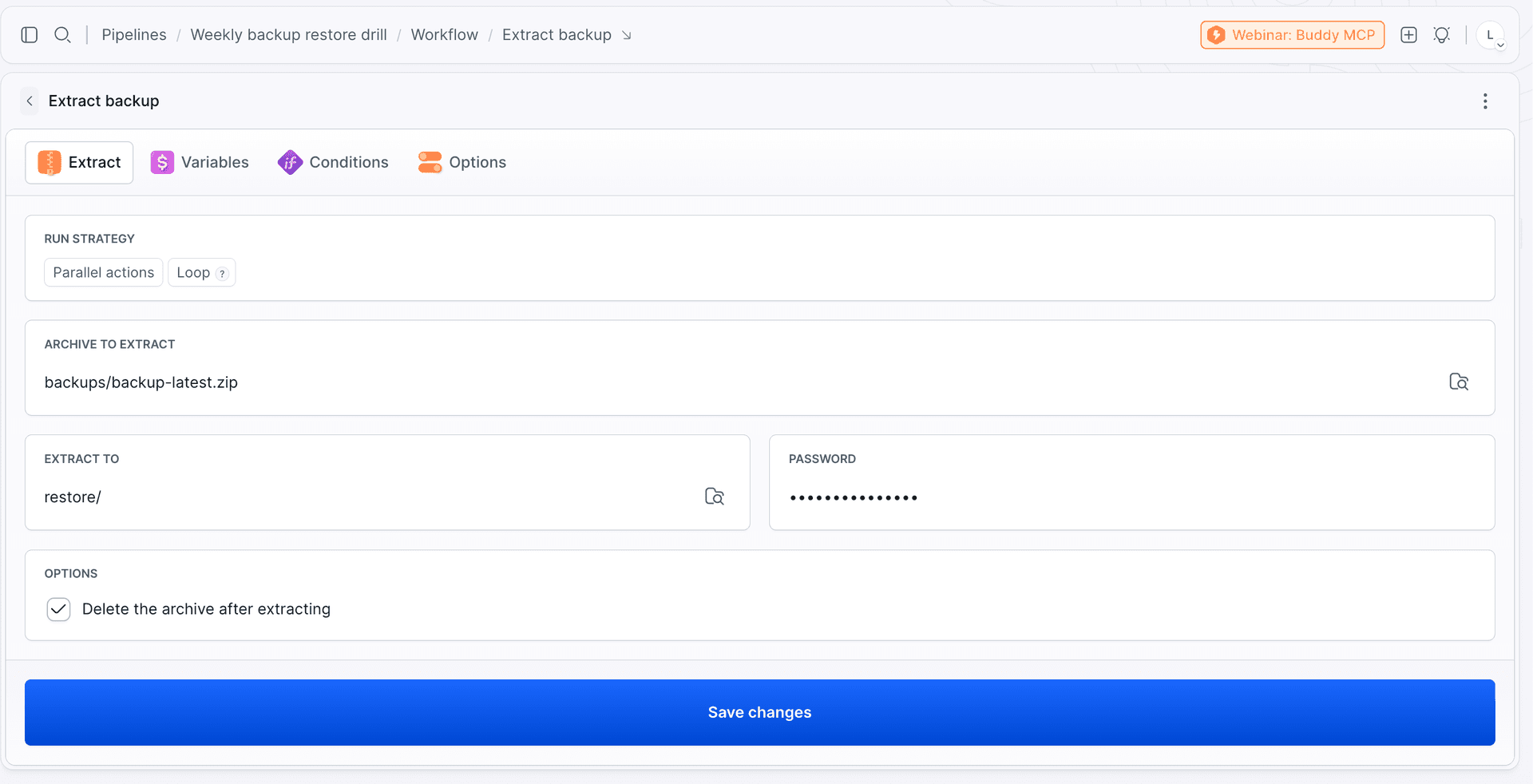
In YAML (full list of fields in the action docs):
yaml- action: Extract backup
  type: EXTRACT
  source_path: backups/backup-latest.zip
  destination_path: restore/
  password: $BACKUP_PASSWORD
  delete_source: true
This is the action log after a green run: the list of extracted files with sizes, the file count, and a note that the archive was deleted. The password is not there.
Image loading...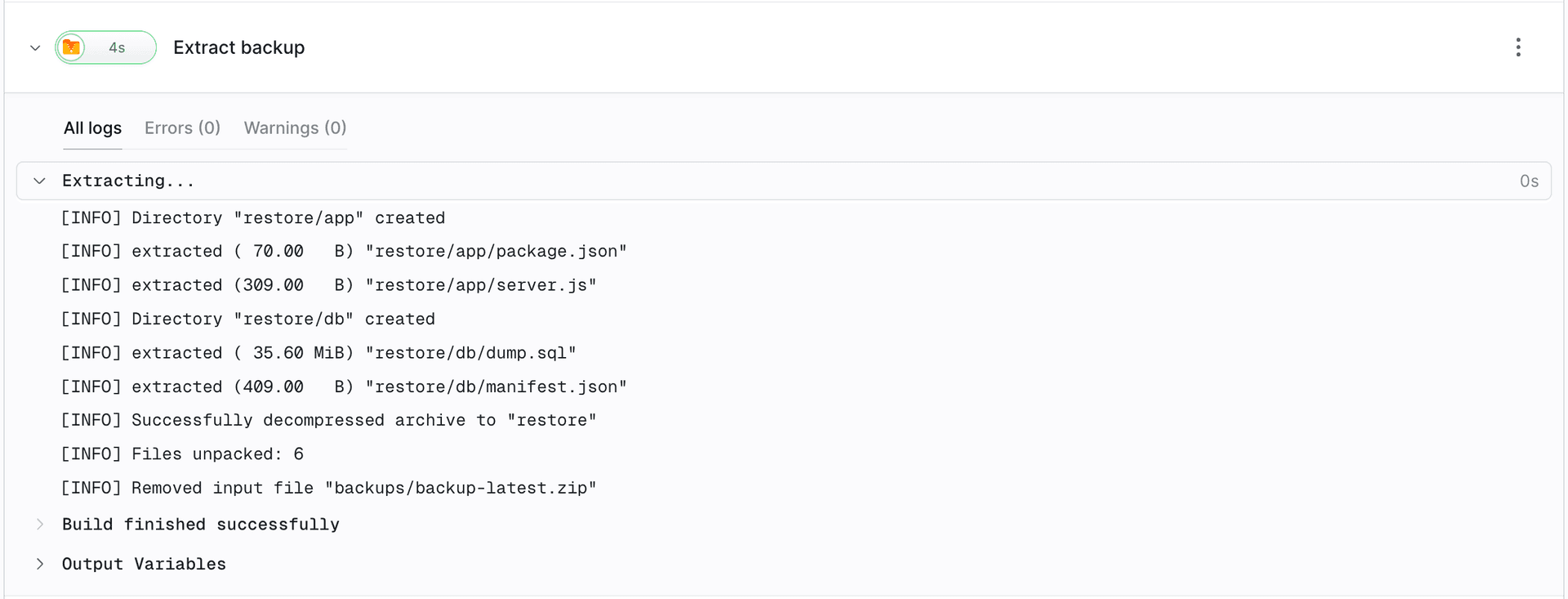
The pipeline: a restore drill every Monday at 3:00
The scenario is simple. Once a week, the pipeline downloads the latest application backup, unpacks it, spins up a clean machine from scratch, loads the data, starts the application, and checks that it responds. Then it deletes the machine. If any step fails, someone gets a Slack message.
The whole pipeline is eight actions, each doing one thing:
- Download latest backup - fetches
backup-latest.zipfrom S3 with the Download S3 action. The following actions start on the same filesystem, so the paths are shared. - Extract backup - the new action. It takes the password from an encrypted variable, unpacks the archive into
restore/, and deletes the zip. - Create clean sandbox - Ubuntu 24.04 from scratch, with the identifier
restore-drill-$BUDDY_EXECUTION_BRANCH. First boot installs Postgres and Node and creates an empty database. A fresh machine every time, so the test cannot "pass by accident" on leftovers from last week. Keep in mind that after the restore this sandbox holds a copy of production data: it exists only for the duration of the run and is deleted at the end, it gets no production credentials, and with personal data the drill should run on an anonymized dump. - Transfer backup to sandbox - a regular Transfer with the sandbox as the target.
- Restore and smoke test - checks that the dump is complete, loads it with
ON_ERROR_STOP, starts the application, and asks both the app and the database for data. If the backup is empty, corrupted, or stale, the run turns red right here. - Delete sandbox - cleanup.
- Delete sandbox after failure - the same, but with
trigger_time: ON_FAILURE, so a red run does not leave the sandbox behind. - Alert on Slack - runs only on failure, with the name of the failed action, a fragment of its log, and a link to the run.
Image loading...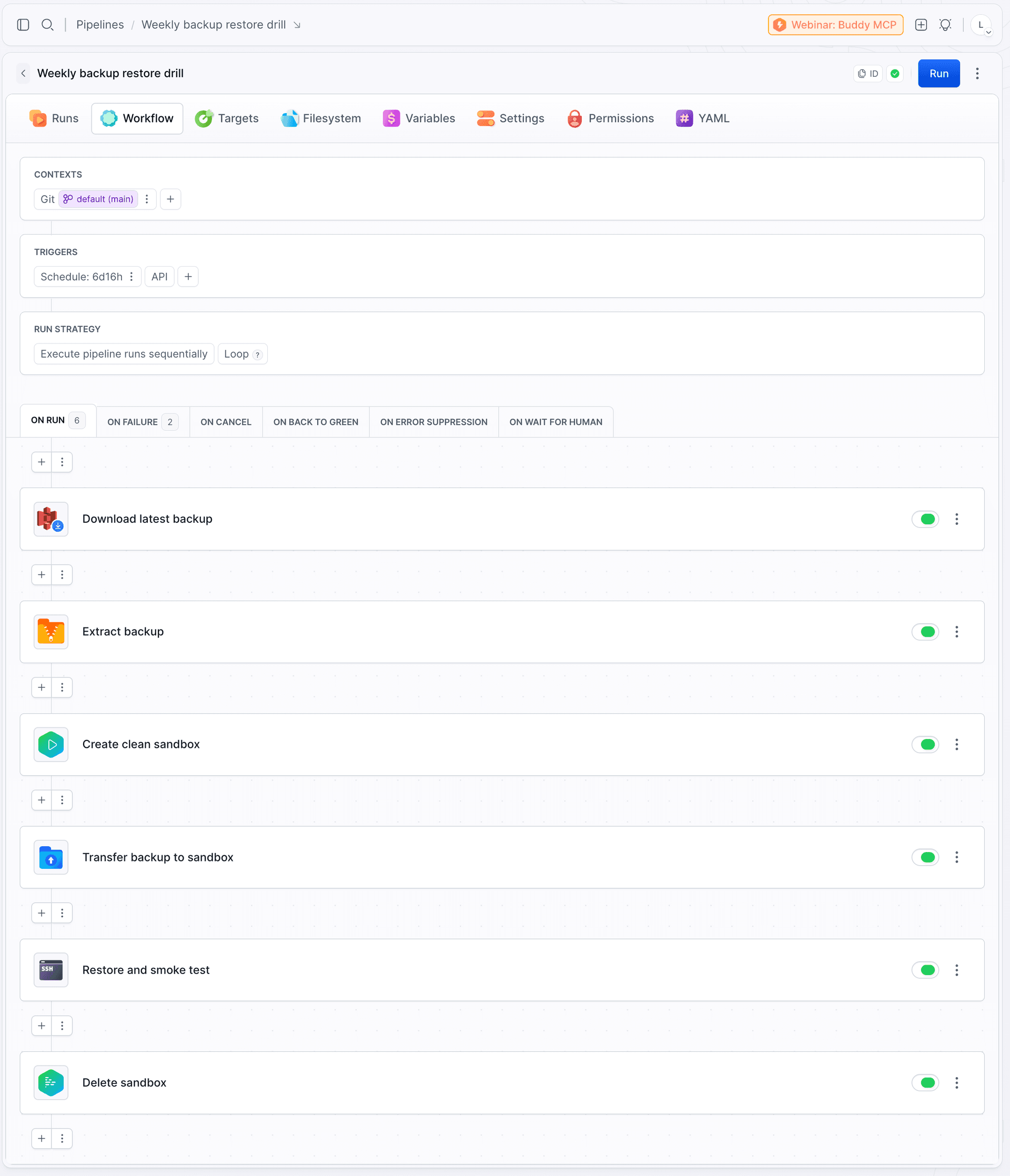
yaml- pipeline: backup-restore-drill
  name: Weekly backup restore drill
  refs:
  - :default
  fail_on_prepare_env_warning: true
  events:
  - type: SCHEDULE
    cron: 0 3 * * 1
    timezone: Europe/Warsaw
  variables:
  - key: BACKUP_BUCKET
    value: buddy-marketing-restore-drill-2026
  - key: BACKUP_PASSWORD
    value: '!encrypted iJKJZQUsiSC61dEfn/5+VJNoG/e7VsgLZqsE8TS6Ev8=.XYDCbw6Mpw37djN5byS/AA=='
    encrypted: true
  actions:
  - action: Download latest backup
    type: DOWNLOAD_S3
    retry_interval: 60
    retry_count: 3
    source_path: app/backup-latest.zip
    destination_path: backups/
    overwrite: true
    integration: amazon-web-services
    bucket_name: $BACKUP_BUCKET
  - action: Extract backup
    type: EXTRACT
    source_path: backups/backup-latest.zip
    destination_path: restore/
    password: $BACKUP_PASSWORD
    delete_source: true
  - action: Create clean sandbox
    type: SANDBOX_CREATE
    from: SCRATCH
    update_if_exists: true
    spec:
      sandbox: restore-drill-$BUDDY_EXECUTION_BRANCH
      name: Restore drill $BUDDY_EXECUTION_BRANCH
      os: ubuntu:24.04
      first_boot_commands: |-
        apt-get update
        apt-get install -y postgresql nodejs npm curl
        service postgresql start
        su postgres -c "psql -c \"CREATE ROLE app LOGIN SUPERUSER PASSWORD 'app'\""
        su postgres -c "createdb -O app app"
      tags:
      - restore-drill
  - action: Transfer backup to sandbox
    type: TRANSFER
    retry_interval: 30
    retry_count: 3
    local_path: /restore
    remote_path: /tmp/restore
    input_type: BUILD_ARTIFACTS
    targets:
    - restore-drill-$BUDDY_EXECUTION_BRANCH
  - action: Restore and smoke test
    type: SSH_COMMAND
    working_directory: /tmp/restore
    commands: |-
      set -euo pipefail
      export PGPASSWORD=app
      tail -n 20 db/dump.sql | grep -q "database dump complete"
      until pg_isready -h localhost; do sleep 2; done
      psql -h localhost -U app -d app -v ON_ERROR_STOP=1 -q -f db/dump.sql
      cd app && (node server.js &) && sleep 3
      curl --fail http://localhost:3000/health
      psql -h localhost -U app -d app -tAc "SELECT count(*) FROM orders" | awk '$1 > 0 {exit 0} {exit 1}'
      psql -h localhost -U app -d app -tAc "SELECT max(created_at) > now() - interval '36 hours' FROM orders" | grep -q t
    targets:
    - restore-drill-$BUDDY_EXECUTION_BRANCH
    run_as_script: true
  - action: Delete sandbox
    type: SANDBOX_MANAGE
    operation: DELETE
    targets:
    - restore-drill-$BUDDY_EXECUTION_BRANCH
  - action: Delete sandbox after failure
    type: SANDBOX_MANAGE
    trigger_time: ON_FAILURE
    ignore_errors: true
    operation: DELETE
    targets:
    - restore-drill-$BUDDY_EXECUTION_BRANCH
  - action: Alert on Slack
    type: SLACK
    trigger_time: ON_FAILURE
    content: |-
      :rotating_light: *Restore drill failed* - backup may not be restorable.
      Failed action: $BUDDY_FAILED_ACTION_NAME
      Reason: $BUDDY_FAILED_ACTION_LOGS
      Run: $BUDDY_RUN_URL
    integration: slack
    channel: alert
In our example, the bucket name and the archive password live in pipeline variables. BACKUP_BUCKET is plain text, while BACKUP_PASSWORD has encryption enabled, which is why the YAML shows an !encrypted ... value with the encrypted: true flag instead of the password. The value is stored encrypted, so the password ends up neither in the repository nor in the logs:
Image loading...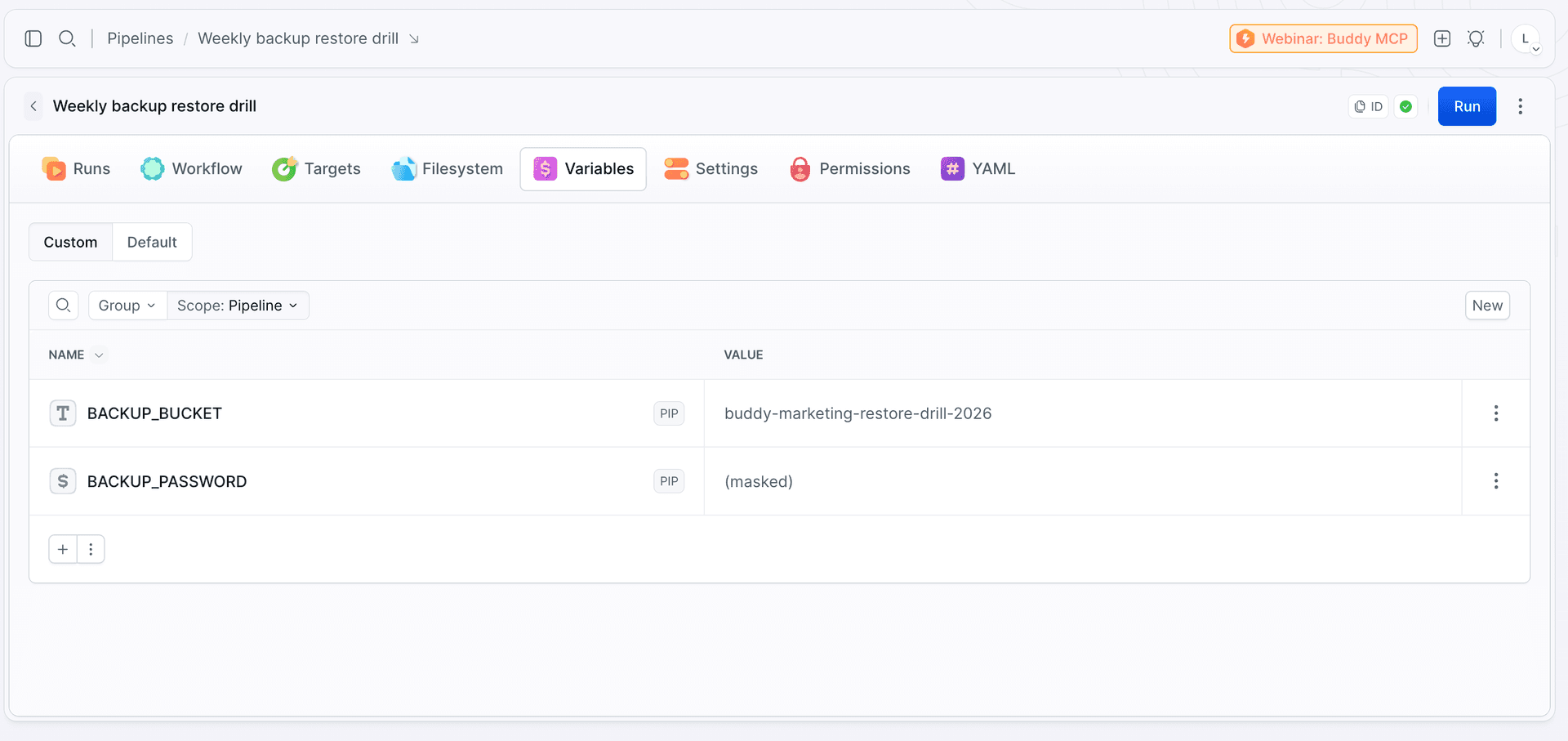
The whole run takes about 20 seconds.
Image loading...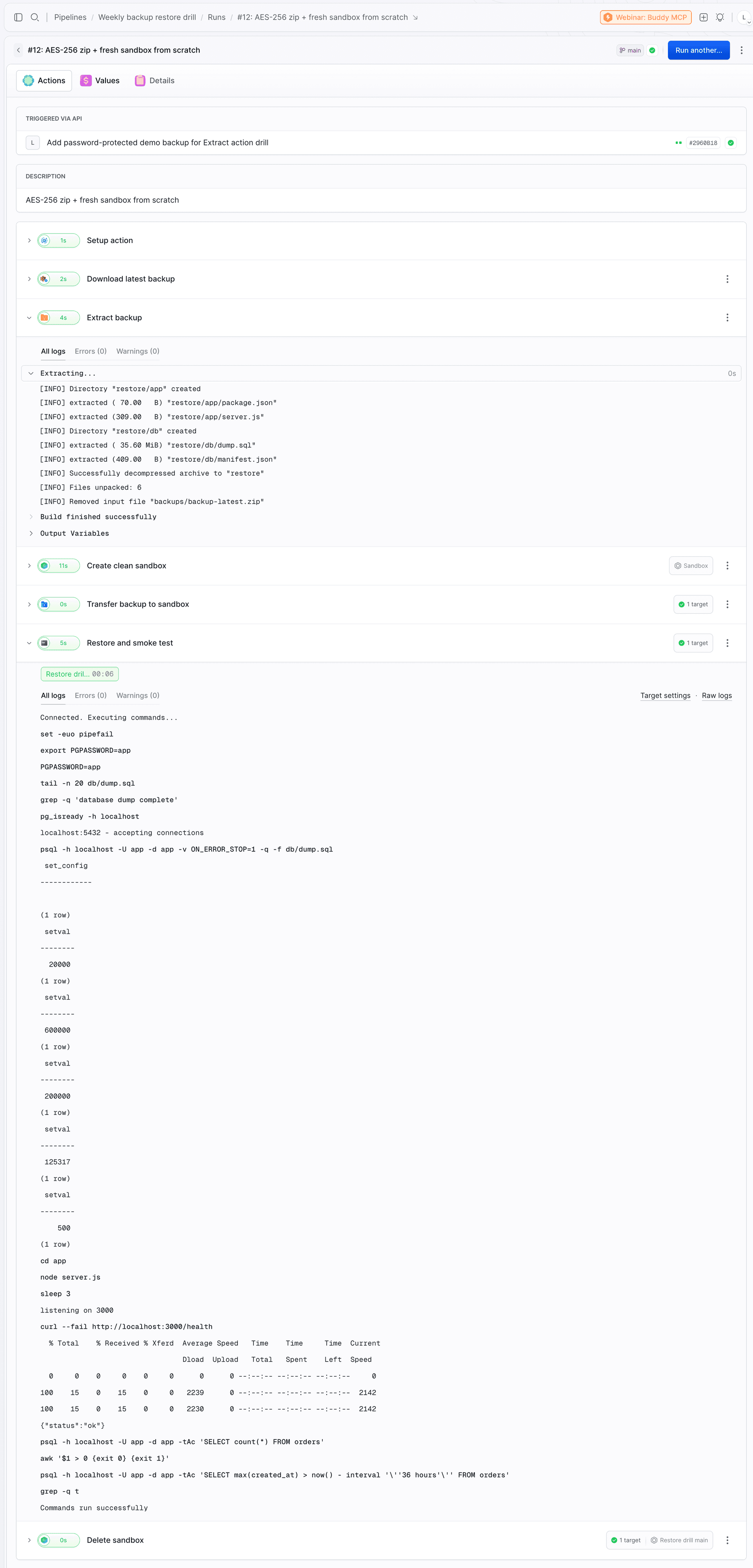
What makes a good smoke test
The smoke test in step five should stay focused on the backup itself. Its job is to confirm that the dump is complete, can be restored without errors, and contains recent application data. Broader application checks are better kept in a separate integration test.
Is the file complete? The most common silent backup failure is a truncated dump: full disk, killed process, cron timeout. Such a file often loads without a single error and leaves you with an incomplete database. A plain pg_dump ends with the line -- PostgreSQL database dump complete, so one line does the job:
bashtail -n 20 db/dump.sql | grep -q "database dump complete"$
Twenty lines, not three: since the August 2025 releases (16.10, 17.6), pg_dump appends \unrestrict after the marker, so tail -n 3 will miss it. We learned this on our own drill, which failed on exactly this line.
In MySQL, the footer -- Dump completed on ... plays the same role. The dump header (-- Dumped from database version 16.4) is worth comparing with the Postgres version on the sandbox. On Ubuntu 24.04, apt-get install postgresql gives you PG 16; if production is already on 17, a dump from a newer major version may not load into the older one, and the drill will catch that before an outage does.
Did it load without errors and in full? psql -f dump.sql without -v ON_ERROR_STOP=1 returns exit code 0 even when half the COPY statements fail. That is exactly the case where the drill is green and the backup is broken. Add set -euo pipefail at the top of the script, otherwise an error in the middle will not stop the rest, and psql | awk will swallow psql's exit code. Check the full set of tables against a list kept in the repo:
bashpsql -h localhost -U app -d app -tAc "SELECT tablename FROM pg_tables WHERE schemaname = 'public' ORDER BY 1" | diff - expected-tables.txt$
Keep expected-tables.txt next to the pipeline. A new table in production without an entry in that file is a red run, which is exactly what you want. Backup scripts with table lists or exclusions tend to skip a table added along the way after a year. On top of that, SELECT count(*) FROM pg_index WHERE NOT indisvalid should return zero: an index that failed to build during restore only hurts under load.
Is the data fresh and can the app see it? curl --fail /health catches an incompatible schema and a missing migration, but many /health endpoints never touch the database. That is why count(*) > 0 on orders stands next to it. An empty table with a working /health is the classic backup taken from a replica that stopped replicating. count(*) alone will not catch another classic, though: a backup-latest.zip that has been the same file for three weeks because the backup script died and nobody noticed. Hence the freshness test:
bashpsql -h localhost -U app -d app -tAc "SELECT max(created_at) > now() - interval '36 hours' FROM orders" | grep -q t$
Pick the threshold based on your RPO, that is, how much data you can afford to lose in a restore. This SELECT does not measure RPO; it checks whether this particular file still fits within it. If you have an endpoint that reads a specific record, such as GET /orders/<id>, it beats /health because it tells "the app is up" apart from "the app sees the data".
Leave table checksums and comparisons with production for later. That is no longer a restore test but a data quality test, and it deserves its own pipeline. One extension in that direction is described at the end: a manifest generated at backup time.
When the drill fails
A green run teaches you nothing. A red one tells you which step failed, and that immediately narrows down the cause:
- Download latest backup - the file is missing, the bucket was renamed, the integration lost its permissions. The backup is not being created, or it lands somewhere else.
- Extract backup - the archive is corrupted, or someone rotated the password without updating the variable. The S3 file listing looks perfectly normal.
- Restore and smoke test - the dump is truncated, loads with errors, the table is empty, or the data is stale.
Slack gets the action name and a fragment of its log, so the notification alone tells you whether the problem is in storage, in the archive, or in the data.
The pipeline filesystem is not clean
The sandbox is created from scratch, but the pipeline filesystem persists between runs, unless you start the run with the Clear cache option. That is what lets actions share paths, but it is also why a few things need attention:
- Leftovers from last week.
delete_source: trueremoves the archive but not the destination directory. After an Extract interrupted halfway, old files stay inrestore/. Add a Build action withrm -rf backups restorebefore Download, or extract intorestore-$BUDDY_RUN_ID/. - Sandbox after a red run. Without the Delete action on
ON_FAILURE, the machine stays after a failure, andupdate_if_exists: truein the next run reconfigures it instead of creating a fresh one, so nothing guarantees a clean disk. - Do not trust the mtime of the downloaded file. After Download S3, the modification date may reflect the download, not the backup. Read the backup age from the data (the freshness test above) or from the file name. In practice, it is better to keep dated files, list the bucket, and take the newest one. If it is older than 8 days, the run fails before downloading anything.
- Checksum. Keep
backup-latest.zip.sha256next to the archive, download both, and verify withsha256sum -cin a Build action before Extract. It catches a corrupted transfer and a file swapped in the bucket. Add a cheap size sanity check on top: a 2 KB dump is usually just the schema with no data.
How to package a dump for Extract
In the example, the archive is a zip with a plain dump.sql inside, because that is the most readable. Two things worth knowing before you change the format:
- No
zst. Extract does not supportzstortar.zsttoday. If you compress with zstd,zstd -din a Build action is the way to go. - AES-256, not ZipCrypto. The classic
zip -Puses weak ZipCrypto encryption. For backups, prefer 7z or a zip with AES-256 and check that your restore tooling opens it.
What to add once the basics work
The pipeline above is the minimum worth running every week. Natural extensions:
- A manifest generated at backup time. The backup script adds a
manifest.jsonto the archive with the date, thesha256of the dump, and row counts for key tables. After the restore, the drill compares those numbers with the database. For large tables, pick a few key ones instead of runningcount(*)on everything. Without it, a week-old backup with half the orders passes as valid. - RTO measurement. Record the duration of the restore step and fail when it exceeds a threshold. Together with the freshness check, the drill records the observed restore time and verifies that the backup still fits your RPO target, which is exactly what a SOC 2 or ISO 27001 audit asks for.
Dead man's switch. The pipeline alerts on failure, but not when it never runs at all: a disabled schedule, a deleted project. Add a final action that pings healthchecks.io or a similar service after a green run, and let it raise the alarm when the ping does not arrive.
yaml- action: Heartbeat type: BUILD docker_image_name: curlimages/curl commands: |- curl --fail --retry 3 https://hc-ping.com/$HEALTHCHECK_UUID- A drill on every backup. The schedule checks one backup a week. If you make them daily, add a Webhook trigger to the pipeline and call its URL with
curlat the end of the backup script. Every backup then gets its own drill a few minutes after it is created. While you are at it, enable versioning or Object Lock on the bucket, so a broken script cannot overwrite the only good copy before the drill checks it. - Physical backups for large databases. Above a few dozen gigabytes, a logical dump stops being realistic. pgBackRest or WAL-G give you point-in-time recovery and their own verification (
pgbackrest verify,pg_verifybackupon the manifest frompg_basebackup). The drill looks the same: a clean sandbox, a restore to a chosen point in time, the same three questions.
Extract is available in all workspaces now. If you have backups nobody has restored in a long time, this pipeline is a good way to find out on Monday at 3:00 instead of in the middle of an outage.

Jarek Dylewski
Customer Support
A journalist and an SEO specialist trying to find himself in the unforgiving world of coders. Gamer, a non-fiction literature fan and obsessive carnivore. Jarek uses his talents to convert the programming lingo into a cohesive and approachable narration.