Using Buddy MCP to Fix a Failed Pipeline
Your AI agent is good at fixing code, but it has no idea what happens after the push. A pipeline in Buddy goes red and the agent will not find out until you open the execution, read the log and paste the stack trace into the chat. Then commit, push, and wait again to see if it passes this time.
Instead, Buddy exposes MCP tools that let the agent read pipeline logs, identify the cause, update the code and rerun the pipeline. Access is limited by the permissions you grant during authorization.
MCP in three sentences
Model Context Protocol (MCP) is an open standard that lets an AI agent call tools exposed by external systems in one consistent way. Buddy runs a remote MCP server, so a connected agent can actually do things in Buddy - list pipelines, read execution logs, trigger a deployment - instead of just talking about them. Nothing is installed locally: you point your client at a URL, sign in, and the agent gets a set of tools it can operate.
What Buddy MCP tools give your AI agent
The server exposes 118 tools across 12 categories, from pipelines and source to sandboxes, packages and domains. To fix a red pipeline the agent needs five of them:
| Tool | What it does |
|---|---|
list-pipelines | lists the pipelines in a project |
list-runs | recent executions of a pipeline with status and branch |
get-run | execution details: revision, list of actions, which one failed |
get-run-action-logs | the full log of a given action, line by line |
run-pipeline | triggers the pipeline on a branch and waits for the result |
The agent can retrieve the same execution logs available in the Buddy UI. For this example, we also limit the available MCP tools to the categories required for the task.
Fixing a failed pipeline with Claude Code: one real run
The setup is small: a Node.js shop API in the buddy-mcp-demo project and a Build & deploy pipeline with two actions. Test runs npm test, while Package builds the artifact.
The agent is Claude Code connected to Buddy MCP with access to only the workspace this project lives in, read-only scopes for Pipelines and Repositories plus the right to run a pipeline, and no access to anything else. In our session we also narrowed the URL with the ?tools=pipelines,source filter, so the agent saw 28 tools instead of 118 and never got a members or domains tool, let alone a project deletion tool. How to set that up is below, the run comes first.
Image loading...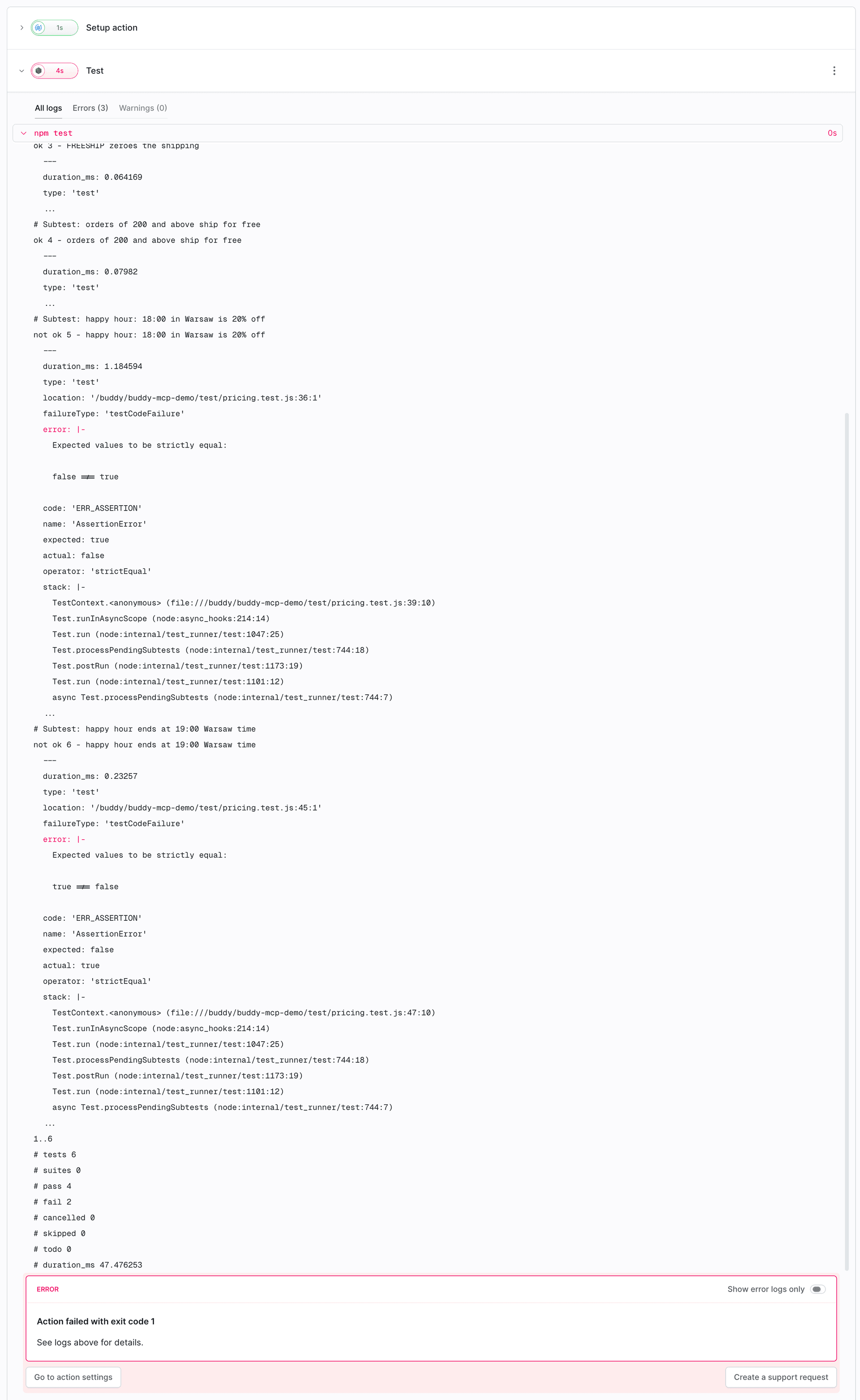
Instead of opening the log, we ask Claude Code:
The "Build & deploy" pipeline in the buddy-mcp-demo project failed on its last execution.
Use Buddy MCP to read the execution log, find what broke, and fix it in this repository.
Do not push anything yet - show me the diff first.
The agent starts with three Buddy MCP calls. First the recent executions of the pipeline, then the details of the one that failed, and finally the log of the Test action:
buddy - list-runs (workspace: "buddy-marketing", projectName: "buddy-mcp-demo", pipeline: "build-and-deploy")
  → { "id": 1, "status": "FAILED", "branch": "main", "comment": "baseline: expected to fail on Test" }
buddy - get-run (pipeline: "build-and-deploy", runId: 1)
  → action_runs: [ { "action_name": "Test", "status": "FAILED" }, { "action_name": "Package", "status": "ENQUEUED" } ]
buddy - get-run-action-logs (runId: 1, actionRunId: "madxhtfmxm0muc")
  → { "total_element_count": 98, "logs": [ "Pulling image library/node:22", ... ] }
Image loading...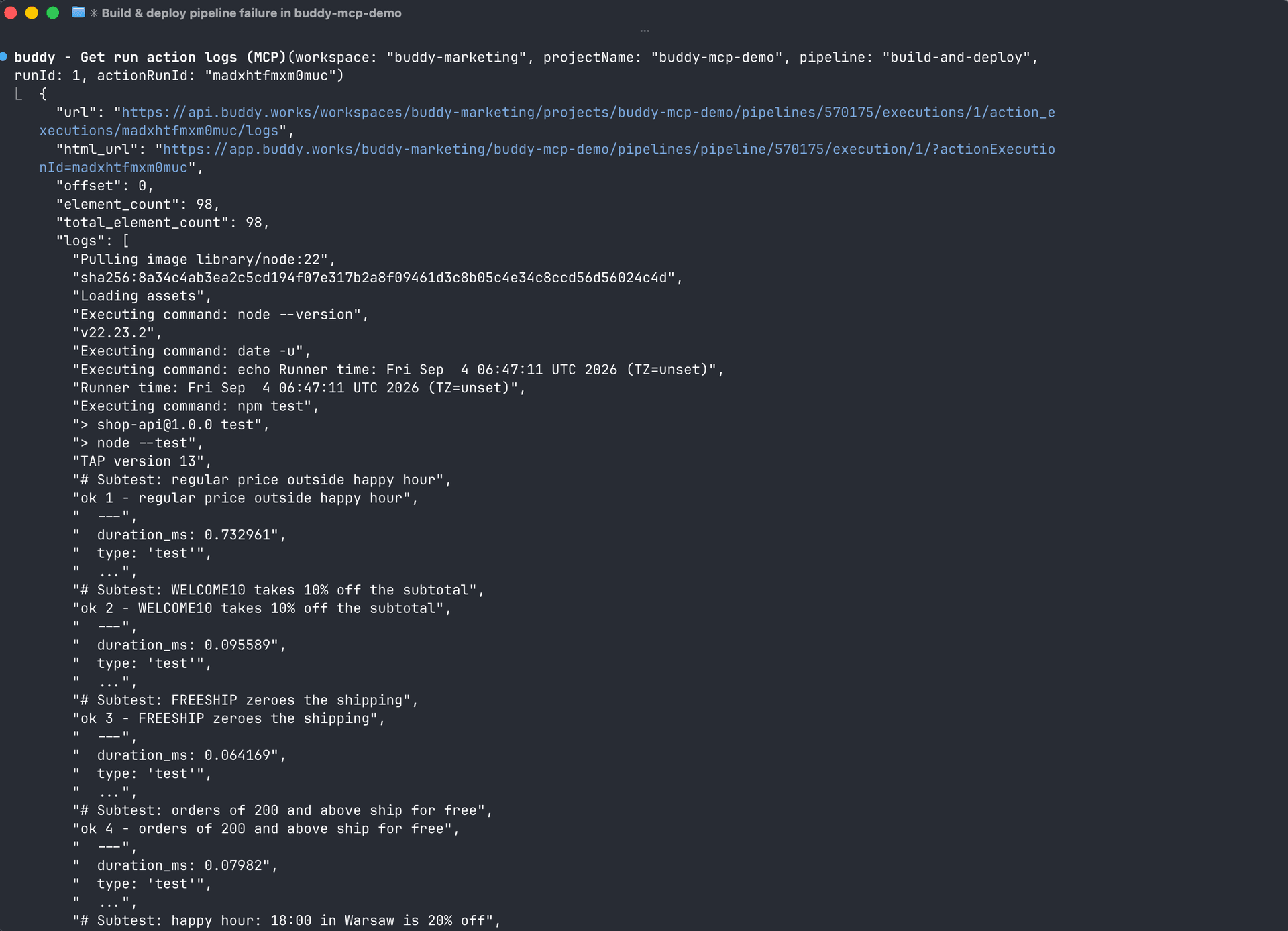
The log from that last call contains two lines that explain everything, even though they are far apart:
Runner time: Fri Sep  4 06:47:11 UTC 2026 (TZ=unset)
...
not ok 5 - happy hour: 18:00 in Warsaw is 20% off
  error: Expected values to be strictly equal: false !== true
  location: '/buddy/buddy-mcp-demo/test/pricing.test.js:36:1'
not ok 6 - happy hour ends at 19:00 Warsaw time
  error: Expected values to be strictly equal: true !== false
# pass 4
# fail 2
The failure comes from isHappyHour using getHours(), which depends on the process time zone. On a developer's laptop in Warsaw, 16:00 UTC is 18:00 and the discount kicks in. On a UTC runner the same moment is hour 16 and happy hour never starts. The same issue could also affect production if the application runs on a server configured for UTC.
The fix keeps the hour in the shop's time zone, whatever machine it runs on:
--- a/src/pricing.js
+++ b/src/pricing.js
@@ -11,8 +11,22 @@ export const COUPONS = {
   FREESHIP: { shipping: true },
 };

+export const SHOP_TIMEZONE = 'Europe/Warsaw';
+
+const shopHourFormatter = new Intl.DateTimeFormat('en-US', {
+  timeZone: SHOP_TIMEZONE,
+  hour: 'numeric',
+  hourCycle: 'h23',
+});
+
+// Hour of the day (0-23) in the shop's local time zone, regardless of the
+// TZ the process runs in (CI runners and servers are usually on UTC).
+export function shopHour(now = new Date()) {
+  return Number(shopHourFormatter.format(now));
+}
+
 export function isHappyHour(now = new Date()) {
-  const hour = now.getHours();
+  const hour = shopHour(now);
   return hour >= HAPPY_HOUR_START && hour < HAPPY_HOUR_END;
 }
Before showing the diff, the agent ran all six tests under UTC, Europe/Warsaw and America/New_York. All passed, and no changes were pushed.
Image loading...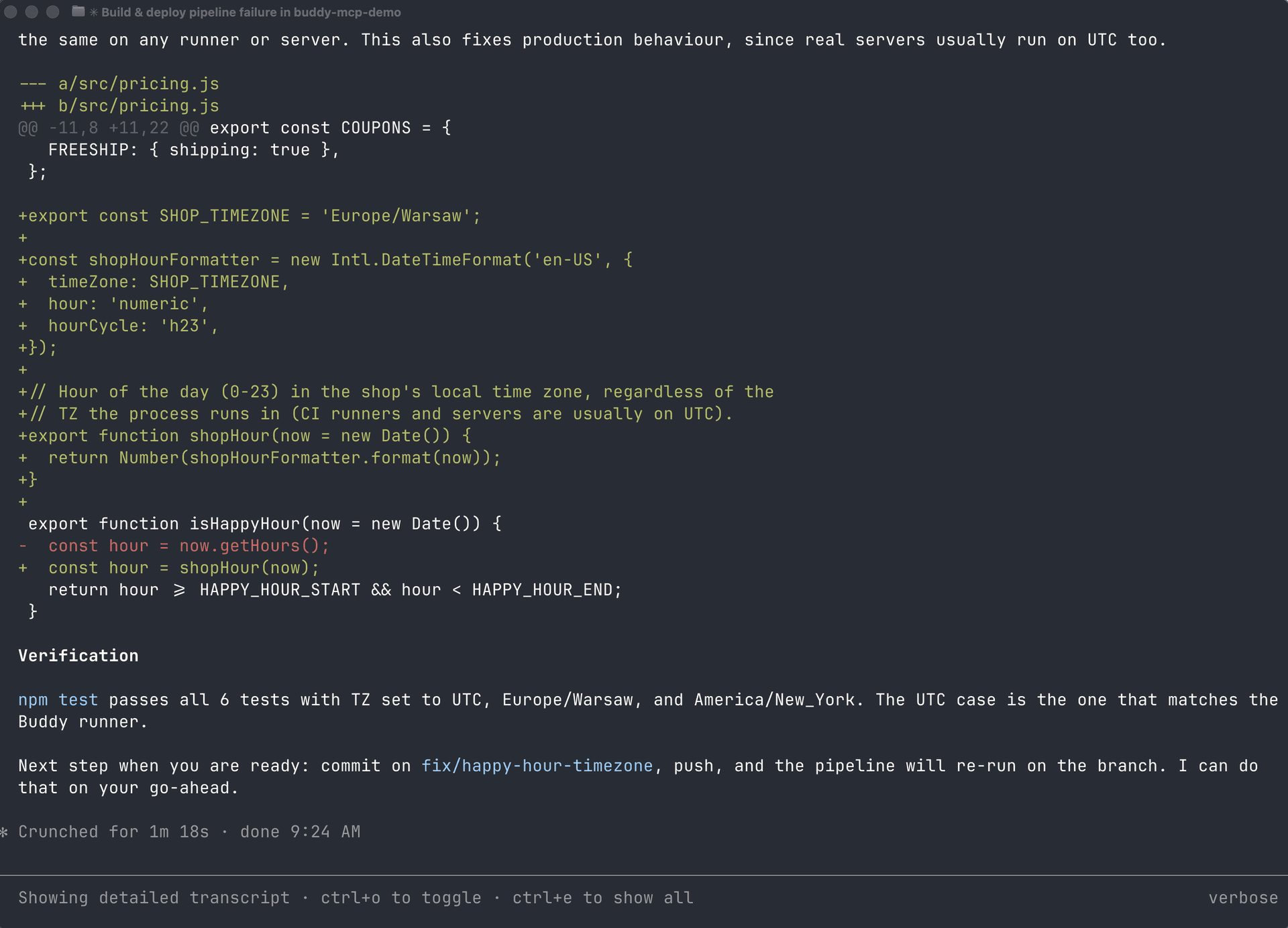
After reviewing the diff, we ask it to commit the change and rerun the pipeline:
Looks good. Commit it, push the branch, then run the "Build & deploy" pipeline on fix/happy-hour-timezone and tell me if it passes.
The agent commits, pushes the branch and triggers the pipeline. The run-pipeline waits for the execution to finish, so the agent receives the final result without polling:
buddy - run-pipeline (pipeline: "build-and-deploy", branch: "fix/happy-hour-timezone", revision: "e1ce98d",
                      comment: "Verify happy hour timezone fix (e1ce98d)", timeoutSec: 300)
  → {
      "id": 3,
      "status": "SUCCESSFUL",
      "start_date": "2026-09-04T07:29:51.16Z",
      "finish_date": "2026-09-04T07:29:57.751Z",
      "branch": "fix/happy-hour-timezone",
      "action_runs": [
        { "action_name": "Test", "status": "SUCCESSFUL" },
        { "action_name": "Package", "status": "SUCCESSFUL" }
      ]
    }
The agent's report: run #3 on fix/happy-hour-timezone passed in seven seconds, both actions green, a link to the execution, and the branch is ready for a PR into main.
Image loading...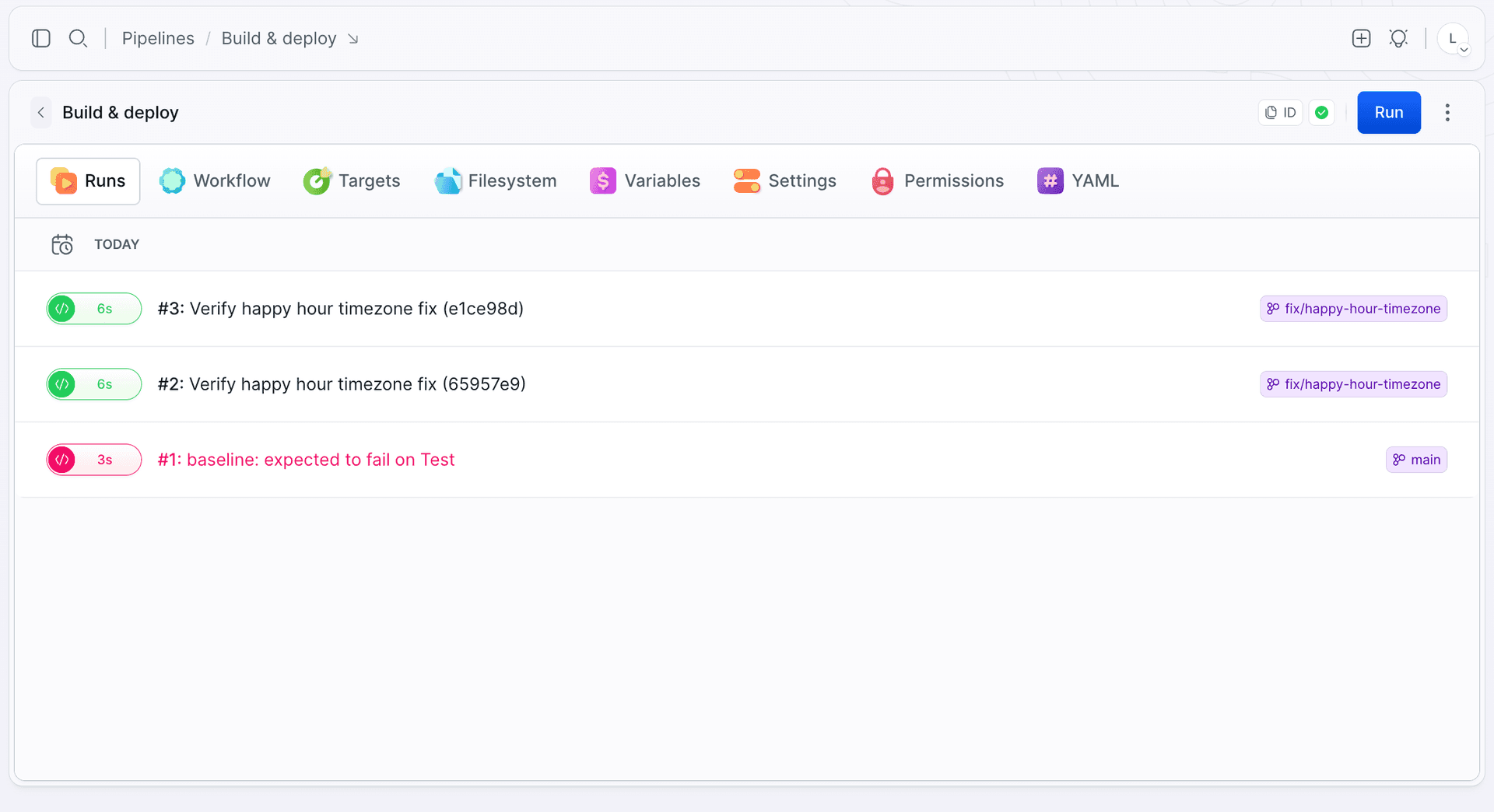
Image loading...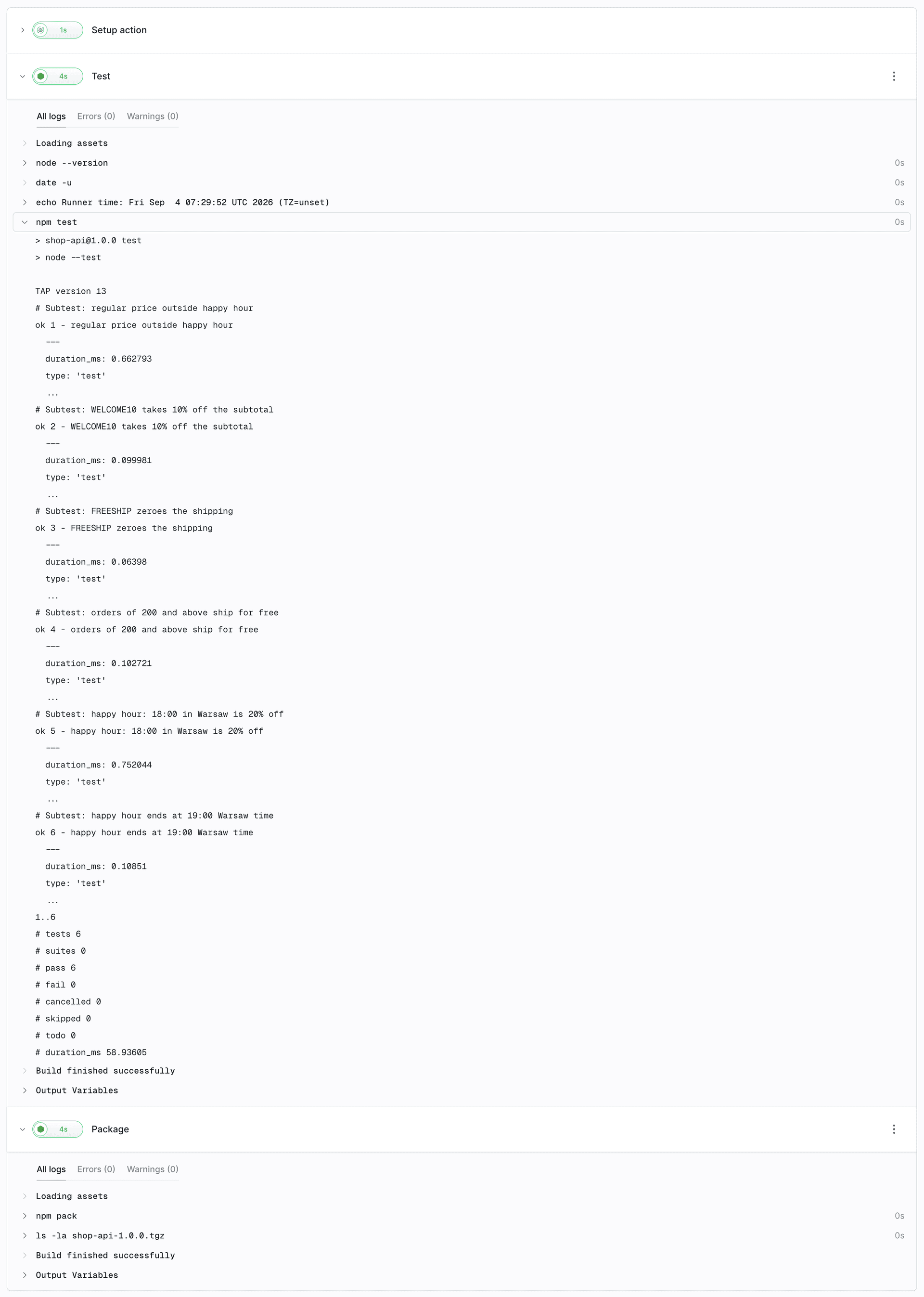
The first step took 78 seconds to diagnose and fix the issue. Committing, pushing and rerunning the pipeline took another 40 seconds.
How much access to give an AI agent in CI/CD
MCP tools operate on your real Buddy workspace, so permissions should be limited to what the task requires. Some tools can modify or delete workspace resources. An agent that only needs to inspect a failed pipeline should not have access to them.
Start read-only
On the first connection Buddy opens an authorization screen. The client asks for everything, but you decide what it gets. Two fields on that screen do all the work:
- Workspace access - defaults to "All workspaces accessible". Change it to the one workspace the agent should work in.
- Scopes - every category (Pipelines, Repositories, Sandboxes, Domains...) has its own level: No access, Read-only, Write, Manage. The "Read-only" button above the list sets all of them at once.
Image loading...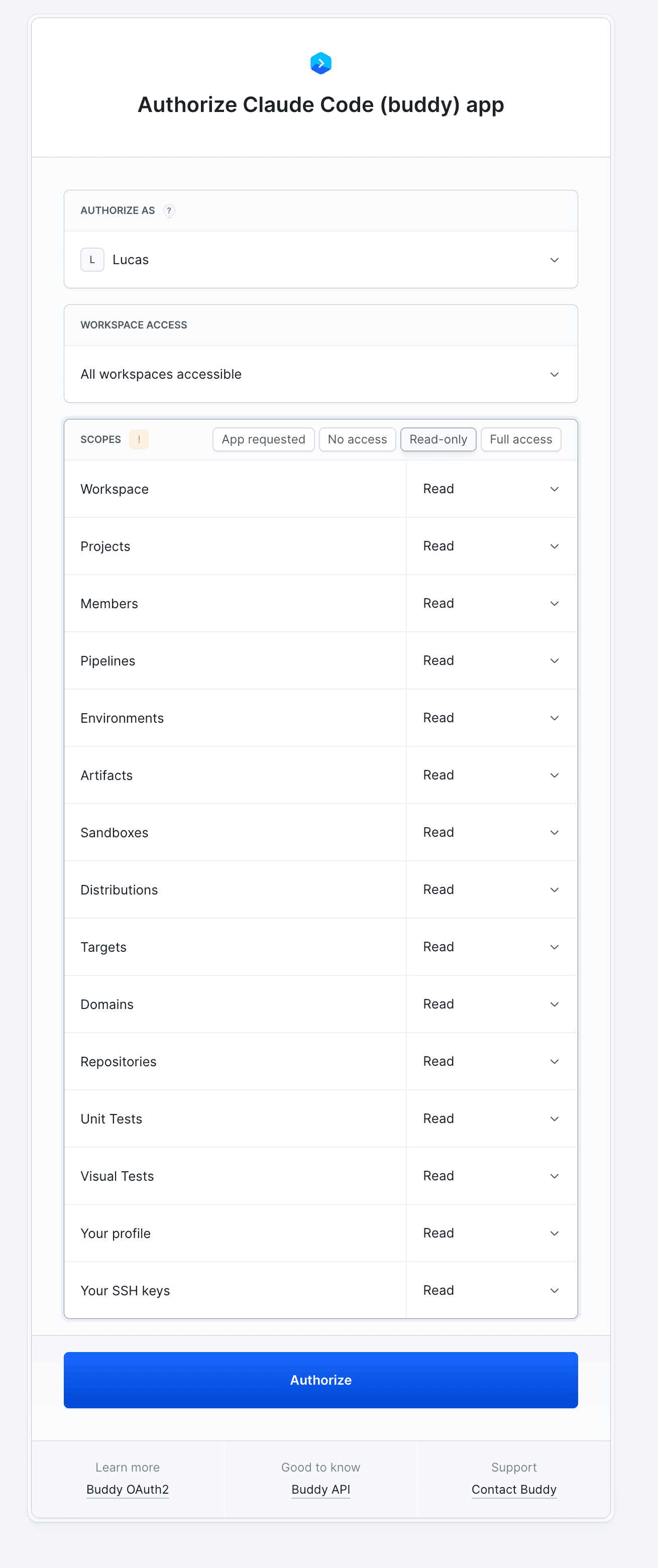
Once you are comfortable with the results from read-only access, raise Pipelines to the level that allows running an execution, and nothing more.
Scopes do more than gate the token. The server builds the tool list from the scopes you granted, so a category set to "No access" does not show up as tools at all. Leave Targets without access and the agent never sees a single target tool, not even a read-only one. Set everything to Read-only and every tool that modifies or deletes something disappears from the list. What the agent cannot do, it cannot see.
Optional: narrow the tool list in the URL
The server URL also takes a tools parameter with a comma-separated list of categories:
https://mcp.buddy.works/mcp?tools=pipelines,source
Image loading...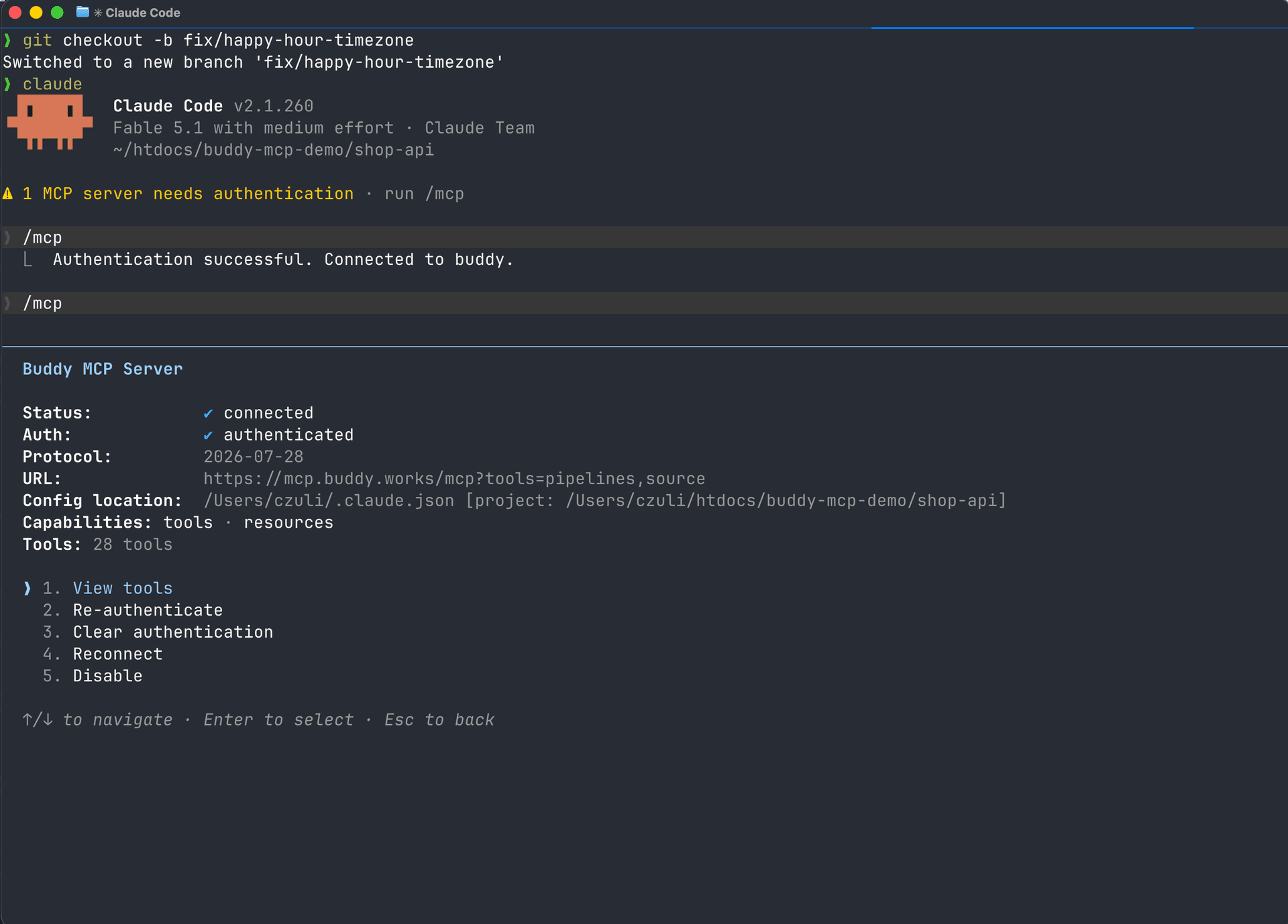
This is the URL from our session: 28 tools instead of 118. Since scopes already trim the list, the filter is not required for security. It is useful when the scopes are broader than a single task: a shorter tool list keeps the agent focused on the categories that matter. It also helps when one URL is configured centrally, for example an MCP server added to Claude.ai for the whole organization, where each person picks their own scopes at sign-in but the admin decides which categories are exposed at all.
A separate token for the agent in CI
If the agent runs without a browser, inside a pipeline or as a custom bot, it gets a personal access token instead of OAuth. The token has the same scope categories as the authorization screen (Pipelines, Repositories, Sandboxes, Domains...) plus two things OAuth does not give you: an expiration date and a restriction to specific IP addresses, such as your CI runners. Create a dedicated token for the agent: read-only to start, valid for 30 days, pinned to an IP. Do not reuse the token you use for everything else. If it ever leaks, the attacker gets what the agent had: read access to pipelines, not your account.
Keep a human in the loop
Keep code review and merge approval with a human. The first prompt in our run ended with "do not push anything yet", the second went out only after we had looked at the diff. There is one more reason to work this way: a pipeline log is untrusted input. Your dependencies, your tests and everyone who has ever committed write into it. An agent that reads such a log and acts on it should not be the same agent that ships to production on its own.
Connect Claude Code, Cursor or Codex to Buddy MCP
1. Pick the server URL for your workspace's region:
| Region | URL |
|---|---|
| US | https://mcp.buddy.works/mcp |
| Europe | https://mcp.eu.buddy.works/mcp |
| Asia | https://mcp.asia.buddy.works/mcp |
2. Add it to your client. Claude Code:
claude mcp add --transport http buddy "https://mcp.buddy.works/mcp"
$
Image loading...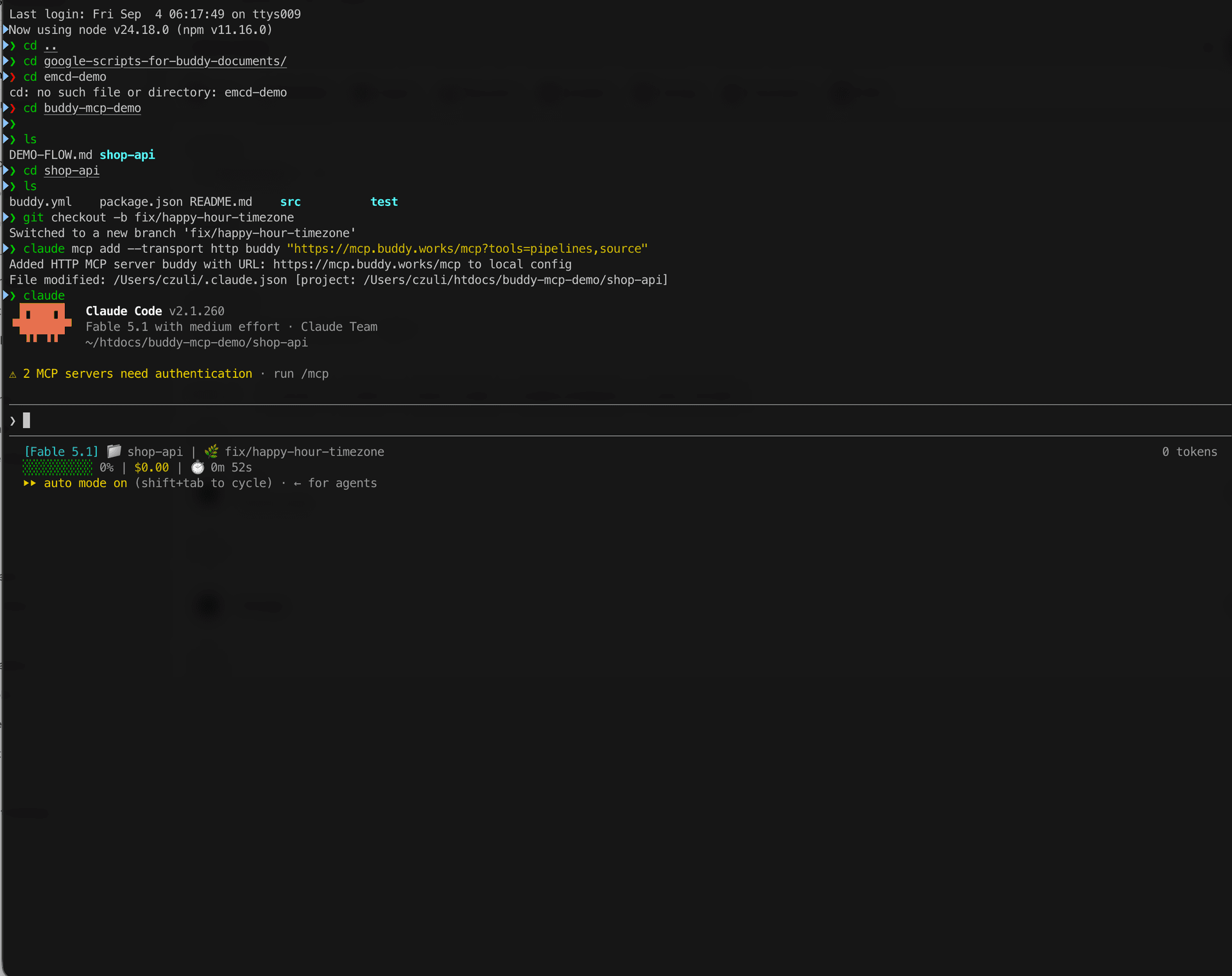
Cursor, in .cursor/mcp.json:
{
  "mcpServers": {
    "buddy": {
      "url": "https://mcp.buddy.works/mcp"
    }
  }
}
Codex CLI, in ~/.codex/config.toml:
[mcp_servers.buddy]
url = "https://mcp.buddy.works/mcp"
3. Sign in. In Claude Code type /mcp, pick buddy and "Authenticate". A browser opens with the authorization screen from the previous section: pick the workspace, set the scopes, confirm. Cursor and Codex do the same on the first tool call.
Image loading...
In CI or in a custom agent without a browser, pass a personal access token instead:
{
  "mcpServers": {
    "buddy": {
      "url": "https://mcp.buddy.works/mcp",
      "headers": {
        "Authorization": "Bearer <YOUR_TOKEN>"
      }
    }
  }
}
What's next
Headless mode with a token means the same server works from inside a pipeline. Drop a coding agent action into the pipeline's ON FAILURE section, give it the Buddy MCP server with a read-only token, and the agent will diagnose the failure and write the cause into the pull request before anyone opens the log.
Learn more
- MCP with Buddy - server URLs, authentication, tool filtering
- AI agents in Buddy - every supported client
- Buddy CLI: getting started - the same thing from the terminal, no agent:
bdy pip run start,bdy pip run logs - Automate Cursor Agent with Buddy Pipelines - the other side of the coin: an agent inside the pipeline
- Automate Codex CLI with Buddy Pipelines
Watch the run
The whole session from the red pipeline to the green one, recorded in Claude Code:

Jarek Dylewski
Customer Support
A journalist and an SEO specialist trying to find himself in the unforgiving world of coders. Gamer, a non-fiction literature fan and obsessive carnivore. Jarek uses his talents to convert the programming lingo into a cohesive and approachable narration.