GitHub Release artifacts in Buddy: auto-deploy new releases
Buddy now supports GitHub Release artifacts. Connect a repository, and Buddy creates artifact versions from the files attached to new releases. A new version can trigger a pipeline that, for example, deploys a GitHub pre-release to staging and requires approval before deploying a stable release to production. In our demo, one release candidate passed its GitHub Actions tests but failed the Buddy smoke test before deployment.
What does a GitHub Release artifact give you?
If you already publish application packages in GitHub releases, the release process does not need to change. A Buddy pipeline can download, test, and deploy the attached files.
Each artifact version is named after the release tag and contains the assets attached to that release. Buddy does not download the source code archives that GitHub generates automatically. A pipeline triggered by a new version receives its name and whether it is a pre-release, so it can download the right package and pick the target environment.
Image loading...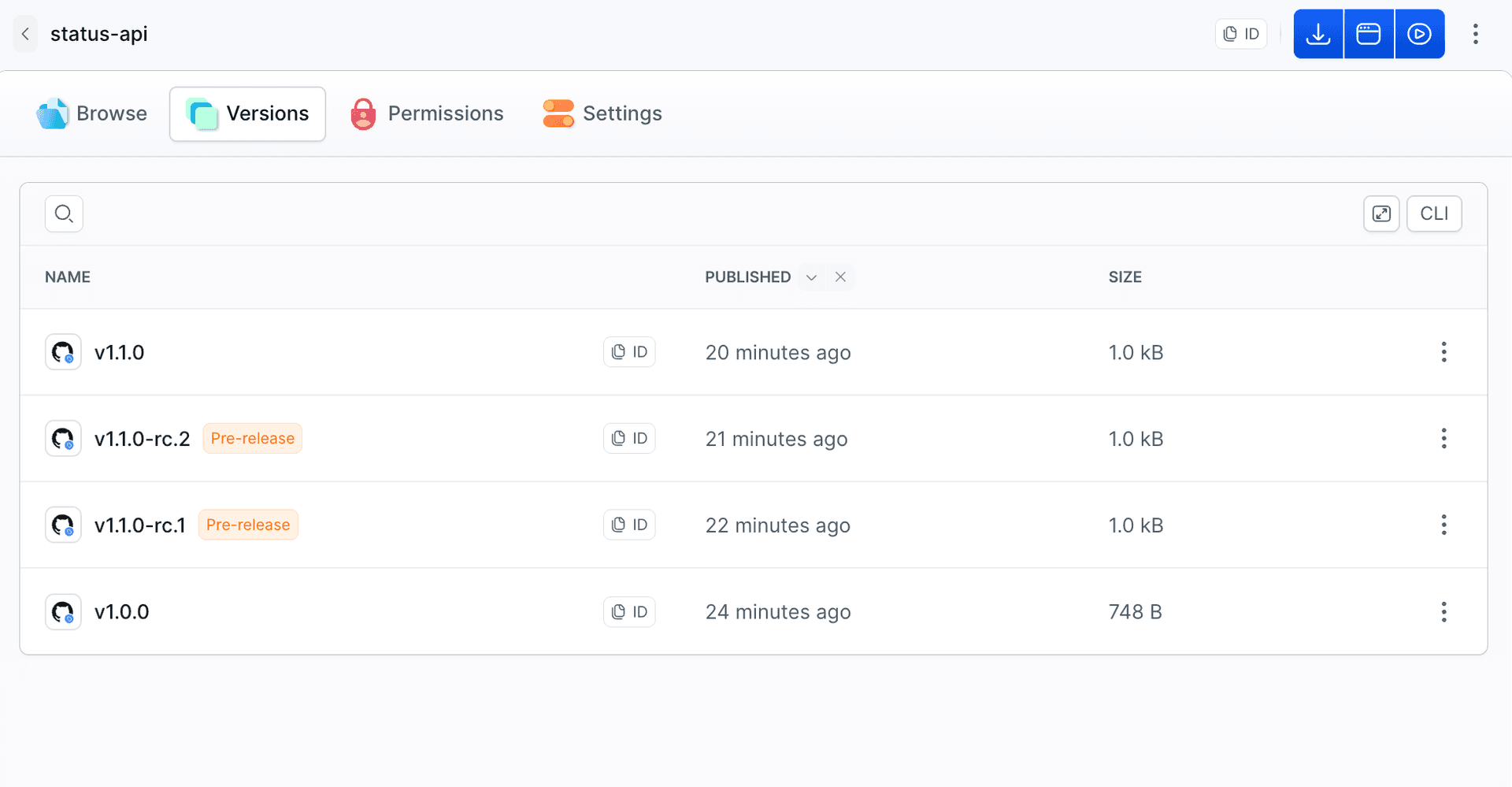
Artifact version is read only. To create releases from Buddy, use the GitHub Release action.
Example: RC to staging, stable to production
We tested this scenario on a small Node app, status-api, with a /health endpoint. GitHub Actions publishes the app as an archive attached to the release. Buddy downloads it, checks that the app starts after installing production dependencies, and routes the run based on the release type:
- Pre-release: deploy to staging and check the deployed version.
- Stable: manual approval, deploy to production, and check the deployed version.
- Failed smoke test: stop the run before deployment.
Image loading...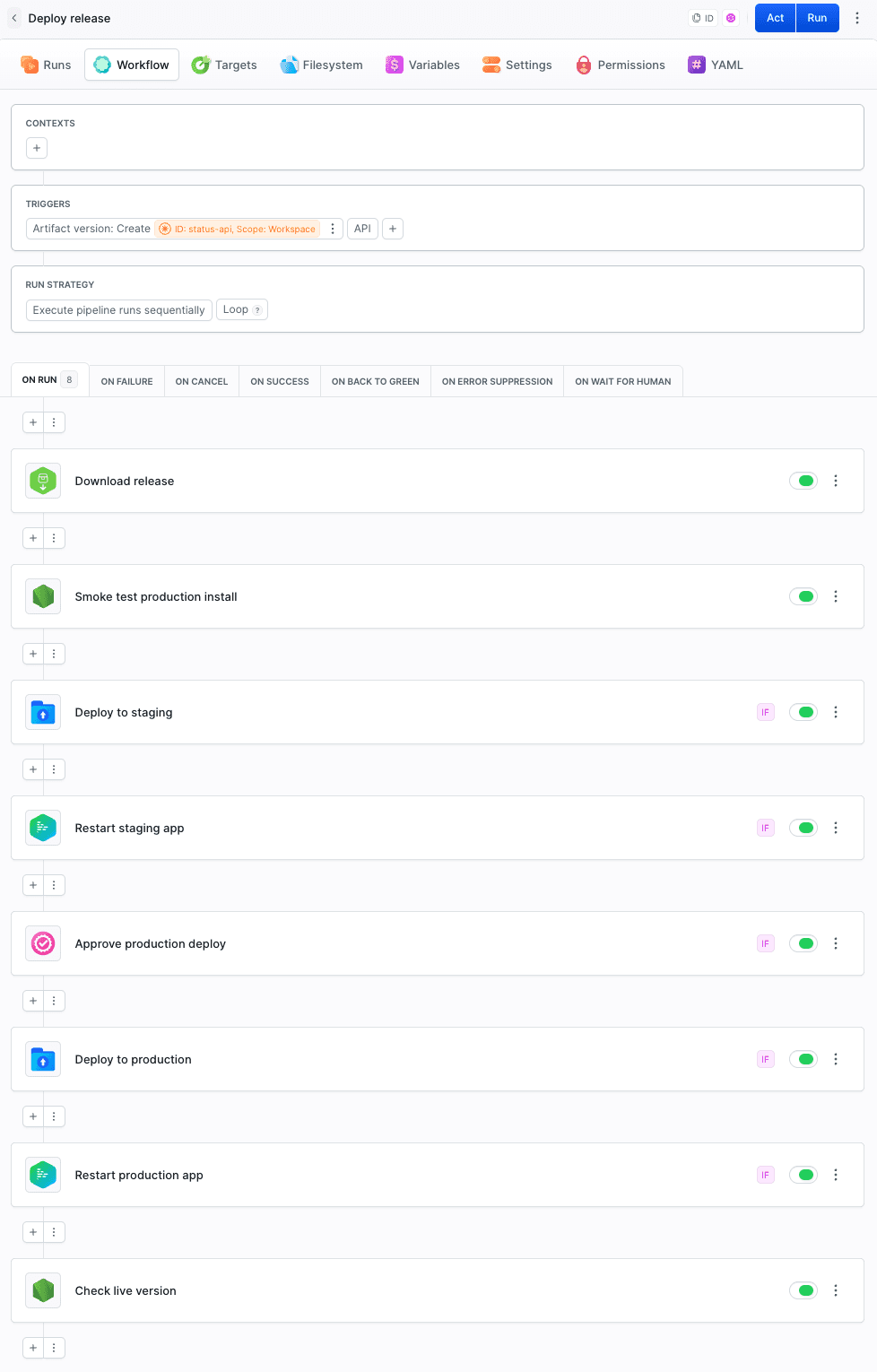
In the demo, both environments are Buddy sandboxes. You can replace them with your own deployment targets. The stable release is packaged separately and goes through its own smoke test. This example routes different releases to staging and production. Promoting the same package from staging to production requires a different pipeline setup.
How do you create a GitHub Release artifact?
Create the artifact in the Artifacts tab of your workspace and choose the GitHub Release type:
- Repository - a repo from your GitHub integration.
- Scope - where the artifact is available: workspace, project, or environment.
- Include draft releases - whether to create versions from drafts.
- Include pre-releases - whether to create versions from pre-releases.
- Retention artifact version pattern - retention rules for versions matching a name pattern, e.g.
v*-rc.*.
When you connect a repository, Buddy does not import its existing releases. Versions are created only from new ones, so connecting a repo with a release history will not trigger any pipelines.
Image loading...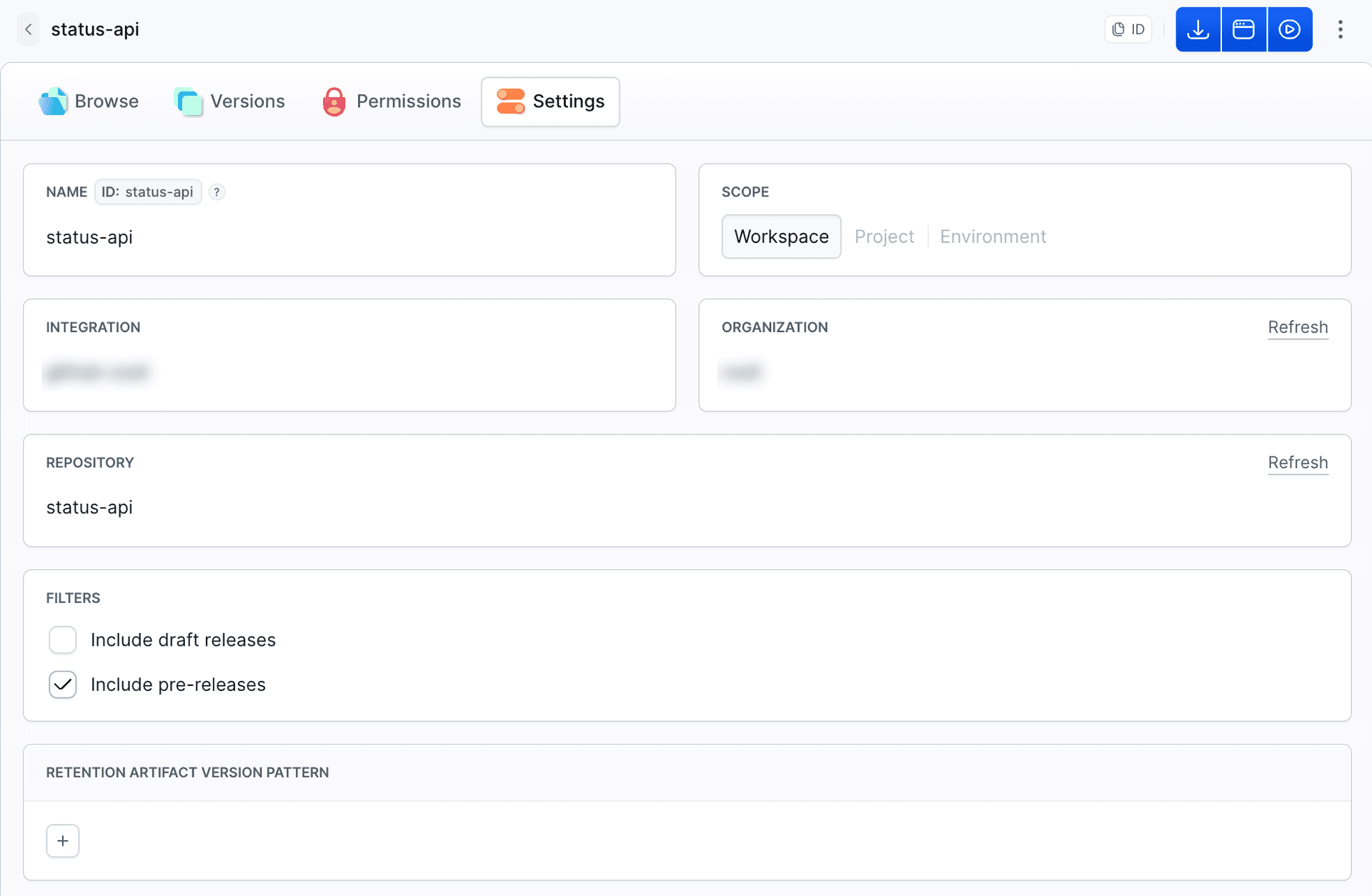
The pipeline requires the Use role in the artifact's Permissions tab. If a run stops with Pipeline not allowed to Use artifact, verify that the pipeline has this permission.
How do you run a pipeline on a new release?
Add the Artifact version: Create trigger and select the artifact. In our example, it is status-api. In YAML:
events:
- type: CREATE_ARTIFACT_VERSION
  artifacts:
  - identifier: status-api
    scope: WORKSPACE
A run triggered by a new GitHub Release artifact version gets two variables, and the whole pipeline is built on them:
| Variable | Value |
|---|---|
BUDDY_RUN_ARTIFACT_VERSION | release tag, e.g. v1.1.0-rc.2 |
BUDDY_RUN_ARTIFACT_VERSION_PRERELEASE | true for a GitHub pre-release, false for stable |
Buddy reads the release type from the pre-release flag on GitHub, not from the tag name. If your workflow does not set the flag, an RC reaches the pipeline as stable.
The full YAML is at the end of the post.
Downloading the version
Download artifact version downloads the version that triggered the run ($BUDDY_RUN_ARTIFACT_VERSION) into its own directory. The pipeline filesystem persists between runs, so a directory per version keeps the archives of different releases apart.
- action: Download release
  type: DOWNLOAD_ARTIFACT_VERSION
  artifact: status-api
  version: $BUDDY_RUN_ARTIFACT_VERSION
  destination_path: release/$BUDDY_RUN_ARTIFACT_VERSION
  overwrite: true
What did we check in the demo?
Each of the four releases triggered a separate run. Only v1.1.0-rc.1 stopped before deployment:
Image loading...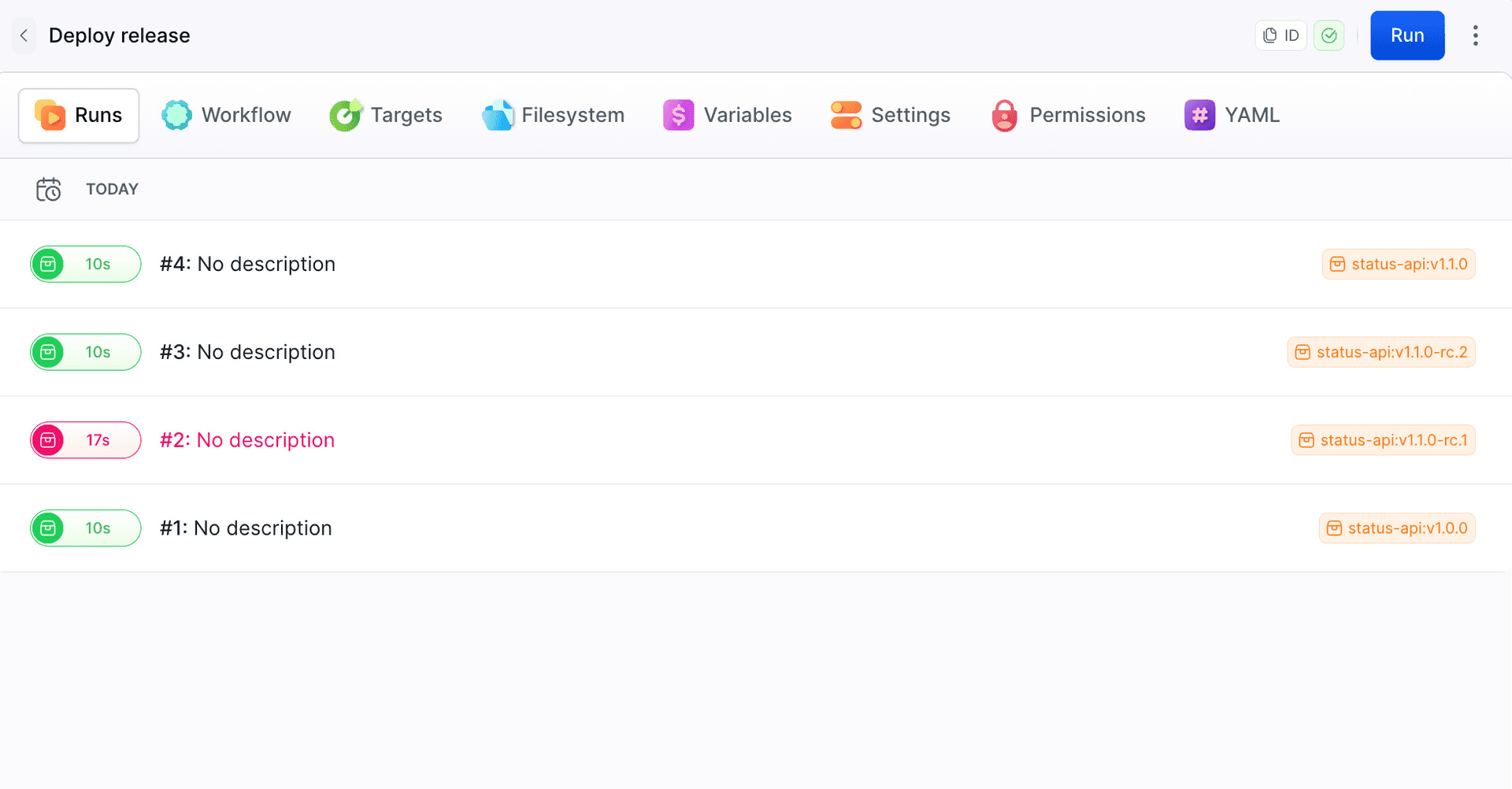
Smoke test before deployment
The smoke test unpacks the archive, installs dependencies with --omit=dev, starts the server, and polls /health every second. If the server does not respond within 10 seconds, the action prints its log and fails the run. The tested app directory, including node_modules, is then transferred to the sandbox for deployment.
Release v1.1.0-rc.1 failed this test. The app imported dotenv, but the package was in devDependencies. Tests in GitHub Actions passed after npm ci, but running the package after npm ci --omit=dev ended with an error:
Error [ERR_MODULE_NOT_FOUND]: Cannot find package 'dotenv' imported from /buddy/status-api/app/src/server.js
Image loading...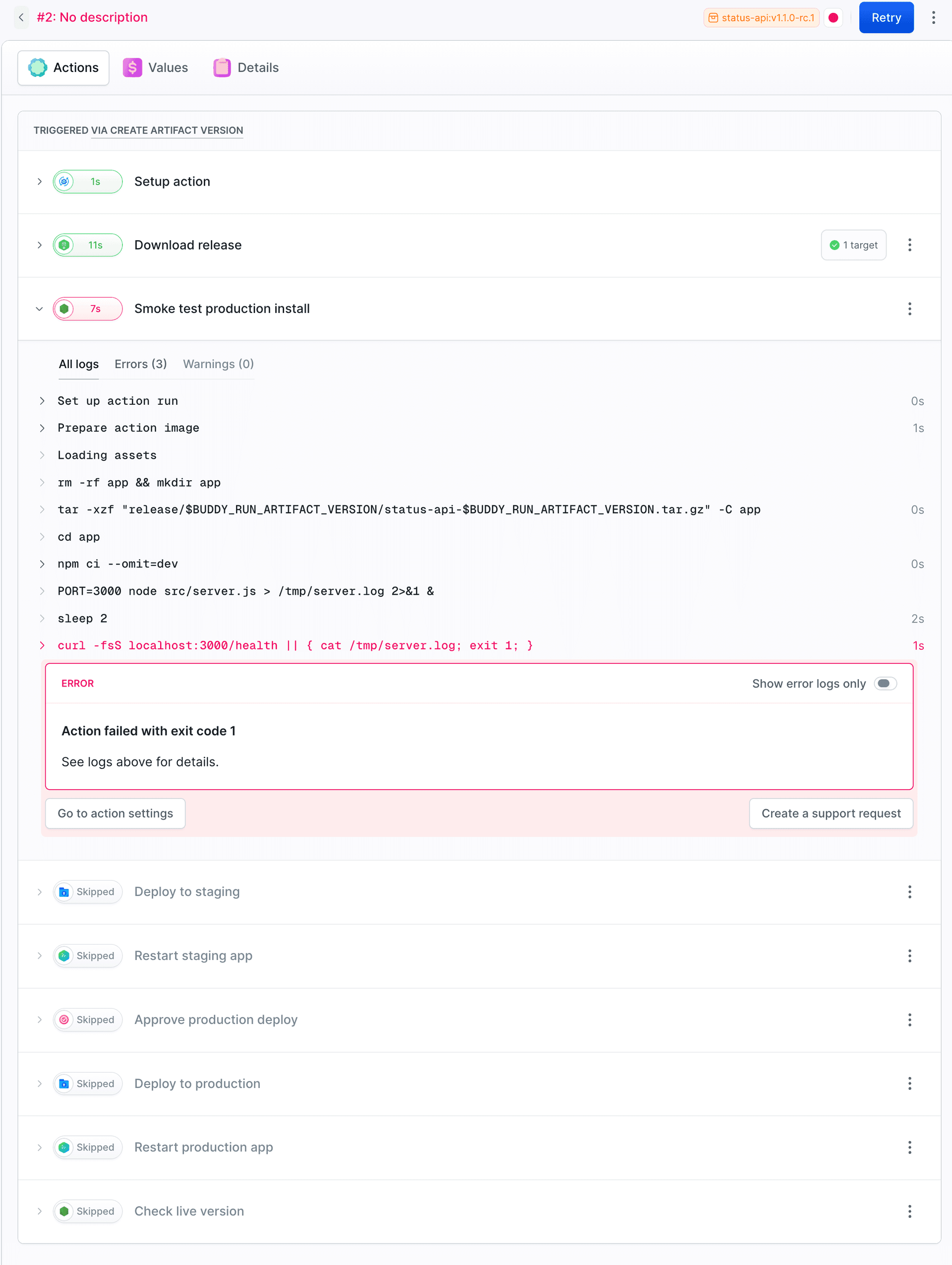
After we moved the package to dependencies, release v1.1.0-rc.2 passed the test and reached staging:
{"status":"ok","version":"1.1.0-rc.2","env":"staging"}
Staging or production
Action conditions check BUDDY_RUN_ARTIFACT_VERSION_PRERELEASE. For a GitHub pre-release, the variable is true, for a stable release it is false. An action whose condition is not met shows up in the run as Skipped. This is the condition on the staging deploy action:
trigger_conditions:
- trigger_condition: VAR_IS
  trigger_variable_key: BUDDY_RUN_ARTIFACT_VERSION_PRERELEASE
  trigger_variable_value: "true"
Image loading...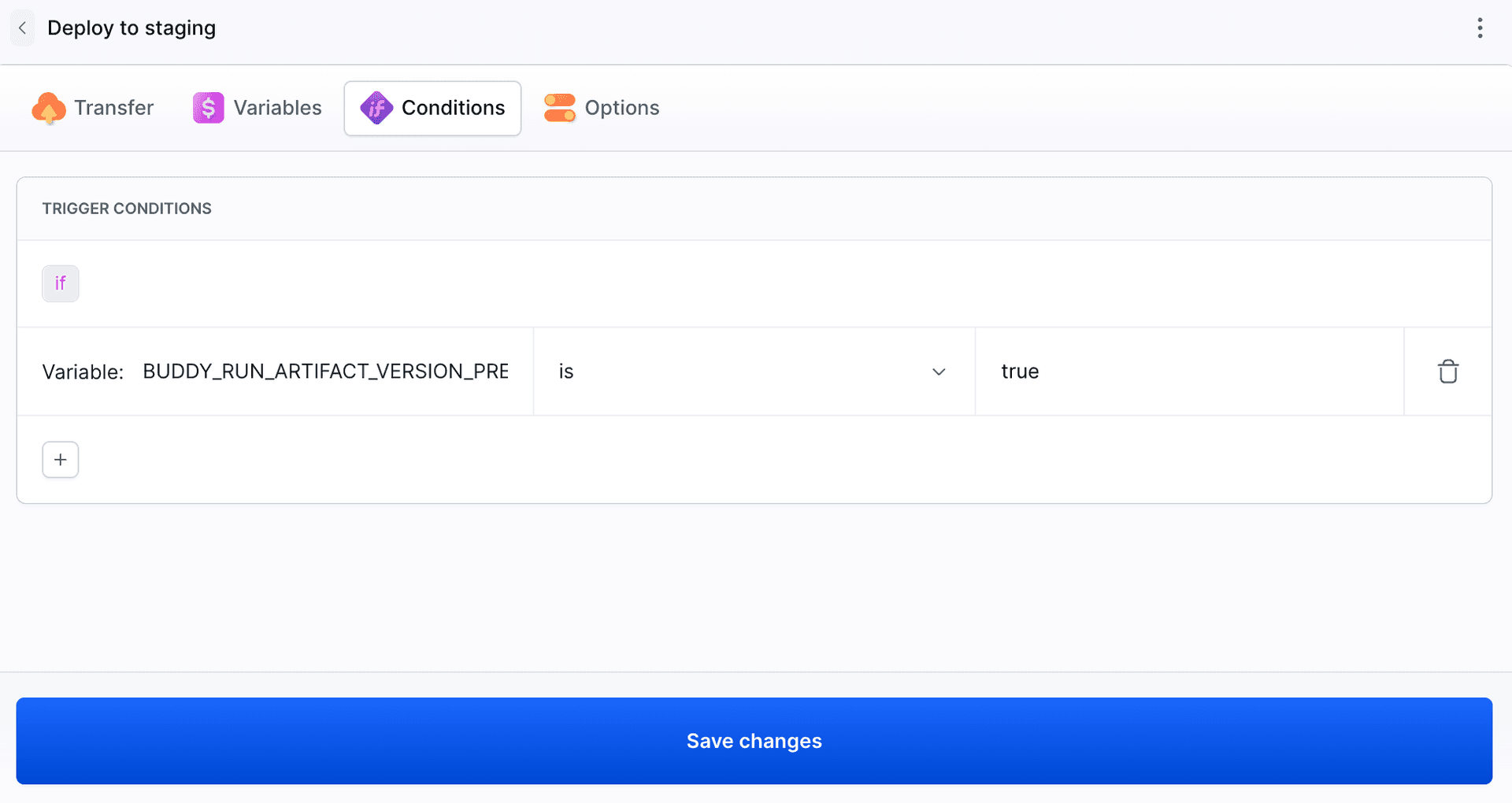
Deploying to a sandbox is a regular Transfer action with the sandbox as the target, followed by a Manage Sandbox action with the APP_RESTART operation. The sandbox runs the app with npm start in /home/buddy/status-api, has an HTTP endpoint on port 3000 and an APP_ENV variable. See Sandboxes in pipelines for setup details.
Image loading...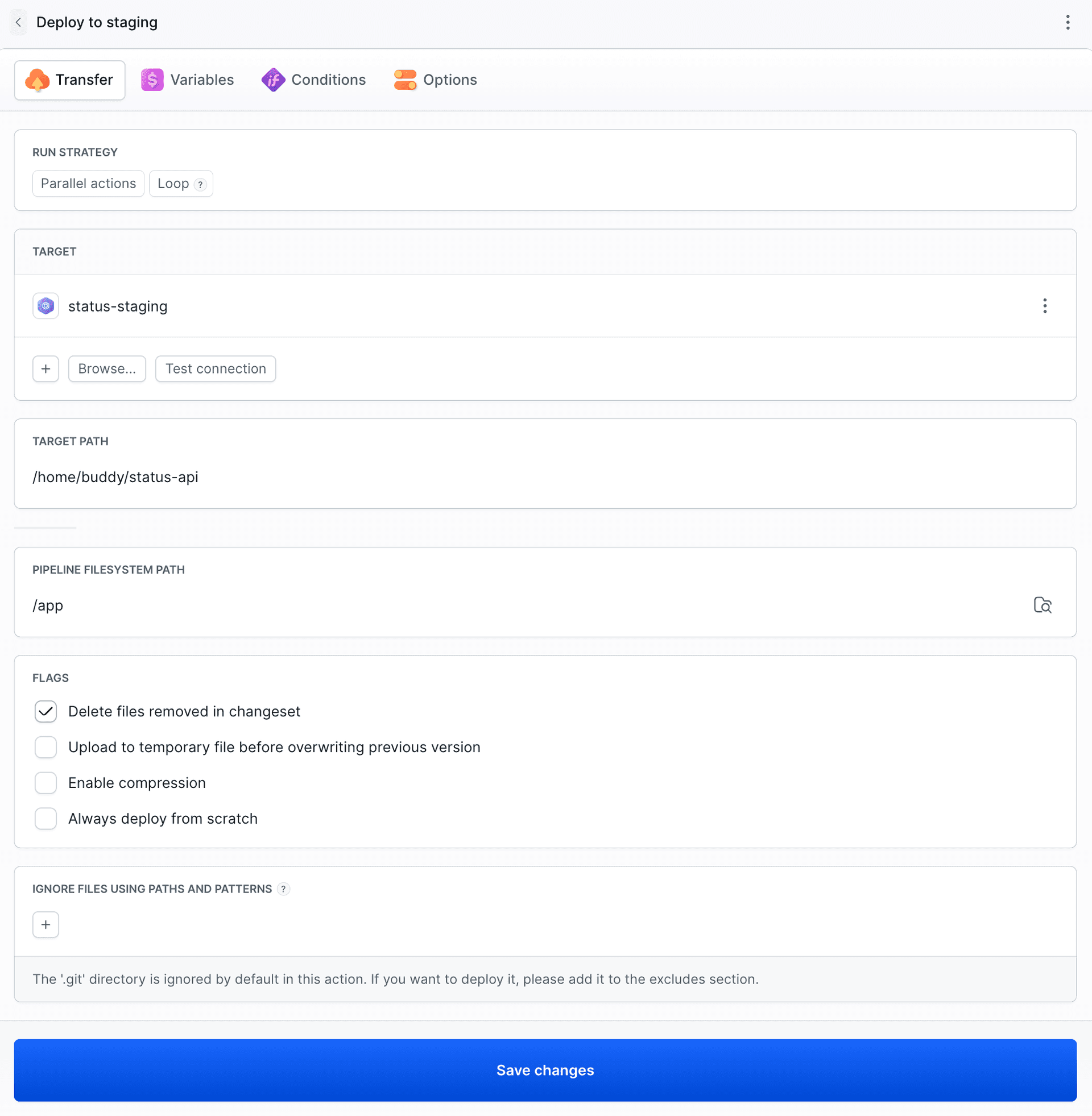
The stable v1.1.0 passed the smoke test, skipped staging, and waited the Approve Run action (WAIT_FOR_APPLY). The run waits until someone with permissions approves it. Details in Manual approval.
Image loading...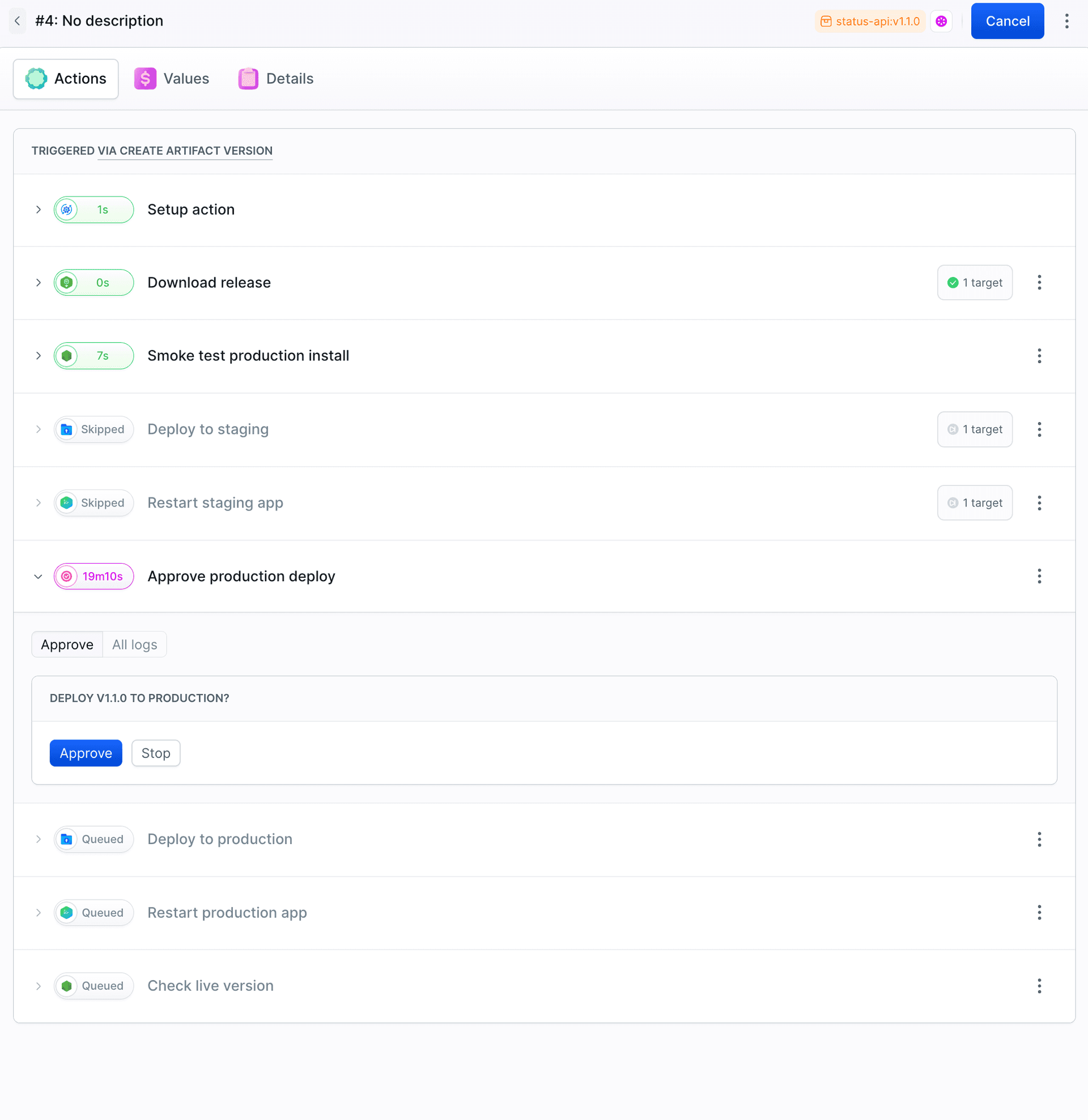
Checking the version
The last action calls the public endpoint of the sandbox the app was deployed to, extracts the version field with node -p, and compares it with the release tag without the v. The app needs a moment to restart, so the action tries up to 10 times, every 3 seconds, before it marks the deploy as failed.
How do you prepare the release on GitHub?
GitHub Actions publishes a release for every v* tag. The workflow runs the tests, writes the version from the tag into package.json, packs the app into a single archive, and publishes the release. Tags with a hyphen, such as v1.1.0-rc.1, are marked as pre-releases. The workflow needs the contents: write permission, otherwise gh release create is denied access. The step that publishes the release:
- name: Publish release
  env:
    GH_TOKEN: ${{ github.token }}
  run: |
    TAG="${GITHUB_REF_NAME}"
    FLAGS=""
    case "$TAG" in *-*) FLAGS="--prerelease" ;; esac
    gh release create "$TAG" "status-api-${TAG}.tar.gz" --title "$TAG" --generate-notes $FLAGS
Full pipeline
The YAML below recreates the demo pipeline. Replace the artifact identifier, target names, archive name, and endpoint URLs with your own.
- pipeline: deploy-release
  name: Deploy release
  events:
  - type: CREATE_ARTIFACT_VERSION
    artifacts:
    - identifier: status-api
      scope: WORKSPACE
  actions:
  - action: Download release
    type: DOWNLOAD_ARTIFACT_VERSION
    artifact: status-api
    version: $BUDDY_RUN_ARTIFACT_VERSION
    destination_path: release/$BUDDY_RUN_ARTIFACT_VERSION
    overwrite: true
  - action: Smoke test production install
    type: BUILD
    docker_image_name: library/node
    docker_image_tag: "24"
    shell: BASH
    commands: |-
      rm -rf app && mkdir app
      tar -xzf "release/$BUDDY_RUN_ARTIFACT_VERSION/status-api-$BUDDY_RUN_ARTIFACT_VERSION.tar.gz" -C app
      cd app
      npm ci --omit=dev
      PORT=3000 node src/server.js > /tmp/server.log 2>&1 &
      for i in $(seq 1 10); do
        curl -fsS localhost:3000/health && exit 0
        sleep 1
      done
      cat /tmp/server.log
      exit 1
  - action: Deploy to staging
    type: TRANSFER
    trigger_conditions:
    - trigger_condition: VAR_IS
      trigger_variable_key: BUDDY_RUN_ARTIFACT_VERSION_PRERELEASE
      trigger_variable_value: "true"
    input_type: BUILD_ARTIFACTS
    local_path: /app
    remote_path: /home/buddy/status-api
    targets:
    - status-staging
  - action: Restart staging app
    type: SANDBOX_MANAGE
    trigger_conditions:
    - trigger_condition: VAR_IS
      trigger_variable_key: BUDDY_RUN_ARTIFACT_VERSION_PRERELEASE
      trigger_variable_value: "true"
    operation: APP_RESTART
    targets:
    - status-staging
  - action: Approve production deploy
    type: WAIT_FOR_APPLY
    trigger_conditions:
    - trigger_condition: VAR_IS
      trigger_variable_key: BUDDY_RUN_ARTIFACT_VERSION_PRERELEASE
      trigger_variable_value: "false"
    comment: Deploy $BUDDY_RUN_ARTIFACT_VERSION to production?
  - action: Deploy to production
    type: TRANSFER
    trigger_conditions:
    - trigger_condition: VAR_IS
      trigger_variable_key: BUDDY_RUN_ARTIFACT_VERSION_PRERELEASE
      trigger_variable_value: "false"
    input_type: BUILD_ARTIFACTS
    local_path: /app
    remote_path: /home/buddy/status-api
    targets:
    - status-production
  - action: Restart production app
    type: SANDBOX_MANAGE
    trigger_conditions:
    - trigger_condition: VAR_IS
      trigger_variable_key: BUDDY_RUN_ARTIFACT_VERSION_PRERELEASE
      trigger_variable_value: "false"
    operation: APP_RESTART
    targets:
    - status-production
  - action: Check live version
    type: BUILD
    docker_image_name: library/node
    docker_image_tag: "24"
    shell: BASH
    commands: |-
      if [ "$BUDDY_RUN_ARTIFACT_VERSION_PRERELEASE" = "true" ]; then
        URL="https://<your-staging-endpoint>/health"
      else
        URL="https://<your-production-endpoint>/health"
      fi
      EXPECTED="${BUDDY_RUN_ARTIFACT_VERSION#v}"
      for i in $(seq 1 10); do
        LIVE=$(curl -fsS "$URL" | node -p 'JSON.parse(require("fs").readFileSync(0, "utf8")).version' 2>/dev/null || true)
        echo "live: ${LIVE:-no response}, expected: $EXPECTED"
        [ "$LIVE" = "$EXPECTED" ] && exit 0
        sleep 3
      done
      exit 1
To deploy GitHub releases automatically, start small: connect a GitHub Release artifact to a repo that already publishes releases and add a pipeline with just the download and the smoke test. Add the staging and production deploys once the smoke test has passed on a few releases.

Jarek Dylewski
Customer Support
A journalist and an SEO specialist trying to find himself in the unforgiving world of coders. Gamer, a non-fiction literature fan and obsessive carnivore. Jarek uses his talents to convert the programming lingo into a cohesive and approachable narration.