OpenAI integration and the Codex CLI action are live in Buddy
Buddy now integrates with OpenAI, and with it comes a new pipeline action: Codex CLI. Connect your API key once and OpenAI's agentic coding tool becomes something you can drop into a pipeline like any other action - triggered by a push, a pull request, a schedule, or a failed deploy, with the repository and the run context already in front of it.
Codex joins Claude Code and Antigravity as the third coding agent you can run inside a Buddy pipeline. Same idea across all three: the agent gets the checked-out repository, the environment variables, and the filesystem of that run, and it works whether or not anyone is watching.
Setup is two steps.
Step 1: connect OpenAI
Open the Integrations tab, click New integration, and pick OpenAI. All it needs is an API key:
- Go to platform.openai.com/api-keys and click Create new secret key.
- Name the key, pick the project, and set its permissions.
- Copy the generated value - the platform shows it exactly once - and paste it into the API KEY field in Buddy.
- Give the integration a name and ID, set its scope, and click Add a new integration.
Image loading...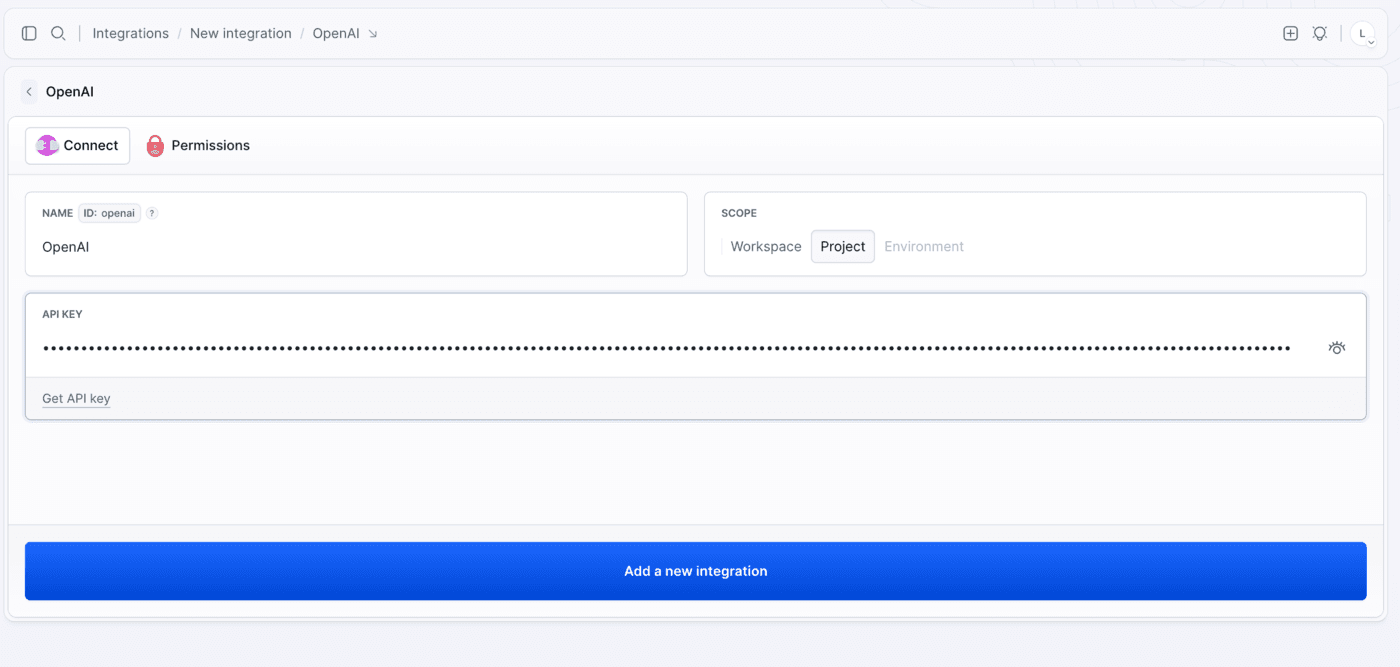
The key is stored as an encrypted secret and passed to the pipeline as a secure environment variable - it never lands in your repository. From here on, pipelines reference the integration by its ID.
A word on scoping: a key with All permissions can read and write every resource in the selected project. If that is more than you want to hand to an automated agent, switch Permissions to Restricted when creating the key and grant Model capabilities only. Create a dedicated key per integration so you can revoke it without breaking anything else. The full walkthrough with screenshots lives in the OpenAI integration docs.
Step 2: add the Codex CLI action
With the integration in place, add a Codex CLI action to a pipeline. Three settings do the heavy lifting:
Image loading...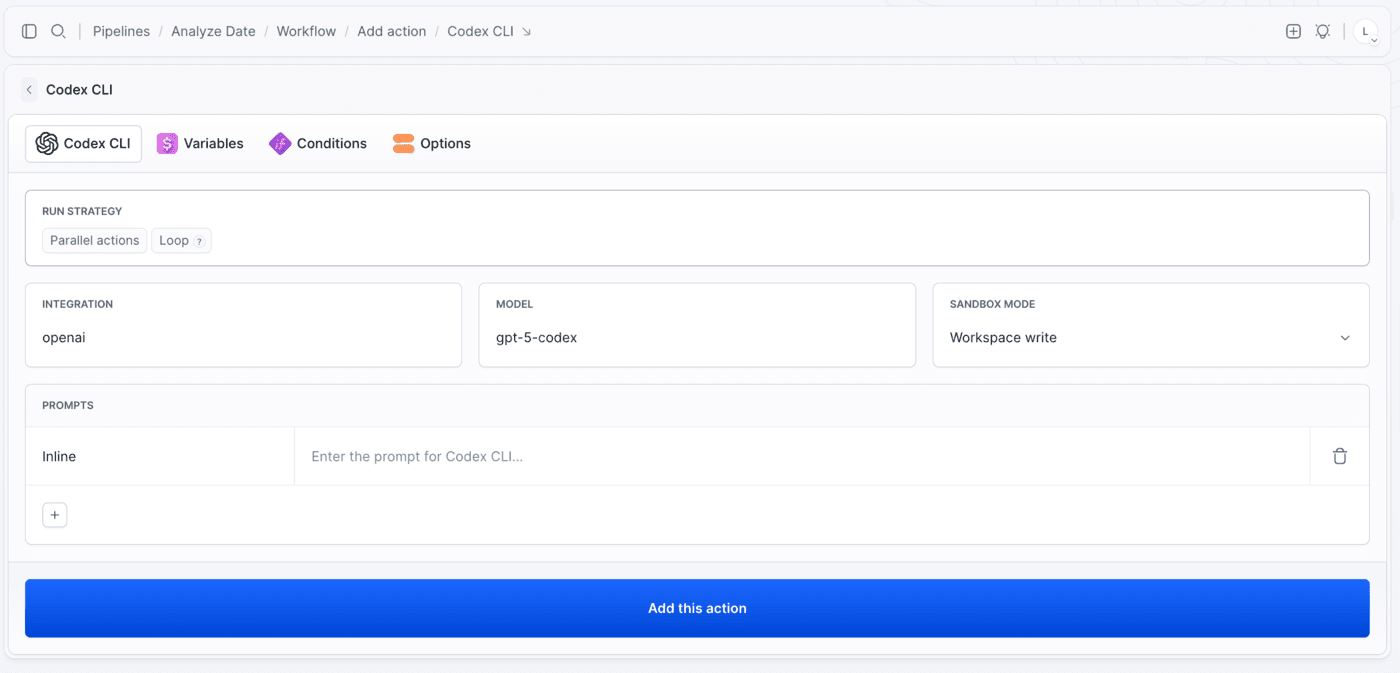
Integration points at the credentials from step 1.
Model decides which model the action runs on. The list covers the Codex family from gpt-5-codex up, including the mini and max variants, plus general-purpose gpt-5:
Image loading...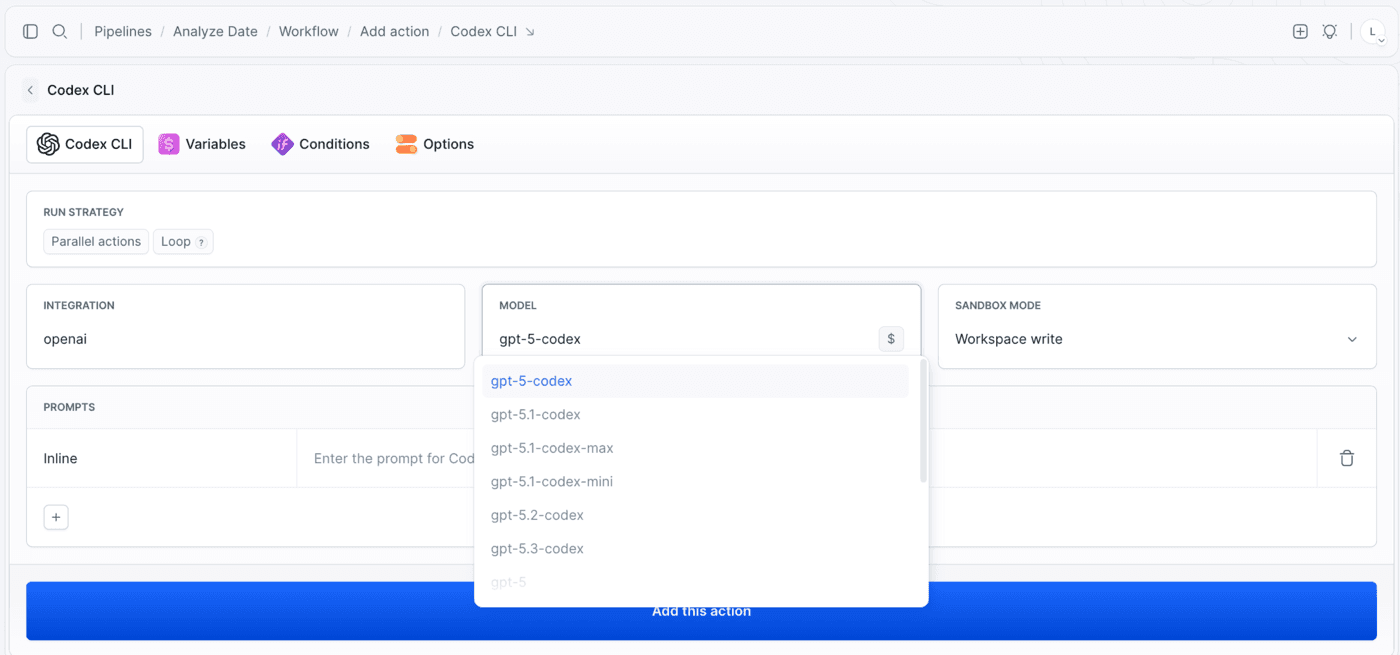
The variants trade depth against speed and cost. Reach for mini on mechanical work where the answer is obvious and the volume is high - formatting sweeps, repetitive edits, a lint rule applied across a hundred files. Reach for max when the run has to reason across the codebase before it can act, like a migration that changes call sites in ways a search cannot predict. In a pipeline that difference is money as much as quality: a max run on a job mini handles fine is a bill you pay every single push.
Sandbox mode is the one worth slowing down on, because it decides how much the agent is allowed to touch:
Image loading...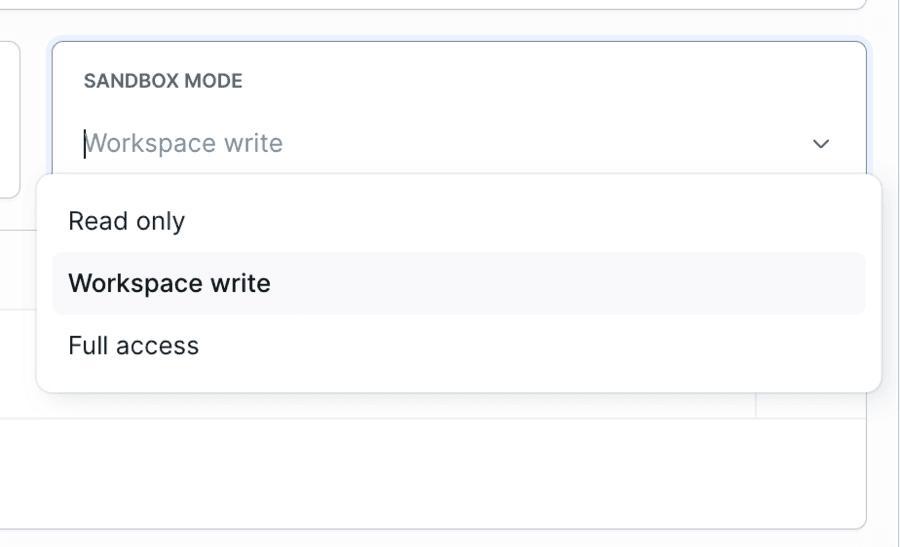
- Workspace write - the default. Read and write inside the pipeline filesystem: enough for code changes, refactors, and generated files, and scoped so the agent cannot wander outside the workspace.
- Read only - the agent reads the filesystem and writes nothing. What you want for reviews and analysis.
- Full access - read and write anywhere in the container. Reach for it only when the agent genuinely needs to touch something outside the workspace.
Note that the action ships on Workspace write, so an agent you add and never configure can already edit your files. That is the right default for most jobs, but while you are still tuning the prompt, switch it down to Read only and let the agent tell you what it would do before it does it.
Prompts live in the repo, not in the UI
An action takes one or more prompts, executed in order. Each is either typed inline or read from a file in the repository:
Image loading...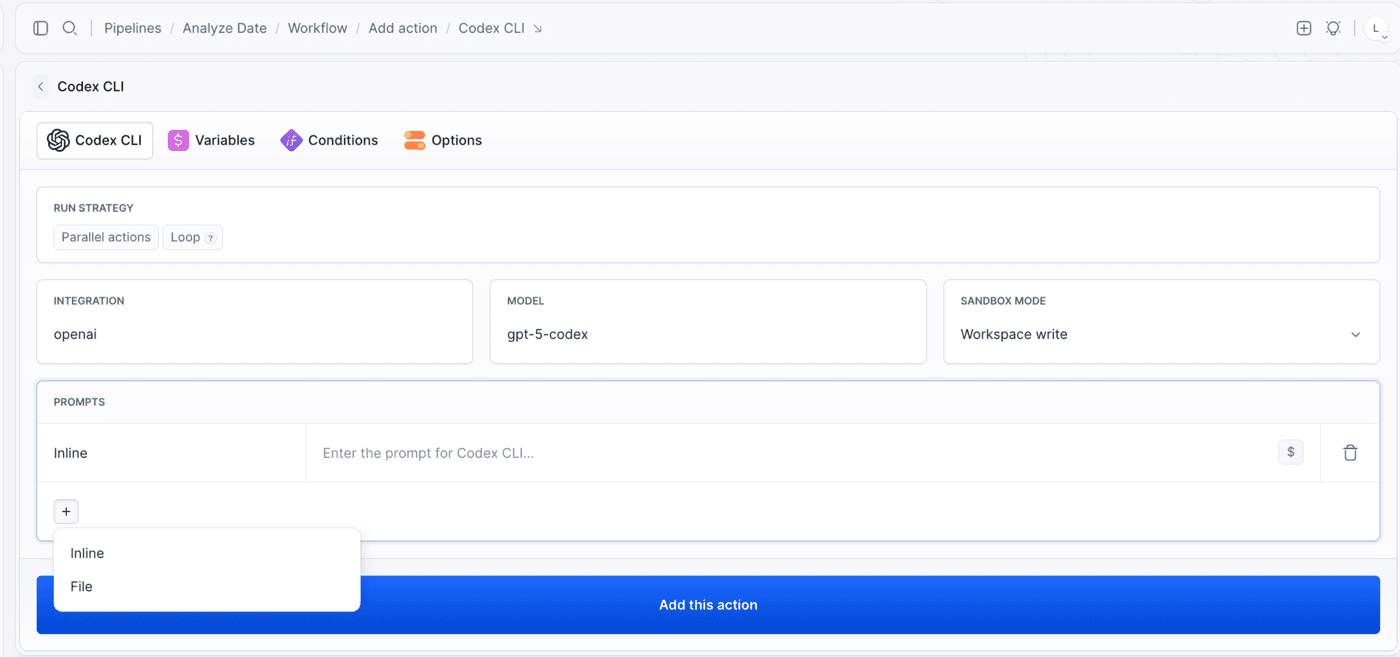
Inline is fine for a one-liner. For anything you actually care about, use a file - codex-prompt.md - and version it next to the code. The prompt then goes through pull requests like any other change, and the same file can be reused across pipelines.
Prompts also expand environment variables, so you can pass the branch, the commit range, or the output of a previous action straight into the agent.
The smallest useful pipeline
A review that runs on every pull request into master is six lines of YAML:
yaml- pipeline: on-pull-request
  events:
  - type: PULL_REQUEST
    branches:
    - master
  actions:
  - action: Codex review
    type: CODEX_CLI
    integration: openai
    model: gpt-5-codex
    sandbox_mode: READ_ONLY
    prompts:
    - file: codex-prompt.md
And the prompt file it reads:
promptReview the changes in this repository.

Point out bugs, security issues, and performance problems. Reference specific
files and line numbers, and suggest a concrete fix for each finding. If the
change looks fine, say so in one line instead of inventing problems.
That last sentence earns its place. Without it, a review agent will always find something, because you asked it to.
From there it composes like anything else in a pipeline. Put an install step in front of it so the agent sees the project with its dependencies resolved, and a notification behind it so the review reaches the team instead of the build log:
Image loading...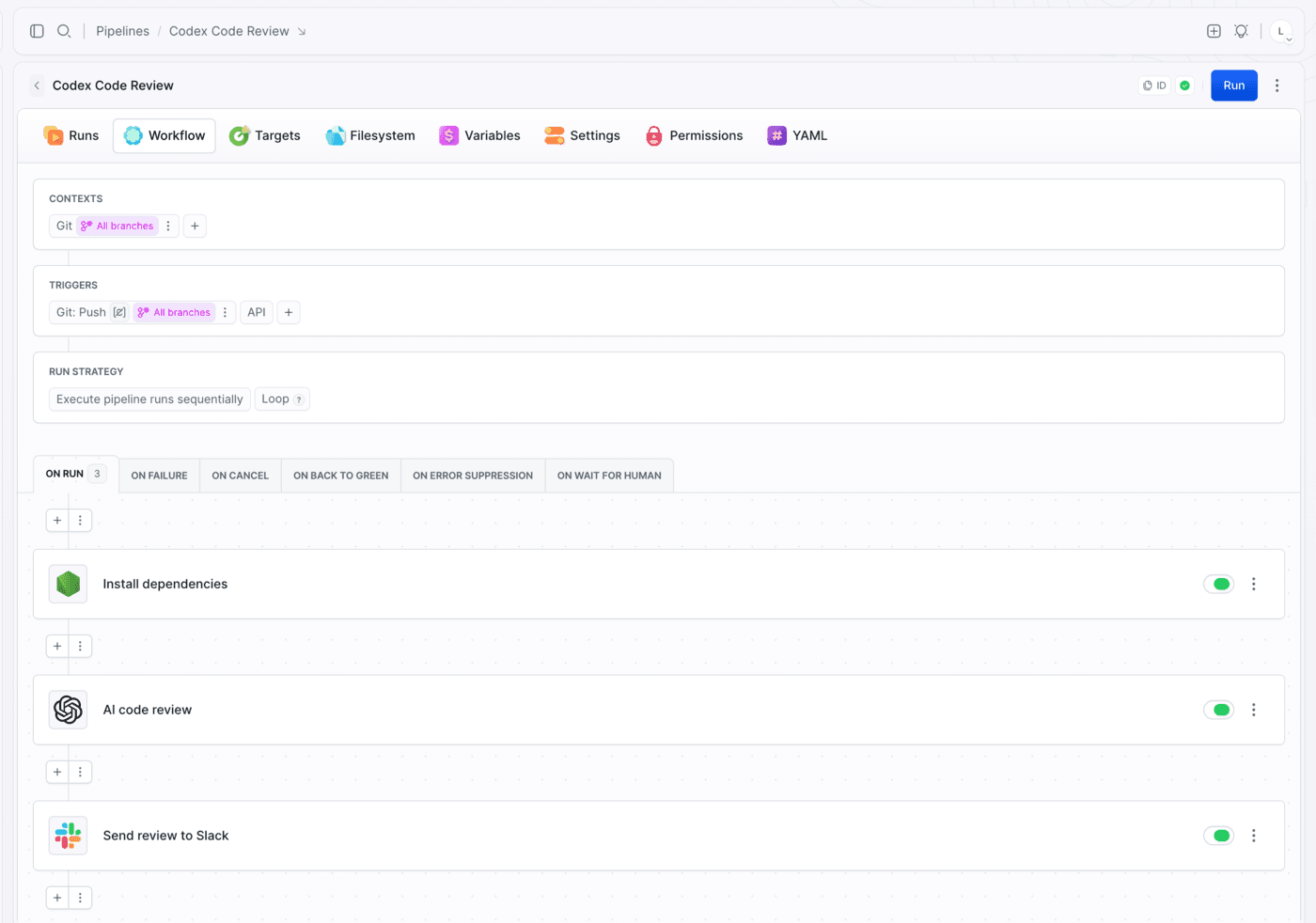
Prefer the terminal? The Buddy CLI creates the same pipeline from that file and runs it on the spot:
bashbdy pip create --yaml @on-pull-request.yml$
bashbdy pip run start on-pull-request --wait$
What to do with it
READ_ONLY reviews are the natural first step, but the action is not limited to reading. On WORKSPACE_WRITE the agent edits files, which means a pipeline can let it upgrade dependencies, fix what the upgrade breaks, run the test suite, and push the result to a branch - all in one run. We will walk through exactly that pipeline in a follow-up post.
Other shapes worth trying:
- Put the action in the ON FAILURE section of an existing pipeline and let the agent look at a broken deploy before you do.
- Trigger it from a schedule for recurring cleanup work nobody volunteers for.
- Wire it to an inbound webhook so a Sentry issue or a forwarded email kicks off an investigation.
And if you would rather drive Codex from your side of the terminal, that direction works too - the Buddy CLI, skill, and MCP server let Codex deploy your project, run your pipelines, and read your build logs. That is covered in Codex with Buddy.
Learn more
- OpenAI integration - full setup with screenshots
- Run agents in a pipeline - sandbox modes, prompt files, and triggers
- Codex CLI action in YAML - every field
- Codex CLI action in the API - POST parameters

Jarek Dylewski
Customer Support
A journalist and an SEO specialist trying to find himself in the unforgiving world of coders. Gamer, a non-fiction literature fan and obsessive carnivore. Jarek uses his talents to convert the programming lingo into a cohesive and approachable narration.