Branch Rulesets for AI Agents in Buddy Git
An instruction in a prompt is a request. An agent can skip it, misread it, or decide it does not apply this time. Rulesets in Buddy Git run on the server: a change that breaks a rule is rejected, whether a person, a script or a Bud sent it.
A prompt is not a safeguard
In July 2025, an AI agent at Replit deleted a production database during a code freeze. The freeze existed only as text in the agent's instructions.
Repository branches work the same way. "Don't push to main" in AGENTS.md helps as long as the agent remembers it. A ruleset applies even when the agent forgets.
A Bud is a separate workspace member
A Bud is an AI agent with its own account in a Buddy workspace. It has its own project permissions and its own row in the ruleset's Bypass tab, next to people and groups. A Bud and a developer in the same project can have different rights to the same branches.
A typical split:
main- changes only through pull requests with passing checks, no force pushes, no deletion, no exceptionsagent/*- branches that only the Bud and administrators can create and deleterefs/tags/v*- release tags that only the release team creates
Image loading...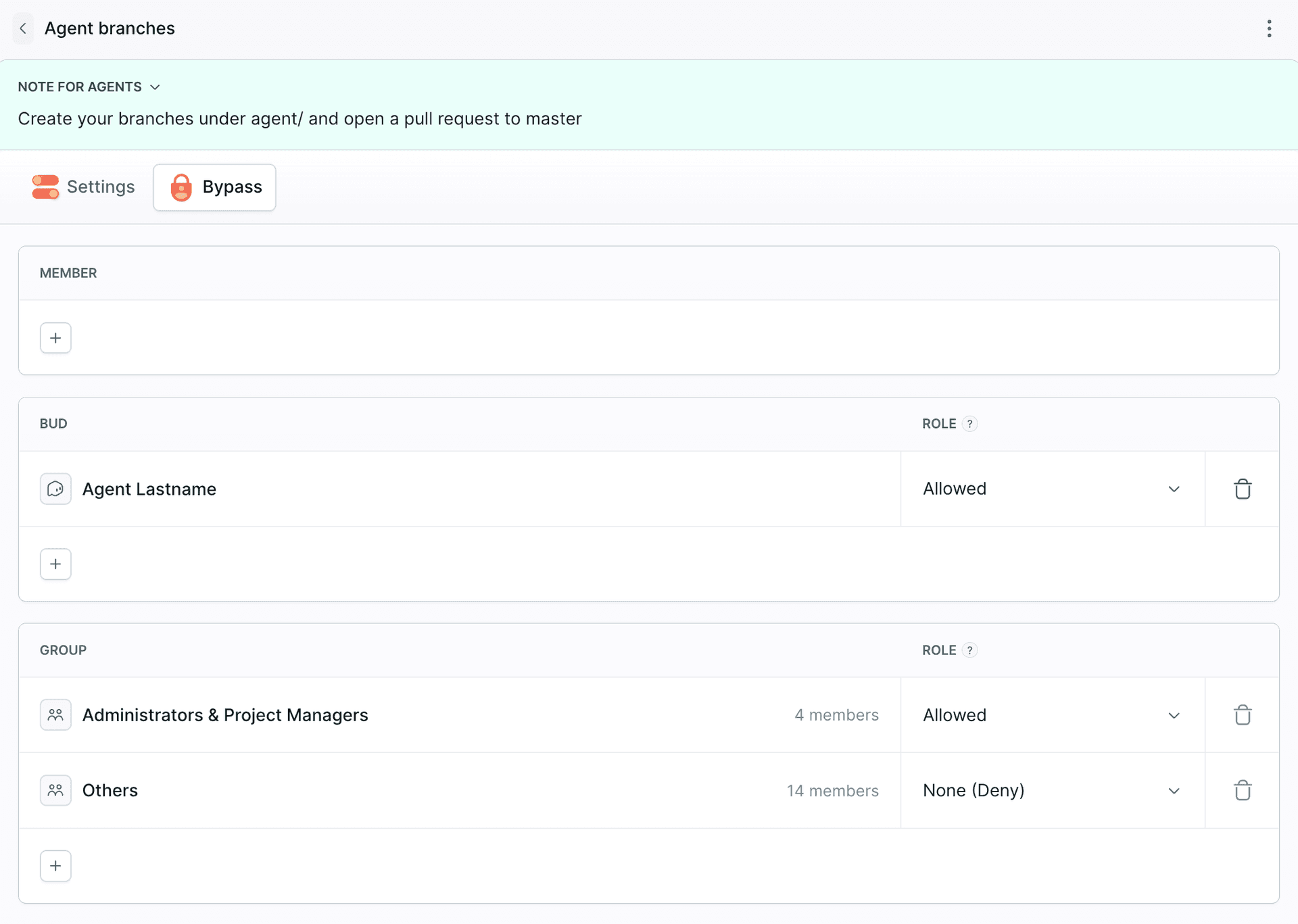
A ruleset for agent branches in YAML:
identifier: agent-branches
name: Agent branches
refs:
  - refs/heads/agent/*
bypass:
  admins: true
  others: DENIED
  users:
    - id: 46
      access: ALLOWED
rules:
  restrict_creation: true
  restrict_deletion: true
agent_note: Create your branches under agent/ and open a pull request to main
Who bypasses the rules
In Bypass, each entry is Allowed or None (Deny). Buddy checks the entries in this order:
- a personal entry in Member or Bud - if one exists, its setting takes precedence,
- groups - if there is no personal entry, Buddy checks all groups the person belongs to,
- Others - for members who do not match any of the entries above.
Allowed lets an account bypass the rules of this ruleset. None (Deny) means the account must follow them.
To set this, add a specific account as Member or Bud in the Bypass tab and choose its value. This personal entry takes precedence over the group and Others settings. For example:
- To make an administrator follow the rules, set them to None (Deny). Other administrators can keep Allowed through the Administrators & Project Managers group.
- To let a Bud bypass the rules, set it to Allowed. Others can stay at None (Deny).
In YAML, both entries go in bypass.users, with access: DENIED or access: ALLOWED.
This way you take the exception away from one account without rebuilding the whole ruleset, for example from an administrator, or from a Bud that may create branches but not release tags. When such an account tries to create a tag, it gets:
Ruleset "Release tags": creating this ref is not allowed
agent_note - a hint for the agent
Every ruleset has two notes: note for people and agent_note for agents. The agent note says what to do instead of the blocked operation, for example "Open a pull request instead of pushing to main".
The note blocks nothing. The rule does the blocking, and the note saves the agent from guessing. The rejection message does not include it, so the agent should read the ruleset before it starts working:
bdy ruleset get protect-main -w my-workspace -p my-project
$
Image loading...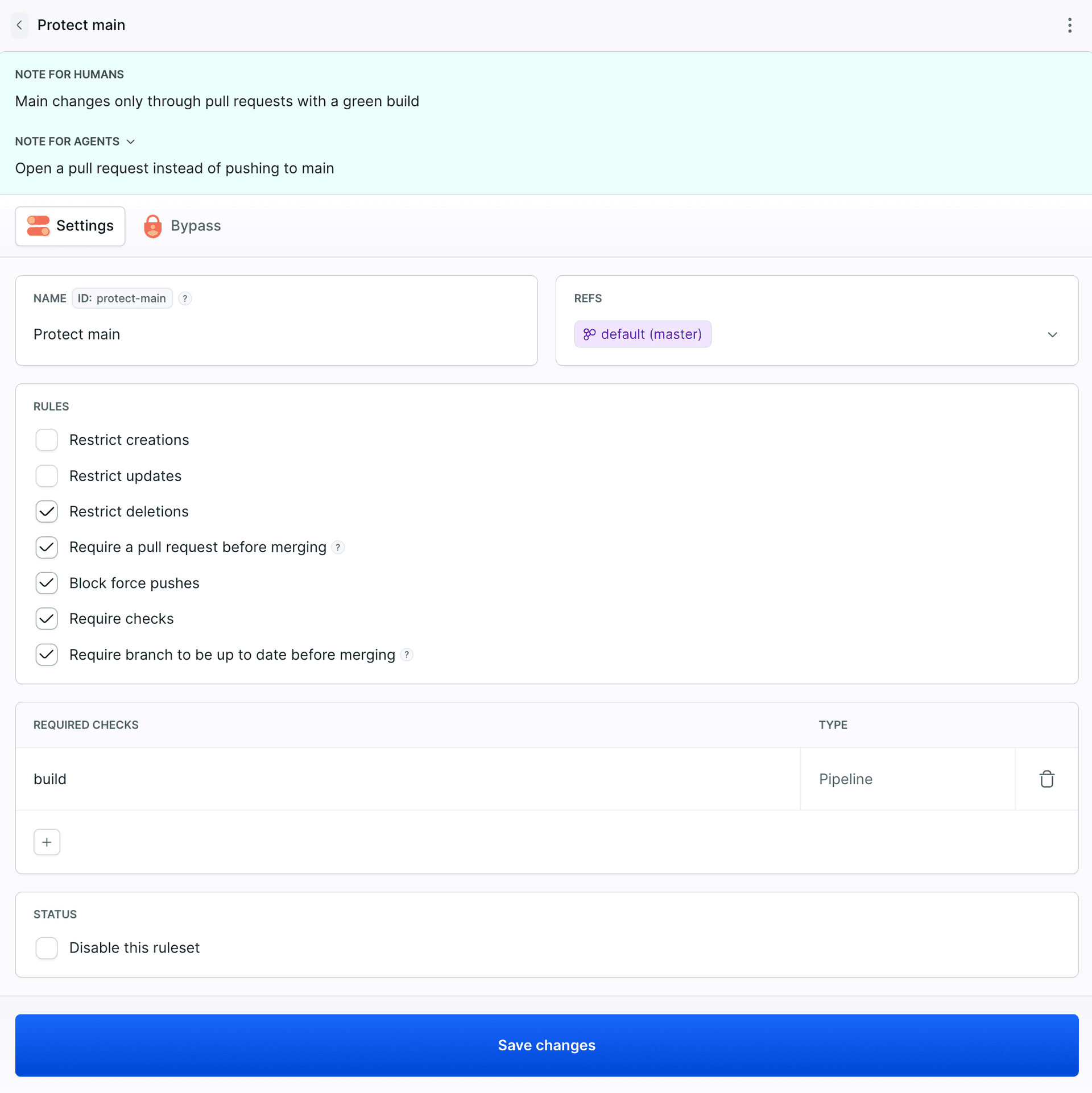
One gate for pipelines, unit tests and visual approvals
The Require checks rule combines three status sources: pipelines, unit test suites and visual test suites. A pull request to a protected branch cannot be merged until all required checks report success for the latest commit.
identifier: protect-main
name: Protect main
refs:
  - ":default"
bypass:
  admins: false
  others: DENIED
rules:
  required_checks:
    pipelines:
      - build
    unit_tests_suites:
      - api-tests
    visual_tests_suites:
      - storefront
    require_up_to_date: true
  require_pull_request: true
  block_force_push: true
  restrict_deletion: true
note: Main changes only through pull requests with green checks
agent_note: Open a pull request instead of pushing to main
While a check is running or if it fails, the pull request shows a red MERGE BLOCKED box, and the API returns the reason:
Ruleset "Protect main": required checks have not passed: pipeline build: failed
Image loading...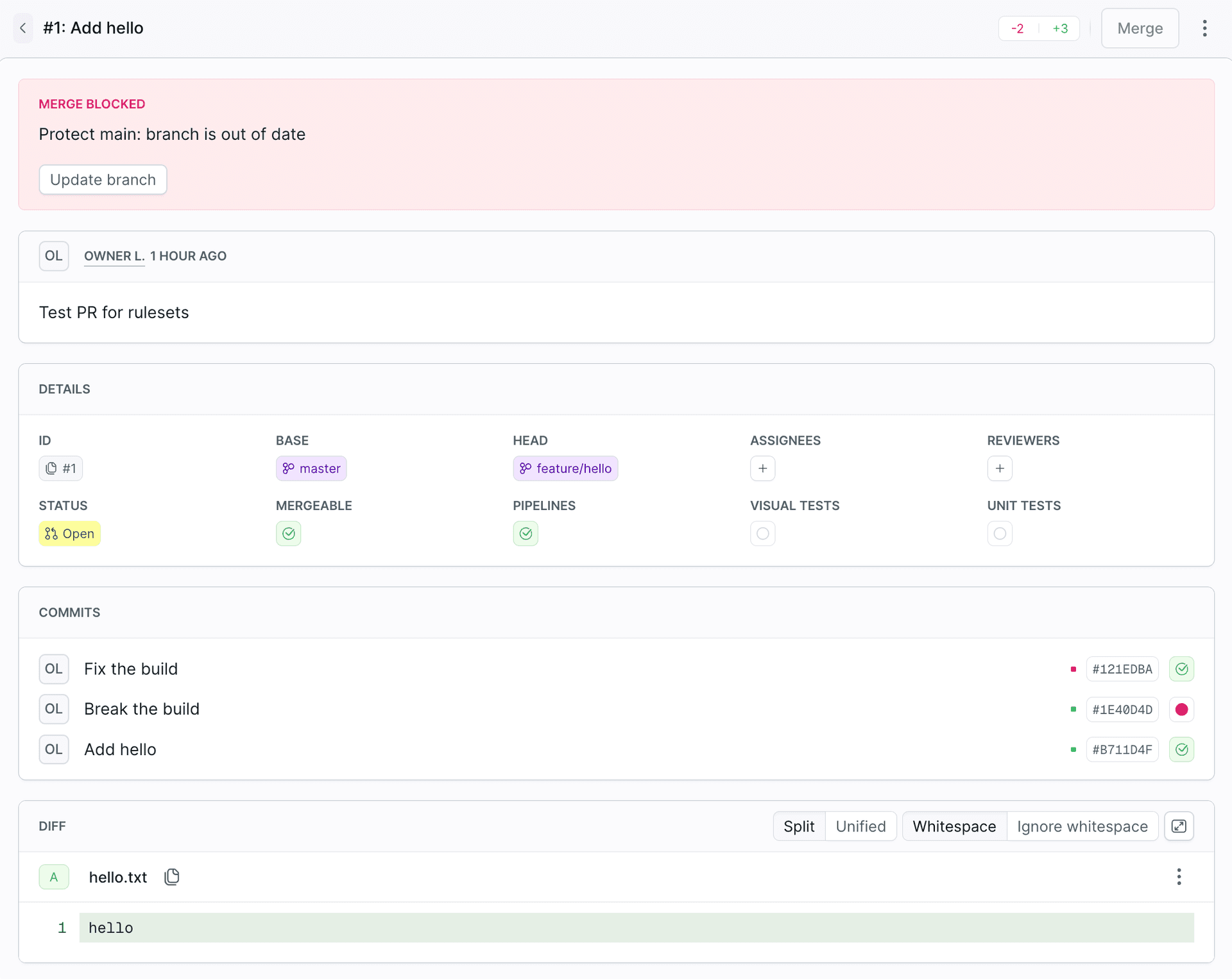
With require_up_to_date: true, the branch must contain the latest changes from main. The Update branch button in the pull request merges them into the branch, and the merge unblocks only after the checks pass on the new commit.
A required check cannot drop out of the gate unnoticed:
- A required pipeline must set the commit status.
- To turn that status off, remove the pipeline from the ruleset first.
- A deleted pipeline shows up in
missing_sourcesin the CLI and the API.
From a rejected push to a merge
With the two rulesets from this post, an agent's work on a change goes like this:
- The agent pushes straight to
main. The server rejects the push:
! [remote rejected] main -> main (Ruleset "Protect main": changes must be made through a pull request)
- The agent reads the ruleset.
agent_notetells it to open a pull request. - It creates a branch under
agent/, pushes the change, and opens a PR tomain. - The merge waits for the required checks.
- Once
build,api-testsandstorefrontsucceed, the merge unblocks.
The Protect main ruleset has no exceptions, so every project member goes through the same steps, administrators included.
Instead of per-branch permissions
Rulesets replace the old push permissions set for each branch separately. The Limit pushing... option in the branch menu now opens the ruleset form with that branch name and the Restrict updates and Restrict deletions rules selected. Tag rulesets have their own tab in Tags.
You can write rulesets in YAML, import them in the form, and manage them through the CLI (bdy ruleset) or the REST API with the RULESET_READ and RULESET_MANAGE scopes.
See also:
- Rulesets - all rules, ref patterns, bypass and rejection messages
- Pull requests - blocked merges and branch updates
- Resource notes - notes for AI agents in other Buddy resources
- Reviewing & Approvals - approving visual test changes

Jarek Dylewski
Customer Support
A journalist and an SEO specialist trying to find himself in the unforgiving world of coders. Gamer, a non-fiction literature fan and obsessive carnivore. Jarek uses his talents to convert the programming lingo into a cohesive and approachable narration.