YAML templates - Remote pipeline configuration
The YAML templates, also known as remote YAML definitions, are templates with parameters that can be inherited by pipelines. This feature is useful to quickly set up new projects and update configuration across multiple pipelines at once.
When to use templates
YAML templates are particularly useful in the following scenarios:
- Multiple similar pipelines - When you have several pipelines that share a common configuration but differ in details.
- Team collaboration - When different teams need standardized pipeline configurations.
- Environment consistency - When you want to ensure that all environments (dev, staging, production) use the same base configuration.
- Rapid project creation - When you need to quickly create new projects with proven pipeline configurations.
- Configuration management - When you want to centralize pipeline configuration and update it across multiple projects at once.
Requirements and parameters
- One file equals one template. Each template needs to be created in a separate file.
- Parameters are defined just like environment variables, but instead of
$you provide!, e.g.!param1. The default value for the remote pipeline parameters is!{param1:defaultValue}. - In the inheriting pipeline, you define the parameter that will be swapped for a string.
- You can parameterize basically everything, from individual properties to whole actions. In the example below, you can see two parameters:
!optionalactionand!awsintegration.
Example
yaml- pipeline: "template"
  events:
  - type: "PUSH"
    refs:
    - "refs/heads/development"
  priority: "NORMAL"
  fail_on_prepare_env_warning: true
  actions:
  - action: "pwd"
    type: "BUILD"
    working_directory: "/buddy/git-repo"
    docker_image_name: "library/ubuntu"
    docker_image_tag: "18.04"
    commands: |-
      pwd
    volume_mappings:
    - "/:/buddy/git-repo"
    cache_base_image: true
    shell: "BASH"

!optionalaction
  - action: "cp bucket"
    type: "AWS_CLI_2"
    region: "us-east-1"
    commands: "aws s3 cp test.txt s3://mybucket/test2.txt"
    shell: "SH"
    integration: "!awsintegration"
GUI configuration
The parameters can also be defined from the GUI. To do that, select the Use template tab when adding a new pipeline, specify the project, branch, and path to the template in the filesystem, and define the parameters below:
Image loading...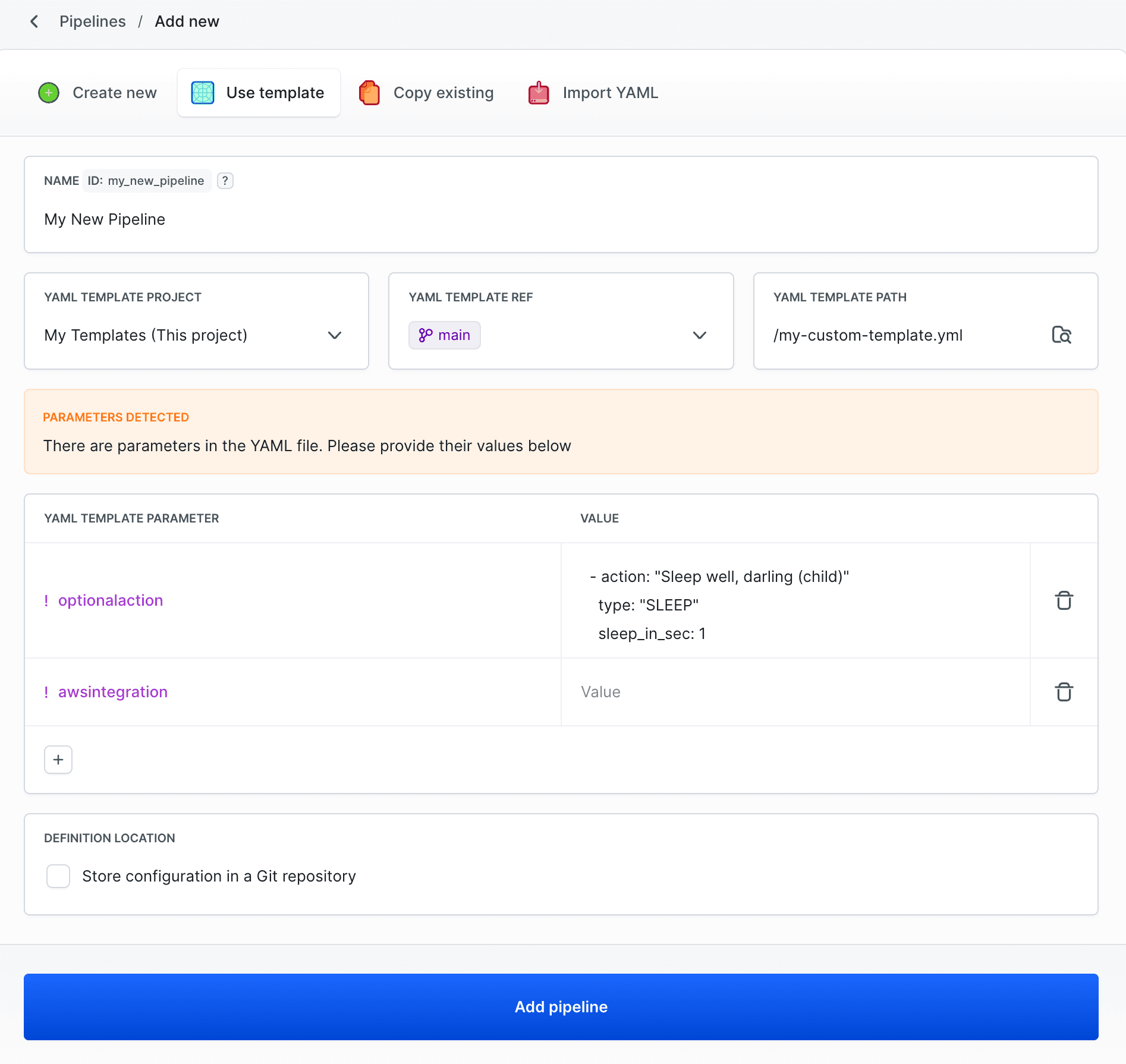
In the YAML template, the !optionalaction parameter is used to provide an additional action, for example Sleep. Remember to use the correct indentation.
yaml- action: "Sleep well, darling (child)" type: "SLEEP" sleep_in_sec: 1
After clicking Add pipeline, a pipeline will appear containing the actions from the template, along with the additional action that we passed as a parameter.
Image loading...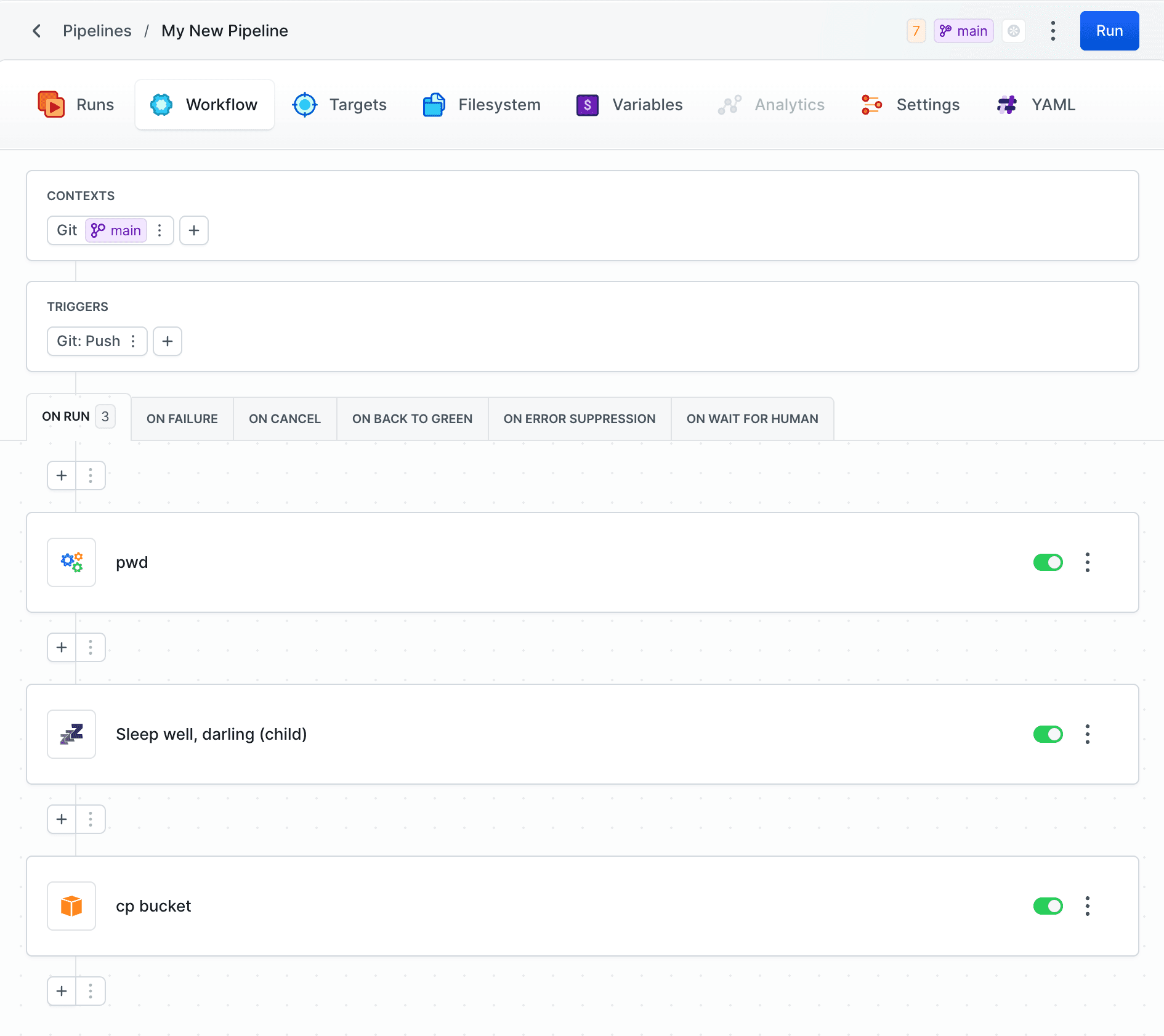
Inheriting pipeline configuration
The next step is to define the pipelines that will inherit from the template. Define a buddy.yml file containing the full configuration of all pipelines in the project. Place the file either in the repository root or in .buddy/buddy.yml. When a project is created in Buddy from this repository, all pipelines are automatically generated from the file.
In these pipelines, you provide:
- Pipeline name - A unique identifier of the pipeline in the project, used for identification and execution.
Definition_source: "REMOTE"- Specifies that the pipeline inherits its configuration from a YAML template.- Project, branch, and template path - template location:
remote_project_name- name of the project containing the templateremote_ref- template repository branchremote_path- template file path in the repository
- List of parameters to swap in the child pipeline - template parameter definition:
key- parameter from the template (without!)value- replacement value
Example
yaml- pipeline: "child1"
  definition_source: "REMOTE"
  remote_path: "/t1.yml"
  remote_ref: "master"
  remote_project_name: "templates"
  remote_parameters:
  - key: "optionalaction"
    value: |-
     - action: "ls"
       type: "BUILD"
       working_directory: "/buddy/git-repo"
       docker_image_name: "library/ubuntu"
       docker_image_tag: "18.04"
       commands: |-
         ls
       volume_mappings:
       - "/:/buddy/git-repo"
       cache_base_image: true
       shell: "BASH"
  - key: "awsintegration"
    value: "vVP4XgELYqaQ5Vg5anjk2m9Oz7"
- pipeline: "child2"
  definition_source: "REMOTE"
  remote_path: "/t1.yml"
  remote_ref: "master"
  remote_project_name: "templates"
  remote_parameters:
  - key: "optionalaction"
    value: ""
  - key: "awsintegration"
    value: "vVP4XgELYqaQ5Vg5anjk2m9Oz7"
Last modified on Jul 9, 2026