Run Google's Antigravity coding agent in your Buddy pipelines
Antigravity is Google's agentic coding platform, built on the Gemini models. It reads, writes, and refactors code from natural-language prompts - the same idea behind Claude Code, now backed by Gemini. As of today you can run it directly inside a Buddy pipeline with the new Antigravity action, so the agent works on your code on every push, on a schedule, or on demand.
What you can do with it
Because the agent runs as a normal pipeline action, it has the whole repository and the pipeline filesystem at hand. That opens up the usual chores you would rather not do by hand:
- Review code on every pull request and leave suggestions before a human looks at it.
- Generate changes from a prompt - bump a dependency, add a test, fix a lint rule across the codebase.
- Automate routine engineering - changelog entries, migration scaffolding, boilerplate - triggered by a push, a cron schedule, or a manual run.
Setup is two steps: connect a Google Gemini integration once, then add the Antigravity action to a pipeline.
Step 1: connect the Google Gemini integration
In Buddy (app.buddy.works), open the Integrations tab, click New integration, and pick Google Gemini. The only thing you need is a Gemini API key:
- Go to Google AI Studio and click Create API key.
- Copy the generated key and paste it into the API KEY field in Buddy.
- Give the integration a name and ID, set its scope, and click Add a new integration.
Image loading...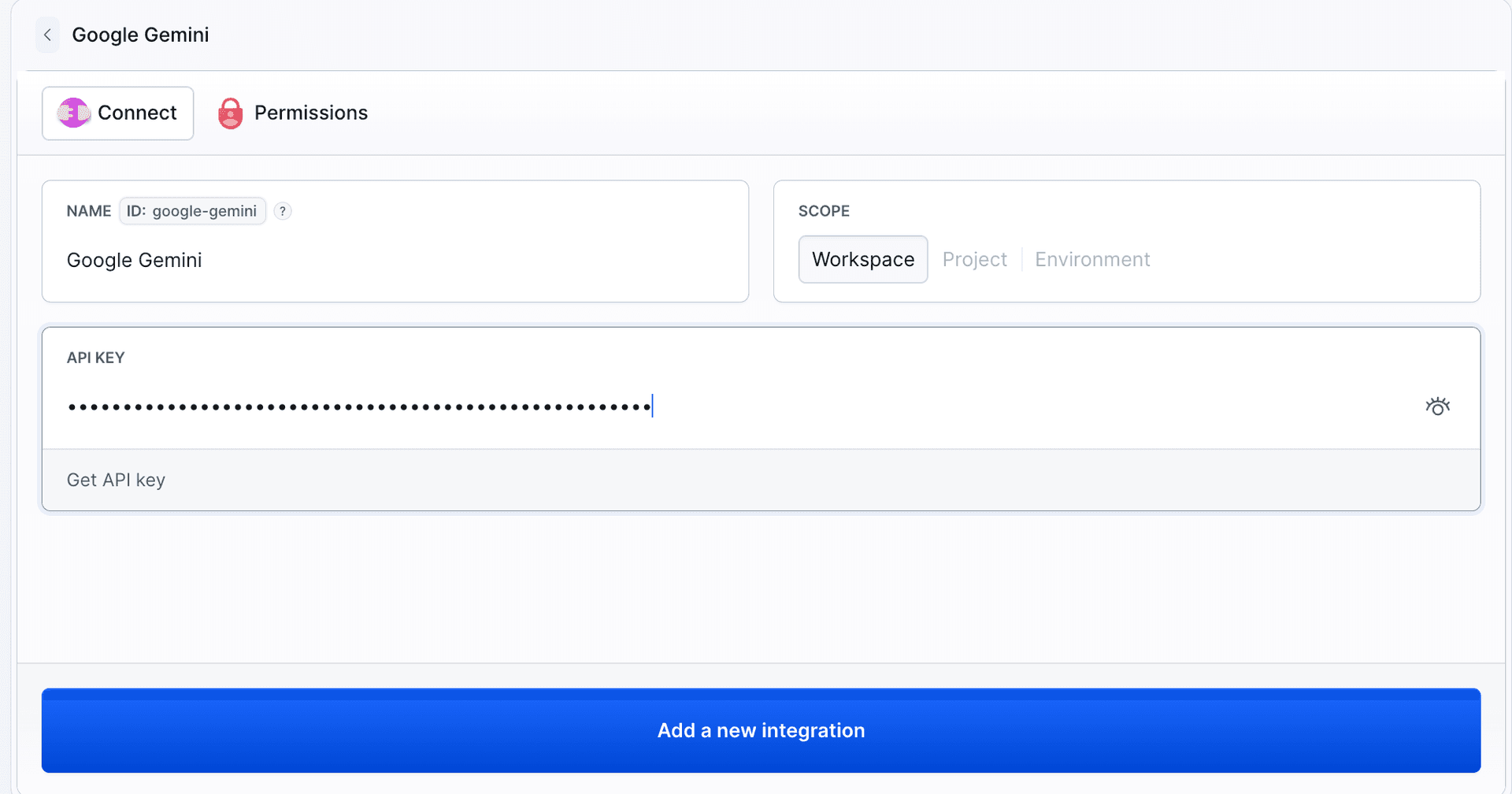
That is it - the integration is now reusable across your pipelines by its ID. The full walkthrough with screenshots lives in the Google Gemini integration docs.
Step 2: add the Antigravity action
With the integration in place, add an Antigravity action to a pipeline and point it at the integration by ID. A minimal review setup looks like this:
yaml- action: "Run Antigravity"
  type: "ANTIGRAVITY"
  integration: "my-gemini-integration"
  prompts:
    - "Review the code and suggest improvements"
  model: "gemini-3.1-flash-lite"
  system_instructions: "You are a senior code reviewer focused on security."
The pieces you will reach for most often:
integration- the ID of the Google Gemini integration from step 1.prompts- a list of instructions. Each entry is either an inline string or a file reference (- file: ".buddy/antigravity-prompt.md"), so long prompts can live in the repo.model- which Gemini model to run, for examplegemini-3.1-flash-lite. Any model your API key has access to works. The lite models are a good default for fast, cheap reviews.system_instructions- a system prompt prepended to every conversation, used to set the agent's persona and global behavior.
By default the agent proposes changes without touching your working tree. If you want it to run autonomously with full shell and file-write access - for example to generate a change and commit it - set dangerously_skip_permissions: true and gate the action behind a branch pipeline you trust.
See it in action
To show what the agent actually does, we seeded a tiny repo with a discount.js file that hides a classic off-by-one bug in cartTotal:
jsfunction applyDiscount(price, percent) {
  return price - (price * percent) / 100;
}

function cartTotal(items, percent) {
  let total = 0;
  for (let i = 0; i <= items.length; i++) {
    total += items[i].price;
  }
  return applyDiscount(total, percent);
}
The loop runs one iteration too far: i <= items.length reaches items[items.length], which is undefined, so undefined.price throws a TypeError at runtime. We pushed this to a feature branch, and the Antigravity action explored the repo, read the files, and reported exactly that - the offending lines, why it breaks, and a one-line fix - plus a second bug it spotted in a nearby helper (a missing default return that produced NaN prices):
Image loading...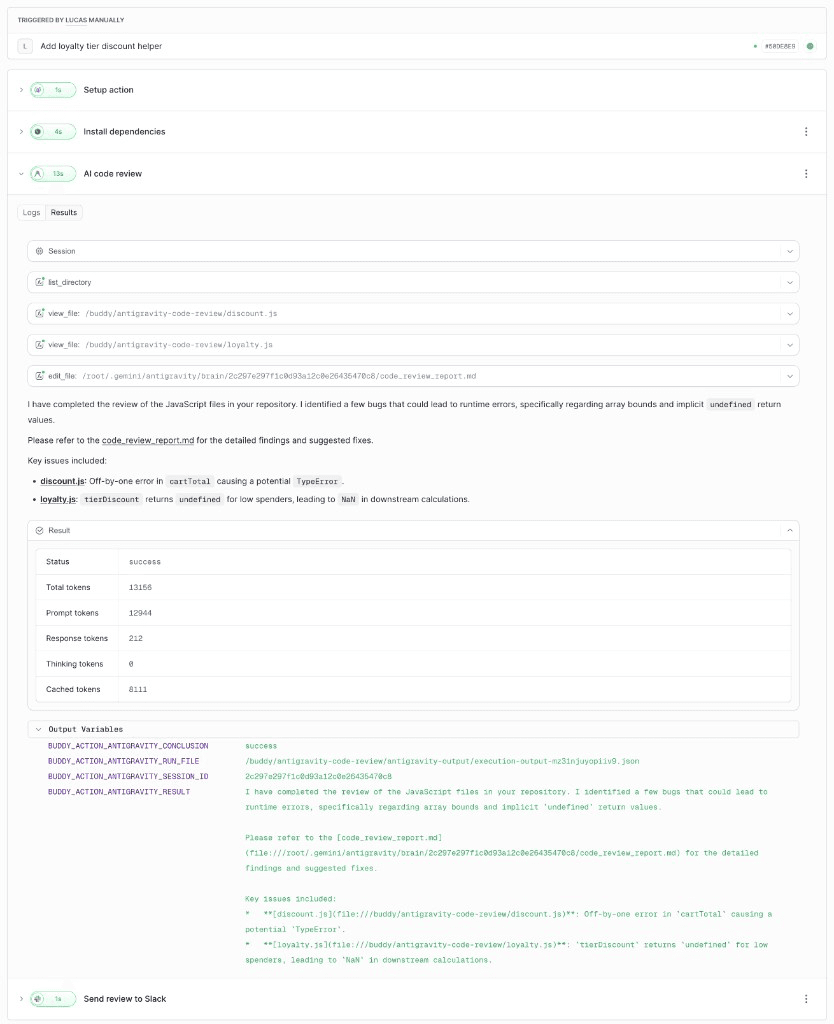
Notice the Output Variables panel at the bottom of the run. The action exposes the review as pipeline variables you can pass to any later action:
$BUDDY_ACTION_ANTIGRAVITY_RESULT- the agent's written summary of the review.$BUDDY_ACTION_ANTIGRAVITY_CONCLUSION- the run status (successorerror).$BUDDY_ACTION_ANTIGRAVITY_RUN_FILE- path to the full step-by-step trajectory JSON.$BUDDY_ACTION_ANTIGRAVITY_SESSION_ID- the agent session identifier.
A review that finds bugs does not fail the pipeline - the agent reports, it does not block - so the run stays green and you decide what to do with the findings.
Run it on every push and post to Slack
Wrap the action in a pipeline that triggers on push and pipe $BUDDY_ACTION_ANTIGRAVITY_RESULT straight into a Slack message. Every commit, on any branch, gets an automatic review in your channel:
yaml- pipeline: antigravity-review
  name: Antigravity Code Review
  refs:
  - refs/heads/*
  events:
  - type: PUSH
    refs:
    - refs/heads/*
  actions:
  - action: Install dependencies
    type: BUILD
    commands: npm install
    docker_image_name: library/node
    docker_image_tag: 24
  - action: AI code review
    type: ANTIGRAVITY
    retry_interval: 20
    retry_count: 2
    integration: my-gemini-integration
    prompts:
    - "Review the JavaScript code in this repository. Point out bugs, security issues, and performance problems, referencing specific files and lines, and suggest concrete fixes."
    model: gemini-3.1-flash-lite
    system_instructions: "You are a senior code reviewer focused on correctness, security, and performance."
  - action: Send review to Slack
    type: SLACK
    content: |-
      :mag: *Antigravity code review* - `$BUDDY_EXECUTION_BRANCH`
      Commit: $BUDDY_EXECUTION_REVISION_MESSAGE
      $BUDDY_ACTION_ANTIGRAVITY_RESULT
      See the full review: $BUDDY_EXECUTION_URL

      file: $BUDDY_ACTION_ANTIGRAVITY_RUN_FILE
      session: $BUDDY_ACTION_ANTIGRAVITY_SESSION_ID
    integration: my-slack-integration
    channel: "#code-reviews"
In Buddy that pipeline is three short actions - install, review, notify - and it runs green even when the review flags bugs, because the agent reports rather than blocks:
Image loading...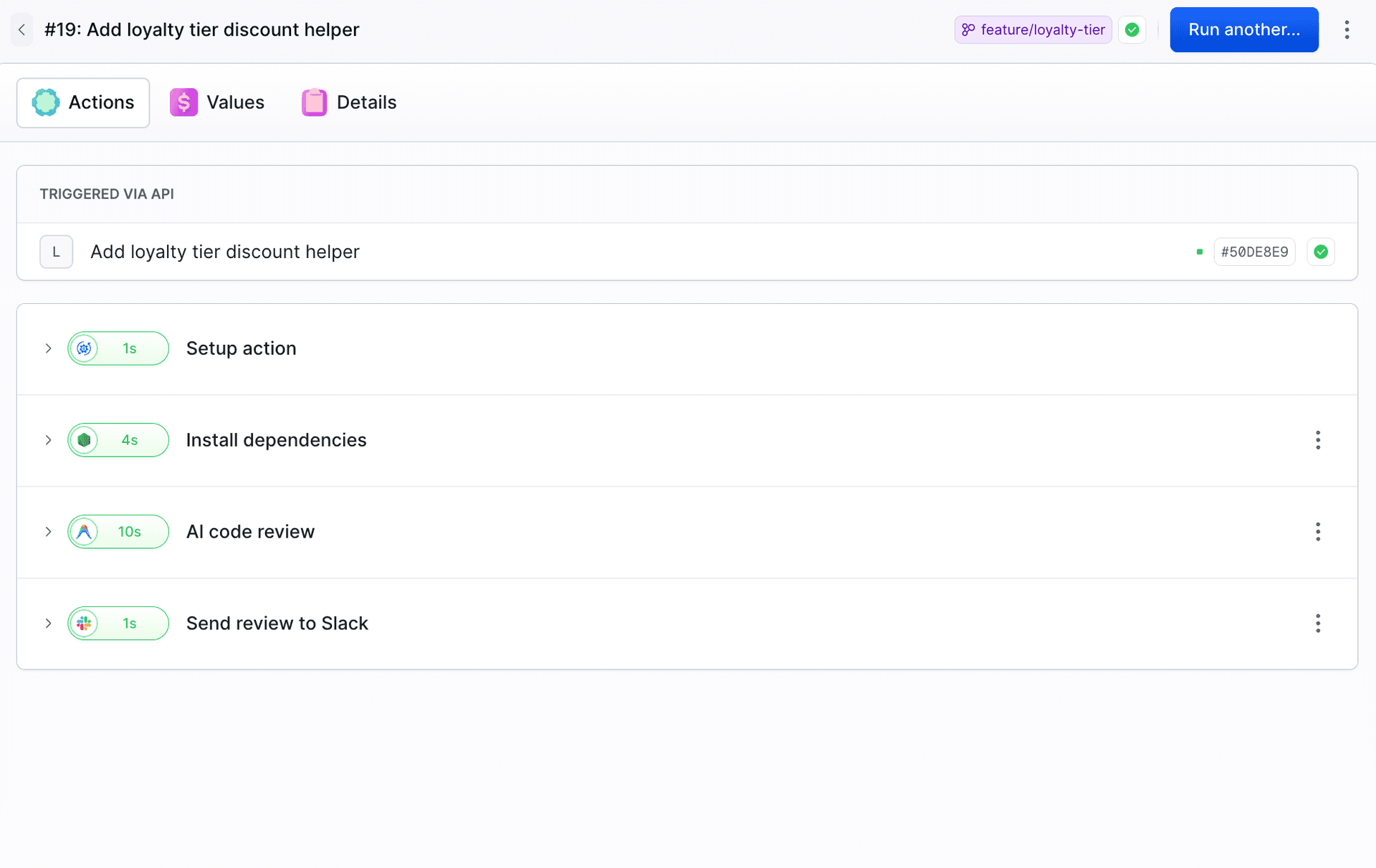
The review lands in the channel seconds after the push, branch name and all:
Image loading...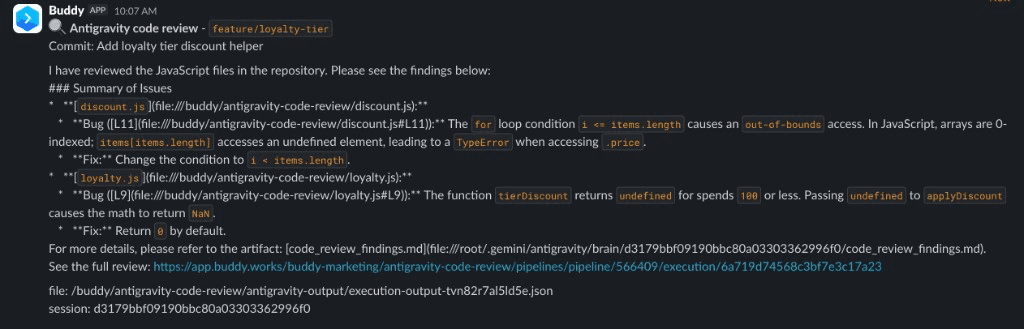
A few things worth calling out:
- The
refs/heads/*filter runs the review on every branch, so feature branches and pull requests get the same treatment asmaster. $BUDDY_ACTION_ANTIGRAVITY_RESULTcarries the review text from the agent to the Slack action with no glue code - no parsing log files, no extra scripts.retry_countandretry_intervalhelp ride out the occasional hiccup on Gemini's free tier. On a paid key you can usually drop them.
Swap the PUSH event for a SCHEDULE to run the agent on a cron, or trigger the pipeline manually when you want a one-off pass.
Learn more
- Google Gemini integration - full setup with screenshots
- Antigravity action in YAML - every field
- Antigravity action in the API - POST parameters

Jarek Dylewski
Customer Support
A journalist and an SEO specialist trying to find himself in the unforgiving world of coders. Gamer, a non-fiction literature fan and obsessive carnivore. Jarek uses his talents to convert the programming lingo into a cohesive and approachable narration.