Approve Terraform Cost Increases Before Terraform Apply with Infracost
The Terraform Plan and Drift Detection actions in Buddy now estimate the monthly cost of your infrastructure through the Infracost integration. The run details show the cost of each resource, and the totals before and after the change go to variables and to the commit status. Buddy also has a new, dedicated Terraform Cost Estimation action.
You can stop a pipeline before Terraform Apply and require manual approval of the changes. In Terraform Plan, Apply, and Drift Detection we did this for plans that destroy resources. Now we add a cost condition to the same mechanism: the pipeline waits for approval when the estimated monthly cost grows by more than a set threshold.
How to enable cost estimation in Terraform Plan?
Cost estimation needs an Infracost integration with a CLI token from Infracost Cloud. In the Terraform Plan action, add a cost_estimation block:
- action: Plan
  type: TERRAFORM_PLAN
  tool: OPENTOFU
  version: 1.12.6
  working_directory: infra
  backend:
    type: ARTIFACT
    artifact: infra-state
    artifact_version: prod
  cost_estimation:
    enabled: true
    integration: infracost
    fail_on_error: true
In the first run, the plan shows the estimated monthly cost of the resources in us-east-1:
t3.microinstance: $8.39- gp3 volume, 20 GB: $1.60
- Total: $9.99
Image loading...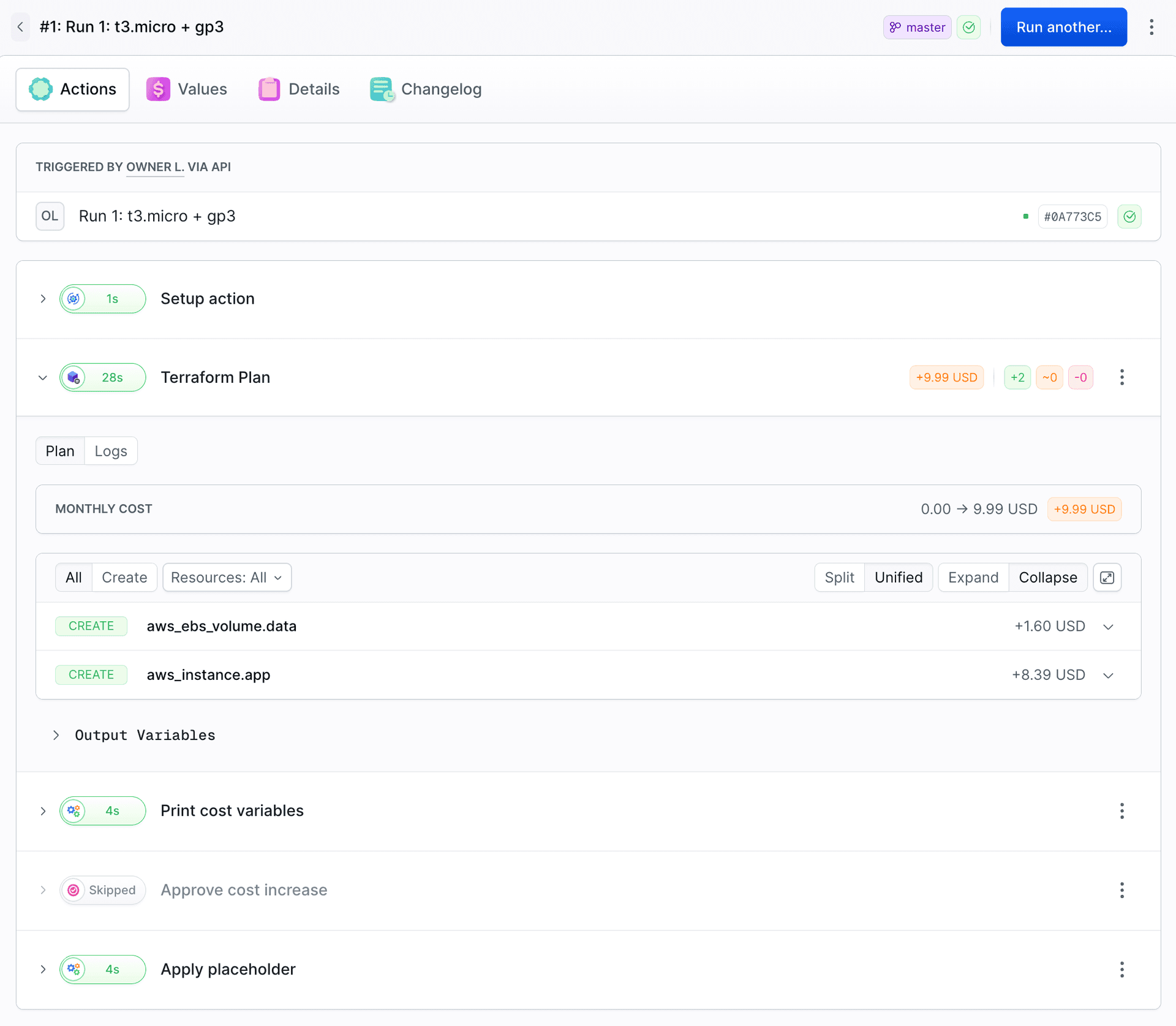
Reviewers don't even need to open the pipeline run in Buddy: the estimated cost is right there in the commit status.
The plan exports the result to variables:
| Variable | Run 1 |
|---|---|
BUDDY_ACTION_TF_PLAN_COST_MONTHLY | 9.99 |
BUDDY_ACTION_TF_PLAN_COST_PAST_MONTHLY | 0.00 |
BUDDY_ACTION_TF_PLAN_COST_DIFF_MONTHLY | 9.99 |
BUDDY_ACTION_TF_PLAN_COST_CURRENCY | USD |
BUDDY_ACTION_TF_PLAN_COST_UNPRICED_COUNT | 0 |
DIFF_PERCENT is set only when the cost before the change is greater than 0.
To estimate infrastructure costs from an existing plan file in a separate pipeline step, use the Terraform Cost Estimation action. The example below uses the cost estimation feature of Terraform Plan.
How to set a cost threshold that requires approval?
You set the threshold yourself, in the condition of the approval action. In this example it is $50. The pipeline waits for approval when the estimated monthly cost grows by more than that amount:
- action: Approve cost increase
  type: WAIT_FOR_APPLY
  description: "Monthly cost: $BUDDY_ACTION_TF_PLAN_COST_PAST_MONTHLY -> $BUDDY_ACTION_TF_PLAN_COST_MONTHLY $BUDDY_ACTION_TF_PLAN_COST_CURRENCY (+$BUDDY_ACTION_TF_PLAN_COST_DIFF_MONTHLY)"
  trigger_conditions:
    - trigger_condition: VAR_GREATER_THAN
      trigger_variable_key: BUDDY_ACTION_TF_PLAN_COST_DIFF_MONTHLY
      trigger_variable_value: "50"
The approval condition compares BUDDY_ACTION_TF_PLAN_COST_DIFF_MONTHLY with your threshold. It is a regular trigger condition, the same mechanism that controls other actions in a pipeline. In the UI, you set it in the Conditions tab of the approval action:
Image loading...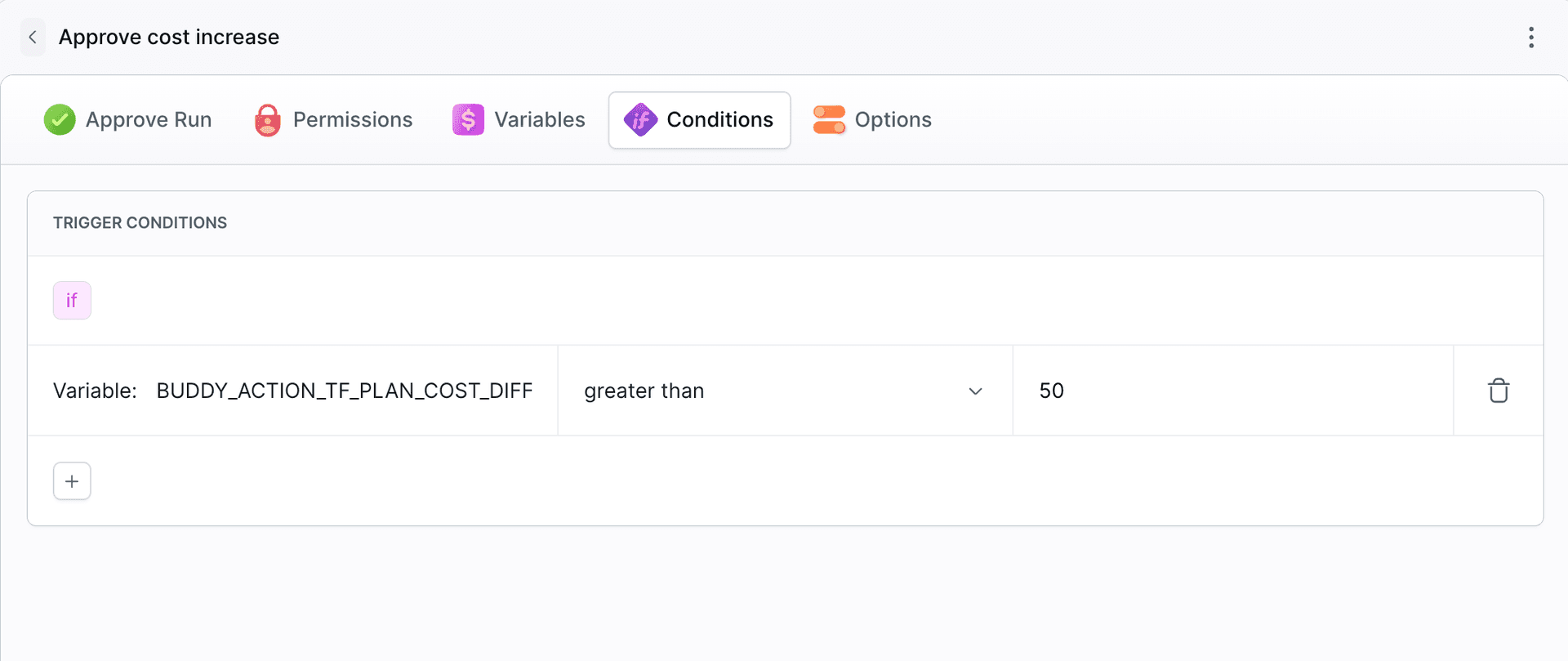
Below are three scenarios for the same pipeline. Runs 1 and 2 show separate plans for an empty state. Run 3 shows the changes after the plan from run 2 was applied. All examples keep a 20 GB gp3 volume:
| Change | Monthly cost (USD) | Difference (USD) | Approval |
|---|---|---|---|
t3.micro + gp3 | 9.99 | +9.99 | skipped |
m5.large + NAT Gateway | 105.33 | +105.33 | waiting |
t3.small, NAT removed | 17.58 | -87.75 | skipped |
Monthly costs in run 2:
m5.largeinstance: $70.88- NAT Gateway: $32.85
- gp3 volume, 20 GB: $1.60
- Total: $105.33
The increase exceeds the $50 threshold, so the pipeline waits for approval.
Image loading...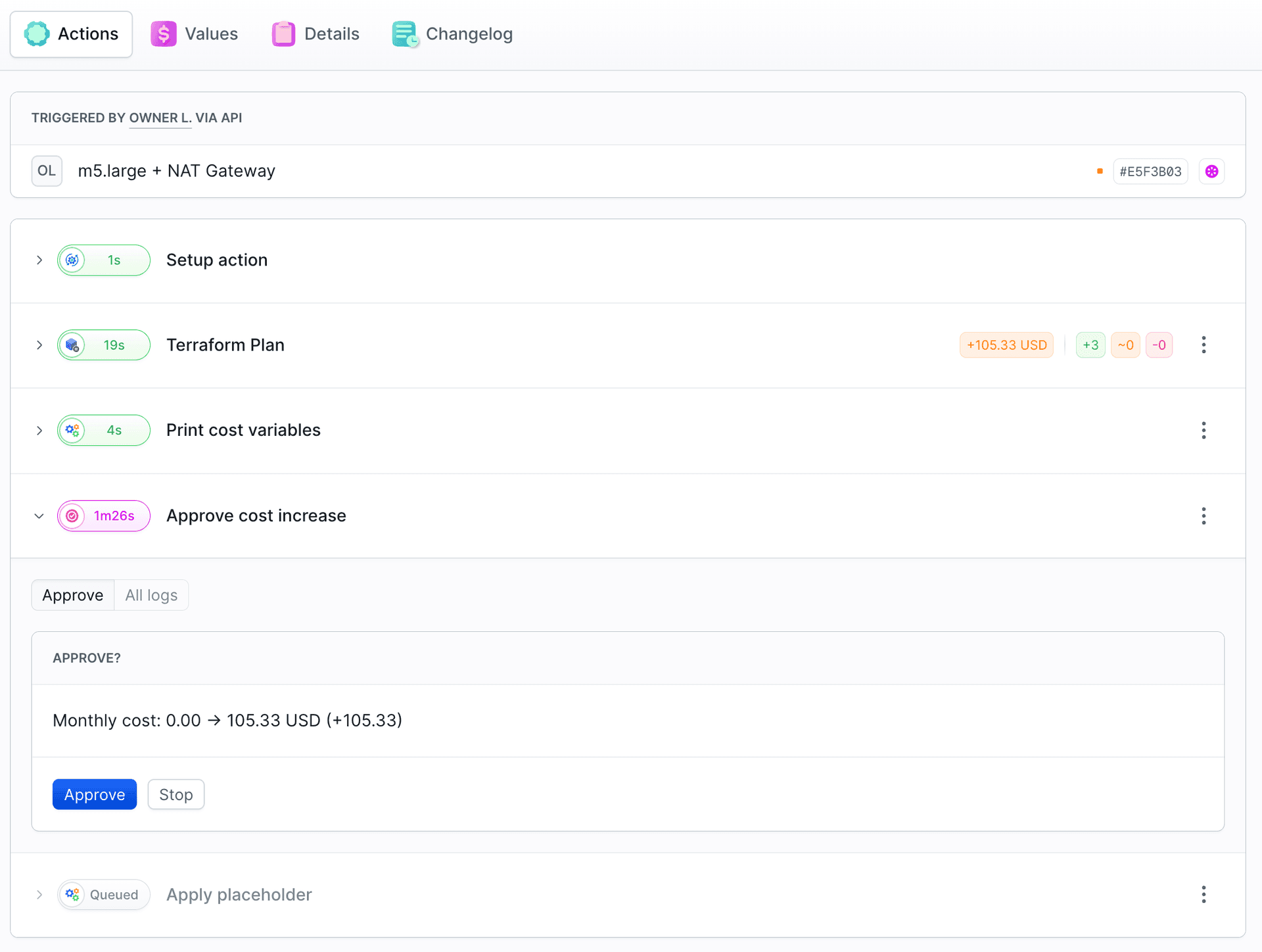
Run 3 goes in the opposite direction. Switching to a smaller instance and removing the NAT Gateway brings the monthly cost down to $17.58, well below the previous estimate. No approval is needed in this case.
Image loading...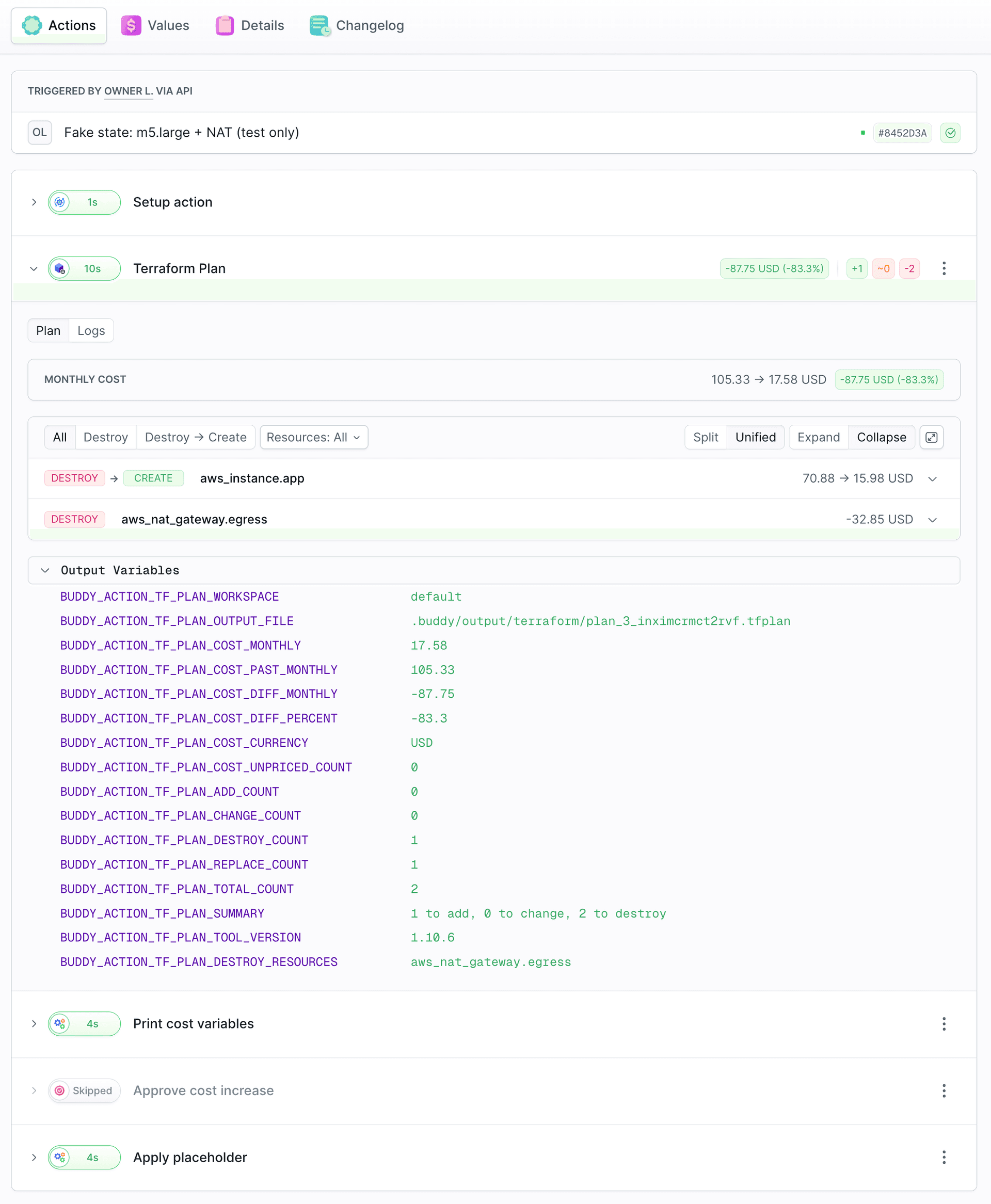
You can combine the cost threshold with the rule for destroyed or replaced resources. Run 3 would then require approval despite the lower cost, because it destroys the NAT Gateway. The condition below stops the run when the plan destroys or replaces resources or raises the cost by more than $50:
- action: Approve
  type: WAIT_FOR_APPLY
  trigger_conditions:
    - trigger_condition: OR
      trigger_operands:
        - trigger_condition: VAR_GREATER_THAN
          trigger_variable_key: BUDDY_ACTION_TF_PLAN_DESTROY_COUNT
          trigger_variable_value: "0"
        - trigger_condition: VAR_GREATER_THAN
          trigger_variable_key: BUDDY_ACTION_TF_PLAN_REPLACE_COUNT
          trigger_variable_value: "0"
        - trigger_condition: VAR_GREATER_THAN
          trigger_variable_key: BUDDY_ACTION_TF_PLAN_COST_DIFF_MONTHLY
          trigger_variable_value: "50"
fail_on_error: true in the Plan action. With false, an Infracost failure ends the Plan without an estimate and the cost condition is not met. Apply then runs without approval, unless another condition, such as destroyed resources, requires it.
How to check the cost of changes found by Drift Detection?
Drift Detection checks whether someone changed the infrastructure outside Terraform. You can run a pipeline with this action, for example, every working day. With cost_estimation, the report also gives the monthly cost before and after the drift, such as an instance resized in the AWS console.
- action: Detect drift
  type: TERRAFORM_DRIFT_DETECTION
  tool: OPENTOFU
  version: 1.12.6
  working_directory: infra
  backend:
    type: ARTIFACT
    artifact: infra-state
    artifact_version: prod
  fail_on_drift: false
  cost_estimation:
    enabled: true
    integration: infracost
- action: Notify
  type: SLACK
  integration: my-slack
  channel: "#infra"
  content: "Drift: $BUDDY_ACTION_TF_DRIFT_SUMMARY. Monthly cost: $BUDDY_ACTION_TF_DRIFT_COST_PAST_MONTHLY -> $BUDDY_ACTION_TF_DRIFT_COST_MONTHLY $BUDDY_ACTION_TF_DRIFT_COST_CURRENCY ($BUDDY_ACTION_TF_DRIFT_COST_DIFF_MONTHLY)"
  trigger_conditions:
    - trigger_condition: VAR_IS
      trigger_variable_key: BUDDY_ACTION_TF_DRIFT_DETECTED
      trigger_variable_value: "true"
What are the limits of cost estimation with Infracost?
Usage-based costs. To price data transfer, requests or queries, provide their expected usage in a usage file or in Infracost Cloud. Without this data, the estimate includes only fixed charges. For the NAT Gateway from run 2, adding 500 GB of monthly data processing raises the estimate from $32.85 to $55.35:
version: 0.1
resource_usage:
  aws_nat_gateway.egress:
    monthly_data_processed_gb: 500
Set the path to the file in usage_file, relative to working_directory.
0.00 estimate without any error, so the pipeline skipped the approval. After you change the file, check the estimate in a pull request run before you run Apply.
Unpriced resources. Infracost prices AWS, Azure and Google Cloud resources. UNPRICED_COUNT counts resources it cannot price, for example DNS records in Cloudflare or Datadog monitors. No price does not mean the resource is free.
List prices. The examples in this post use list prices, without discounts or Savings Plans. You can describe Reserved Instances for EC2 in the usage file. The amount in the run can therefore be higher than your bill.
See also:
- Terraform Plan, Apply, and Drift Detection - a pipeline with approval for destroyed resources and drift checks
- Terraform in Buddy - an overview of the Terraform and OpenTofu actions

Jarek Dylewski
Customer Support
A journalist and an SEO specialist trying to find himself in the unforgiving world of coders. Gamer, a non-fiction literature fan and obsessive carnivore. Jarek uses his talents to convert the programming lingo into a cohesive and approachable narration.