Buddy Loops
Deploying the same pipeline or action multiple times with different variables is a common need: regions, deployment strategies, frameworks, configurations, you name it. Until now, doing that in Buddy meant either manually triggering runs with different variables or creating multiple pipelines that were effectively the same.
Today, we’re happy to introduce a brand-new feature that eliminates all this repetitive work.
What are loops?
Loops let you automatically generate multiple pipeline or action runs based on variable combinations, either as multiple pipeline runs or repeated executions of a single action. You define one or more variables, assign a list of values to each, and Buddy takes care of generating a separate run for every combination.
Example:
deployment_strategy:canary,rollingregion:eu-west,us-east,ap-south
Buddy will automatically create 6 runs, one for every combination of both variables.
Image loading...
Action Loops work in a similar way, but at the action level. Instead of creating multiple pipeline runs, they repeat a single action multiple times inside one run, based on variable combinations.
Setup
Pipeline Loops can be configured directly in the UI and in buddy.yml. Action Loops are configured in the same way, but inside an action’s settings rather than the pipeline’s Run Strategy.
GUI Setup
You can define loop variables in the Run Strategy section of any pipeline. Here you can choose or create variables to base the loop on and provide their values. alues can be written either comma-separated or line by line.
You can run your pipelines in both sequential and parallel execution modes. Parallel execution will start all generated runs at the same time. Sequential execution ensures each run waits for the previous one to finish.
Image loading...
YAML setup
You can configure pipeline loops directly in buddy.yml by using the loop field with a list of variables.
Example:
A loop pipeline using two variables: deployment_strategy (with values: canary and rolling) and region (with values: eu-west, us-east, ap-south)
yaml- pipeline: Deploy to Production
  refs:
  - :default
  events:
  - type: PUSH
  loop:
  - deployment_strategy
  - region
  resources: XLARGE
  variables:
  - key: deployment_strategy
    value: "canary, rolling"
  - key: region
    value: |-
      eu-west
      us-east
      ap-south
This will create a combination of 6 runs for each deployment strategy - region combination.
Image loading...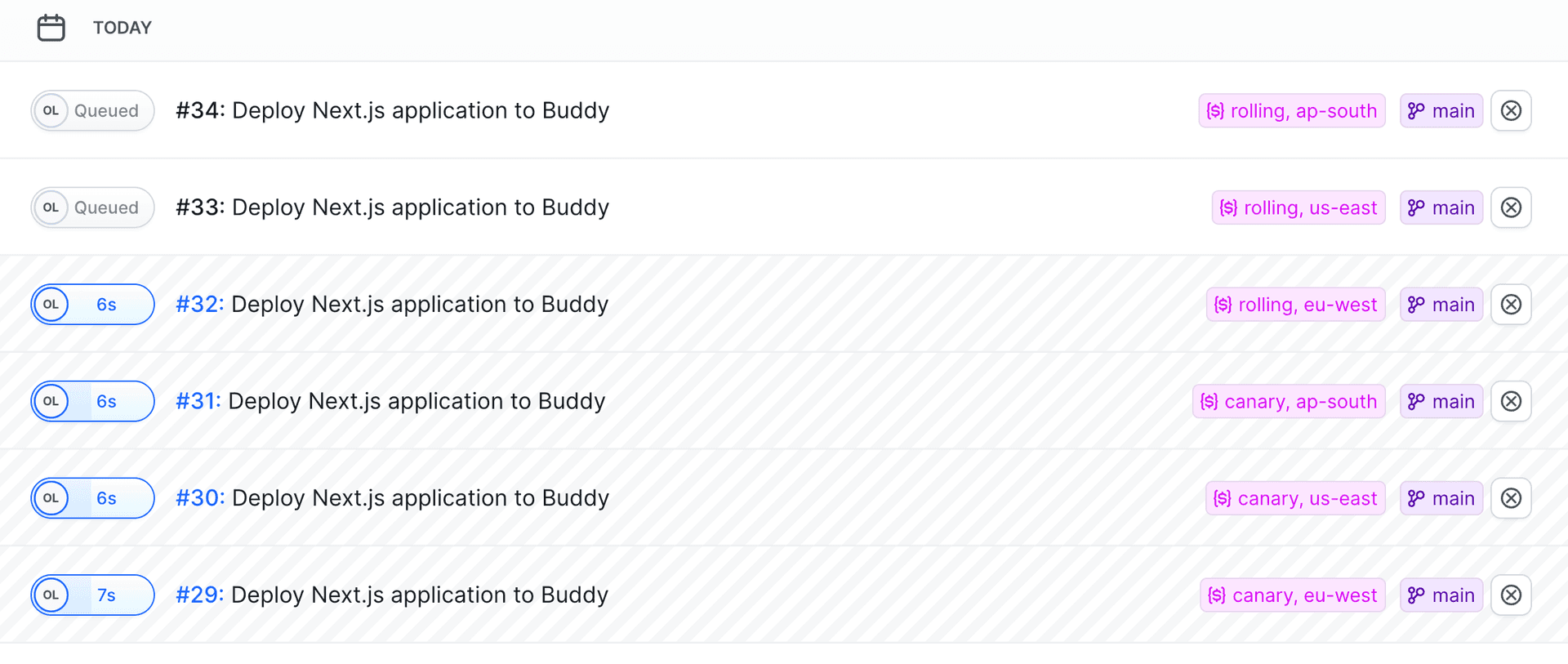
Action Loops use the same YAML pattern, but inside an action block. For example:
yamlactions: - action: Deploy to region type: BUILD loop: - region - config docker_image_name: buddy/localshell docker_image_tag: ubuntu_24.04 commands: - echo "Deploying to $region with $config" variables: - key: config value: "dev,prod" - key: region value: "us-east,eu-west,asia-pacific"
This repeats the same action for each value of environment inside a single pipeline run.
Variable extraction from JSON and key-value pairs
If a loop variable contains a JSON object or a key-value string, Buddy automatically extracts its properties as sub-variables. For example, a variable USER with the value {"name":"Alice","age":30} will produce USER_name and USER_age sub-variables available inside the pipeline run.
You can use the EXTRACT: prefix to map properties directly without a variable prefix:
yamlvariables:
  - key: USER
    value: '{"name":"Alice","age":30}'
loop:
  - EXTRACT:USER
This makes name and age available directly, without the USER_ prefix.
API Support
Pipeline Loops are available through the Buddy REST API too, so you can create or update pipelines programmatically with full loop configuration support.
Why does it matter?
Pipeline Loops unlock a ton of new automation workflows:
- Test or deploy to multiple regions in one go
- Run multiple deployment strategies (canary, rolling, blue-green) automatically
- Trigger multi-environment or multi-framework builds
- Reduce pipeline duplication — keep one definition, run many variations
- Perfect for teams working with multi-cluster, multi-region, or multi-tenant setups
Action Loops add even more flexibility inside a single pipeline run:
- Multi-platform builds
- Repeating a single action across many environments
- Generating test matrices without duplicating actions
- Running multiple parameterized tasks in one place
- More about the pipeline loops
- More about the action loops

Jarek Dylewski
Customer Support
A journalist and an SEO specialist trying to find himself in the unforgiving world of coders. Gamer, a non-fiction literature fan and obsessive carnivore. Jarek uses his talents to convert the programming lingo into a cohesive and approachable narration.